✨ AI-Powered Protection

Your Mac is
the agent.

AI-powered 24/7 network monitoring. Ask your network anything, get AI security help, automatic device identification, and smart alerts on your iPhone - no extra hardware needed.

Download on the Mac App Store iOS App

Free on the Mac App Store, requires macOS 15 or later. Guardian is what puts it on your iPhone.

How it works.

Set it up once. It runs silently in your menu bar.
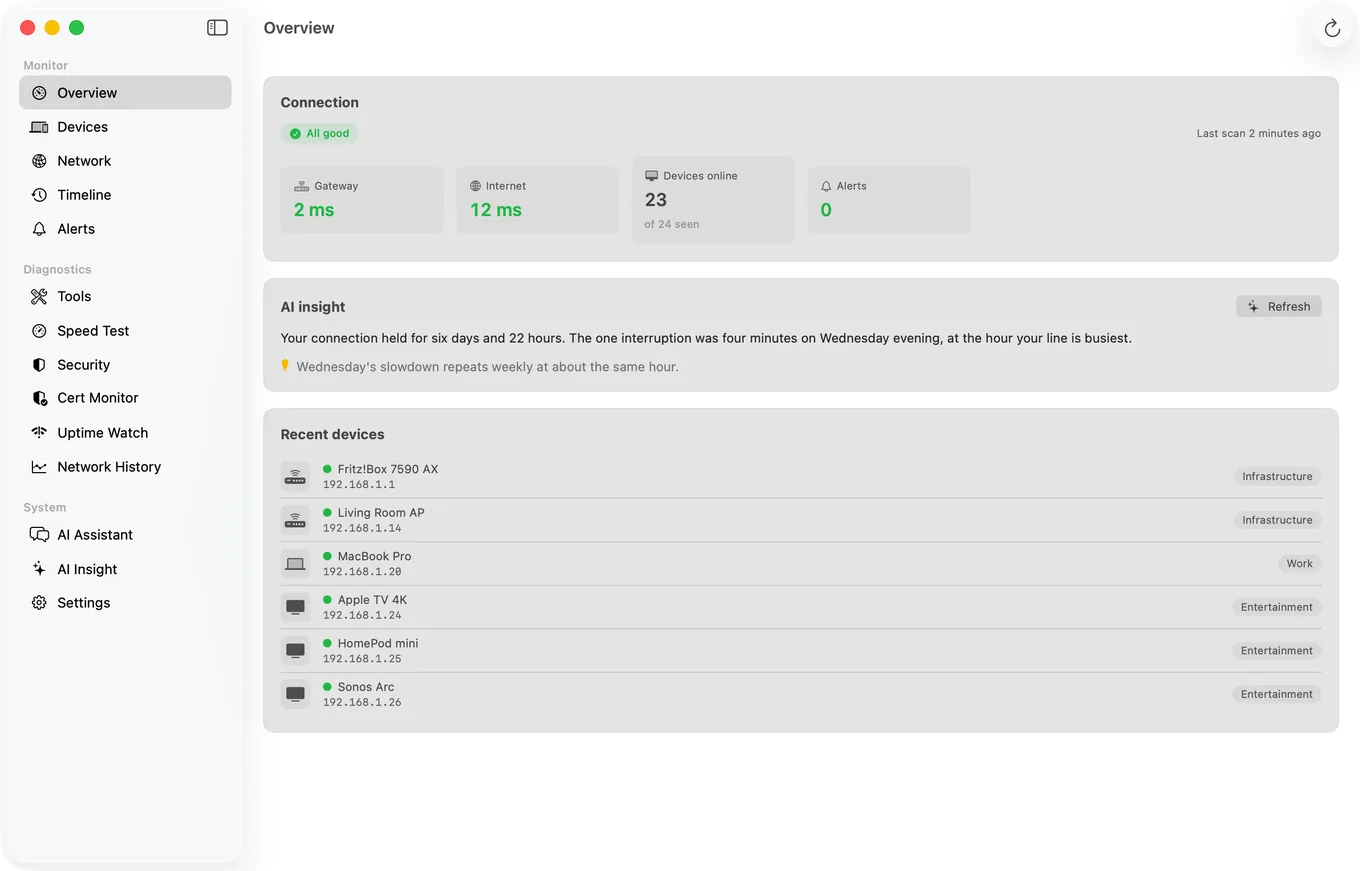
PingKit Agent's Overview pane on macOS, showing gateway and internet latency, the number of devices online, and a plain-English summary of the last few days.
What actually lands in the menu bar: gateway and internet latency, how many devices are online, and anything raised since you last looked.
💻
1

Install on Your Mac

Install PingKit Agent from the Mac App Store. It lives in your menu bar - no dock icon, no windows to manage.

🔍
2

It Watches Your Network

The agent continuously scans for new devices, pings your gateway and internet, and runs scheduled speed tests.

📱
3

Alerts on Your iPhone

Everything the Agent finds syncs through your own private iCloud. With Guardian on your iPhone, the device list, timeline and alerts appear in the app's Monitor tab and reach you wherever you are.
Always watching.

Comprehensive monitoring that never sleeps.

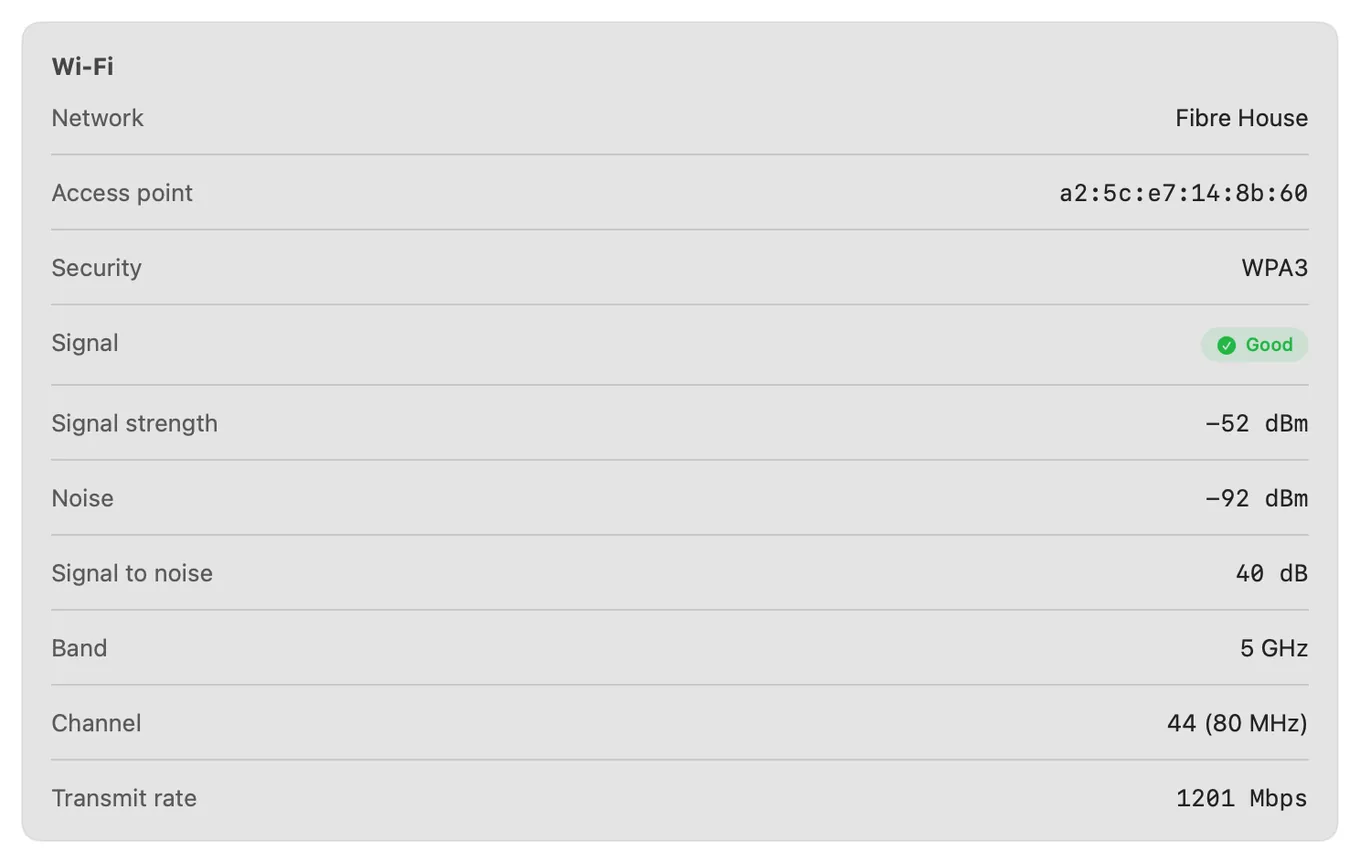
PingKit Agent's Wi-Fi panel on macOS showing signal strength -52 dBm, noise -92 dBm, a 40 dB signal-to-noise ratio, the 5 GHz band, channel 44 at 80 MHz and a 1201 Mbps transmit rate.
The reading no iPhone app can produce. Signal against the noise floor, the margin between them, and the transmit rate that margin buys.
📶

Wi-Fi Detail Only a Mac Can Show

Signal strength in dBm, noise floor, signal-to-noise ratio, channel, band, and negotiated transmit rate, read straight from the Wi-Fi radio. iOS does not expose any of this, so this one is Mac-only by necessity rather than by choice.

🚨

Intruder Detection

Get an instant alert when an unknown device connects to your network. Name and categorize your devices to build a trusted whitelist.

📡

Device Tracking

See every device on your network - online or offline. Track when devices come and go with full history.

📈

Latency Monitoring

Continuous gateway and internet ping with latency timeline. Spot connection problems before they become outages.

⚡

Scheduled Speed Tests

Automatic speed tests on your schedule. Track your ISP's performance over time and hold them accountable.

🔔

Smart Alerts

Customizable notifications for new devices, internet outages, latency spikes, and speed drops. Set your own thresholds.

☁

iCloud Sync

Your device list, timeline, alerts and speed test results sync to your iPhone through your own private iCloud database. No PingKit account and no third-party cloud. Guardian on your iPhone is what unlocks the phone side.

📊

Network Timeline

A complete event feed of everything happening on your network. Devices joining, leaving, outages, latency spikes - all timestamped.

🔧

Launch at Login

Set it and forget it. PingKit Agent starts automatically when your Mac boots and runs silently in the background.

🛡

Security Scoring

Per-device security assessment with comprehensive detection rules. Identifies open ports, weak services, and misconfigured devices with remediation advice.

🧬

Deep Fingerprinting

Multi-layer device identification via Bonjour/mDNS, SSDP, WS-Discovery, CoAP, LLMNR and NetBIOS, with cloud AI stepping in when signature matching alone can't confidently label a device. Know exactly what's on your network.

Why PingKit Agent?

See how we compare to other network monitoring solutions.

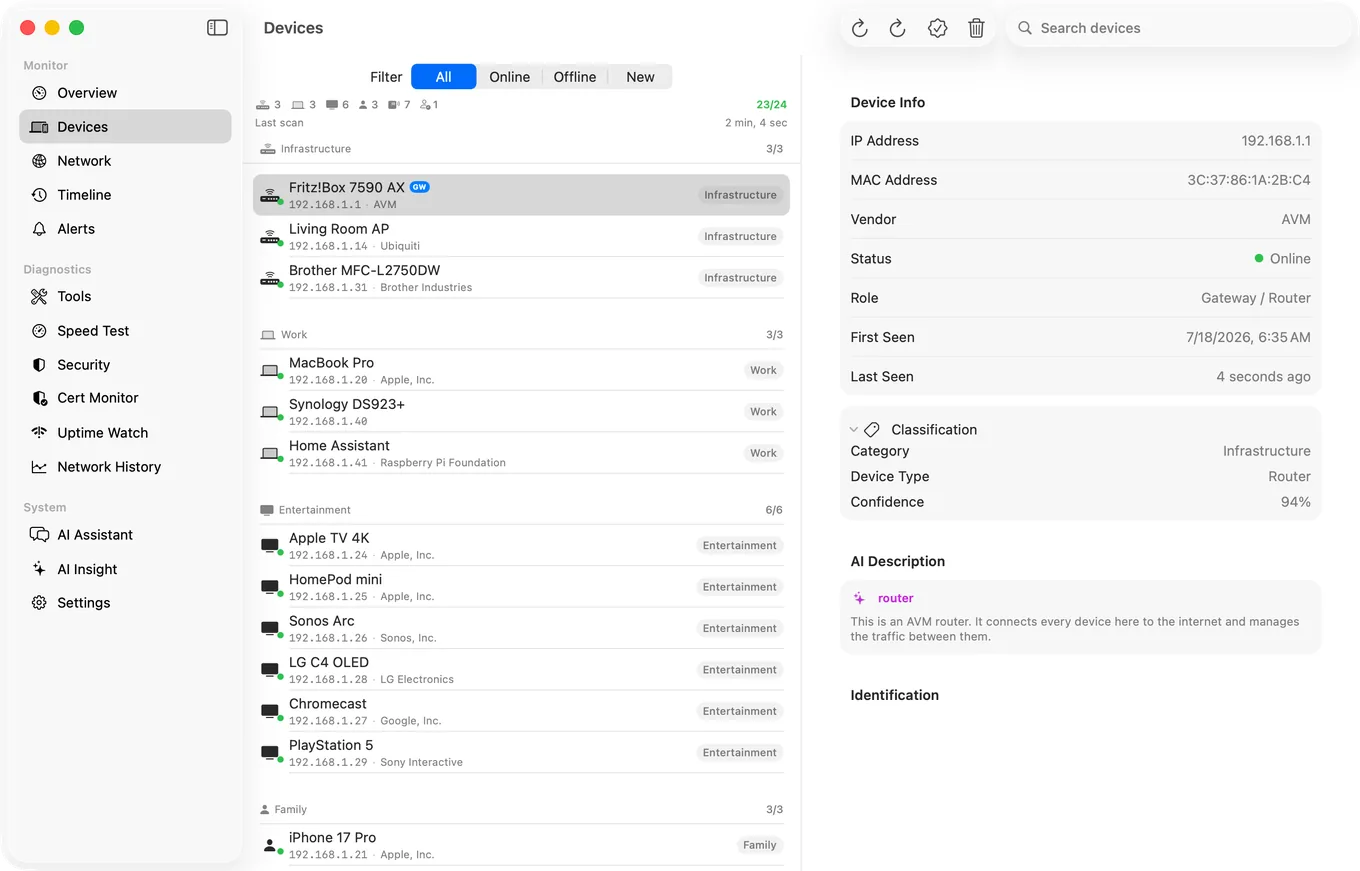
The Devices list in PingKit Agent for Mac, with each device named and sorted into a category such as Infrastructure, Work or Entertainment.
What the comparison below is really about. Not a list of addresses, but every device named and sorted into a category.
PingKit Agent Other Apps DIY (Pi/Docker)
AI network assistant ✓ ✕ ✕
AI security explanations ✓ ✕ ✕
AI device classification ✓ ✕ ✕
Menu bar agent ✓ ✕ ✕
Launch at login ✓ ✕ ✓
Device detection ✓ ✓ ✓
Intruder alerts ✓ ✓ ✕
Speed test scheduling ✓ ✓ Paid tier ✕
iCloud sync to iPhone ✓ ✕ Third-party cloud ✕
8 diagnostic tools built in ✓ ✕ ✕
No account required ✓ ✕ ✓
Data stays in Apple ecosystem ✓ ✕ ✓
No extra hardware ✓ ✓ ✕ ~$50–$108
Security scoring ✓ ✕ ✕
Deep fingerprinting (6 protocols) ✓ ✕ ✕
Cost Free
Guardian from $2.99/mo
$4–$17+ Free*

* DIY solutions require technical setup, ongoing maintenance, and don't include a native iOS companion app.

What Guardian adds.

The Agent itself is free. Two optional tiers extend it, and a subscription bought on your iPhone unlocks the Mac too.

Guardian Plus
$4.99/mo
or $39.99 a year, on Mac
For certificates and compliance evidence. $9.99 a month or $79.99 a year on iPhone and iPad.
  • Everything in Guardian
  • Cert Monitor: 25 domains, not 1
  • Expiry push at 30, 14, 7 and 1 days
  • Signed ISO 27001 PDF export
  • AI network history summary
  • Apple Private Cloud Compute answers

The Agent is free, and so are all 19 iOS tools

Install PingKit Agent and use its eight tools, continuous device discovery, the timeline, alerts, scheduled speed tests, security scoring, one Uptime Watch URL and one Cert Monitor domain without paying anything. Every plan carries a 1-week free trial except Guardian Plus yearly on the Mac, which bills immediately. Cancel anytime.

🚀

Guardian Plus

The top tier adds Cert Monitor for continuous TLS certificate tracking (25 domains instead of 1), a signed ISO 27001 PDF export, and an AI network history summary. Uptime Watch is included in Guardian.

From PingKit Agent 1.2, your Mac polls every monitored certificate hourly for as long as the Agent is running, and PingKit's backend runs the uptime checks on its own hourly schedule, so a site going down still reaches your iPhone when the Mac is off.

Explore Guardian Plus

Guides for PingKit Agent.

Everything we have written about monitoring a network from a Mac, including the parts the Agent deliberately does not do.

🔒

Private by design.

PingKit Agent runs entirely on your Mac. Your network data syncs through your personal iCloud account, not through our servers, with two exceptions: if you use Uptime Watch or Guardian Plus's Cert Monitor, the domains/URLs you choose to monitor and their check results are stored on PingKit's backend (a Cloudflare Worker) so alerts can reach you while your devices are asleep.

No accounts. No ads. No third-party analytics or tracking SDKs; the only usage data we collect is anonymous, aggregate counts of which features get used, carrying no identifier. AI features send only the minimal network data a request needs (such as a security finding or device details, which can include a device name you have set) to our private, server-backed AI assistant, never your browsing history or account details.