Network Utility for Mac: Where It Went and How to Get It Back (2026)
Short version. Network Utility for Mac is gone. Apple deprecated it in macOS 11 Big Sur and it is not on current macOS, so a guide that tells you to open it from Applications or Spotlight is describing an app you do not have. You have three ways back: Neo Network Utility, a free app from DEVONtechnologies that restores the same tabbed window; the Terminal commands that were always doing the work behind it; or PingKit Agent, if you also want something that keeps watching the network after the test is over.
Network Utility was the small Apple app with tabs for Info, Netstat, Ping, Lookup, Traceroute, Whois, Finger and Port Scan. If you came here looking for it, the sections below say where it went, how to get the same window back, and the one-line Terminal equivalent for every tab.
Where Network Utility Went
Network Utility lived at /System/Library/CoreServices/Applications/Network Utility.app. Apple deprecated it in macOS 11 Big Sur, and said at the time that tools such as ping and lookup were now reached through Terminal, with Wi-Fi troubleshooting handled by the Wireless Diagnostics app (AppleInsider's report from the Big Sur beta). It was then removed. On current macOS (checked on macOS 27) that folder still holds Wireless Diagnostics, Keychain Access and Directory Utility, but no Network Utility, and there is no copy anywhere else on the disk. Apple's macOS User Guide covers Network Utility only up to macOS 10.15 Catalina (Apple: Use Network Utility on Mac).
This matters because a great deal of Mac networking advice still opens with "launch Network Utility", including advice from otherwise reliable sources. If a guide starts there, it has not been revised in years. Howard Oakley's Where have the network tools gone? traces the same disappearance: of the three graphical network apps macOS once had, only Wireless Diagnostics survived into Sonoma.
How to Get Network Utility Back on a Mac
Apple has not brought it back, but a third party has. Neo Network Utility is a free app from DEVONtechnologies. It was announced in July 2024 under the headline "Welcome (Back) Network Utility", so "Welcome (Back) Network Utility" and the Neo Network Utility listings you may have seen are the same app.
- Price: free, downloaded from DEVONtechnologies' freeware page rather than the App Store.
- Requires: macOS 13 Ventura or later. Version 2.0 (October 2025) was redesigned for macOS 26 Tahoe and added multiple windows (release notes).
- Tabs: in version 2.0, Info, Netstat, Ping, Lookup, Traceroute, Whois, Finger, Port Scan and Network Speed. Version 1.0 had all of those except Info, which arrived in 2.0; Network Speed is the one the original never had. TidBITS notes that its Lookup tab lets you choose between nslookup, dnscacheutil and dig, and that the speed test uses Apple's own
networkQualitytool. - Wi-Fi name: from 2.0 it shows the SSID and BSSID when Location Services is enabled for it.
If what you miss is the window itself, this is the answer, and it costs nothing.
The Terminal Command for Every Network Utility Tab
Every tab in Network Utility was a front end to a command that is still built in to macOS. Open Terminal (in Applications › Utilities) and use these.
| Old tab | Replacement |
|---|---|
| Info | ifconfig, or System Settings › Network › Details |
| Netstat | netstat -s, routing table with netstat -nr |
| Ping | ping -c 5 example.com |
| Lookup | dig +short example.com |
| Traceroute | traceroute example.com |
| Whois | whois example.com |
| Finger | Nothing. The protocol is long obsolete. |
| Port Scan | nc -zv host 1-1024, or install nmap |
| Speed (never in the original) | networkQuality, Apple's built-in speed and responsiveness test |
The Ones Worth Knowing Properly
Ping
ping -c 5 1.1.1.1Without -c it runs forever, which is what the old GUI's checkbox was for. Ctrl-C stops it and prints the summary, which is the part that matters: packet loss and min/avg/max round trip.
Traceroute
traceroute example.comStars at a middle hop are normal and do not indicate a fault. Routers deprioritise generating replies to probes while forwarding traffic perfectly. Only loss that starts at a hop and continues to the destination is real. This single misreading generates more incorrect ISP complaints than anything else in networking.
Port scan
nc -zv 192.168.1.1 1-1024nc is built in. For anything more, install nmap. Scan machines on your own network, and nothing else.
Info
ifconfig | grep "inet "
route -n get default
If You Want the GUI Back
PingKit Agent, a menu bar network monitor for Mac, is the one we make, and it needs macOS 15 or later.
The command line versions are strictly more capable, and if you are comfortable there, you do not need anything else. The reason people miss Network Utility is not capability, it is that a window with tabs did not require remembering flags. Neo Network Utility, above, answers that directly. PingKit Agent is a free download that answers a different question as well: what happened on the network while you were not running a test.
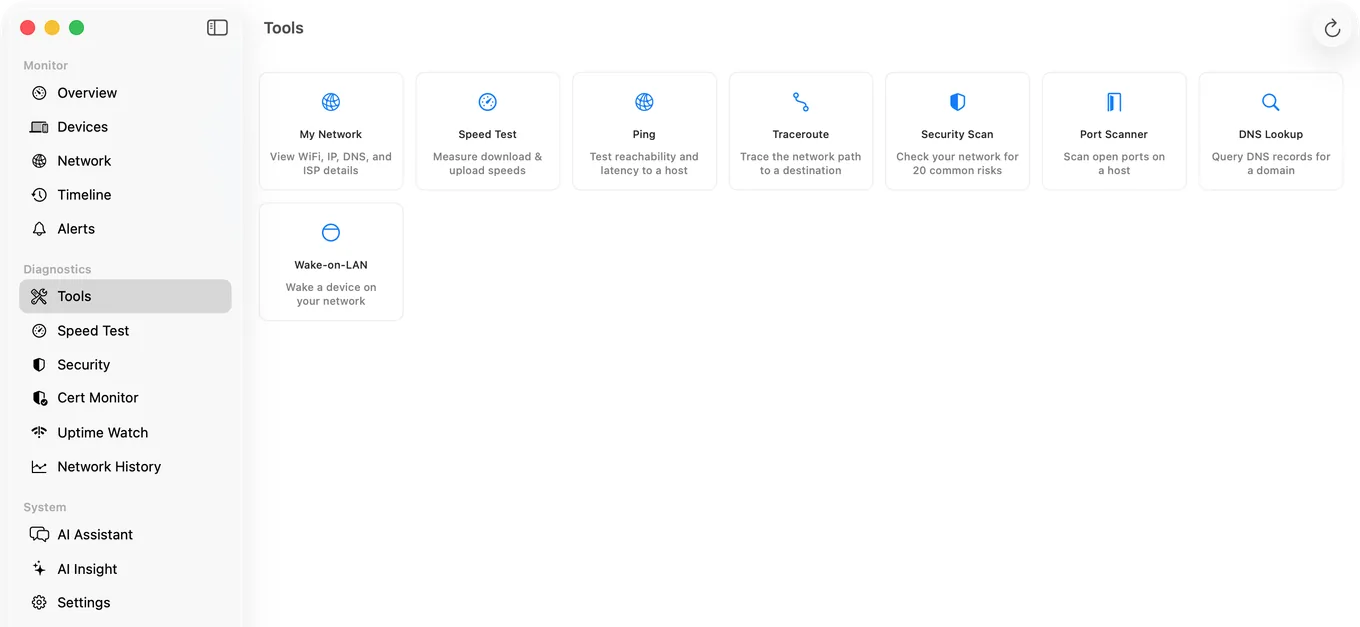
PingKit Agent covers most of what Network Utility did, in a Mac app with eight tools: My Network (the Info tab, plus Wi-Fi signal and DNS provider detail Network Utility never had), Ping, Traceroute, DNS Lookup, Port Scanner, Speed Test, Wake-on-LAN and Security Scan. Its traceroute additionally resolves each hop's geographic location and network operator, which the old app did not attempt.
Where it does not match, precisely:
- No Whois tool. Use
whoisin Terminal, which is built in. - No Netstat tab. Use
netstat. - No Finger. Nobody needs Finger.
Its Port Scanner also differs on purpose: it only scans private, local network addresses and refuses a public one, where nc will point at anything you give it.
The difference in intent is worth stating: Network Utility ran a test when you opened it. PingKit Agent's reason to exist is that it keeps running afterwards, from the menu bar, while the Mac is awake. On mains power it checks your router and the internet every 30 seconds and rescans the network for devices every five minutes. It keeps a timeline of drops and new devices, and alerts when something changes. All of that runs on the Mac without a subscription. The tools are the familiar part, not the point.
Which One Should You Use?
| You want | Use | Cost |
|---|---|---|
| The old Network Utility window, tab for tab | Neo Network Utility | Free |
| Every option and flag, scriptable | Terminal: ping, traceroute, dig, whois, netstat, nc | Built in |
| Wi-Fi signal, noise and drop diagnosis | Wireless Diagnostics (Option-click the Wi-Fi menu) | Built in |
| The common tools plus a record of drops, devices and latency over time | PingKit Agent | Free on the Mac |
None of these exclude the others. You can keep Neo Network Utility for the occasional whois and run PingKit Agent for the monitoring. If your actual problem is a Wi-Fi connection that keeps dropping, this guide to MacBook Wi-Fi disconnects covers Wireless Diagnostics step by step.
Honest Limits
- No Whois, Netstat or Finger equivalent in the app. Terminal covers the first two.
- No packet capture. Network Utility never had it either; that is Wireshark's job.
- Port scanning is for your own network.
- macOS 15 or later.
Frequently Asked Questions
Where is Network Utility on macOS?
It has been removed. Apple deprecated Network Utility in macOS 11 Big Sur and pointed people to Terminal commands and Wireless Diagnostics instead. It is no longer in /System/Library/CoreServices/Applications on current macOS, although Wireless Diagnostics still is. Its functions remain available as command line tools such as ping, traceroute, dig, whois, netstat and ifconfig.
How do I get Network Utility back on my Mac?
Install Neo Network Utility, a free app from DEVONtechnologies that runs on macOS 13 Ventura or later. Version 2.0 brings back the familiar window with Info, Netstat, Ping, Lookup, Traceroute, Whois, Finger and Port Scan tabs, plus a Network Speed tab the original never had.
What replaced Network Utility on Mac?
No single Apple app did. Ping, traceroute and lookup moved to the ping, traceroute and dig commands, Info to ifconfig and the Network settings pane, and Port Scan to nc or nmap. Third-party apps bundle these into one window again, and Neo Network Utility from DEVONtechnologies is the closest to the original.
How do I ping on a Mac without Network Utility?
Open Terminal and run ping -c 5 example.com. The -c flag limits it to five packets, and the summary line at the end reports packet loss and minimum, average and maximum round trip times.
How do I scan ports on a Mac now?
netcat is built in: nc -zv 192.168.1.1 1-1024 checks a range on a host. For faster or more detailed scanning, install nmap. Only scan devices on networks you own or administer.
Is there a GUI replacement for Network Utility?
Yes. Neo Network Utility is free and the closest to the original window. PingKit Agent provides ping, traceroute, DNS lookup, port scanning, a speed test, Wake-on-LAN, a network information pane and a security scan, and keeps monitoring from the menu bar rather than only running tests on demand.
The tools in one window again
Ping, traceroute, DNS lookup, port scanner, speed test, Wake-on-LAN and network info, plus monitoring from the menu bar every 30 seconds while your Mac is awake. Free, macOS 15 or later.
Get PingKit Agent for Mac