How to Find Your IP and Router Address on a Mac (2026)
Short version. Three different numbers answer three different questions. Your local IP (ipconfig getifaddr en0) identifies your Mac on your network. Your router address (route -n get default) is the box you log into. Your public IP (curl ifconfig.me) is what the internet sees, and it is shared by every device in your home.
The Three Addresses
| Address | Looks like | Answers |
|---|---|---|
| Local IP | 192.168.1.42 | Which device am I on this network |
| Router / gateway | 192.168.1.1 | Where do I log in to change settings |
| Public IP | 203.0.113.7 | What does the internet see |
Nearly every "how do I find my IP" confusion is asking for one of these and being handed another.
Your Mac's Local IP
Fastest, one line:
ipconfig getifaddr en0en0 is usually Wi-Fi and en1 is often Ethernet, though this varies by model. If it returns nothing, that interface is not the active one, so try the other.
Without Terminal: System Settings › Network › Wi-Fi › Details › TCP/IP. Or hold Option and click the Wi-Fi menu bar icon, which shows the IP address directly.
These addresses are private ranges: 192.168.x.x, 10.x.x.x, or 172.16 through 172.31.x.x. They are meaningful only inside your own network, which is why giving someone your 192.168 address to connect to from outside never works.
Your Router's Address
route -n get default | grep gatewayOr, showing the whole routing table:
netstat -nr | grep defaultThe same value appears in System Settings › Network › Wi-Fi › Details › TCP/IP as Router. Type it into a browser to reach the admin page. It is usually, but not reliably, 192.168.1.1 or 192.168.0.1, and guessing wastes more time than the command takes.
Your Public IP
curl ifconfig.meOr curl -s https://api.ipify.org. Every device in your home shares this one address, because your router translates between it and your internal addresses. That is why a port forward is required to reach something at home from outside.
Your public IP usually changes. Most residential connections get a dynamic address that moves after a reconnection or router reboot. If you are relying on it for remote access, use a dynamic DNS service rather than writing the number down.
Everything At Once
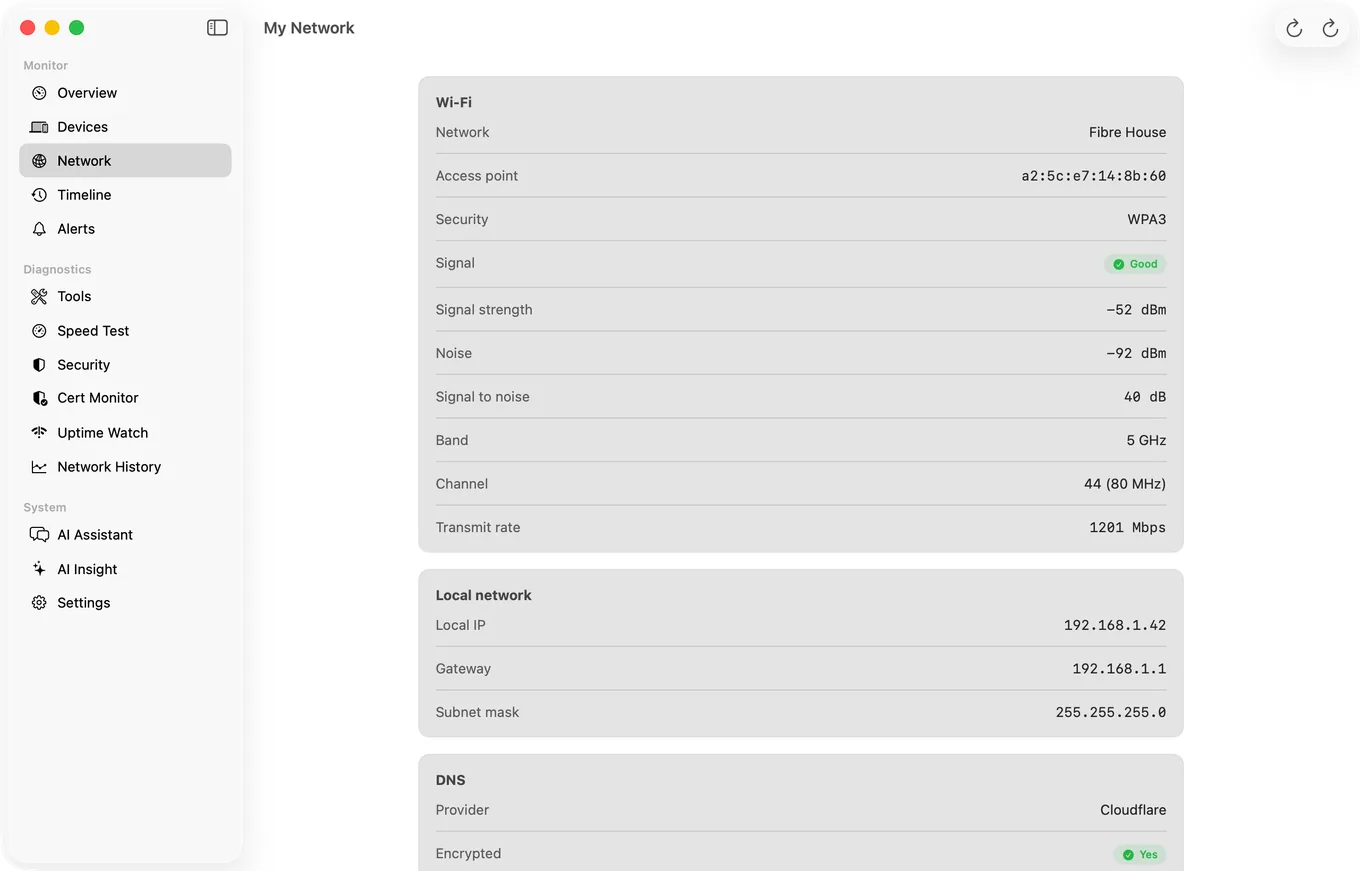
The same pane in PingKit Agent for Mac also carries the public IP and the ISP behind it, and lists the active interfaces with their addresses underneath, so you can see which adapter the local address belongs to.
All three, plus the subnet mask, in one paste:
echo "Local:  $(ipconfig getifaddr en0)"
echo "Router: $(route -n get default | awk '/gateway/{print $2}')"
echo "Public: $(curl -s ifconfig.me)"
PingKit Agent's My Network tool shows the local IP, gateway and subnet mask together with the Wi-Fi and DNS details in one pane, which saves the interface guessing when your Mac has several active adapters.
Two Things That Trip People Up
The interface is not always en0. With a dock, a VPN and a Thunderbolt bridge attached, a Mac can have half a dozen interfaces with addresses. ifconfig | grep "inet " lists them all. The one that matters is whichever carries the default route, which is what route -n get default tells you.
A 169.254.x.x address means DHCP failed. That is a self-assigned address macOS invents when no router answered. It is not a configuration to fix on the Mac; either the router is not responding or the cable or Wi-Fi association is broken.
Honest Limits
- A VPN changes both your public IP and your routing, so read these with the VPN in whatever state you actually care about.
- Carrier-grade NAT on some ISPs means even your public IP is shared with other customers, and inbound connections are impossible without the ISP's help.
- macOS 15 or later for PingKit Agent.
Frequently Asked Questions
How do I find my IP address on a Mac?
Run ipconfig getifaddr en0 in Terminal for the Wi-Fi address, or open System Settings, Network, Wi-Fi, Details, TCP/IP. Holding Option while clicking the Wi-Fi menu bar icon also shows it immediately.
How do I find my router's IP address on a Mac?
Run route -n get default | grep gateway in Terminal, or read the Router field in System Settings, Network, Wi-Fi, Details, TCP/IP. Typing that address into a browser opens the router's admin page.
What is the difference between my local IP and public IP?
The local IP identifies your Mac inside your own network and starts with 192.168, 10, or 172.16 to 172.31. The public IP is what websites see and is shared by every device in your home, because the router translates between them.
Why does my Mac have a 169.254 IP address?
That is a self-assigned address macOS uses when no DHCP server answered. The router did not respond, so either it is down, the cable is bad, or the Wi-Fi association failed. Nothing on the Mac needs fixing.
Which interface is en0 on a Mac?
Usually Wi-Fi, with Ethernet often en1, but it varies by model and by what is attached. The interface that matters is the one carrying the default route, which route -n get default reports.
Every address in one pane
Local IP, gateway, subnet mask, Wi-Fi details and DNS provider together, without guessing which interface is active. macOS 15 or later.
Get PingKit Agent for Mac