Best DNS Servers for Mac (2026): How to Change and Verify Them
Short version. Cloudflare 1.1.1.1 for speed and privacy, Quad9 9.9.9.9 if you want malware domains blocked for you. The part almost everyone skips: on macOS, DNS is set per network service, so setting it on Wi-Fi does nothing when you plug in Ethernet, and plain DNS settings are not encrypted. Encrypted DNS needs a configuration profile, which is a separate step.
Which Resolver
| Provider | Primary / Secondary | Best for |
|---|---|---|
| Cloudflare | 1.1.1.1 / 1.0.0.1 | Speed and privacy, no filtering |
| Cloudflare for Families | 1.1.1.2 / 1.0.0.2 | Malware blocking |
| Quad9 | 9.9.9.9 / 149.112.112.112 | Security, blocks known malicious domains |
| 8.8.8.8 / 8.8.4.4 | Reliability above all | |
| AdGuard DNS | 94.140.14.14 / 94.140.15.15 | Ad and tracker blocking |
Which is genuinely fastest depends on where you are, because it comes down to which provider has a point of presence near you. The table is a starting point, not a ranking. Test from your own connection before believing anyone's benchmark, including this one.
Your ISP's DNS is not automatically bad. It is often the physically closest resolver and therefore the fastest. The reasons to switch are that many ISPs log queries, some return an ad-laden search page instead of a proper "does not exist" answer, and few support encryption. If none of that applies to you, the speed win from switching is frequently zero.
Setting DNS in System Settings
- System Settings › Network
- Select the service you are using, usually Wi-Fi, and click Details
- Choose DNS in the sidebar
- Use + to add servers, and remove the greyed-out inherited ones by adding yours above them
- OK, then Apply
The trap: DNS is per network service, not per Mac. Setting it on Wi-Fi leaves Ethernet, Thunderbolt Bridge and every USB adapter untouched. Plug into a dock and you are silently back on your ISP's resolver. List your services with networksetup -listallnetworkservices and set each one you actually use.
Setting It From the Command Line
networksetup -listallnetworkservices
networksetup -setdnsservers Wi-Fi 1.1.1.1 1.0.0.1
networksetup -getdnsservers Wi-Fi
To hand control back to DHCP:
networksetup -setdnsservers Wi-Fi EmptyService names with spaces need quoting, exactly as -listallnetworkservices printed them.
Encrypted DNS Is a Separate Step
Everything above sends your queries in plaintext. Anyone on the path, your ISP included, can read every domain you look up and could tamper with the answers. Encrypted DNS, either DNS over HTTPS or DNS over TLS, closes that.
macOS supports it, but not through the Network settings pane. It requires a configuration profile, which is why so many people believe their Mac has encrypted DNS when it does not. Cloudflare, Quad9, AdGuard and NextDNS all publish signed profiles for Apple platforms. Download the one you want, then install it under System Settings › General › Device Management. Once installed it applies system-wide across every network service, which conveniently also solves the per-service problem above.
Verifying It Actually Took Effect
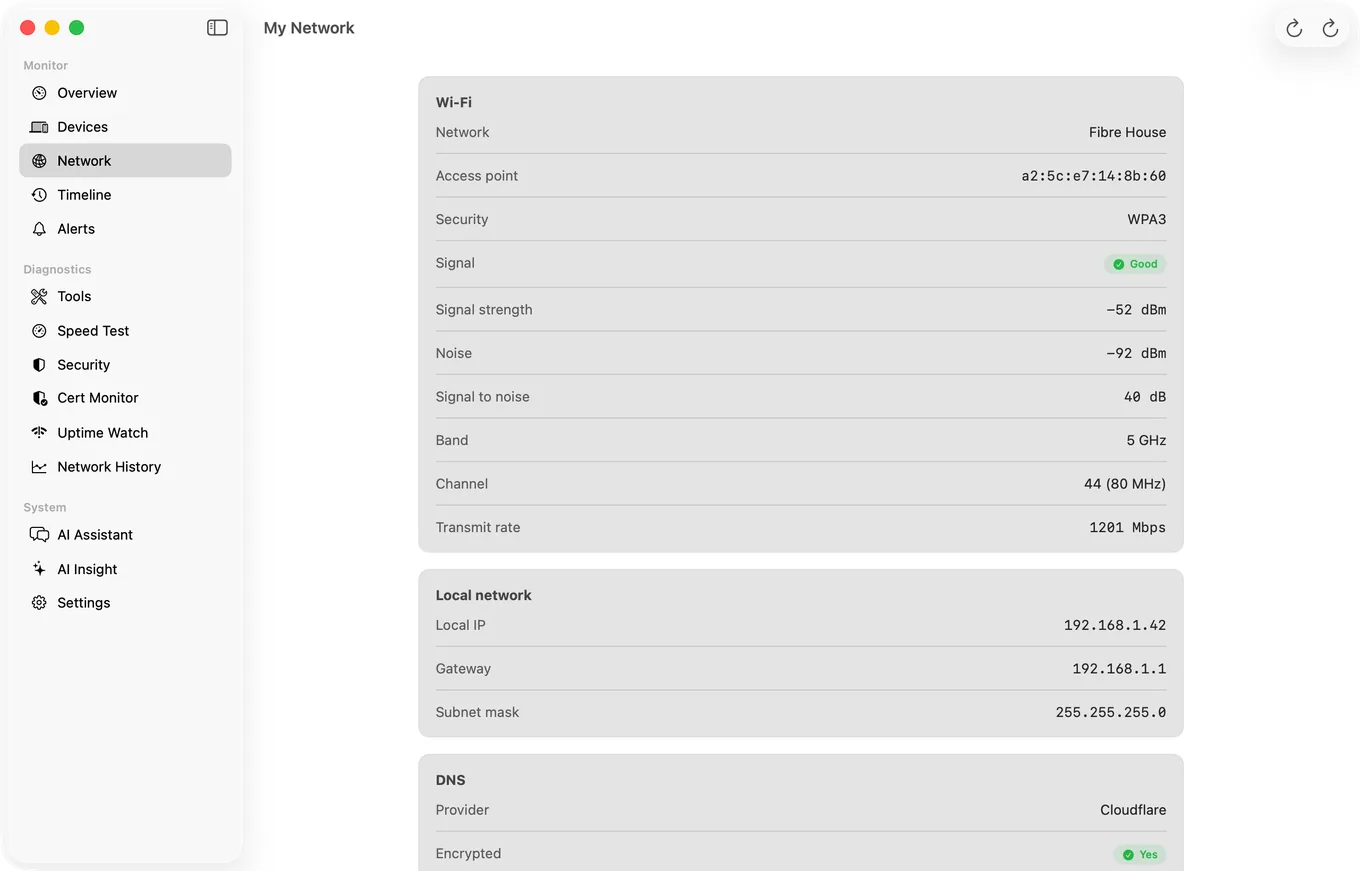
That pane is part of PingKit Agent for Mac, the menu bar app that also tracks the devices on your network and keeps pinging the gateway and the internet between visits.
This is the step people skip, and it is where the surprises are.
scutil --dns | head -20That prints the resolver configuration macOS is genuinely using, per interface. If your new servers are not in the first resolver block, they are not being used, whatever the Network pane displays.
Then confirm you are reaching who you think:
dig +short whoami.cloudflare ch txt @1.1.1.1To check encryption specifically, Cloudflare's 1.1.1.1/help page reports whether your connection is using DNS over HTTPS or TLS.
PingKit Agent's My Network tool does the same check without the command line: it identifies which DNS provider your Mac is actually resolving through, shows the resolver IP addresses, states whether the connection is encrypted, and gives the provider a privacy rating. It is a useful sanity check after installing a profile, and after joining any network you did not configure yourself.
That is the My Network pane described just above, and it is free: PingKit Agent for Mac
What Changing DNS Will Not Fix
- Slow downloads. DNS is a lookup before the connection. It affects how quickly a page starts, not how fast it transfers.
- Buffering. That is bandwidth, congestion or bufferbloat.
- High ping in games. Routing and distance, not name resolution.
- Wi-Fi dropping. A different layer entirely.
DNS makes the first moment of a new connection quicker and can improve privacy. Anything beyond that is a different problem.
Honest Limits
- PingKit Agent identifies and rates your DNS, it does not change it. Changing it is System Settings or
networksetup. - A VPN overrides your DNS while connected, usually with its own resolver.
- macOS 15 or later.
Frequently Asked Questions
What is the best DNS server for a Mac?
Cloudflare 1.1.1.1 for speed and privacy with no filtering, or Quad9 9.9.9.9 if you want known malicious domains blocked automatically. The genuinely fastest resolver depends on which provider has a server near you, so test from your own connection.
How do I change DNS servers on macOS?
Open System Settings, Network, select your connection, click Details, choose DNS, and add servers with the + button. From Terminal, networksetup -setdnsservers Wi-Fi 1.1.1.1 1.0.0.1 does the same thing.
Why did my DNS change not apply?
macOS stores DNS per network service. Setting it on Wi-Fi leaves Ethernet and every USB or Thunderbolt adapter on the ISP's resolver. Run networksetup -listallnetworkservices and configure each service you use, or install a configuration profile, which applies system-wide.
How do I enable encrypted DNS on a Mac?
macOS supports DNS over HTTPS and DNS over TLS through configuration profiles rather than the Network settings pane. Download a signed profile from Cloudflare, Quad9, AdGuard or NextDNS and install it in System Settings, General, Device Management.
How do I check which DNS server my Mac is actually using?
Run scutil --dns in Terminal and read the first resolver block, which reflects what macOS is really using rather than what the settings pane displays. PingKit Agent's My Network tool shows the same thing, including whether the connection is encrypted.
Check your DNS without the command line
My Network identifies your resolver, shows whether it is encrypted, and rates it for privacy. Alongside monitoring of the rest of your network whenever your Mac is awake. macOS 15 or later.
Get PingKit Agent for Mac