Bonjour Browser and all 19 tools are free. No ads, no account required.
What PingKit's Bonjour Browser Does
Bonjour (also known as mDNS/DNS-SD)[source] is how Apple devices and many third-party products announce their presence on a network. PingKit's Bonjour Browser sweeps the 37 service types that cover almost everything a home or small office advertises, and shows you exactly what answers -- device names, IP addresses, ports, and TXT record metadata. It's the network equivalent of shouting "who's there?" and getting a detailed answer from every device.
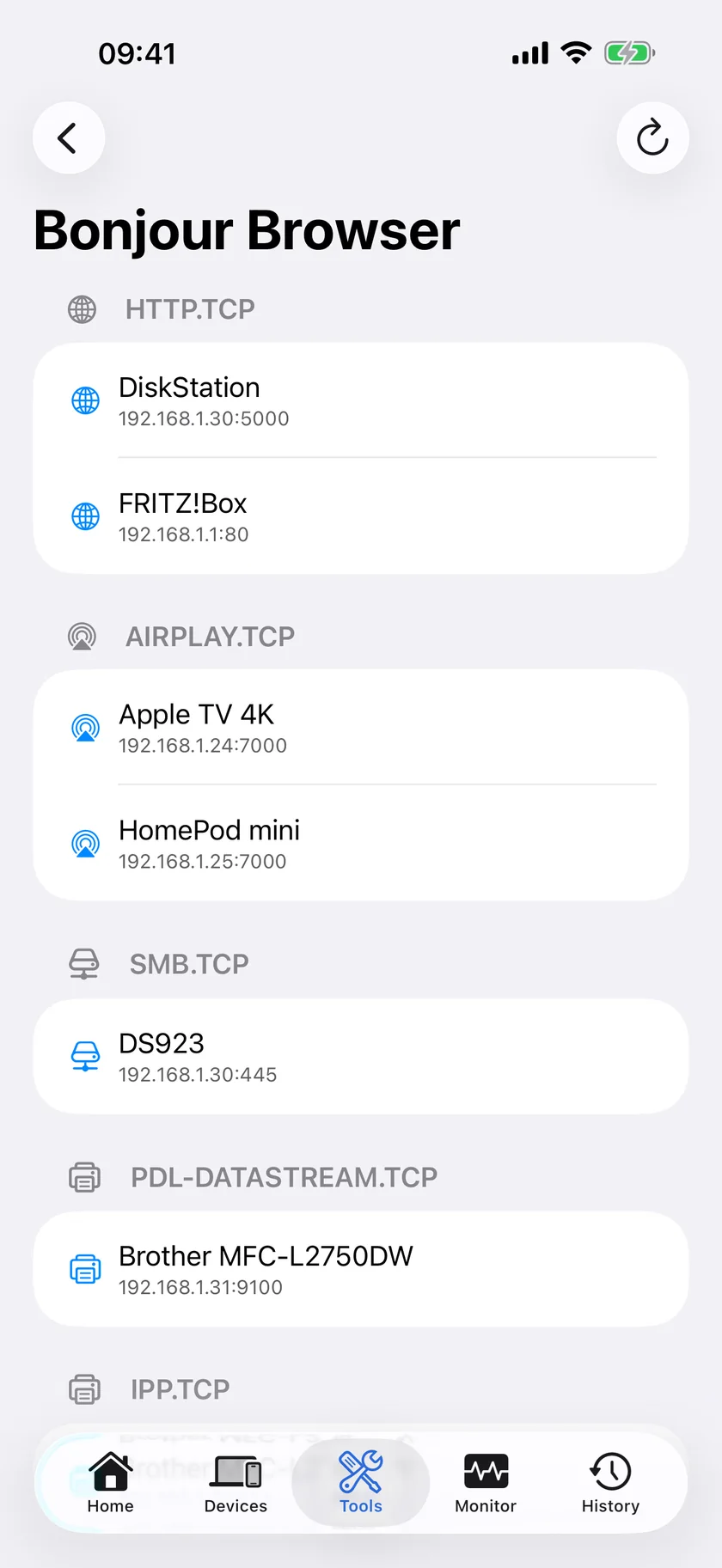
Services grouped by type, with the device, address and port advertising each one.
Service Discovery
Sweeps 37 service types in parallel, from AirPlay and AirPrint to Matter, Sonos, Hue and OctoPrint. Results are grouped by type and ordered by how many of each turned up, so the busiest category is at the top.
AirPlay & AirPrint
See every AirPlay receiver and AirPrint printer on the network with their resolved IP addresses and ports. Instantly tells you whether a missing device is a discovery problem or something else.
HomeKit Devices
Find HomeKit accessories advertising the HAP protocol (_hap._tcp). Verify that new smart home devices are discoverable before pairing, and troubleshoot accessories that have gone offline.
Service Details
Every discovered service shows its hostname, IP address, port number, and TXT record data. See exactly what a device is advertising, including firmware versions and capability flags.
When You Need a Bonjour Browser
Finding AirPlay Devices
You're trying to AirPlay to your Apple TV or a wireless speaker, but it doesn't show up in the list. Is the device offline? On a different network? Or is multicast DNS being blocked? The Bonjour Browser answers this definitively. If the _airplay._tcp service appears, the device is advertising correctly and the problem is elsewhere. If it doesn't appear, you know to check the device's network connection or your router's multicast settings.
Troubleshooting AirPrint
AirPrint printers rely entirely on Bonjour for discovery. When a printer stops appearing in the print dialog, the first question is whether it's still advertising. The Bonjour Browser shows you _ipp._tcp and _printer._tcp services. If your printer is listed with the correct IP, the issue is in the printing stack. If it's missing, you need to check the printer's network settings or restart its Bonjour service.
Smart Home Debugging
HomeKit accessories use the HAP (HomeKit Accessory Protocol) over Bonjour to be discoverable. When a new device won't pair or an existing one drops out of the Home app, checking Bonjour is the first diagnostic step. PingKit shows whether the device is advertising _hap._tcp, along with its raw TXT record data, including HAP fields like c# and sf when the accessory exposes them -- saving you from blindly resetting devices.
Developer Testing
If you're building an app or device that uses Bonjour for service discovery, you need to verify it's advertising correctly. PingKit's Bonjour Browser shows exactly what service type, port, and TXT records your device is publishing. Test from a real iPhone on the same network without needing to write a separate discovery client.
How the Scan Works
Tap into the tool and the scan starts on its own. PingKit opens a separate browser for each of 37 service types[source] and runs them at the same time, collecting whatever answers for fifteen seconds before stopping automatically. You can stop it sooner, or tap the refresh button to run it again.
Two details matter more than they look. The first is that PingKit asks for TXT records as part of the browse rather than resolving services and fetching metadata afterwards. Measured on a live network, the plain descriptor returned TXT data for none of 28 results and this one returned it for 36 of 36. TXT is where the useful identity lives, so the difference is the difference between a list of addresses and a list of devices.
The second is that each service type gets its own browser and its own failure. Networks advertise strange things, and a malformed service type used to take the whole scan down with it: on one network three Matter subtypes killed all 61 browsers and not one device arrived with a service attached. An empty list looks exactly like an empty network, which is the worst kind of bug. Now a browser that fails is dropped and the other 36 carry on.
UDP service types are browsed with UDP parameters, because browsing a ._udp type over TCP simply never finds it. That is why Apple's sleep proxy shows up here and does not in several other browsers.
Reading the Results
Services are grouped into sections by type, and the sections are ordered by how many services each one holds, so whatever your network has most of sits at the top. The toolbar keeps a running count of everything found.
Each row shows the service instance name, or the device's hostname when the instance has no name of its own, with the resolved IP address and port underneath. A chevron appears on any row whose service published TXT records; tapping it expands every key and value, sorted alphabetically.
TXT records are the part worth reading. An Apple device publishes model=AppleTV14,1 or model=AudioAccessory5,1, which names the exact hardware. A HomeKit accessory publishes ci, a number from Apple's accessory category table that says what the thing is (a camera, a lock, a bridge) without naming its vendor, and it is the only signal that classifies smart-home hardware from a manufacturer nobody has heard of. Printers publish their capabilities. Some devices publish a firmware version.
You get one row per service type per address. A device advertising four instances of the same type appears once, not four times, which keeps a NAS or a busy media server from burying everything else.
One service is deliberately absent. Apple's _remotepairing._tcp is the single most common service on many networks, but its instances are named by UUID, carry no model or vendor data, and on one real network eighteen of them resolved to a single address. Browsing it adds noise and nothing else, so PingKit does not.
PingKit vs Other Bonjour Browsers
Bonjour browsers are a small category with a few good entries, most of them written for the Mac. On iOS the field is thinner, and much of it predates the local-network permission iOS 14 introduced. Here is where PingKit sits.
What matters
PingKit
Typical Bonjour browser app
Price
Free, all 19 tools included
Often paid, or free with a service-count limit
Service types
37 browsed in parallel, chosen for what home networks actually run
Varies; some browse a handful, some enumerate everything and drown you
TXT records
Requested during the browse, so they are there when the service appears
Frequently missing, because the plain browse descriptor returns none
UDP services
Browsed with UDP parameters, so sleep proxies and similar appear
Commonly TCP only, which silently misses them
Ads & accounts
No ads, no account required
Commonly ad-supported
Beyond discovery
Ping the address, scan its ports, look up its vendor, all in the same app
Usually discovery only
The honest limit: PingKit browses a curated list rather than enumerating every service type present. That is a deliberate trade. Full enumeration finds the exotic thing you were looking for and also 68 copies of a developer pairing service, and on a phone screen the second outcome is more common than the first. If you need to browse an arbitrary service type you invented yourself, a Mac browser is the better tool.
Troubleshooting Bonjour Discovery
Nothing appears at all. This is almost always the Local Network permission. iOS requires it for any mDNS browse, and when it is missing the browsers do not fail, they simply wait, so the screen stays empty and no error is shown. Check Settings, PingKit, Local Network. If it was ever declined, that switch is the whole problem.
A device you know is on the network is missing. Work through three things in order. Is it on the same subnet? mDNS does not cross subnets, so a device on a guest network or a second VLAN is invisible by design, no matter how healthy it is. Is your router forwarding multicast? Many mesh systems and most enterprise access points filter it, and some do it only between bands, which is why an AirPlay speaker can be visible from 2.4 GHz and gone from 5 GHz. And is the service type one of the 37? A device advertising something unusual is discoverable by the app that knows to ask for it and by nothing else.
An AirPlay receiver or AirPrint printer is not listed. If it does not appear here, it is not advertising to your phone, and no amount of restarting the Apple TV or the print dialog will change that. Check the device's own network settings, then the router's multicast handling. If it does appear here but not in the AirPlay or print menu, the discovery layer is fine and the problem is above it.
A HomeKit accessory will not pair. Look for _hap._tcp. If the accessory is listed, it is advertising correctly and the pairing failure is in the Home app or the accessory's own state, so a factory reset is the wrong first move. Expand the TXT records and read sf: the status flags say whether the accessory still considers itself unpaired.
The list stops filling in. The scan ends after fifteen seconds by design, because a Bonjour browse that runs forever is a battery drain and the useful answers arrive in the first two. Tap refresh to run it again. A device that only appears on the second or third run is usually one that sleeps and wakes on demand.
Your own iPhone appears in the list. That is correct. Your phone advertises services too, and seeing it is a useful confirmation that the browse is working at all.
See What's Really on Your Network
Most people have no idea how many services are being advertised on their home network. Between Apple TVs, HomePod speakers, smart plugs, NAS devices, and laptops sharing screens, a typical home network has dozens of Bonjour services running. PingKit's Bonjour Browser makes all of this visible, and combined with the network scanner and device list, gives you a complete picture of everything connected to your local network.
Cert Monitor for 50 domains (5 on Guardian, 1 free), a signed ISO 27001 PDF export, and scheduled, branded reports. $9.99/mo on iPhone and iPad, $4.99/mo on Mac.
The Bonjour Browser answers one question: is it advertising itself on this network right now. These are the cases where that is the whole diagnosis, plus what the answer means.
Bonjour is Apple's name for mDNS/DNS-SD, the zero-configuration protocol that lets devices announce services on a local network without any central server. AirPlay receivers, AirPrint printers, HomeKit accessories, Chromecasts, NAS boxes and Macs all use it to say what they are and what they offer. Browsing it shows you that conversation directly: PingKit listens for 37 service types and lists whatever answers, with the name, address and port each service publishes.
How do I find AirPlay devices on my network?
Open PingKit's Bonjour Browser and it begins sweeping straight away, for about 15 seconds, grouping everything it hears by service type. Every AirPlay receiver appears together under the AIRPLAY heading, each row showing the advertised name with its IP address and port, and the TXT records behind a tap. Speakers and Apple TVs usually publish AirPlay audio as well, listed separately under RAOP, and PingKit browses both. If a device you expect is in neither group it is not advertising at all, so the fault is the device or your router's multicast handling rather than AirPlay itself.
Why can't my iPhone find my AirPrint printer?
If your iPhone cannot see your printer, open PingKit's Bonjour Browser and look for it under the IPP or PRINTER headings: _ipp._tcp and _printer._tcp are the two printing service types PingKit browses. If it does not appear within the 15-second browse, it is not advertising either of those where your iPhone can hear them, which points at a different subnet, Bonjour turned off on the printer, or a firewall between the two. Treat an absence as a reason to check the printer's own network settings rather than as proof, since a printer that advertises only the encrypted _ipps._tcp variant will not show up here either. If it does appear, discovery is working and the problem lies further along in AirPrint itself.
Can I see HomeKit devices with a Bonjour browser?
Yes. HomeKit accessories advertise _hap._tcp, and PingKit browses that alongside _homekit._tcp and Matter's _matter._tcp, so they appear grouped by type with the address and port on each row. Where an accessory publishes TXT records, a chevron on its row expands them, which is where HAP fields such as c# and sf sit. An accessory that shows up here has already been found by the network, so a failure to pair is in pairing rather than in discovery.
Is PingKit's Bonjour Browser free?
Yes. The Bonjour Browser and all 19 tools are free, with no ads, no account and no usage limit. Guardian is optional, $2.99 a month or $24.99 a year on iPhone with a one-week free trial, and it buys continuous monitoring rather than tools: the free Mac Agent's data and alert history on your iPhone, Uptime Watch for 10 URLs instead of 1, per-network trends, and AI answers from Apple Private Cloud Compute. The AI answers written on your iPhone itself stay free and unlimited.
Discover local services.
Download PingKit free and browse every Bonjour service on your network.