Roku Not Showing Up on Network: Find It From Your iPhone
Short version. The Roku mobile app finds your player by listening on the local network, so it fails for exactly two reasons: the Roku is not announcing itself, or your phone is not on the same network to hear it. PingKit's Bonjour Browser for iPhone shows whether _roku-rsp._tcp is being advertised, and a scan from the LAN Scanner for iPhone finds the player by address even when it is not advertising, reading its friendly name straight out of its own description. A guest SSID or an extender with its own DHCP is the most common answer.
The Bonjour Browser, the LAN scan and Ping are free, with all 19 tools. No ads, no account.
How the Roku App Finds a Roku
There is no address to type into the Roku app. The player announces itself on the local network in two ways at once: over Bonjour with the service type _roku-rsp._tcp, and over SSDP, the UPnP discovery mechanism, where it serves a description document naming the manufacturer, the model and the friendly name you gave it[source]. Anything looking for a Roku listens for one or both.
So "the app cannot find my Roku" is not one problem. It is three, and they have different fixes: the player has stopped announcing, the announcement is not reaching your phone, or the player is not on the network at all.
Step 1: Is It Advertising?
Open PingKit, go to the Tools tab and open Bonjour Browser. It browses 37 service types for fifteen seconds and groups the rows by type, with no filter, so scroll to the heading ROKU-RSP. The browser gives a section a friendly name where it knows one and falls back to the service's own token in capitals where it does not, which is what _roku-rsp._tcp gets.
- The player is listed. It is on your network and advertising, so your phone can hear it. Force-quit the Roku app and reopen it, and make sure the app has local network permission in iOS Settings, which is a separate permission from Wi-Fi and is the single most common cause of an app that cannot find a device the network can.
- Nothing is listed at all. Multicast is not reaching the phone. Go to step 2.
- Other devices are listed, the Roku is not. Go to step 3, because either it has stopped advertising or it is gone.
The Bonjour Browser, the LAN scan and Ping are free in PingKit, with no account and no ads.
Step 2: Check the Network Your Phone Joined
Open My Network in PingKit. Compare the gateway against the network you believe you are on, and your own local address against the address the Roku reports under Settings › Network › About on the television.
| What you see | What it means |
|---|---|
| An unfamiliar gateway | A guest SSID, an extender running its own DHCP, or a neighbour's open network. Guest networks isolate clients from one another, which stops discovery dead |
| Same gateway, different third octet from the Roku | Two subnets. Discovery does not cross a subnet boundary without a router that forwards it |
| Both match | Same network. The player is the problem, so go to step 3 |
Turn off any VPN on the phone before deciding. A VPN profile that captures local traffic breaks discovery while the internet keeps working perfectly.
Step 3: Find It by Address Instead
Open the Devices tab, which scans as it appears; the circular arrow at the top right runs it again. The scan does not need the player to announce itself: it sweeps the subnet and lists what answers, and it runs an SSDP pass at the same time. Where a Roku answers that pass, PingKit reads the description document, and the friendly name you gave the player titles the row when the player has no hostname of its own to use first. Either way it is typed a Streaming Box under Entertainment.
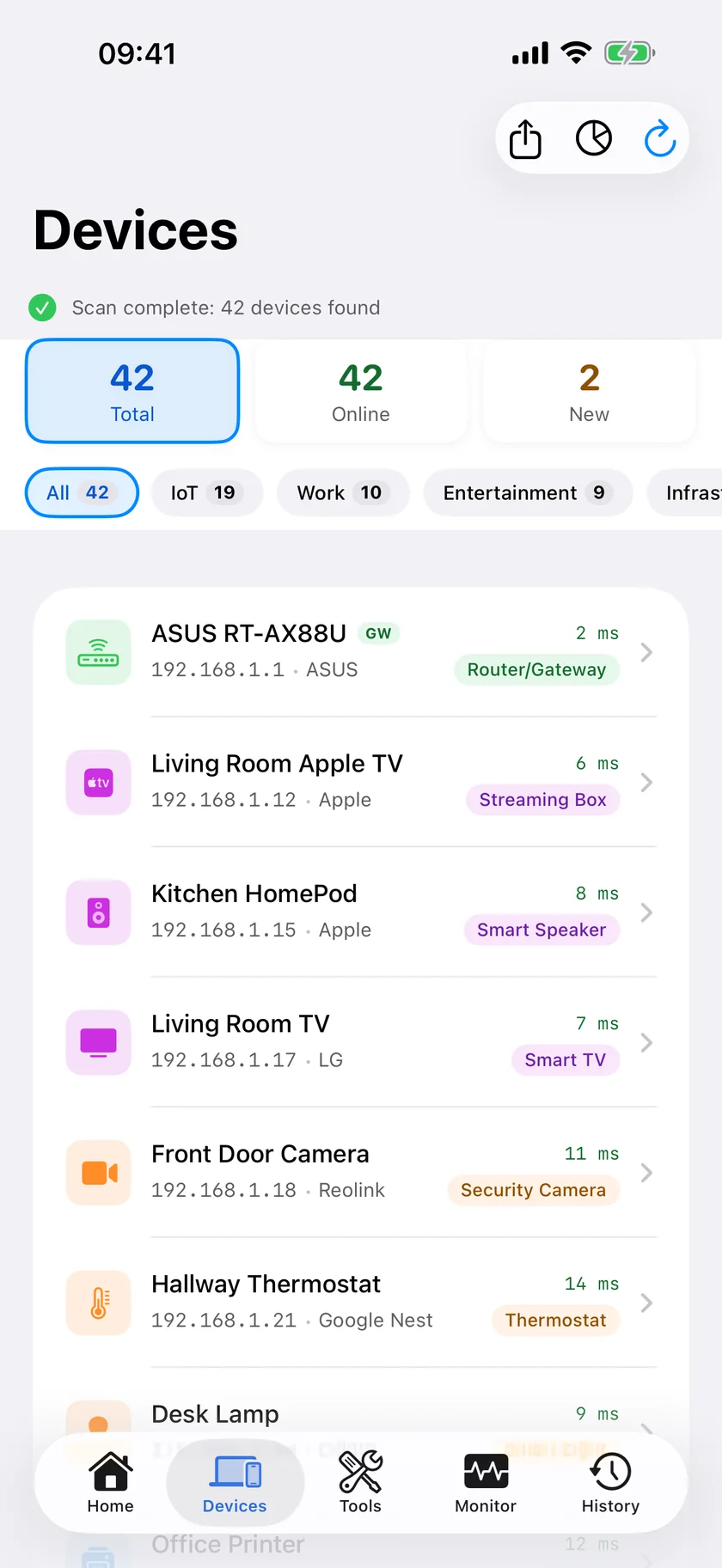
- It answers the scan but not the Bonjour browse. It is on the network and has stopped advertising. Restart it from Settings › System › Power › System restart, or pull the power for ten seconds, which restores the announcement in most cases.
- It does not answer the scan. It is not on this network. Check Settings › Network on the television and confirm which SSID it joined and what address it holds.
- You want to confirm reachability. Take the address from the Roku's own About screen, open Ping in the Tools tab, and send packets to it. Replies mean the network path is fine and the problem is discovery; timeouts mean the player is not reachable at that address at all.
If the player takes a new address every few days, reserve one for it in the router: How to Set a Static IP Address on Your Home Network.
Ask PingKit Instead of Driving the Tools
In PingKit 3.0 you can ask the assistant whether a device is on the network, and where a measurement would answer the question it offers to run one: a browse of the advertised services, or a scan of the devices on your network. Nothing runs until you tap to allow it, and the assistant cannot be handed a target: the actions it can offer are a fixed list, and a scan or a browse of your own network is on it. On a scan you have already run, Explain This Result turns the device list into a sentence, on a button rather than automatically.
If It Keeps Disappearing
The free PingKit Agent for Mac scans every five minutes on mains power, every fifteen on battery, keeps first-seen and last-seen times, and marks a device offline after fifteen minutes unseen, so a player that comes and goes shows as a pattern rather than an irritation. Device Offline alerts are off by default: turn the Device Offline toggle on in the Agent's Settings under Device Alerts and, until the next Agent update, set Offline scans before alert, one section below under Alert Debouncing, to 1. PingKit Guardian brings that alert and that history to the iPhone. The alert reaches the iPhone through your own private iCloud, which is one hop and best effort rather than instant.
Honest Limits
- PingKit does not control a Roku, cast to it, or talk to Roku's services. It reports whether the device is present, advertising and reachable.
- The Bonjour Browser shows what reaches your phone, so a multicast-filtering network makes it empty even when everything works.
- Client isolation on a guest network is a router setting and cannot be worked around from an app.
- The friendly name in a scan result comes from what the device publishes about itself. A player that publishes nothing appears as an unnamed device with an address, and you can name it by hand from its row.
- Nothing on the iPhone watches for the player leaving while the app is closed. That needs the Mac Agent.
Frequently Asked Questions
Why can the Roku app not find my Roku?
Either the player has stopped advertising itself over Bonjour and SSDP, or your phone is on a different network from it. A guest SSID, an extender with its own DHCP, a second subnet or a VPN profile on the phone all break discovery. It is also worth checking that the Roku app has local network permission in iOS Settings.
How do I find my Roku's IP address?
On the player it is under Settings, Network, About. From an iPhone, scan from the Devices tab in PingKit: the scan does not depend on the player advertising, and where the Roku answers the SSDP pass the friendly name you gave it titles the row, unless the player has a hostname of its own, which comes first.
Does a Roku need to be on the same WiFi as my phone?
For the mobile app to find it, yes, and on the same subnet. Discovery does not cross a subnet boundary unless the router is configured to forward it, so a phone on a guest network will not see a player on the main one.
My Roku shows in a network scan but the app still cannot find it. What now?
It is on the network with a working address and has stopped advertising itself. A power cycle, pulling the plug rather than using the menu, restores the announcement in most cases. Check the Roku app's local network permission in iOS Settings as well.
Can PingKit tell me when the Roku drops off?
Not from the iPhone alone, because iOS does not let an app monitor a network while it is closed. The free PingKit Agent for Mac scans every five minutes on mains power and raises a Device Offline alert, and Guardian carries that alert to the iPhone.
Find the device, then find out why.
Free to download, with all 19 tools and no ads. Guardian is $2.99 a month or $24.99 a year, with a 1-week free trial. Cancel anytime.
Download PingKit for iPhone