Chromecast Not Showing Up on Your Network: How to Find It
Short version. Casting works by discovery, not by address: your phone listens for a _googlecast announcement on the local network, and if it does not hear one there is no cast icon. So there are only two questions. Is the device still announcing itself, which PingKit's Bonjour Browser answers directly, and is your phone on the same network as it, which My Network answers by showing you the gateway and subnet you are actually on. A guest network or a second subnet is the single most common cause, and no amount of restarting the TV will fix it.
Why the Cast Icon Disappears
A Chromecast, a Google TV or a TV with Chromecast built in does not have an address you type. It announces itself on the local network over mDNS, using the service type _googlecast._tcp, and your phone listens for that announcement. The cast icon appears when an announcement has been heard, and does not appear when one has not.
That means a missing cast icon has only two possible explanations at the network level: the device has stopped announcing, or the announcement is not reaching your phone. Restarting things sometimes fixes the first by accident. Nothing fixes the second except putting both devices back on one network.
Step 1: Listen for the Announcement
Open PingKit, go to the Tools tab and open Bonjour Browser. It browses 39 service types; the one you want is _googlecast._tcp. A Google device will often appear under other browsed types as well, _http._tcp being the usual second entry.
- The device is listed. It is on your network and announcing itself correctly. Your phone can hear it, so the problem is inside the app you are trying to cast from: sign out and back in, or update it. Restarting the Chromecast will not change anything the network can see.
- Nothing is listed at all, not even other devices. Multicast is not reaching your phone. Go to step 2; this is almost always the network you are joined to.
- Other devices are listed but not the Chromecast. The device itself has stopped announcing, or it has left the network. Go to step 3.
The Bonjour Browser, My Network and the LAN scan are free in PingKit, with no account. Get PingKit for iPhone
Step 2: Check Which Network You Are Actually On
Open My Network in PingKit. It shows your local IP address, the gateway, the subnet mask, and separately your public IP with the ISP and ASN behind it.
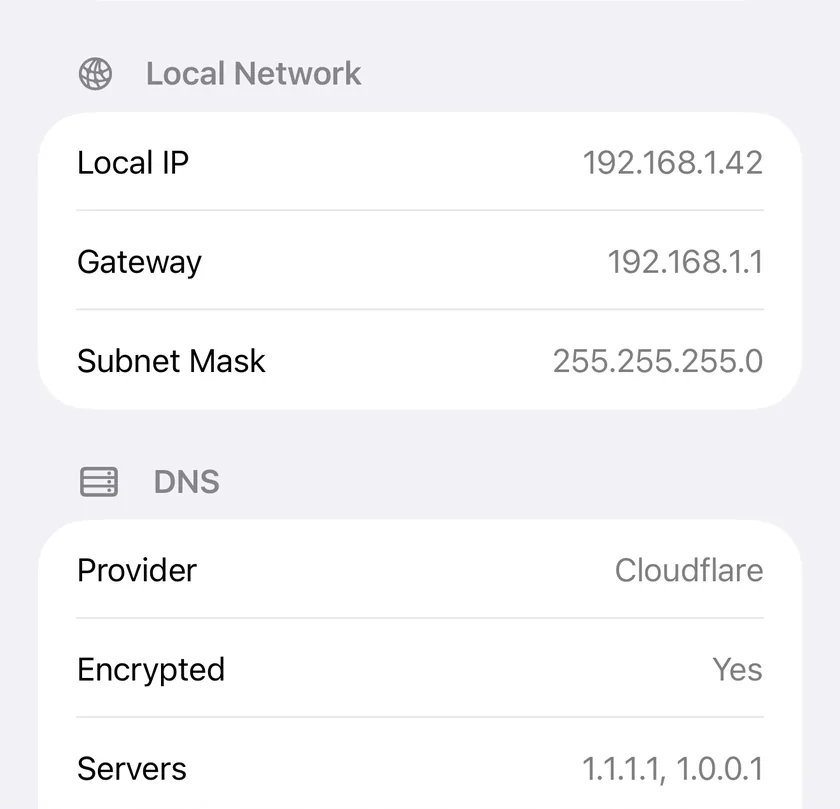
The number to look at is the gateway. Compare it on the phone against what you expect for your main network. Three situations show up here constantly.
| What you see | What it means |
|---|---|
| A gateway you do not recognise, often 192.168.x.1 where your normal one is different | You are on a guest network, an extender with its own DHCP, or a neighbour's open network. Guest networks isolate clients from each other by design, which blocks casting entirely |
| The gateway is right but the third octet differs from the TV's address | Two subnets. mDNS does not cross a subnet boundary without a router configured to forward it |
| The gateway matches and the subnet matches | You are on the same network. The problem is the device, so go to step 3 |
If you are on a VPN, turn it off and try again. A VPN profile on the phone can capture local traffic and make discovery fail while everything else looks perfect. The background on why discovery stops at the subnet edge is in What Is mDNS / Bonjour?
Step 3: Find the Device Without Discovery
Go to the Devices tab and tap Scan Network. This does not rely on announcements; it sweeps the subnet and lists what answers, naming a brand wherever the device publishes one over SSDP or another Bonjour service. A Google device usually does.
- The device answers the scan but does not appear in Bonjour. It is on the network with a working address and has stopped advertising. A power cycle of the device, pulling the power rather than using a menu, restores the announcement in most cases.
- The device does not answer the scan either. It has left the network. Check its WiFi settings, and give it a reserved address in the router so a lease change cannot orphan it again: How to Set a Static IP Address on Your Home Network.
Keeping Track of What Is Actually There
If devices vanishing is a pattern rather than a one-off, it is worth having something that keeps the list rather than rebuilding it each time you look. The free PingKit Agent for Mac, while your Mac is awake, scans the network every five minutes on mains power (every fifteen on battery) and maintains a device list with first seen and last seen times, so a device that comes and goes is visible as a pattern instead of a mystery. With PingKit Guardian that list and its history appear on your iPhone too.
Honest Limits
- PingKit does not cast, control playback, or talk to Google's services. It tells you whether the device is present and announcing itself.
- The Bonjour Browser shows what reaches your phone. On a network that blocks or filters multicast it will be empty even though everything is working for devices that already know each other's addresses.
- Guest networks and client isolation cannot be worked around from an app. The fix is in the router. If only your router answers a scan in the Devices tab, PingKit tells you the Wi-Fi may be keeping devices apart.
- A device that has been factory reset will not appear under any service type until it has been set up again and joined to WiFi.
Frequently Asked Questions
Why is my Chromecast not showing up on my iPhone?
Either the device has stopped publishing its _googlecast announcement, or your phone is not on the same network as it. Guest networks, WiFi extenders that run their own DHCP, second subnets and active VPN profiles all break discovery while leaving the internet working perfectly.
Does a Chromecast need to be on the same WiFi as my phone?
Yes, and more precisely on the same subnet. Casting relies on mDNS discovery, which does not cross a subnet boundary unless the router is configured to forward it. Checking the gateway address on your phone against the network the TV is on is the fastest way to spot this.
How do I find my Chromecast's IP address?
Scan your network from the Devices tab in PingKit. The scan does not depend on the cast announcement, so it finds the device even when the cast icon is missing, and names the brand from whatever else the device publishes about itself.
Why does my Chromecast show in a network scan but not as a cast target?
It is on the network with a working address but has stopped advertising itself over mDNS. Pulling the power rather than using a software restart restores the announcement in most cases.
See what your network is announcing.
Free to download, with all 19 tools and no ads. Guardian is $2.99 a month or $24.99 a year on iPhone or Mac, with a 1-week free trial. Cancel anytime.
Download PingKit for iPhoneRelated Articles
- Bonjour Browser: see what your network advertises
- What Is mDNS / Bonjour? .local Hostnames Explained
- How to Set Up a Guest WiFi Network (and Why You Should)
- My Network: your IP, gateway and ISP at a glance
- AirPrint Printer Not Found on iPhone: Is It on the Network?
- Apple TV Not Showing Up in AirPlay: How to Find It
- Roku Not Showing Up on Network: Find It From Your iPhone