Run it on a device of your own that stays on: a Raspberry Pi, a NAS, a Linux computer with Docker, or Home Assistant. It watches your network for free, sends its alerts to your own services, and, with Guardian, tells your iPhone when the internet goes down, a new device joins, or a device goes offline.
Free to run, with free alerts to ntfy, Telegram, Discord, Pushover or a webhook. Alerts on your iPhone need Guardian: $2.99 a month or $24.99 a year on iPhone, with a 1-week free trial.
Any 64-bit Linux computer with Docker: one compose.yaml and docker compose up -d.
Your network, watched from a device that stays on
PingKit Agent for Docker and Raspberry Pi is a small program you run on a device of your own that stays on. It watches your own network while that device stays on:
Internet Down and Internet Restored, and while something is wrong, whether the fault looks to be your router, the first hop past it or DNS, with honest time bounds. Loss and latency are kept as a history.
New devices. The agent spends its first day learning what is already yours, then tells you about a device it has not seen before.
Phones on private Wi-Fi addresses. A phone whose private address changes looks new to most monitors. PingKit asks whether it is the device that just went quiet, and shows the evidence, instead of announcing a stranger.
Device Offline and Device Online, if you turn them on.
A daily speed test from the device that stays on, once it is paired.
Its own pages, read-only and in 27 languages: overview, devices, timeline, outages with a 30-day chart, and diagnostics. The pages that name your devices sit behind a six-digit PIN.
It watches; it does not block devices or change anything on your network. It needs no Mac. If you have a Mac that stays awake, the Mac Agent does the same job from the menu bar and adds Wi-Fi readings.
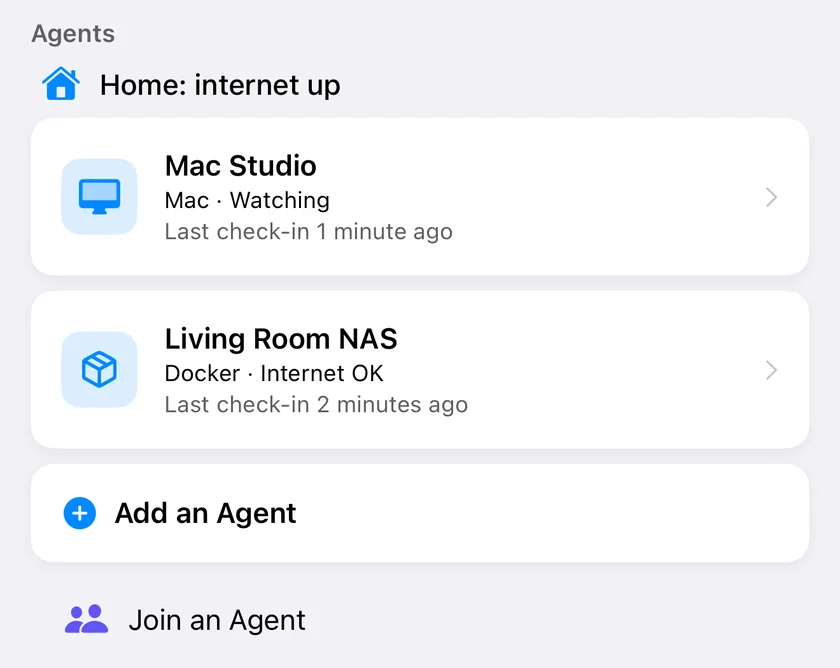
The agent as PingKit on iPhone lists it once paired. Sample data.
Free on the device
Everything the agent does on your own network is free, with or without an iPhone:
its own pages, with 30 days of history (the agent keeps a year on disk);
alerts to your own services: ntfy, Telegram, Discord, Pushover, a signed webhook (Home Assistant's webhook trigger, n8n, Node-RED) and apprise-api for everything else, with per-target event filters and quiet hours;
Home Assistant entities over MQTT: an internet connectivity sensor, device counts, the last outage, and a device tracker or connectivity sensor per device.
No iPhone? Leave the claim code empty. The agent still watches, shows its pages and sends to your own services.
With PingKit on your iPhone
Pairing an iPhone, the agent's status and the last 24 hours of its timeline are free. PingKit Guardian adds the relay and the dashboard:
the push for every alert kind, a Live Activity during an outage, a Home Screen widget, Control Center and Siri, and the Apple Watch;
the dashboard: devices, outages, loss and latency, and speed tests, with 90 days of history;
the Internet Outage Report, to send your provider;
Wake-on-LAN, ping and a scan, now, from anywhere, through the relay.
The paid part is the relay and the dashboard, and it funds the one person who builds PingKit.
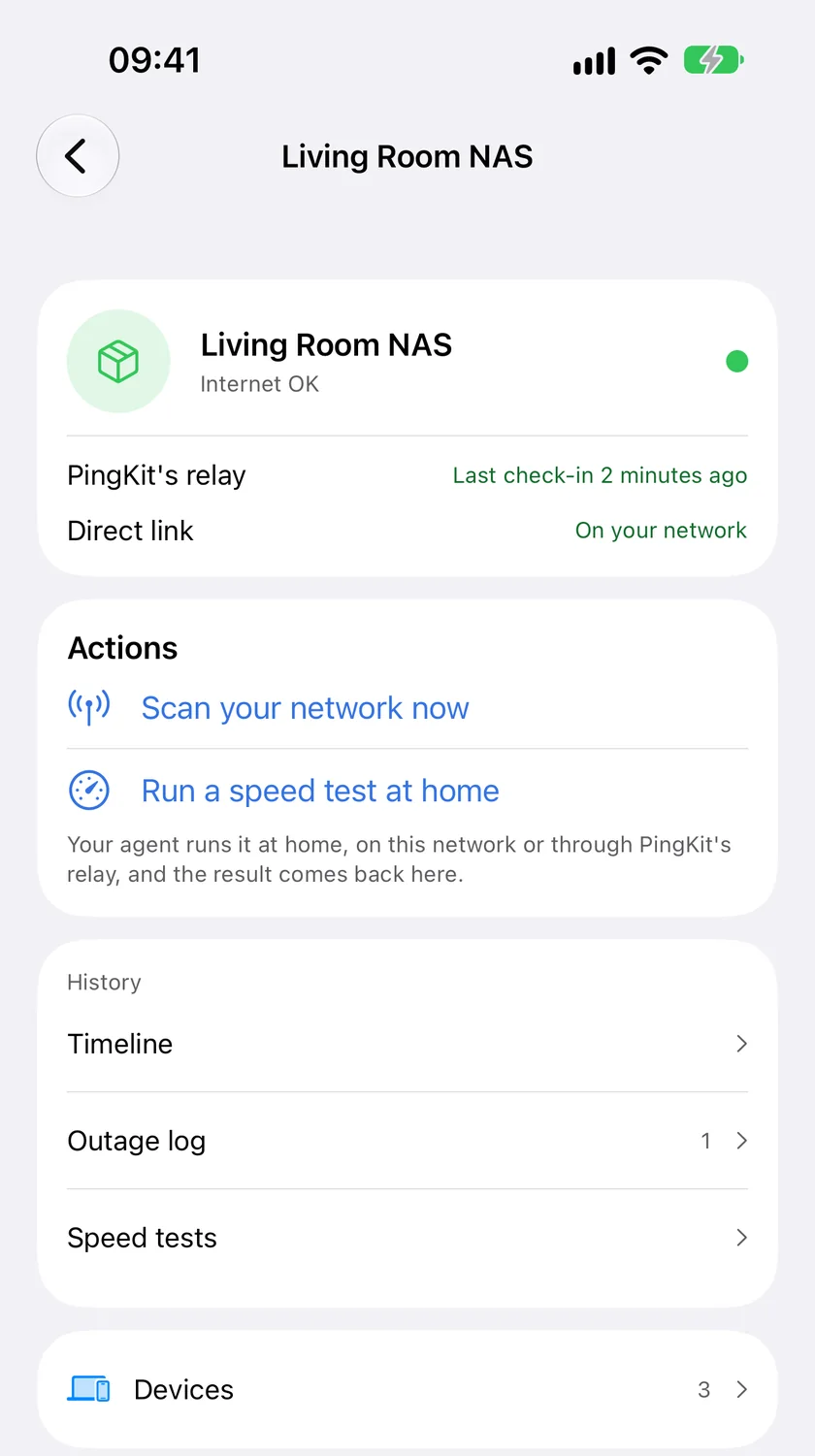
One agent in PingKit on iPhone with Guardian: status, actions, history and devices. Sample data.
How quickly it tells you
Internet Down. The agent checks the internet once a minute. Internet Down is recorded after three checks in a row fail, so about three minutes after the line drops, dated to the first failed check, and Internet Restored after two good checks in a row. A shorter drop leaves no entry.
When the whole line drops. The agent cannot send anything, so PingKit's server notices that its connection has gone quiet and, with Guardian, tells your iPhone that the internet looks down at home within about three minutes. The agent's dated record follows when the line is back.
Device Offline. The agent sweeps your network every 15 minutes and reads the network's own address table in between. A device is reported offline after three missed sweeps, up to 45 minutes at the default. This alert is off until you turn it on.
New Device. The agent spends its first day learning which devices are already yours, then reports a device it has not seen before.
The agent itself. The agent checks in with PingKit's server every five minutes. If it stops, because the device lost power or was unplugged, your iPhone is told after about 20 minutes that the agent has stopped reporting, and again when it is back.
Install it
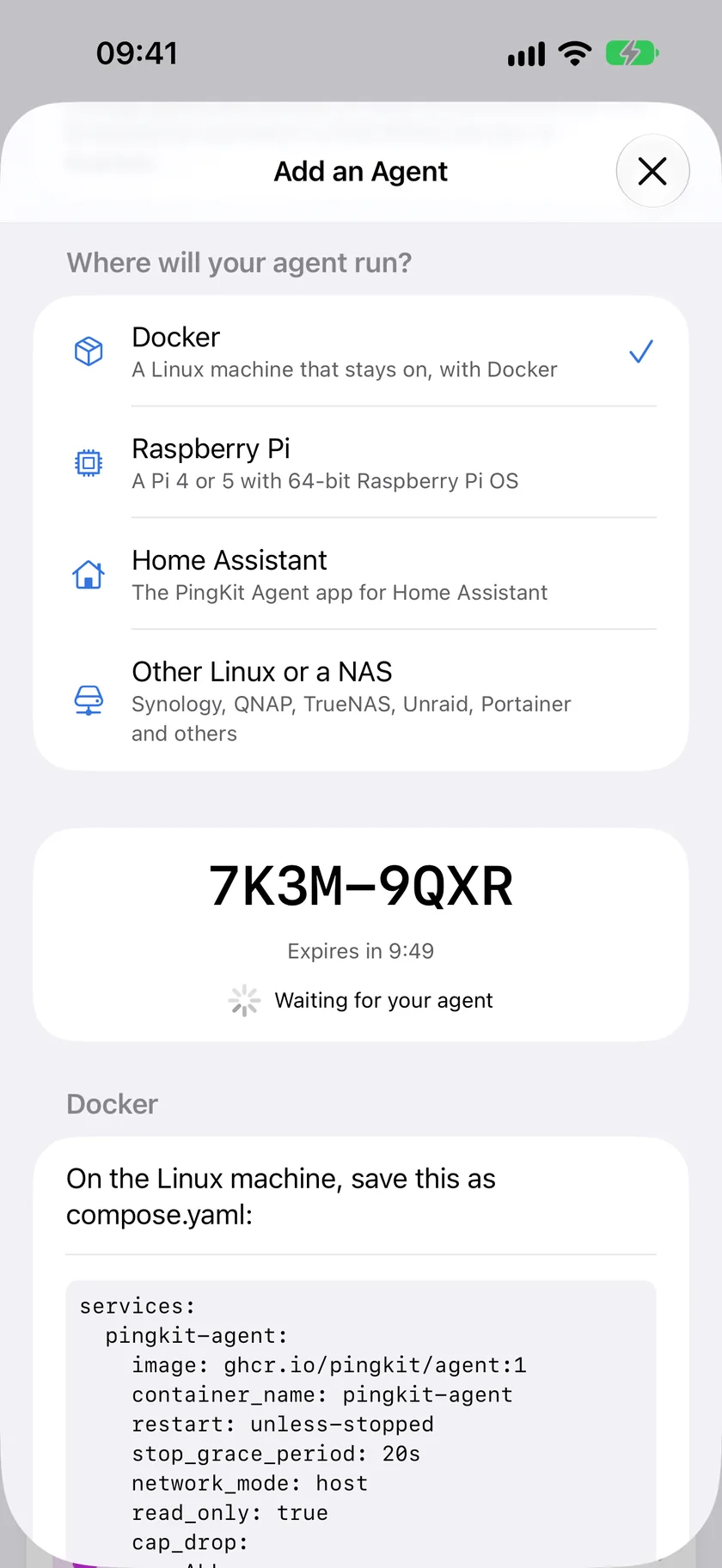
First, open PingKit on your iPhone, go to Agents, tap Add an Agent and keep the 8-character code it shows. The code works once, for 10 minutes. No iPhone? Leave the code empty. Then pick the device it will run on.
Add an Agent in PingKit on iPhone gives the 8-character code the install asks for.
Docker on Linux, or a NAS
Save this as compose.yaml, put your code between the quotes and run docker compose up -d.
services:
  pingkit-agent:
    image: ghcr.io/pingkit/agent:1
    restart: unless-stopped
    stop_grace_period: 20s
    network_mode: host
    read_only: true
    cap_drop: [ALL]
    user: "65532:65532"
    security_opt: [no-new-privileges:true]
    tmpfs: [/tmp:rw,noexec,nosuid,nodev,size=16m]
    mem_limit: 256m
    pids_limit: 64
    volumes: [pingkit-agent-data:/data]
    environment:
      PINGKIT_CLAIM_CODE: ""   # the code from your iPhone, used once
      # PINGKIT_NOTIFY_URLS: "ntfy://192.168.1.5/home-net"   # alerts to your own services
volumes:
  pingkit-agent-data:
stop_grace_period: 20s is there because the agent drains within 15 seconds of being told to stop, and Docker's default of 10 seconds would cut that short.
For Synology, QNAP, TrueNAS SCALE, OpenMediaVault, CasaOS, Portainer and Unraid, use the matching file in the compose folder on GitHub; each one carries its own steps. The agent needs the host's network (network_mode: host) to see your devices, so Docker Desktop on Windows and macOS is not supported.
The :1 tag moves to each new 1.x release. To run exactly one signed build, pull it by digest instead, with the digest from that release's notes: docker pull ghcr.io/pingkit/agent:1.0.0@sha256:<digest>.
Raspberry Pi
On 64-bit Raspberry Pi OS, on a Raspberry Pi 4 or 5:
curl -fsSL https://pingkit.app/agent/install.sh | sudo sh -s -- --claim-code YOURCODE
The script checks the download's SHA-256 against the value pinned inside it before anything runs, installs a service that runs as its own unprivileged user, and prints the status page address. Run it again with --update to update, or with --uninstall to remove the agent. You can read the script before you run it. The Raspberry Pi guide walks through the first hour, the first day, Pi-hole and troubleshooting.
Home Assistant
Press the button below, or in Settings, open Apps, then Install app, and under Repositories, in the menu at the top right, add https://github.com/pingkit/ha-apps. Install PingKit Agent, paste your code into Claim code and start it. Before Home Assistant 2026.2, apps were called add-ons. The app runs on aarch64 and amd64, so a Raspberry Pi needs the 64-bit Home Assistant OS image. The Home Assistant page covers the entities, presence and the sidebar.
Your iPhone lists the agent under Agents within a minute. The agent's status page, at http://<the device's address>:7474/, shows the pairing, the network it watches, the last sweep and the outage log.
Ping is optional. Without it the agent checks devices with ARP and TCP connection attempts. With Docker, allow it on the host with sudo sysctl -w net.ipv4.ping_group_range="65532 65532"; a container capability does not help, because the agent only ever opens datagram ping sockets, which that setting alone admits. The Raspberry Pi script sets it up for you.
On TrueNAS SCALE, add the setting under System, Advanced Settings, Sysctl: variable net.ipv4.ping_group_range, value 0 2147483647. TrueNAS keeps it after a restart, and that range covers the group of the compose file and of the TrueNAS app alike. In an unprivileged Proxmox container (LXC), set it inside the container, as root: sysctl -w net.ipv4.ping_group_range="65532 65532", and put the same line, without sysctl -w, in /etc/sysctl.d/60-pingkit-agent.conf so it holds after the container restarts. The container refuses 0 2147483647, and a setting on the Proxmox host does not reach it, because each container has network settings of its own. Without the setting, on either, the agent still works and checks with TCP instead.
To update: docker compose pull && docker compose up -d with Docker, the install command again with --update on a Raspberry Pi, and the app store in Home Assistant.
A daily speed test
Once it is paired, the agent runs one speed test a day against PingKit's speed endpoint, at a fresh random minute each day, so a month of tests samples every hour. It never runs one during an outage. On a line with a data cap, set PINGKIT_SPEED_TEST to manual, so a test runs only when you ask for one, or to off. PINGKIT_SPEED_BUDGET_MB is the most the tests may move in a calendar month, 10,000 MB unless you change it.
A test over Wi-Fi, or one that reaches 90% of the agent's own link, is kept and labelled as limited by this monitor, because it measured the device and not your line. The results on your iPhone are part of Guardian's dashboard.
What is free, and what Guardian adds
Running the agent is free, with or without an iPhone. The paid part is the relay and the dashboard on your iPhone, and it funds the one person who builds PingKit.
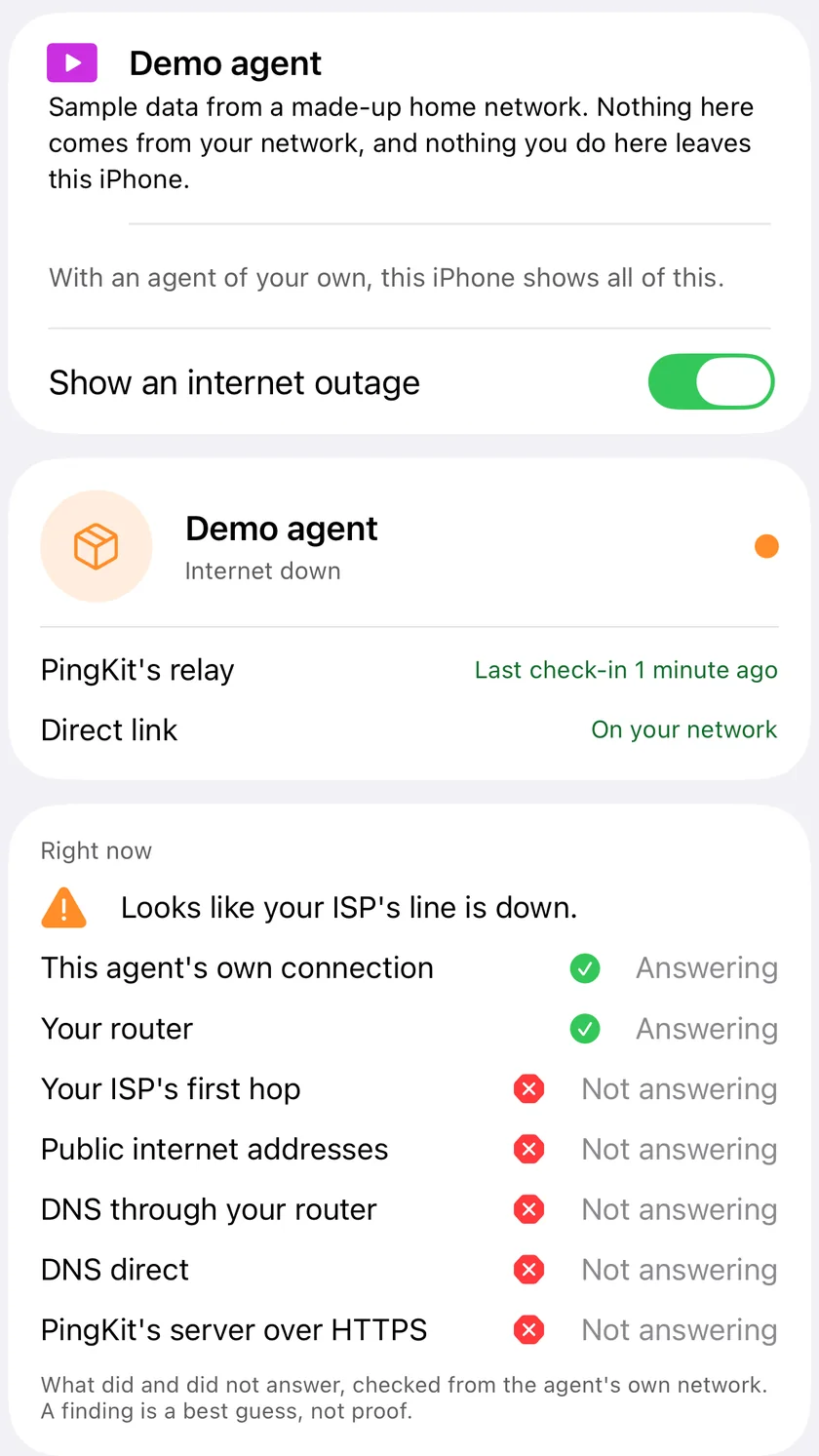
During an outage PingKit on iPhone shows what answered and what did not, checked from the agent's network. Demo agent.
Free
PingKit Guardian
Guardian Plus
The agent, its pages, alerts to your own services (webhook, ntfy, Telegram, Discord, Pushover, apprise-api), Home Assistant entities over MQTT
Yes
Yes
Yes
Pair an iPhone, see the agent's state
Yes
Yes
Yes
The agent's timeline on your iPhone
The last 24 hours
Yes
Yes
History shown, on the iPhone and on the agent's pages (the agent keeps a year on disk either way)
30 days on the agent's pages
90 days
365 days
Push to your iPhone for every alert kind, the Live Activity, the widget, Control Center, Siri
Yes
Yes
The dashboard: devices, outages, loss and latency, speed tests, Wake-on-LAN and other actions from the iPhone
Yes
Yes
The Internet Outage Report for your provider
Yes
Yes
Agents
1
1
Up to 5
Phones per agent
1
1
Up to 5
Prices in US dollars, each plan with a 1-week free trial:
On iPhone
On Mac
PingKit Guardian
$2.99 a month or $24.99 a year
$2.99 a month or $24.99 a year
Guardian Plus
$9.99 a month or $79.99 a year
$4.99 a month or $39.99 a year
A subscription bought on either device counts on both, and the higher tier wins.
What leaves your network
The complete list. A check on every build holds the agent's source to it, so a new destination cannot arrive unseen.
Destination
What, and when
PingKit's server, monitor.pingkit.app
Pairing (the claim code, and whether it runs in Docker, on a Raspberry Pi, in Home Assistant or elsewhere, and its CPU type). A check-in every five minutes: the agent's version, how long it has run, whether its internet check passed, and how many devices are online, a count and never a name. Alert events, which pass through to Apple's push service for your iPhone and are not stored: PingKit keeps the kind of event, how many and when. With the relay, one connection that carries commands from your iPhone, signed by your iPhone, and their sealed answers.
PingKit's speed endpoint, speed.pingkit.app
The daily speed test's traffic, unless you turn it off.
pingkit.app/agent/latest.json
The newest version's number and its signature, to tell you an update exists.
The internet check: 1.1.1.1, 8.8.8.8, 9.9.9.9
A ping or a connection attempt; a DNS question for the name of PingKit's server, asked of your router and of 1.1.1.1; once an hour, a short-lived probe toward 1.1.1.1 that finds the first hop past your router. More often while something is wrong.
Your own services
Only the notification targets and the MQTT broker you configure, and in Home Assistant its own Supervisor.
Your own network
Discovery queries, pings and connection attempts to devices on your own network.
Nothing else. Apple's push service is reached through PingKit's server only. Your device list stays on the agent: your iPhone reads it directly, on your network or through a VPN that routes to it, over an encrypted connection the two set up when you pair. An alert may name the device it is about on its way to your iPhone, but device names never rest on PingKit's servers. There is no account. The details are in the privacy policy.
The Mac Agent or this one?
PingKit Agent for Mac
PingKit Agent for Docker and Raspberry Pi
Runs on
A Mac with macOS 15 or later
A Linux computer with Docker, a NAS, a 64-bit Raspberry Pi 4 or 5, or Home Assistant
Watches your network
While the Mac is awake
While the device stays on
Alerts on your iPhone
With Guardian
With Guardian
Your device list
In your private iCloud
On the device; your iPhone reads it directly
Wi-Fi readings, Security Scan
Yes
No
How it compares
Honest and dated; check each project's own pages before you decide.
PingKit Agent
Fing Agent
NetAlertX
WatchYourLAN
Cost to run
Free
A paid Fing plan: Premium $8.99 a month or $79.99 a year on fing.com, $7.99 or $69.99 in Fing's iPhone app
Host network plus NET_RAW, NET_ADMIN, NET_BIND_SERVICE
Host network
32-bit Raspberry Pi
No, 64-bit only
No, its Docker image is 64-bit
Yes (armv6, armv7)
Yes (arm_v6, arm_v7)
Fing Agent as published on fing.com/agent and fing.com/pricing, and Fing's iPhone app as its App Store listing shows it; NetAlertX and WatchYourLAN as their own READMEs and documentation describe them. All checked on 2026-11-11. NetAlertX does far more on a LAN than PingKit (plugins, router imports, a full web interface); if you want open source and a full web interface, it is the one to look at. Fing Agent can block devices and set access schedules; PingKit Agent cannot. Side by side: PingKit Agent vs NetAlertX and PingKit Agent vs Fing Agent.
What it does on your network
The agent uses the host's network, the one privilege it needs, to read the neighbour (ARP) table and to hear the Bonjour (mDNS) and UPnP (SSDP) announcements your devices make; a bridge network hides all three. Every probe is a connection attempt, a ping, or a discovery query to devices on your own network, plus the internet checks in the table above. It runs as a non-root user with no added capabilities and a read-only file system, and it never opens a raw socket.
Images are signed with cosign through a GitHub sign-in, so the issuer to verify against is https://github.com/login/oauth. The notes of each release on GitHub give the signer's email, the digest, the command that verifies it and a software bill of materials.
If PingKit ends
Our continuity pledge, written on 2026-11-10: the agent keeps working on your network without PingKit's server, its pages, its alerts to your own services and its Home Assistant entities included. If PingKit ever ends, a final build removes the dependency on PingKit's server, so the agent you run keeps running.
Limits
64-bit only: an amd64 or arm64 Linux computer or NAS, or a Raspberry Pi 4 or 5 on 64-bit Raspberry Pi OS. The Raspberry Pi script refuses a 32-bit system.
Docker Desktop on Windows and macOS cannot give the agent your devices, because its host network stops short of them. Use a Linux host.
No Wi-Fi readings, Security Scan or Uptime Watch targets. It watches devices and the internet, and it watches only while its device stays on.
A device is reported offline after three missed sweeps, up to 45 minutes at the default.
The image is about 41 MB to download on arm64 and about 43 MB on amd64. In a 24-hour test on a Linux virtual machine the agent peaked at about 55 MB of memory and used under 1% of one core. We have not measured it on a Raspberry Pi yet.
Questions and answers
Does PingKit Agent for Docker and Raspberry Pi need an account?
No. You pair it with the 8-character code PingKit shows on your iPhone under Agents, which works once, for 10 minutes. There is no PingKit account to make.
Which Raspberry Pi does it run on?
A Raspberry Pi 4 or 5 running 64-bit Raspberry Pi OS. The install script refuses a 32-bit system.
Does it run in Docker Desktop on a Mac or a Windows PC?
No. The agent needs the host's network to see your devices, and Docker Desktop on Windows and macOS does not give a container that. Run it on a Linux computer, a NAS or a Raspberry Pi. On a Mac, use the Mac Agent instead.
Can I see my devices when I am away from home?
Your iPhone reads the device list from the agent directly, so it needs to be on your network or connected through a VPN that routes to it. Alerts arrive as ordinary notifications, on Wi-Fi or mobile data.
Does it work without an iPhone?
Yes. Leave the claim code empty and the agent still watches your network, shows its own pages and sends its alerts to ntfy, Telegram, Discord, Pushover, a webhook or apprise-api, and to Home Assistant over MQTT. All of that is free.
What does it cost?
Running the agent is free, and so are its own pages with 30 days of history, its alerts to your own services and its Home Assistant entities. On your iPhone, pairing an agent, the agent's status and the last 24 hours of its timeline are free. Push alerts from your agent, the dashboard with the agent's device list and outage log, 90 days of history and the Internet Outage Report need PingKit Guardian. 365 days of history, and more than one agent, up to five, need Guardian Plus.
Pair your first agent.
Download PingKit, open Agents and tap Add an Agent for your code. Running the agent is free.
Requires iOS 17.0 or later and PingKit 4.0 or later. Running the agent and its local alerts are free; alerts from your agent on your iPhone need Guardian.