Introducing PingKit Agent: Menu Bar Network Monitoring for Mac
PingKit started as a toolkit - 19 network diagnostic tools in your pocket. But diagnostics are reactive. You run a speed test when your video call stutters. You scan your network after something feels wrong. By then, the problem has already happened.
PingKit Agent changes that. It turns your Mac into a network guardian that watches your home network whenever the Mac is awake and alerts you when something needs your attention: on the Mac, and with Guardian, on your iPhone too.
Why a Mac Agent?
Your Mac is already on your network. It's already plugged in and running. Unlike dedicated monitoring hardware that costs $50–$100+, your Mac can do the job without any additional equipment.
PingKit Agent runs silently in your menu bar - no dock icon, no windows to manage. Turn on Launch at Login during setup or in Settings and it starts every time you log in, then works in the background while you use your Mac normally. It never keeps your Mac awake, and monitoring pauses while the Mac sleeps.
Tip: PingKit Agent requires macOS 15 (Sequoia) or later and works alongside PingKit for iOS. The Mac agent monitors and has 8 free tools of its own; the iOS app gives you the full toolkit of 19.
What It Monitors
PingKit Agent runs eight monitoring functions simultaneously, all configurable from the menu bar:
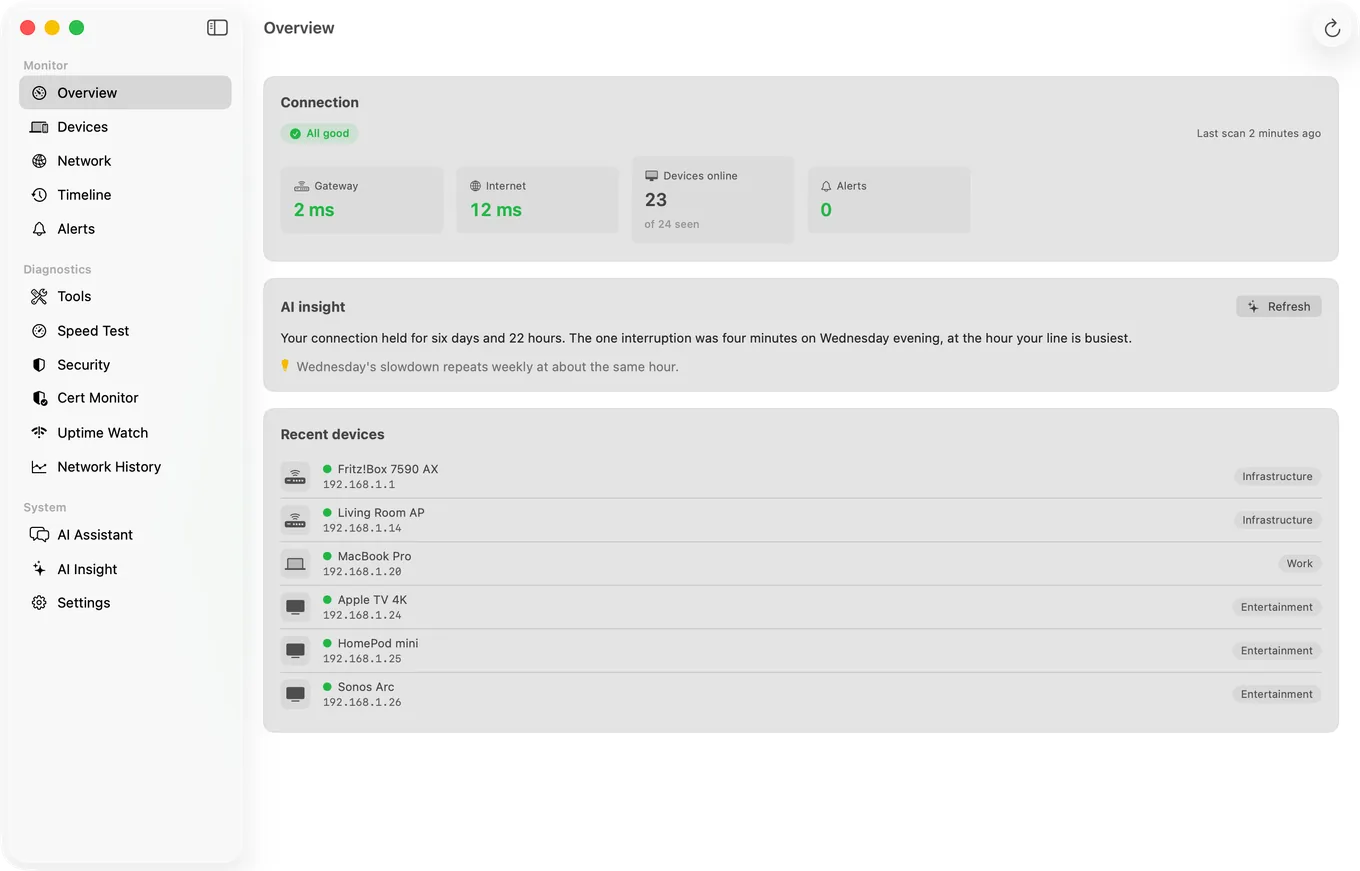
How It Works
Getting started takes about a minute:
- Install PingKit Agent from the Mac App Store. It appears in your menu bar, opens a short setup on first launch, and needs no account.
- Grant local network access when prompted. This allows the agent to discover devices on your network using the same protocols your router uses.
- Name your devices. The agent lists the devices it finds on your network. Click a device to name it, then click Mark as Known; a known device is never set aside, so it is not reported as new if it comes back after a month away.
That's it. From this point on, PingKit Agent monitors your network whenever your Mac is awake; it pauses while the Mac sleeps and picks up again on wake. You'll see the PingKit mark in your menu bar: a slash through it means the internet is down, and a dot means alerts are waiting.
iCloud Sync - No Servers Required
The agent keeps what it discovers in your personal iCloud account, and with Guardian, PingKit on your iPhone shows it. This means:
- No accounts to create. With both devices signed in to iCloud with the same Apple Account, it just works.
- Sync through iCloud. Your device list and timeline sync through your personal iCloud account, not PingKit's servers, while Uptime Watch and Cert Monitor run through PingKit's monitoring service. PingKit asks before anything you measured is sent to its own AI service, and when it writes an answer, your Wi-Fi name, public IP address, hardware addresses and the names you gave your devices are not part of what it sends.
- No cloud subscription fees. iCloud sync uses your existing iCloud storage - the data footprint is tiny.
When the agent detects something - a new device, a latency spike, an internet outage - it writes to CloudKit. With Guardian, PingKit on your iPhone picks it up and shows the alert. The result feels like a native notification, because it is one.
Who Is This For?
PingKit Agent is built for people who want to know what's happening on their home network without needing a networking degree:
- Parents who want to know when new devices connect to their home WiFi
- Remote workers who need reliable internet and want early warning of connection issues
- Gamers who want to track latency trends and catch ISP performance dips
- Security-conscious users who want to keep an eye on their network perimeter
- Anyone frustrated with ISP reliability who wants hard data on actual speeds over time
Pricing
Update (October 2026): We've simplified pricing. All 19 iOS tools can be used free, and so can PingKit Agent, including its network monitoring and network alerts. The optional subscription is PingKit Guardian (Guardian Plus adds more on top), which adds the Agent's dashboard in the iPhone app, actions on the Mac from your iPhone, and a daily network briefing while your Mac is awake:
PingKit Guardian
US prices, the same on iPhone and Mac. Guardian Plus is $9.99 a month or $79.99 a year on iPhone, and $4.99 a month or $39.99 a year on Mac.
Two plans in all, Guardian and Guardian Plus, and you need neither to start. All 19 iOS diagnostic tools (ping, speed test, traceroute, a port scanner for your own network, and more) can be used free. The Mac Agent monitors your network whenever your Mac is awake, free; Guardian adds its devices and timeline to PingKit on your iPhone.
Private by Design
We built PingKit Agent with the same privacy philosophy as PingKit for iOS: your data stays yours. The agent doesn't require an account, and the usage statistics it sends are anonymous counts that are not linked to you. Your scans, device list and speed test results are kept on your Mac and in your personal iCloud, where we cannot see them; PingKit's servers receive only what a feature needs, such as the sites and certificates you ask Uptime Watch and Cert Monitor to watch and, if you allow PingKit's own AI service, what an answer or a device identification needs.
Related Articles
- How to Monitor Your Home Network from Mac
- PingKit 1.3: All Tools Free
- What Is Network Security Scoring
- Fing Agent Alternatives Without New Hardware
- PingKit Agent for Mac
- PingKit 3.3 and 3.2: What Changed in Device Discovery, the Mac Agent and Guardian
Turn Your Mac Into a Network Guardian
PingKit Agent is available now on the Mac App Store.
Download on the Mac App Store Learn more →