Advanced IP Scanner for Mac (2026): It Does Not Exist, So What Now
Short version. There is no macOS version of Advanced IP Scanner and there never has been. It is a free Windows application, listed for Windows 11, 10, 8 and 7. On a Mac, the same job is done by arp -a, which is already installed, by nmap, by Angry IP Scanner, which has a real Mac download, or by PingKit Agent if you also want to know when something new joins. Do not run Advanced IP Scanner under Wine or in a virtual machine for this: a VM's network adapter is usually behind its own NAT, so the scan will not even see your real network. Use a native Mac tool instead.
Why People Look for It
Advanced IP Scanner, from Famatech, the maker of Radmin, is popular on Windows for good reasons: it is free, it runs as a portable app with no installation, it scans a subnet in seconds and lists what it finds with names and MAC addresses. People switching to a Mac reasonably go looking for the same IP scanner for Mac.
It is a Windows application. There is no Mac build, no beta, and no plan for one that its developer has published.
Do not solve this with a virtual machine. It is the obvious workaround and it usually produces wrong answers. A VM with a NAT network adapter sits on its own private subnet, so scanning "the network" scans the VM's network, not yours. Bridged mode can work, but at that point you have configured a whole VM to avoid installing a native app.
The IP Scanners for Mac That Actually Do the Job
arp, already installed, zero effort
arp -aLists every device your Mac has recently communicated with on the local network, by IP and MAC address. Instant and free. The catch is that it only shows devices your Mac has already talked to, so it undercounts badly. Warm the table up first by pinging the broadcast address:
ping -c 3 255.255.255.255
arp -a
Many devices deliberately ignore broadcast pings, so this is still not a complete list.
nmap, the closest match in raw capability
brew install nmap
nmap -sn 192.168.1.0/24
-sn is a ping sweep with no port scanning, which is the equivalent of what Advanced IP Scanner does by default. It is more thorough than arp and slower. Installing it and when it is worth the bother are covered in nmap on a Mac.
Angry IP Scanner, the direct cross-platform equivalent
Unlike Advanced IP Scanner, Angry IP Scanner does have a Mac build, in separate Apple Silicon and Intel variants; the current version is 3.10.0. It is free and open source under GPL v2, and the macOS bundles include a Java runtime, so no separate Java install is needed. It is not notarized, so Gatekeeper will object on first launch, and on macOS 15 or later you approve it under System Settings, Privacy and Security. The steps are in Angry IP Scanner for Mac.
MAC addresses: where a Mac beats an iPhone
Advanced IP Scanner's MAC address column is one of the reasons people want it, and it is something a Mac gives you far more fully than an iPhone. iOS hides most devices' hardware addresses from apps and hands back a placeholder instead, so an iPhone scanner shows no MAC address for most of the devices it finds. On a Mac, arp -a lists them on every macOS version, because it is Apple's own tool.
PingKit Agent reads them too on macOS 15 and 26, and Agent 3.3.0 or later reads them on macOS 27: a device's detail view shows its MAC address, the maker of its network chip looked up from it unless it is a private address, the brand the device reports about itself where it reports one, its hostname, and when it was first and last seen. macOS 27 gives that table only to apps Apple entitles to read it; an older Agent there has no MAC row for a device it first meets, and identifies it from what it announces on the network instead: Bonjour, UPnP and hostnames. PingKit Agent also asks devices on your network for a name over mDNS, NetBIOS and LLMNR, and asks printers, NAS boxes and routers over SNMP, so more devices get one.
The Thing All of These Miss
The interval is a setting rather than a fixed figure in PingKit Agent for Mac, one, five, ten, fifteen or thirty minutes, and each scan is compared against the devices it already knows rather than against the previous scan alone.
Every option above answers "what is on my network right now". That is the question Advanced IP Scanner answers too, and for a one-off audit it is the right question.
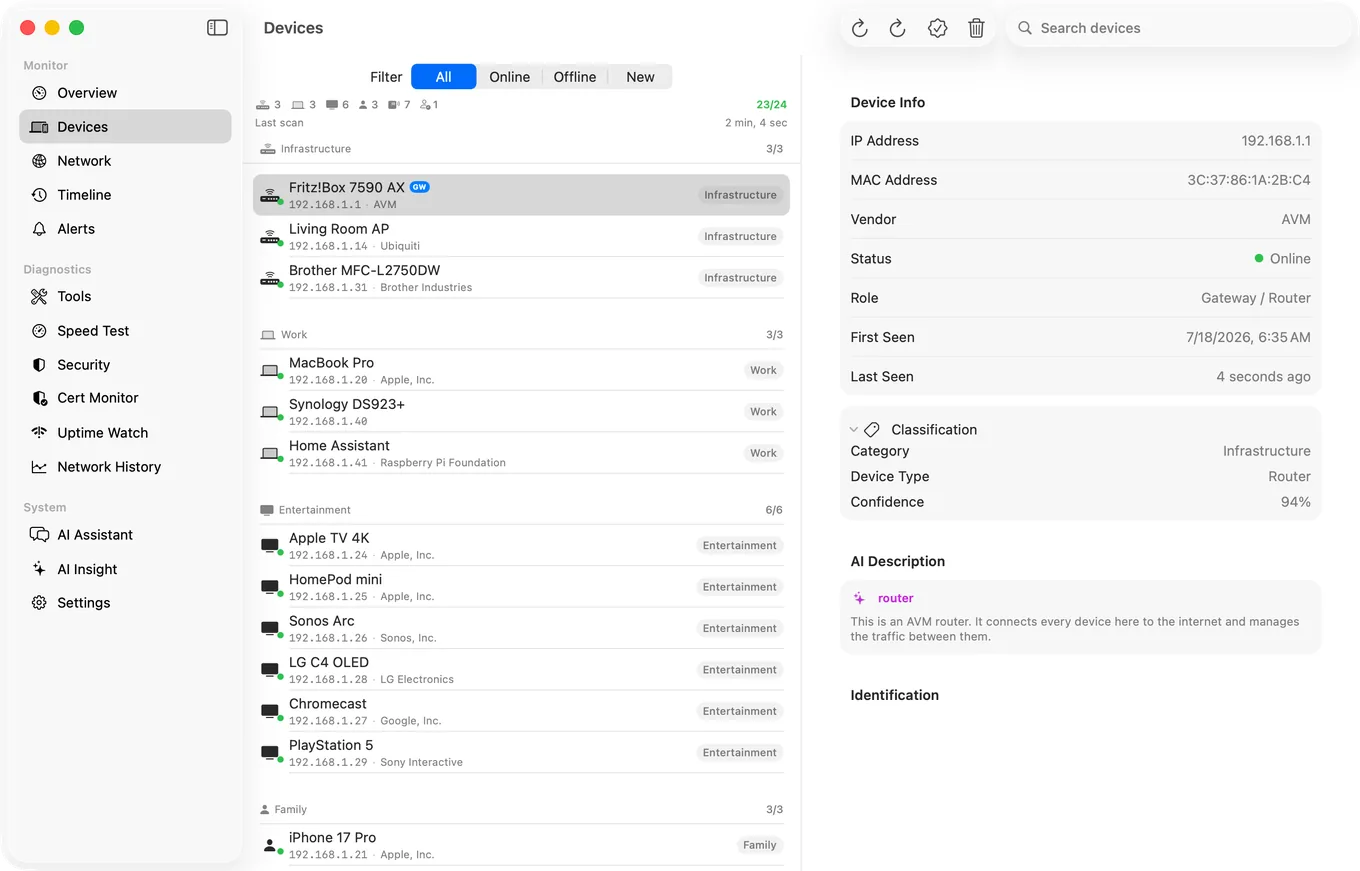
It is the wrong question for the reason most people scan their network in the first place, which is wanting to know when something new appears. A scan you have to remember to run cannot tell you that. Whatever joined at 2am and left by morning is invisible to every tool in this list.
PingKit Agent takes the other approach, and it is free on the Mac. It runs from the menu bar and rescans on a schedule you set in minutes, tracking devices over time rather than producing a fresh list each run. When something appears that was not there before, it raises a new device alert, after a first 24 hours spent learning the devices you already have, so your existing ones do not each set one off. It also notifies on devices going offline and coming back, which is how you notice a camera or a NAS has quietly dropped off, once you switch that alert on in the Agent's Settings, since it is off by default.
| arp / nmap | Angry IP Scanner | PingKit Agent | |
|---|---|---|---|
| Runs on macOS | Yes, built in | Yes, Java bundled | Yes, native |
| One-off scan | Yes | Yes | Yes |
| Scheduled monitoring | No | No | Yes, while the Mac is awake |
| New device alerts | No | No | Yes |
| Port scanning | nmap yes | Yes | Yes |
| Price | Free | Free | Free, paid tiers for extras |
Honest Limits
- No tool sees every device. Anything that ignores probes and has not spoken recently stays invisible, to all of these equally.
- PingKit Agent is not a port scanner first. It has one, but nmap is the better tool if deep port work is the actual job. The options are compared in Port Scanner for Mac.
- Scan only networks you own or administer.
- Monitoring pauses when the Mac sleeps.
- macOS 15 or later.
Frequently Asked Questions
Is there an Advanced IP Scanner for Mac?
No. Advanced IP Scanner is a Windows application, compatible with Windows 11, 10, 8 and 7, with no macOS build. Native alternatives include the built-in arp command, nmap via Homebrew, Angry IP Scanner, and PingKit Agent.
Can I run Advanced IP Scanner on a Mac in a virtual machine?
Technically yes, but it usually gives wrong results. A VM using a NAT network adapter has its own private subnet, so the scan sees the VM's network rather than yours. Bridged networking avoids that, but a native Mac tool is far less work.
What is the best free IP scanner for Mac?
For a quick look, arp -a is already installed and instant. For thoroughness, nmap -sn 192.168.1.0/24 after brew install nmap. Angry IP Scanner offers a graphical option, is free and open source, and its macOS bundles ship with their own Java runtime.
How do I scan my network from a Mac without installing anything?
Run ping -c 3 255.255.255.255 to prompt responses, then arp -a to list the devices your Mac now knows about. It is incomplete because many devices ignore broadcast pings, but it takes seconds.
How do I get alerted when a new device joins my network?
Scanning tools only report the moment you run them. You need something that rescans on a schedule and compares against what it saw before. PingKit Agent does this from the macOS menu bar, free, and raises an alert when a previously unseen device appears, after a first 24 hours spent learning the devices you already have.
Which IP scanner for Mac shows MAC addresses like Advanced IP Scanner?
On a Mac, arp -a in Terminal lists the MAC address of every device on your local network that your Mac has recently talked to, on any macOS version. PingKit Agent shows the MAC address of the devices it finds and, where the address is not a private one, the maker of its network chip: on macOS 15 and 26, and on macOS 27 too, where Agent 3.3.0 or later reads them. An older Agent on macOS 27 has no MAC row for a device it first meets, and identifies it from what it announces on the network instead: Bonjour, UPnP and hostnames. On iPhone, iOS hides most devices' hardware addresses from apps, so PingKit's own scan there shows one only for a device that answers NetBIOS, such as a Mac with File Sharing turned on.
Know when something new joins, not just what is there now
Scheduled rescans from the menu bar while your Mac is awake, with new device alerts, plus offline and back online alerts you can switch on. Free, macOS 15 or later.
Get PingKit Agent for Mac