Get an Alert When a New Device Joins Your WiFi (2026)
Short version. Three approaches work: your router, if it supports notifications; a self-hosted monitor on a device that never sleeps; or a monitoring app on a Mac you already leave running and awake. What does not work is a phone app alone, because iOS suspends apps in the background and cannot watch anything while you are not looking at it.
The usual trigger for this search is opening a scanner, seeing a device you do not recognise, and realising you have no idea how long it has been there. A one-off scan cannot answer that. Something has to be watching.
Full disclosure: I build PingKit Agent, so weigh the recommendation accordingly. The limits section is not padding, and there is a whole category of Mac network tool below that PingKit deliberately is not.
Why Your Phone Cannot Do This Alone
Worth understanding before you install anything, because several App Store listings imply otherwise. iOS suspends apps when they are not in the foreground. There is no background mode that lets an app sweep your network on a schedule while your phone is in your pocket.
So an iPhone app can tell you what is on the network right now, while you are looking at it. It cannot notice a device that joined at 2am. Any product promising that is either using a companion device that stays awake, or overstating what it does.
The Three Approaches That Work
1. Your router
Free, already installed, and the most reliable place to see truth because every device has to ask it for an address. Many mesh systems (eero, Google Nest WiFi, Ubiquiti, some ISP routers) can push a notification when an unknown device joins.
Check this first. If your router does it, you are finished, and it will also let you block the device, which no app can do.
The limitation is that most routers show a MAC address and little else, and modern phones randomise their MAC per network, so the list fills with unidentifiable entries over time.
2. Something self-hosted that never sleeps
A Raspberry Pi or NAS running a monitoring tool. Total control, no subscription, and it is a project you now maintain. Good if you enjoy that.
3. A monitoring app on a Mac that stays awake
If you already leave a Mac on and set it not to sleep, it can do the watching; while it sleeps, nothing is watched. That is what PingKit Agent is: a menu bar app that keeps sweeping at an interval you set and raises an alert when something changes.
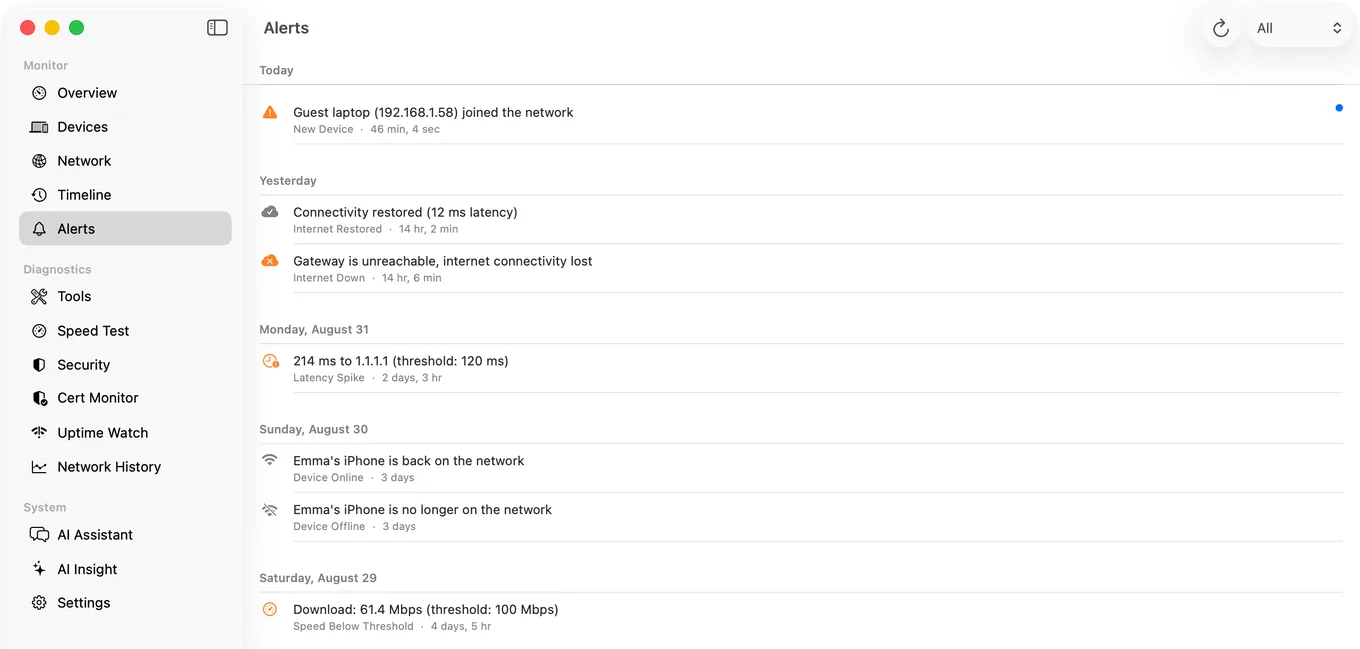
It raises eight kinds of network alert, free: new device, device offline, device back online, internet down, internet restored, high latency, slow speed test and security risk. New device alerts start after a first 24 hours spent learning the devices you already have. Device offline and slow speed test alerts are off by default; switch them on in the Agent's Settings if you want them. With Guardian it also tells you, while your Mac is awake, when a website you watch goes down or comes back, or a certificate is about to expire.
With Guardian, alerts also reach your iPhone: the Agent publishes them to your own private iCloud database and the PingKit iPhone app reads them from there. The Mac does the watching; the phone is the screen.
The third approach, and the free half of it. A Mac that stays on, scanning every few minutes and comparing each scan against the devices it already knows: PingKit Agent for Mac
Identifying What You Found
An alert saying "new device" is only useful if you can work out what it is. On a Mac running macOS 15 or 26, or macOS 27 with Agent 3.3.0 or later, identification uses the real MAC address and vendor prefix from the ARP table, plus Bonjour and SSDP service advertisements, hostnames and open port patterns. A device announcing AirPlay is a speaker or a TV; one advertising IPP is a printer.
Before you panic about an unknown device. Most turn out to be something you own. Modern phones and laptops randomise their MAC address per network, so your own devices can appear unfamiliar. Count your devices first, including anything with WiFi you forgot about: a thermostat, a doorbell, a games console, a printer, a smart plug. The number is almost always higher than people expect.
Honest Limits
- The Mac has to be awake. A sleeping Mac is a paused monitor. If your Mac sleeps overnight, use your router or a device that stays on.
- No app can block a device. That is your router's job.
- Detection is by network sweep, so a device that joins and leaves entirely between two sweeps can be missed. Shorten the interval if that matters.
- A device away for more than a month can alert again. PingKit Agent sets aside a device it has not seen for a month unless you marked it as known, and if that device comes back it raises a new device alert again. Mark the devices you own as known.
- Device naming is good, not infallible. Unusual hardware sometimes stays unlabelled.
- Alerting on the Mac is free; Guardian, $2.99 a month or $24.99 a year on iPhone or Mac, brings the Agent's alerts and dashboard to PingKit on your iPhone. macOS 15 or later.
Frequently Asked Questions
Can my iPhone alert me when a new device joins my WiFi?
Not on its own. iOS suspends apps in the background, so no iPhone app can sweep your network while your phone is idle. You need something that stays awake: your router, a self-hosted monitor, or an app on a Mac that stays awake and sends the alert to your phone.
How do I know if someone is using my WiFi?
Compare the device list against what you own, remembering that phones and laptops randomise their MAC addresses per network, so your own devices can look unfamiliar. Continuous monitoring is more useful than a one-off scan, because it tells you when something appeared rather than only what is there now.
Can my router notify me about new devices?
Many can. Most mesh systems including eero, Google Nest WiFi and Ubiquiti support new device notifications, and some ISP routers do too. Check this first: it is free, it is already running, and your router can also block the device, which no app can do.
Will I get the alert on my phone?
Yes, with Guardian and the PingKit iPhone app signed in to the same iCloud account. The Mac Agent publishes alerts to your own private iCloud database and the iPhone app shows them. The Mac does the monitoring while it is awake; the phone displays it.
Know when something joins
New device alerts plus seven other kinds of network alert, free in your menu bar whenever your Mac is awake, and on your iPhone too with Guardian. macOS 15 or later.
Get PingKit Agent for Mac