Get Notified on Your iPhone When Your NAS, Plex or Home Server Goes Offline
Short version. There are two mechanisms and they do not overlap. If the server has a public URL (a domain pointed at your Plex, a reverse proxy, a tunnel), Uptime Watch checks it from Cloudflare and pushes when it goes down and when it is back; one URL is free, checked hourly, and Guardian checks ten every five minutes. If it only has a private address, the free PingKit Agent on a Mac marks it offline once it has been unseen for 15 minutes and, with its Device Offline alert turned on, raises that alert on the Mac, free; with Guardian, your iPhone shows it too. A NAS that emails you about problems cannot email you when it is off.
First, Which Kind of Offline
"My server is down" is three different events with three different fixes. The box itself has stopped: power, a kernel panic, a disk array that will not mount. The box is fine but the internet is down, so you cannot reach it from outside. Or the box is fine and reachable, but the service on it, Plex or Home Assistant or a container, has crashed. A monitor that only checks one of these will tell you the wrong thing at the worst moment, so it is worth knowing which one each route below actually detects.
Route 1: A Public URL, Checked From the Internet
If the server answers on a URL the internet can reach, a domain you have pointed at it, a reverse proxy in front of it, or a tunnel, then Uptime Watch can watch it. Add the URL in PingKit's Monitor tab and PingKit's backend on Cloudflare's network checks it with a 10-second timeout: once an hour for the free target, every five minutes with Guardian. A site that answers 401, 403 or 405 is marked as refusing automated checks rather than down; any other 4xx, a 5xx or no answer marks it down and sends a push to your iPhone, and the next good check sends the recovery. Results are kept for 7 days on the free tier and 30 days with Guardian. One URL is free, permanently; Guardian watches ten, and a target can also be a TCP port, such as Plex's 32400, if that port is reachable from the internet.
What this detects: all three kinds of offline at once, because a request from outside fails whether the box, the internet or the service is the thing that broke. What it cannot tell you is which. That is the trade for needing nothing on your network: the check is real, from where your users are, and it runs while your Mac and your phone are off.
What it cannot reach: a private address. 192.168.1.20 does not exist on the internet, so PingKit will not add it to Uptime Watch and points you to the Mac Agent's offline alerts instead. A public name that points at a private address gets past that check and will simply read down, so do not use one: it is not a monitor, it is a red row. Plex's own remote access goes through plex.tv and is not a URL you can point a monitor at either; you need a name that resolves to your server directly.
Route 2: A Mac on the LAN, Watching the Box
For everything with only a private address, the answer is a machine on the same network that notices when the box stops answering. The free PingKit Agent for Mac scans the network every five minutes by default and keeps a device list. Once a known device has not been seen for 15 minutes, the Agent marks it offline and records in its timeline that it stopped answering. Device Offline alerts are off by default: turn them on in the Agent's Settings under Device Alerts. The Agent then raises a Device Offline alert on the Mac and resolves it when the device is seen again. That is free. With Guardian, the same alert also arrives on your iPhone through your private iCloud, wherever you are.
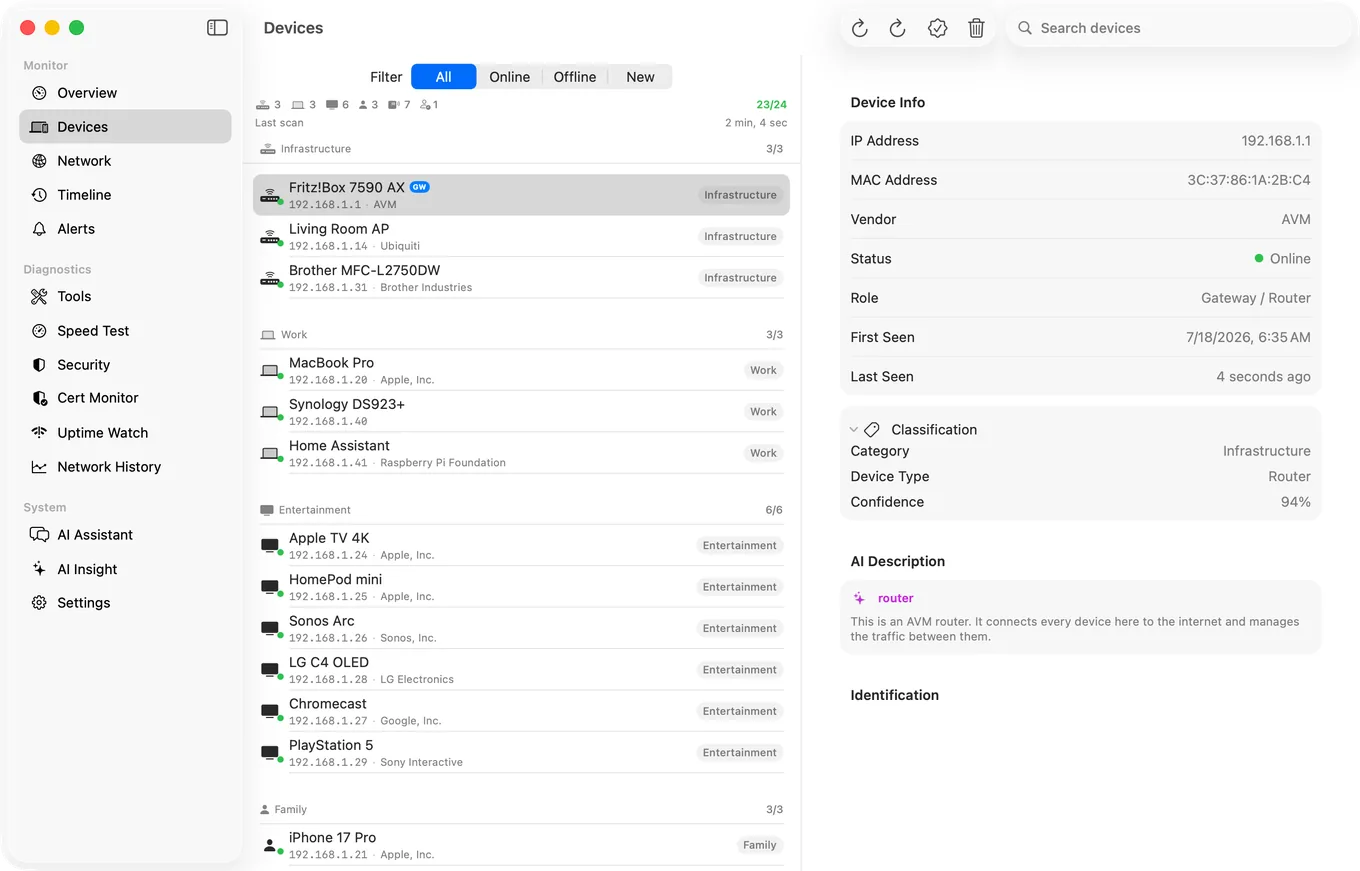
What this detects: the box has gone off the network, which covers power and crashes. It does not detect a service that has died on a box that is still answering ARP, and it does not detect your internet being down, which the Agent reports separately as a connectivity alert. It needs a Mac that stays awake on the same LAN; a Mac mini next to the NAS is the classic setup.
Use Both
A homelab with a Plex behind a domain and a NAS on a private address gets Uptime Watch on the Plex URL and the Agent watching the NAS, and the two alerts together tell you which kind of offline it is: URL down and NAS still on the LAN means the service or the internet; NAS gone from the LAN means the box.
Bringing It Back
If the box supports Wake-on-LAN and the outage was a sleep or a soft shutdown, PingKit's Wake-on-LAN tool sends the magic packet from your iPhone while you are on the same Wi-Fi, and the Mac Agent can send it from the Mac. Away from home, with Guardian, the iPhone can ask the Mac to send it and tell you when the box answers. That does nothing for a kernel panic or a pulled plug, which is why the alert matters: it tells you to go and look.
Why Not Let the NAS Email You
Synology, QNAP and most Linux boxes can send email or push about disk health, temperature and failed logins, and you should turn that on. It covers problems the box can see about itself. It cannot cover the box being off, because a machine that is off sends nothing. The silence is the event, and only something outside the box can notice silence.
Honest Limits
- Uptime Watch checks every five minutes with Guardian and hourly on the free tier, and it cannot see private addresses. A crash at 21:05 is reported at the next check, not at 21:05.
- The Agent's offline alert needs a Mac that stays awake on the same network, and it means "not seen on the LAN", not "the service has stopped".
- Neither route restarts anything. They tell you; you fix it.
- The Agent's alerts reach the iPhone free; Guardian adds its dashboard to the iPhone app. On the Mac itself, everything the Agent does is free.
Frequently Asked Questions
How do I get a notification when my NAS goes offline?
If the NAS has a public URL, add it to PingKit's Uptime Watch and you get a push on your iPhone when it stops answering and when it recovers; one URL is free, checked hourly, and Guardian checks up to ten every five minutes. If it only has a private address, run the free PingKit Agent on a Mac on the same network that stays awake: it marks the NAS offline once it has been unseen for 15 minutes and, with Device Offline alerts turned on in its settings, raises an alert on the Mac, free; with Guardian, your iPhone shows it too.
Can I get a Plex server down alert on iPhone?
Yes, if the server answers on a domain you control: Uptime Watch checks it from the internet, hourly on the free tier or every five minutes with Guardian, and pushes when it goes down. Plex's remote access through plex.tv is not a monitorable URL, so you need a direct name or a tunnel.
Can Uptime Watch monitor a private IP address like 192.168.1.20?
No. The check runs from Cloudflare's network and can only reach addresses that exist on the internet. For a LAN-only device, use the Mac Agent's Device Offline alert.
How quickly does the Mac Agent notice a device is offline?
It marks a device offline once it has been unseen for 15 minutes, three or four scans at the default five-minute interval. Device Offline alerts are off by default; turn them on in the Agent's Settings under Device Alerts.
Does this work without a Mac?
Uptime Watch does: it needs only a public URL and the PingKit app on your iPhone. Watching a LAN-only device needs the Mac Agent, because an iPhone cannot scan the network while its app is closed.
Know before you get home.
Free to download. Guardian is $2.99 a month or $24.99 a year on iPhone and on Mac, with a 1-week free trial on both plans. Cancel anytime. The Mac Agent is free on the Mac App Store.
Download PingKit for iPhoneRelated Articles
- Uptime Monitor App for iPhone and Mac: Free for One Site
- PingKit Agent for Mac
- Monitor Your Home Network While You Are Away
- Wake-on-LAN for iPhone
- Get an iPhone Alert When Home Assistant Goes Offline
- Monitor a Cloudflare Tunnel: Know When Your Origin Goes Down
- Wake-on-LAN Not Working From iPhone: The Failure Checklist