Monitor a Cloudflare Tunnel: Know When Your Origin Goes Down
Short version. A Cloudflare Tunnel is the right way to expose a home service without opening a port, and it has one side effect: when the origin dies, Cloudflare keeps answering, so the failure is quiet. Watch the public hostname from outside with PingKit's Uptime Watch, which checks from Cloudflare's own network and pushes to your iPhone on the way down and again on the way back. One URL is free, permanently, checked hourly. Guardian watches ten, every five minutes. Two behaviours will mislead you if you do not know them: a Cloudflare Access login page reads as up, and a 502 or 1033 error page reads as down, which is correct but tells you about the origin rather than the tunnel.
Why a Tunnel Fails Quietly
With a tunnel, nothing of yours is exposed. A connector on your machine dials out to Cloudflare, Cloudflare terminates TLS at the edge, and requests are carried back down the connection. There is no open port and no public IP of yours anywhere.
That also means Cloudflare is always up even when you are not. If the connector stops, the container dies, the host reboots or your internet drops, requests still reach Cloudflare, and Cloudflare answers with an error page of its own. Your service is gone, but the hostname is still resolving and still responding, so nothing obvious breaks in a way you would notice. You find out when someone tells you.
Watch the Hostname, Not the Tunnel
The check that works is the one a visitor performs: request the public hostname from outside your network and look at what comes back.
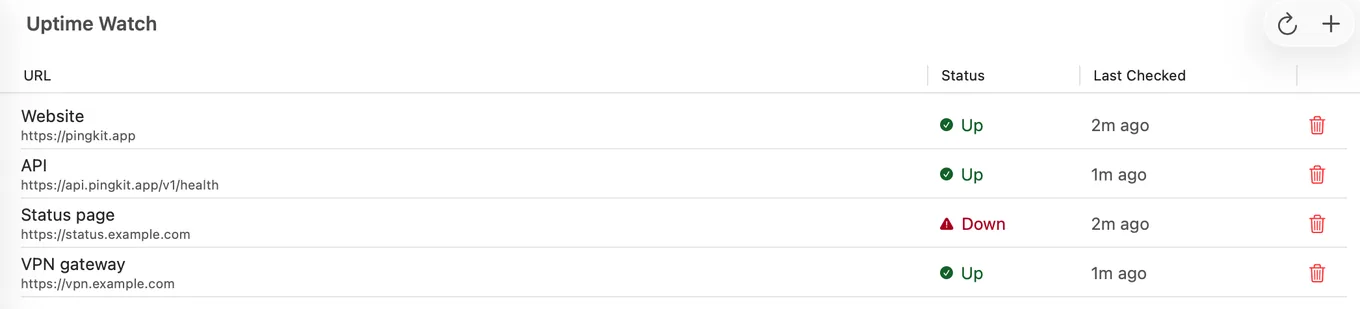
In PingKit, open the Monitor tab and add the hostname to Uptime Watch. What it then does:
- An HTTP request every five minutes with Guardian, or hourly on the free tier, from Cloudflare's network, with a 10-second timeout, following redirects.
- Final status 200 to 399 counts as up. A 401, 403 or 405, the answer a firewall or bot filter usually gives an automated check, is marked Checks refused instead of down and left out of the uptime figure; anything else, or a timeout, counts as down once a second check 30 seconds later agrees. With Guardian you can also require a keyword on the page (case-sensitive, exact text) or an exact status code.
- A push notification to your iPhone on the transition down, and on the transition back up.
- If a site that was up starts refusing automated checks, PingKit tells you once, and on iPhone the target explains why and offers the User-Agent Uptime Watch checks with,
PingKit-UptimeWatch/2.0 (+https://pingkit.app/uptime-watch/), to copy, so you can allow it in your site's firewall or bot rules. - 7 days of results kept on the free tier and 30 days with Guardian, with an hourly response-time chart, so a connector that flaps nightly becomes visible as a pattern.
Uptime Watch is free for one URL, permanently, with push on the way down and the way back. Get PingKit for iPhone
Trap 1: Cloudflare Access Makes a Dead Service Look Alive
If the hostname is protected by Cloudflare Access, an unauthenticated request does not reach your origin at all. It is redirected to the Access login page, which answers correctly with a 200. Uptime Watch follows redirects and treats anything under 400 as up, so a plain status check reads as up whether your origin is healthy or has been switched off for a week.
That is not a bug in the check; it is what any external HTTP check sees, because Access is doing exactly its job. The workarounds, in order of preference:
- Publish a second hostname with no Access policy that maps to a trivial health path on the same origin. Then the check reaches your service and means something. Keep it to something that returns a fixed 200 and reveals nothing.
- Add a bypass policy for a specific path, for example a health endpoint, and watch that path rather than the root.
- With Guardian, add a keyword that appears on your own page and never on the Access login page. The login page then fails the check and reads as down, which tells you the check cannot see your origin. It does not get you past Access; it stops the check lying about it.
- Accept the limitation and understand that the target proves Cloudflare and Access are working, not that your origin is.
Whichever you choose, check the target's history in the app after you add it. If a service you know is down is reading as up, this is why.
Trap 2: A Down Result Is About the Origin, Not the Tunnel
When the connector is not running, Cloudflare answers requests for that hostname with its own error page and a 5xx status, commonly 502 or the 1033 tunnel error. Uptime Watch reads that as down, which is the right answer for "is my service reachable", but note what it is telling you: the edge is fine, DNS is fine, and the thing that failed is on your side, either the connector, the service behind it, the host, or your internet connection.
That distinction matters for what you do next. If you also run the free PingKit Agent on a Mac on the same network that stays awake, its Internet Down alert fires on that Mac after three consecutive failed pings to 1.1.1.1 and 8.8.8.8 (thirty seconds apart on mains power, a minute apart on battery, by default) and tells you whether that network lost its internet connection, though a dead router reads the same. If you are there, an Internet Down alert on the Mac alongside the Uptime Watch push means the line dropped, and the push on its own means the connector or the service; away from the site, the Mac cannot tell you anything while the line is down, so the push on its own does not rule the line out.
What to Watch, in Practice
| Target | What it proves | Worth a slot? |
|---|---|---|
| The public hostname, no Access | Edge, tunnel, connector and origin are all working | Yes, this is the one |
| A hostname behind Access | Cloudflare and Access are working | Only if you have nothing better |
| A dedicated health path with a bypass policy | The origin answers | Yes, the best version |
| Your home's public IP | Nothing useful. A tunnel has no inbound port and your address may change | No |
One URL is free, permanently, checked hourly. Guardian watches ten, every five minutes. One free target is enough for a single tunnelled service; ten is what you want once you have a few hostnames, a status page and a personal site.
Honest Limits
- Hourly checks on the free tier, so a connector that drops for twenty minutes and recovers may not be seen at all. Guardian's five-minute checks will catch that, but a drop shorter than five minutes can still fall between two checks.
- A status check is not a health check. It proves an answer, not a correct one; a Guardian keyword check proves one page contains one piece of text, no more.
- Uptime Watch does not talk to the Cloudflare API, cannot read tunnel status, and does not know your account exists. It behaves like a visitor.
- A Guardian TCP port check of a hostname served through Cloudflare always reads down, because Uptime Watch runs on Cloudflare, which does not let it open a TCP connection to Cloudflare's own addresses; watch a tunnelled hostname with the HTTP check.
- Uptime Watch cannot see anything with only a private address; watching the devices inside your network is what the Mac Agent does, while your Mac is awake.
Frequently Asked Questions
How do I get alerted when my Cloudflare Tunnel goes down?
Watch the public hostname from outside. PingKit's Uptime Watch checks it from Cloudflare's network and pushes to your iPhone when it stops answering and when it recovers. One target is free permanently, checked hourly; Guardian watches ten, every five minutes.
Why does my tunnelled site read as up when the service is off?
Almost certainly Cloudflare Access. An unauthenticated request never reaches your origin; it is redirected to the Access login page, which answers with a 200. Any external status check will read that as up. Watch a hostname or path with a bypass policy instead, or, with Guardian, require a keyword that only your own page contains.
What does a 502 on a Cloudflare Tunnel mean?
Cloudflare could not reach your origin through the tunnel. The edge and DNS are fine, and the fault is on your side: the connector is not running, the service behind it has stopped, the host is down, or your internet connection dropped.
Can I monitor a tunnel without exposing anything extra?
A path that returns a fixed 200 and no content is the usual approach. It reveals nothing about the service and gives an external check something real to ask for.
How do I tell a tunnel failure from an internet outage?
Run the free PingKit Agent on a Mac at the same site that stays awake. Its Internet Down alert fires on that Mac after three consecutive failed pings to public addresses, so if you are on site, an Internet Down alert on the Mac alongside the Uptime Watch push means the line dropped, and the push on its own means the connector or the service. Away from the site, the Mac cannot reach you while the line is down, so the push on its own does not rule the line out.
Know your origin died before a user tells you.
One URL is free, permanently, checked hourly. Guardian watches ten, every five minutes. Guardian is $2.99 a month or $24.99 a year, with a 1-week free trial.
Download PingKit for iPhone