LanScan Alternatives for Mac (2026): Scanners and Monitors Compared
Short version. LanScan is a clean, focused Mac scanner: free to use, with a Pro in-app purchase from $9.99 that removes the limit on how many hostnames are shown, read from its App Store listing on 20 September 2026. The main reasons to look elsewhere are wanting continuous monitoring rather than on-demand scans, or wanting more than discovery. PingKit Agent is a menu bar monitor that keeps sweeping while your Mac is awake and alerts on changes.
LanScan does one thing and does it tidily: it discovers devices on your network and resolves their names over mDNS, SMB and DNS, showing IP, MAC and vendor. If you have outgrown it, it is usually because you want the scan to keep happening without you.
Full disclosure: I build PingKit Agent, so weigh the recommendation accordingly. The limits section is not padding, and there is a whole category of Mac network tool below that PingKit deliberately is not.
The Comparison
| LanScan | PingKit Agent | Angry IP Scanner | |
|---|---|---|---|
| Pricing model | Free tier, Pro from $9.99 | Free, optional subscription | Free, open source |
| On-demand scan | Yes | Yes | Yes |
| Continuous monitoring | No | Yes, while the Mac is awake | No |
| Change alerts | No | New devices, internet drops, latency; offline if you turn it on | No |
| Menu bar presence | No | Yes | No |
| MAC address and vendor | Yes | macOS 15 and 26; 27 from Agent 3.3.0 | Yes |
| Port scanning | Not listed | Yes | Yes |
| Scheduled speed tests | No | Yes | No |
| Certificate expiry monitoring | No | Yes | No |
| Syncs to an iPhone app | No | With Guardian | No |
| Wide arbitrary ranges | Yes | Local segment | Yes |
Pricing and features move around. Check the current listing before buying anything.
One Real Mac Advantage Worth Knowing
On macOS 15 and 26, Mac scanners can read genuine MAC addresses from the ARP table and identify manufacturers from the OUI prefix. iPhone apps mostly cannot, because iOS returns a placeholder address for network peers. So a Mac scanner and an iPhone scanner looking at the same network are working from different information, and the Mac has the better raw material. macOS 27 gives the system ARP table only to apps Apple entitles to read it: PingKit Agent 3.3.0 or later reads them on macOS 27, and scanners without that entitlement show no MAC addresses there.
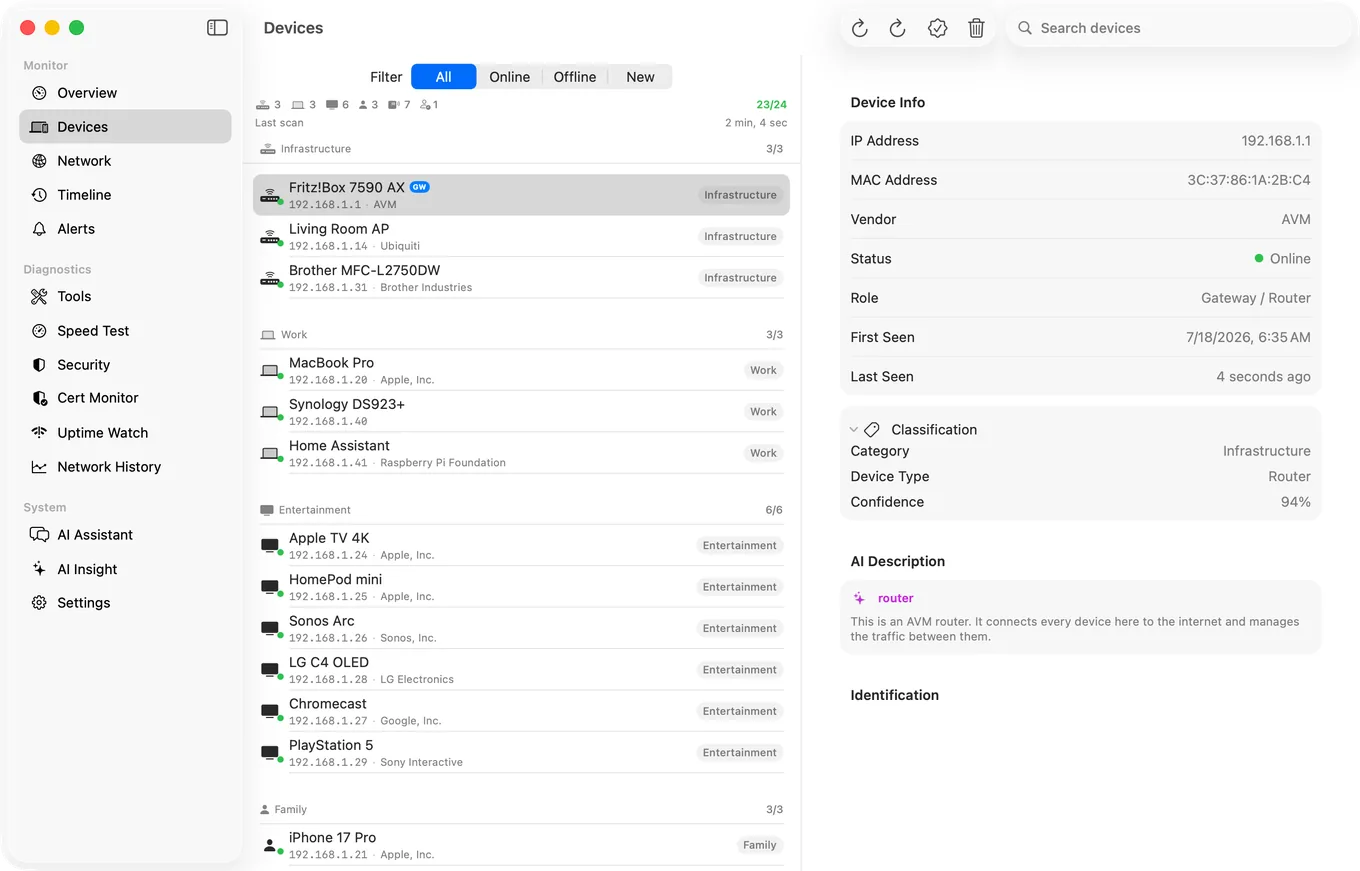
PingKit Agent uses both: vendor prefixes from the ARP table (on macOS 15 and 26, and on macOS 27 from Agent 3.3.0), plus Bonjour and SSDP service advertisements, hostnames, the names devices give when asked directly over mDNS, NetBIOS, LLMNR or SNMP, and open port patterns. With Guardian, and once you allow PingKit's own AI service, an AI fallback runs only when signature matching is genuinely uncertain, with a 24 hour cooldown per device.
What PingKit Agent is not. It does not measure bandwidth, throughput per app, or which process is using your connection. If that is what you came for, iStat Menus is the standard answer for your own Mac's usage and Little Snitch is the answer for controlling what your Mac connects to. PingKit Agent watches the network and the devices on it, which is a different job.
Honest Limits
- PingKit Agent sweeps your local segment, not arbitrary wide ranges. LanScan and Angry IP Scanner are better for auditing an unfamiliar subnet.
- Monitoring pauses when the Mac sleeps.
- Network alerts and scheduled speed tests are free. Guardian, $2.99 a month or $24.99 a year on iPhone or Mac, adds the Agent's dashboard to PingKit on your iPhone, and site and certificate alerts on the Mac.
- macOS 15 or later.
Frequently Asked Questions
What is a good LanScan alternative for Mac?
For on-demand scanning, Angry IP Scanner is free and open source. For monitoring with alerts when devices appear or the internet drops, PingKit Agent is a menu bar app that keeps sweeping while your Mac is awake, rather than scanning once.
Can Mac apps see MAC addresses of other devices?
On macOS 15 and 26, yes. macOS exposes the ARP table there, so Mac scanners can read real MAC addresses and identify manufacturers from the OUI prefix. macOS 27 gives the system ARP table only to apps Apple entitles to read it, so PingKit Agent 3.3.0 or later reads them on macOS 27 and scanners without that entitlement show no MAC addresses there. iPhone apps mostly cannot, because iOS returns a placeholder address for network peers, although PingKit on iPhone can show the MAC address of a device that answers NetBIOS, such as a Mac with File Sharing turned on.
Do I need a subscription to scan my network on Mac?
No. Free options exist, including Angry IP Scanner and PingKit Agent, whose monitoring while your Mac is awake, network alerts and scheduled speed tests are free too. Guardian, $2.99 a month or $24.99 a year on iPhone or Mac, adds the Agent's dashboard to PingKit on your iPhone.
Why does my Mac scanner show fewer devices than expected?
Devices asleep or in a low-power state may not answer probes, and some networks isolate clients from each other. Check that the app has Local Network permission in System Settings, Privacy and Security, since a denied app reports an empty network. PingKit Agent tells you when it can see that Local Network access is off, and if only your router answers a scan, it says the Wi-Fi may be keeping devices apart.
Does PingKit Agent scan arbitrary IP ranges?
No. It sweeps the local segment you are connected to. For auditing an unfamiliar or very wide range, a dedicated scanner such as Angry IP Scanner is the better tool.
Scanning that does not stop when you look away
Discovery that keeps running while your Mac is awake, with alerts for new devices and internet drops, scheduled speed tests and certificate monitoring, in the menu bar. macOS 15 or later.
Get PingKit Agent for Mac