Scheduled Speed Tests on Mac (2026): Proving What You Actually Get
Short version. A single speed test proves nothing. ISPs will point out that you tested once, over WiFi, at a busy time. What changes the conversation is a series: the same test, on a schedule, over days, with timestamps. On a Mac you can do this with a cron job and the Speedtest CLI, or with an app that schedules it for you. Your iPhone cannot do it at all.
You pay for 500 Mbps. Evenings feel slow. You run a speed test, it says 180, you screenshot it, and support tells you to restart your router. The screenshot is the problem: one measurement at one moment is not evidence.
Full disclosure: I build PingKit Agent, so weigh the recommendation accordingly. The limits section is not padding, and there is a whole category of Mac network tool below that PingKit deliberately is not.
Why a Series Beats a Screenshot
A single result has too many explanations: WiFi rather than Ethernet, one device saturating the line, a busy test server, a bad moment. A series removes them by repetition. If the same test at the same place runs at 480 Mbps at 3am and 160 Mbps every evening between 8 and 10, you are no longer describing a feeling. You are describing a pattern with timestamps, and evening congestion is a known, fixable class of problem.
Test over Ethernet if you possibly can. The first thing any ISP will say is that WiFi is the bottleneck, and quite often they are right. A wired test removes the strongest counter-argument before they make it.
Three Ways to Schedule It on a Mac
1. Speedtest CLI plus cron or launchd
Free and precise. Install Ookla's CLI (brew install speedtest-cli or the official tap), then schedule it to append CSV output to a file. You own the data completely and can graph it however you like.
The cost is setup, and the fact that a launchd job that silently stops running is a classic way to discover you have no data exactly when you need it.
2. An app that schedules it
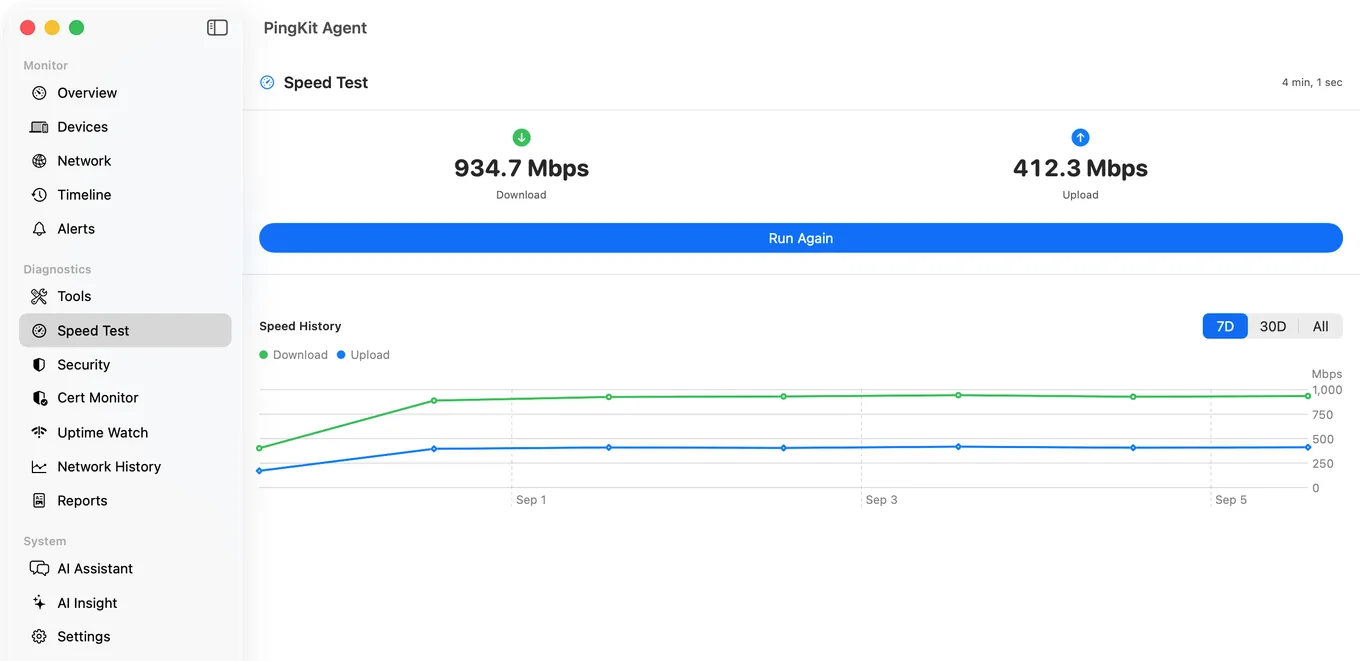
PingKit Agent runs a speed test every 1, 6, 12 or 24 hours (daily by default) while your Mac is awake, and keeps the history. Switch on its speed below threshold alert, which is off by default, and a bad result finds you rather than waiting to be discovered. With Guardian, the results also appear in the PingKit iPhone app through your own private iCloud database.
3. Your router
Some routers, particularly eero and Ubiquiti, run periodic speed tests themselves. This is the most defensible measurement of all, because it removes both WiFi and your Mac from the equation. Check whether yours does before installing anything.
An Important Platform Note
Scheduled speed tests are a Mac feature, not an iPhone one. iOS has no mechanism that lets an app run network tests on its own in the background. The iPhone app can run a speed test when you open it and, with Guardian, can display the history the Mac collected, but it cannot schedule tests itself. Any iOS app implying otherwise is overstating what the platform allows.
Honest Limits
- The Mac has to be awake when a scheduled test is due. Tests do not run while it sleeps, which will leave gaps overnight unless your Mac is set to stay awake.
- A speed test measures the path to a test server, not your ISP's internal capacity. A slow result can be the route rather than your line.
- Testing over WiFi measures your WiFi. Use Ethernet for anything you intend to argue with.
- Scheduling and alerting are free on the Mac. Guardian, $2.99/month or $24.99/year on iPhone or Mac, is what brings the results to your iPhone. macOS 15 or later.
Frequently Asked Questions
Can I run automatic speed tests on a Mac?
Yes, three ways: Ookla's Speedtest CLI driven by cron or launchd, an app that schedules tests for you such as PingKit Agent, or your router if it supports periodic testing. Router-based testing is the most defensible because it removes WiFi and your Mac from the measurement.
Can my iPhone run speed tests automatically in the background?
No. iOS provides no mechanism for an app to run network tests on its own schedule in the background. An iPhone app can test when you open it and display history collected elsewhere, but it cannot schedule its own tests.
How do I prove slow internet to my ISP?
Collect a series rather than a single test. Run the same test on a schedule over several days, wired rather than over WiFi, and record timestamps. A pattern such as consistently low speeds every evening is far harder to dismiss than one screenshot.
Why is my speed test slower over WiFi?
WiFi adds a shared, variable link between your device and the router that the advertised speed does not account for. Interference, distance, band and the number of connected devices all affect it. Always test over Ethernet when the result matters.
How often should scheduled speed tests run?
Hourly is plenty for spotting patterns without generating much traffic. What matters more is covering both busy and quiet periods, since evening congestion is the most common complaint and only shows up if you test then.
Build the series, not the screenshot
Speed tests every 1, 6, 12 or 24 hours while your Mac is awake, kept as history, with an optional alert when a result falls below your threshold. macOS 15 or later.
Get PingKit Agent for Mac