Is My Internet Speed Normal? Network Baselines for iPhone
A number on its own means nothing. 180ms is terrible for your router and unremarkable for a server overseas. PingKit learns what each of your networks normally does, then tells you when a result is off.
Baselines, per-network memory and trends are in Guardian. Every tool that feeds them, including the speed test and Smart Diagnostics, is free and available to everyone.
The problem with a single reading
Every network tool ever written will tell you your ping is 84ms. Almost none of them will tell you whether that is good. The honest answer is that it depends entirely on the network you are standing on: 84ms to your own router is a sign something is badly wrong, and 84ms to a public DNS server on a rural connection is a perfectly ordinary Tuesday.
That is why "run a speed test" so rarely settles an argument with an ISP or a landlord. Without a normal to compare against, one measurement is just a number with an opinion attached.
Learned from your own runs
PingKit remembers the results of the tools you already run: router latency, internet latency, DNS resolution time, download and upload speed, jitter, packet loss and your security score. No extra tests, no background activity.
Median, not average
One timeout during a speed test would drag an average far enough to make every later result look excellent. PingKit uses the median, so a single bad run cannot quietly rewrite what counts as normal.
It waits before it concludes
No comparison is offered until there are at least five readings for that metric on that network. Three data points are a coin toss, not a baseline, and an app that announces a dramatic regression on your second run has not earned your trust.
Proportion and size, together
A change has to be both proportionally large and absolutely noticeable before PingKit mentions it. That is what stops "1ms became 4ms" being announced as a fourfold degradation, which is true, and useless.
A baseline per network, never shared
Home, the office and a hotel are different networks with genuinely different normals, and mixing them produces nonsense in both directions: your home connection looks broken next to a fast office line, and a slow hotel looks fine next to nothing. PingKit keeps a separate history for each network it has seen, identified by Wi-Fi name where iOS makes that available and by router address where it does not.
The list of remembered networks is visible in the History tab, along with how many readings each one holds, and any of them can be deleted in one tap. That part is not a paid feature and never will be: knowing what an app has stored about you is not something to sell back to you.
Everything stays on the device
Readings are written to a local file on your iPhone. Nothing is uploaded, nothing is sold, and there is no account to create. This history is not synced between your devices: each iPhone, iPad and Mac learns its own baselines from the tests run on it, which is also the honest answer, since a baseline measured on one device is not a baseline for another.
Trends: the shape, not the snapshot
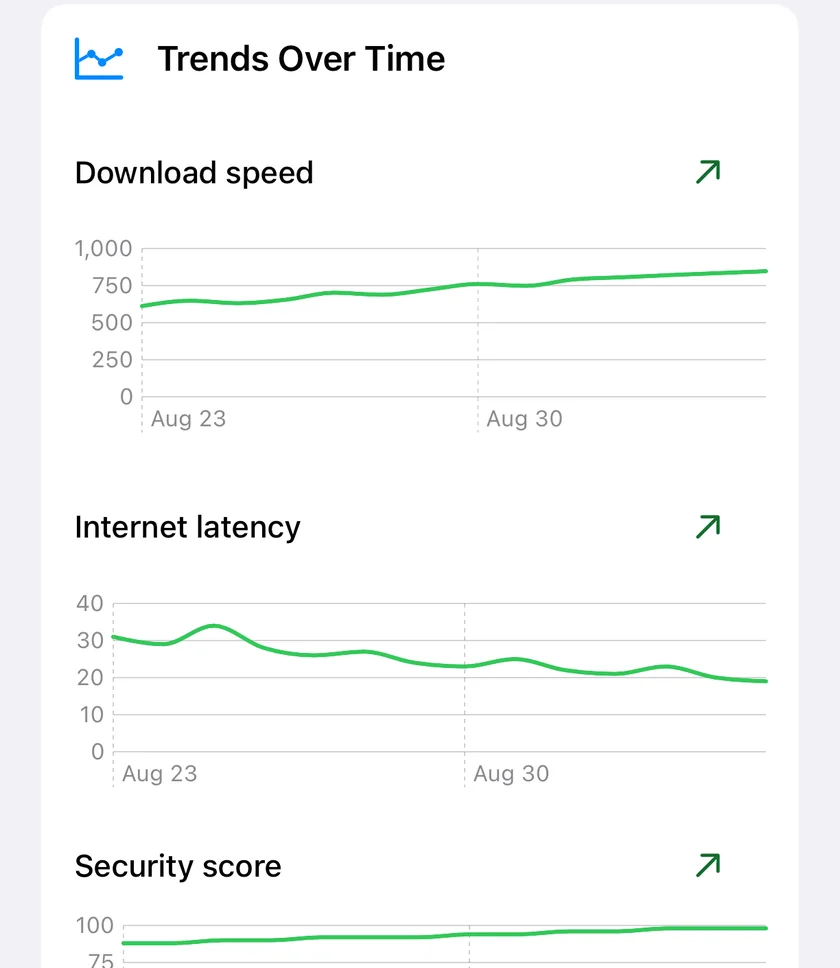
Networks rarely fail all at once. They drift. Latency creeps up over a fortnight, a mesh node starts dropping packets at a certain time of day, download speed halves after an equipment swap you had forgotten about. None of that is visible in a single test, and all of it is obvious in a line.
A fortnight of the same three readings. The percentage beside each is the movement, which a single test can never show you.
PingKit charts each metric per network by day, using the median of that day's readings. A direction, improving or degrading, is only offered once there are at least four days to look at, and it is judged by comparing the older half of the window against the newer half rather than the first point against the last, so one unlucky day at either end cannot decide the verdict.
What you can do with it
Prove to an ISP that the problem started on a specific date. Show a landlord what the connection actually delivers across a fortnight rather than during a single showing. Confirm that the router you bought to fix your Wi-Fi actually fixed it. Notice that your security score has been sliding since a device joined the network.
What is free and what is Guardian
Every tool that produces a reading stays free, unlimited and unchanged: the speed test, Smart Diagnostics, ping, the security checkup, and the full event history with its filters, CSV, JSON and PDF export. PingKit has never had an ad or a usage cap on those and this release does not add one.
Guardian adds the reading of that history over time: the comparison against your normal, the per-network trend charts, and the rest of the 2.1 additions. It is $2.99 a month or $24.99 a year on iPhone and iPad, with a one-week free trial on the monthly plan.
Does PingKit keep separate baselines for different Wi-Fi networks?
Yes, each network keeps its own history, so a slow hotel line cannot drag your home numbers around. On iPhone they are told apart by the router's address rather than the Wi-Fi name, because iOS does not give apps the network name, which does mean two networks that both use 192.168.1.1 share one history. PingKit remembers up to 25 networks and drops the least recently seen after that, and the History tab lists them all with the number of readings each one holds.
Is my ping normal?
There is no universal answer: a round trip to your own router and a round trip to a server overseas are different questions with different normal ranges. PingKit answers it from your own history instead, filing every reading against the network you were on and judging a new one against the median of the earlier ones. A reading is called elevated at 1.5 times worse than normal and anomalous at 2.5 times, and only when it has also moved by an amount worth reporting, at least 15 ms for router latency, so a router that normally answers in 1 ms and today answers in 3 ms is not announced as a threefold problem. Collecting the readings is free; reading them back as a comparison is the Guardian part.
How many tests does PingKit need before it can tell me what is normal?
At least five readings of that metric on that network. Fewer than that is not a baseline, and a verdict drawn from two or three results is a coin toss presented as a conclusion, so until then PingKit says it is still learning rather than inventing a normal. The trend charts have their own floor: a direction, improving or degrading, is only offered once there are four separate days to compare, and only when the movement clears 10 percent.
Where is my network history stored?
In a JSON file inside the app's own storage on your iPhone. None of that history is uploaded, there is no account, and it does not sync between your devices, so each device learns its own baselines from the tests run on it. It keeps the most recent 120 readings per metric per network, roughly four months at a run a day, and the History tab lets you delete any network's history in one tap whether or not you subscribe.
Is the baseline feature free?
The tools that produce the readings are free and unlimited, and so is everything that shows you what has been stored: the speed test, Smart Diagnostics, the full event log with its JSON and CSV export, the PDF network report, and the list of remembered networks with a delete control on each. Reading that history back over time is the paid part, meaning the comparison against your normal and the per-network trend charts. That is PingKit Guardian, $2.99 a month or $24.99 a year on iPhone and iPad, and both plans start with a one-week free trial.
Find out what normal looks like.
Download PingKit free, run the tools you would run anyway, and let the picture build itself.