PingPlotter Alternatives for Mac (2026): Honest Comparison
Short version. PingPlotter has a Mac version, so this is not a “there is no Mac build” page. It is genuinely the best tool for one specific job: watching latency and packet loss per hop along a path over time. If that is your problem, use it. If your problem is “something is wrong with my network and I do not know where”, a per-hop graph is more instrument than you need.
What PingPlotter Is Actually For
PingPlotter continuously traces a path to a target and graphs latency and packet loss at every hop along the way, over hours or days. That combination is genuinely uncommon, and when you need it nothing else in this article substitutes for it.
The job it is built for: proving that a specific hop, usually inside your ISP's network, is where a problem begins. When support says "the line looks fine from here", a per-hop history showing loss starting at hop 4 and continuing to the destination is the artefact that ends the argument.
The Misreading That Wastes Everyone's Time
Loss at a middle hop that does not continue to the destination is not a fault. Routers treat generating ICMP replies as the lowest priority work they do, so a busy router shows loss on the probes while forwarding your actual traffic perfectly. This is normal and expected.
Only loss that begins at a hop and persists through every subsequent hop to the destination indicates a real problem. Screenshots of red middle hops are the single most common reason a legitimate ISP complaint gets dismissed, because the support engineer can see the reading is misinterpreted.
This applies equally to mtr, to traceroute, and to every tool in this category. It is worth internalising before buying anything.
When a Per-Hop Graph Is the Wrong Tool
Path analysis assumes you already know the fault is on the path. Plenty of problems are not:
- Wi-Fi degrading, which shows up at hop 1 as noise rather than as a path problem
- A device saturating the connection, where every hop looks bad because the first one is congested
- The connection dropping entirely, where there is no path to graph
- DNS failing, which is not a latency problem at all
For those, what you want is broad and continuous rather than deep and targeted.
The Alternatives, Honestly
The free option in a terminal is mtr from Homebrew, and the free option in the menu bar is the PingKit Mac Agent, a download for macOS 15 or later that raises its latency alerts against a threshold you set yourself.
mtr, free
brew install mtr
sudo mtr 1.1.1.1
The same per-hop continuous probing in a terminal. It needs sudo because it uses raw sockets. Excellent for a live look, poor at running for days and summarising what happened, which is the part PingPlotter is built around.
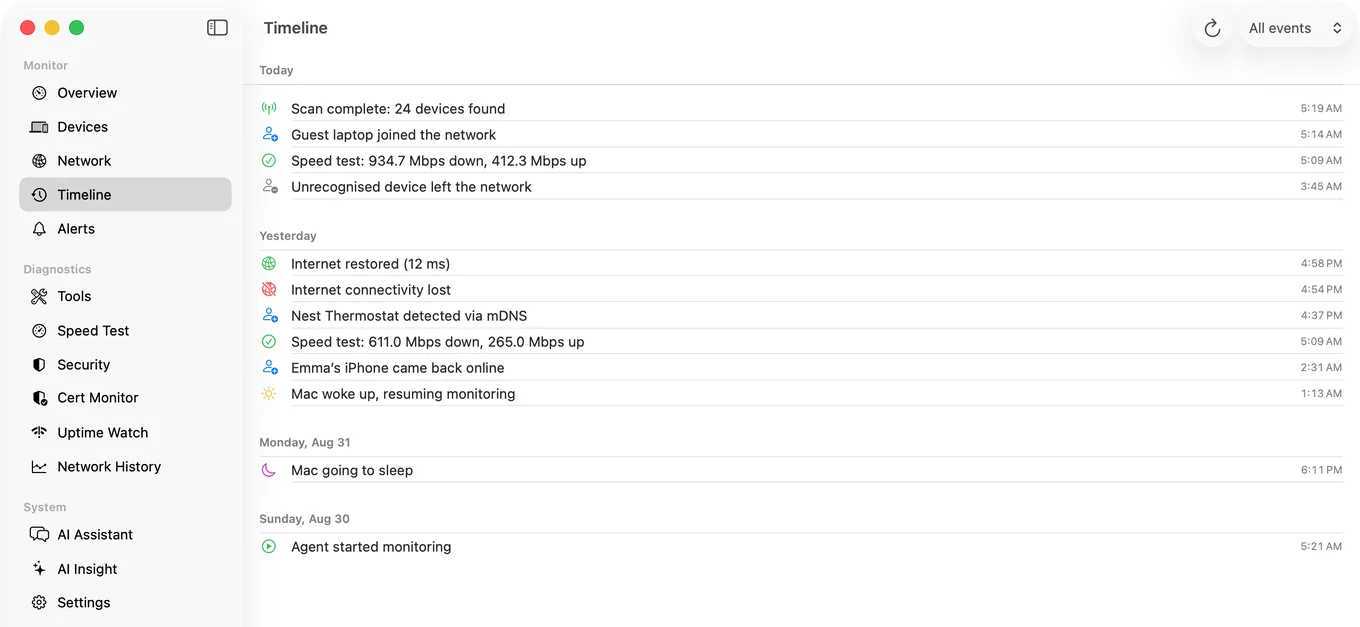
PingKit Agent, a different shape of tool
It monitors continuously from the menu bar, but it watches your network rather than a path. Connectivity checks at an interval you set, latency recorded over time with spike alerts past your own threshold, internet down and restored events with timestamps, device tracking with new device alerts, and scheduled speed tests. Its traceroute is on-demand, and reports each hop's address, round trip, geographic location and network operator.
Being exact about the boundary: PingKit Agent does not graph latency per hop over time. Its traceroute is a snapshot you run, not a continuously updating per-hop history. If per-hop history is the requirement, PingPlotter or mtr is the correct answer and this is not a substitute.
| PingPlotter | mtr | PingKit Agent | |
|---|---|---|---|
| Continuous per-hop latency and loss | Yes | Yes, while running | No |
| Long-run history and summary | Yes | No | Yes, for the connection |
| Alerts on degradation | Yes | No | Yes |
| Device discovery and new device alerts | No | No | Yes |
| Scheduled speed tests | No | No | Yes |
| Wi-Fi signal, noise and channel | No | No | Yes |
| Runs in the menu bar | No | No | Yes |
| Needs sudo | No | Yes | No |
Which to Choose
- You have already localised the fault to the path, and need per-hop evidence over time: PingPlotter.
- You want a live look right now and are comfortable in a terminal:
mtr, free. - You do not yet know what is wrong, and want something watching the connection, the devices and the Wi-Fi continuously: a menu bar monitor.
They are complementary rather than competing. Plenty of people reasonably run a continuous monitor for awareness and reach for mtr when it flags something.
Honest Limits
- PingKit Agent has no per-hop latency history. This is the main gap versus PingPlotter.
- Monitoring pauses when the Mac sleeps.
- Traceroute hops that stop responding are normal in every one of these tools.
- macOS 15 or later.
Frequently Asked Questions
Does PingPlotter work on Mac?
Yes, PingPlotter has a macOS version. This is not a case where a Windows tool has no Mac build, so the question is which approach fits your problem rather than what to use instead.
What is a free alternative to PingPlotter on Mac?
mtr, installed with brew install mtr and run with sudo mtr followed by a host. It performs the same continuous per-hop probing in a terminal. It is excellent for a live look and not designed for leaving running for days and summarising afterwards.
Why does traceroute show packet loss at one hop but not the destination?
Routers give the lowest priority to generating replies to probe packets while forwarding real traffic normally. Loss at a middle hop that does not continue to the destination is expected behaviour, not a fault. Only loss that starts at a hop and persists to the end is real.
Can PingKit Agent graph latency per hop like PingPlotter?
No. Its traceroute is an on-demand snapshot showing each hop's address, round trip, location and network operator. It records latency continuously for the connection as a whole, not per hop over time. For per-hop history use PingPlotter or mtr.
Do I need sudo to run mtr on a Mac?
Yes. mtr uses raw sockets, which require elevated privileges on macOS. That is a property of the protocol rather than something an application can work around.
Watch the whole network, not just one path
Continuous connectivity and latency history with threshold alerts, device tracking, scheduled speed tests and live Wi-Fi readings. macOS 15 or later.
Get PingKit Agent for Mac