PingPlotter Alternatives for iPhone (2026): Path Analysis on iOS
Short version. PingPlotter is a desktop tool with no iPhone version. The equivalent technique on iOS is MTR, which combines traceroute with continuous ping so you can see which hop is losing packets or adding latency. PingKit includes MTR free, which is uncommon on iOS.
PingPlotter is the tool people reach for when an ISP says the problem is at your end and you want evidence otherwise. It runs traceroute repeatedly and graphs latency and loss per hop over time, which turns "the internet is bad" into "hop 4 is dropping 12% of packets".
There is no PingPlotter for iPhone. But the underlying technique is not proprietary, and it is available on iOS.
Full disclosure: I build PingKit, so weigh the recommendation accordingly. The comparison below is written to stay useful even if you pick something else, and the limits section is not padding. Competitor features and pricing change, so check the current listing before you decide.
MTR Is the Technique
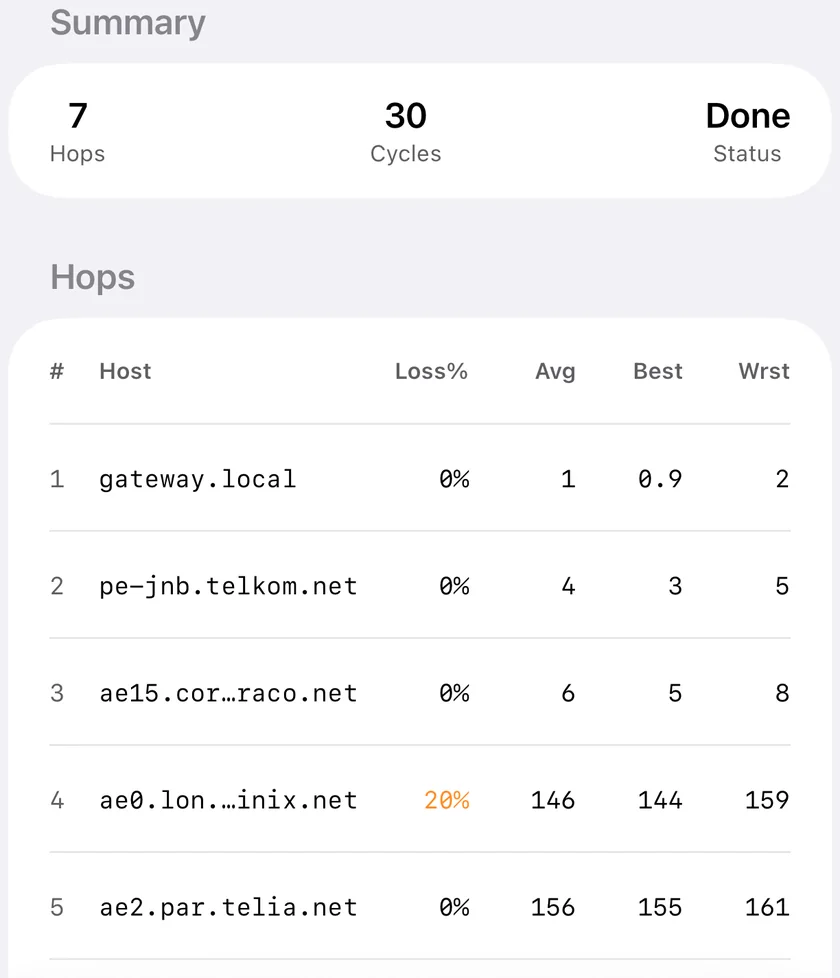
MTR (My Traceroute) does the same essential thing: it maps the path to a destination, then keeps probing every hop and reports per-hop latency and packet loss. If a middle hop shows sustained loss and every hop after it also degrades, the fault is at or before that point. If one hop shows loss but later hops are clean, that hop is simply deprioritising ICMP replies and is not your problem.
Reading it correctly. Loss at a single intermediate hop that does not propagate to later hops is almost always rate limiting, not a fault. Routers deprioritise responding to probes; forwarding traffic is their actual job. Only loss that continues through to the destination indicates a real problem.
What You Can and Cannot Do on iOS
| PingPlotter capability | On iPhone | Notes |
|---|---|---|
| Hop-by-hop latency | Yes | MTR |
| Per-hop packet loss | Yes | MTR |
| Continuous sampling while you watch | Yes | Foreground only |
| Multi-hour unattended recording | No | iOS suspends background apps |
| Reverse DNS hop names | No | Not implemented in PingKit |
| Share a result with your ISP | Yes | Export or screenshot |
| Named alert conditions | No | Desktop or server feature |
The unattended recording line is the one that matters. Building an evidence trail across an evening is exactly what PingPlotter is for, and iOS will not let an app do that in the background. If you need it, run PingPlotter or command-line mtr on a computer that stays awake, or use a Mac companion app that keeps monitoring while the Mac is on.
Doing It with PingKit
MTR is free and gives you the per-hop latency and loss table. Traceroute gives a single path snapshot with geolocation for each hop. Connection Monitor watches latency, jitter and packet loss to a single target live, which is the right tool when you want to catch a drop as it happens rather than map a path.
For the overnight case there is a Mac menu bar Agent that keeps monitoring while the Mac is awake and raises its alerts on the Mac. It is a free download, like MTR, traceroute and Connection Monitor on iPhone; Guardian, the optional subscription, puts the Agent's alerts and results in the iPhone app.
Honest Limits
- Hops are IP addresses, not hostnames. There is no reverse DNS step, so you will not see names like
ae-1.border2.lon.example.net. Traceroute does show geolocation per hop, which usually answers the same question. - Connection Monitor keeps a rolling window of roughly the last minute and does not persist history between runs.
- No latency or packet loss alerts on iOS: those thresholds live on the Mac Agent. Without a Mac, the iPhone can still tell you when a website goes down, through Uptime Watch, which checks from PingKit's servers: one site free, checked every hour.
- Scheduled, unattended tests are a Mac Agent feature. The iPhone does not run network tests on its own in the background.
Which Should You Use?
Building a case for your ISP over several days: PingPlotter or mtr on a machine that stays on. A phone cannot do this.
Diagnosing right now, from wherever you are standing: MTR on the phone answers the question in under a minute.
Frequently Asked Questions
Is there a PingPlotter app for iPhone?
No. PingPlotter is a desktop application for Windows and macOS with no iOS version. The equivalent technique on iPhone is MTR, which combines traceroute with continuous ping to show per-hop latency and packet loss.
What is MTR and how is it different from traceroute?
Traceroute maps the path once. MTR maps the path and then keeps probing every hop continuously, reporting latency and packet loss per hop over many samples. That makes intermittent problems visible where a single traceroute run would miss them.
Can an iPhone monitor a connection overnight?
No. iOS suspends apps in the background, so continuous monitoring only runs while the app is in the foreground and the screen is on. Long unattended recording needs a computer that stays awake.
Why does one hop show packet loss but the destination does not?
That hop is rate limiting its replies to probes rather than dropping traffic. Routers deprioritise answering ICMP because forwarding is their real job. Only loss that continues through to the final destination indicates an actual fault.
Does PingKit show hostnames for traceroute hops?
No. Hops are reported as IP addresses with latency and geolocation, not reverse DNS hostnames. There is no reverse lookup step in the path analysis.
Find the hop that is actually failing
PingKit includes MTR, traceroute with per-hop geolocation and a live connection monitor. Free on iPhone and iPad, no ads.
Download PingKit Free