Is My Internet Down, or Is It Just Me? Checking From a Mac (2026)
Short version. Test outwards in four hops: your Mac, your router, the internet by IP, then the internet by name. Whichever hop first fails is where the fault is. This takes under a minute and is the difference between a precise answer and rebooting things at random.
The Four-Hop Test
Run these in order and stop at the first failure.
# 1. Is my own network stack alive?
ping -c 2 127.0.0.1

# 2. Can I reach my router?
ping -c 3 $(route -n get default | awk '/gateway/{print $2}')

# 3. Can I reach the internet by IP?
ping -c 3 1.1.1.1

# 4. Can I resolve names?
dig +short apple.com| First failure | What is broken | What to do |
|---|---|---|
| 1 | macOS networking itself. Rare. | Restart the Mac. |
| 2 | Wi-Fi or the cable between you and the router. | Check Wi-Fi association, try Ethernet. |
| 3 | The router's connection to your ISP. | Check the router's WAN status lights. |
| 4 | DNS only. Your connection is fine. | Change DNS, or wait it out. |
| None | Nothing on your side. The site or service is down. | Check that service's status page. |
Step 4 failing on its own is the most misdiagnosed outcome. If ping 1.1.1.1 works and dig apple.com does not, your internet connection is healthy and only name resolution is broken. Nobody needs to reboot a router for that, and calling the ISP will waste your afternoon.
Apple's Own Speed and Responsiveness Test
macOS includes a built-in test that most people have never run:
networkQualityIt reports download and upload throughput plus a responsiveness figure in round trips per minute, which measures how the connection behaves while it is loaded. That second number is the useful one. A connection that benchmarks at 500 Mbps and has poor responsiveness is exactly the connection where calls break up while someone else is uploading, a condition called bufferbloat. Add -v for more detail, or -s to run the tests sequentially.
Is It an Outage, or Just You?
If step 3 fails, the question becomes whether your line is down or your area is. Three checks, in order of reliability:
- Your router's own status page. A WAN or DSL light that is off or red, or an admin page reporting no WAN address, is a definitive answer.
- Your ISP's status page, reached from mobile data. Most publish known outages by area.
- Third-party outage trackers. Useful for corroboration, not proof, since they are built from user reports and lag real events.
The Intermittent Case, Which Is the Hard One
Those down and restored alerts are published to your own private iCloud as well as shown on the Mac, so with Guardian on the phone the timeline PingKit Agent for Mac builds can be read from your iPhone rather than only from the machine that recorded it.
Everything above works when the connection is down while you are looking at it. The common complaint is different: it drops for two minutes several times a day, always recovering before you finish opening a Terminal.
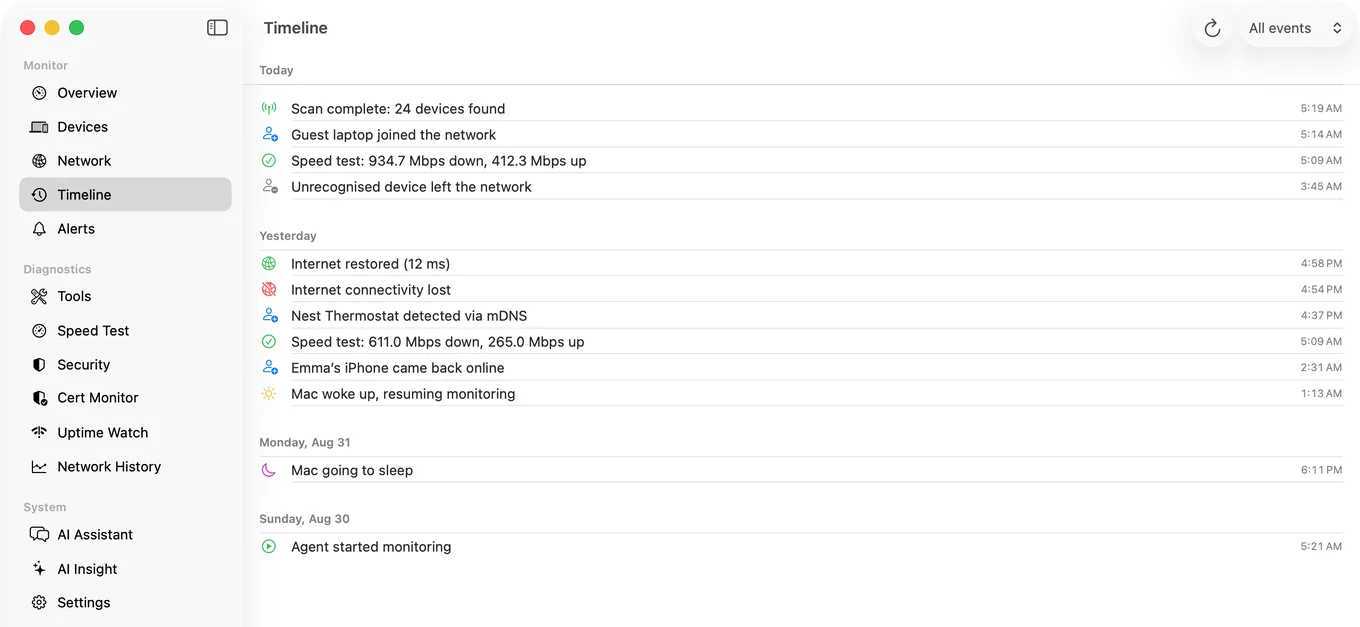
That needs a record rather than a test. PingKit Agent checks your connection from the menu bar every 30 seconds on power and every minute on battery by default, while your Mac is awake (you can change both), and raises internet down and internet restored alerts with timestamps, plus latency spike alerts when round-trip time crosses a threshold you set. After a couple of days you have the thing that actually answers the question: how often, how long, and at what time of day.
That record is also what makes an ISP conversation productive, which we covered in how to prove internet drops to your ISP.
Honest Limits
For the question behind this one, being told about the drop instead of checking for it, the guide to internet-down notifications walks through the three layers: the iPhone while you watch, the Mac while it is awake, and a server for anything at home that answers from outside.
- Monitoring pauses while the Mac sleeps, so overnight coverage needs a Mac that stays awake.
- The Agent tests from your Mac. It cannot distinguish your line being down from your whole street being down; only the ISP can confirm that.
- ping being blocked is not the same as unreachable. Some networks drop ICMP, so test a second target before concluding.
- macOS 15 or later.
Frequently Asked Questions
How do I check if my internet is down on a Mac?
Ping your router, then ping 1.1.1.1, then resolve a name with dig. If the router responds but 1.1.1.1 does not, the fault is between your router and the ISP. If both work and only the name lookup fails, only DNS is broken.
How do I know if it is my WiFi or my ISP?
Ping your router's address. If it replies, your Wi-Fi is working and the problem is beyond the router. If it does not, the fault is between your Mac and the router, which is Wi-Fi or cabling.
What is the networkQuality command on macOS?
A built-in test that measures download and upload throughput plus responsiveness in round trips per minute. The responsiveness figure shows how the connection behaves under load, which is what determines whether calls break up while someone else is uploading.
Why can I ping 1.1.1.1 but not open websites?
DNS is failing while the connection itself is fine. Names are not resolving to addresses. Changing to a different DNS resolver usually fixes it immediately, and no router reboot is needed.
How can I tell how often my internet drops?
A single test only reports the moment you ran it. Continuous monitoring that records internet down and restored events with timestamps gives you frequency, duration and time of day, which is what an ISP needs to act on a complaint.
Catch the drops you keep missing
Connectivity checks every 30 seconds on power while your Mac is awake, with timestamped internet down and restored alerts, plus latency thresholds you set. macOS 15 or later.
Get PingKit Agent for MacRelated Articles
- How to Prove Internet Drops to Your ISP
- Is It Your WiFi, Your Router, or Your ISP?
- How to Check If Your ISP Has an Outage
- Why Your MacBook WiFi Keeps Disconnecting
- PingKit Agent for Mac
- Monitor a Cloudflare Tunnel: Know When Your Origin Goes Down
- Continuous Ping Test on iPhone: What Is Actually Possible
- How to Get a Notification When Your Home Internet Goes Down