Fing Premium vs PingKit Guardian (2026): What Each Subscription Monitors
Short version. Fing Premium ($7.99/mo or $69.99/yr) buys continuous monitoring, a full event timeline, device blocking and internet time limits, two monitored networks and mobile plus email alerts, and needs Fing Desktop, Fing Agent or a Fingbox running to do any of it. PingKit Guardian ($2.99/mo or $24.99/yr, on iPhone or Mac) buys the free Mac Agent's dashboard and alerts on your iPhone (its monitoring, and its network alerts on the Mac, are free), Uptime Watch for ten URLs, Cert Monitor for five domains, trend charts and, on devices with Apple Intelligence, Private Cloud Compute answers, and needs a Mac that stays awake for the network half. Fing wins on blocking, Windows and its device database. PingKit wins on price, no ads, website and certificate monitoring, and 19 free tools.
The Two Products, Stated Plainly
Fing is a network scanner with a subscription that turns it into a monitor, provided a Fing Desktop, Fing Agent or Fingbox is running somewhere on the network. PingKit is a 19-tool network kit for iPhone with a free Mac companion that does the monitoring, and a subscription that puts the companion's findings on your phone. Both charge monthly. Both need something that stays on. The prices are not close, and neither are the feature lists, so this is worth reading before either trial ends.
Every Fing figure below is from fing.com's pricing page and the App Store listing, read on 8 September 2026. Every PingKit figure is from the app's own source. If either changes, this page is wrong and we would rather hear about it.
Price
| Plan | Monthly | Yearly | What it is |
|---|---|---|---|
| Fing Free | $0 | $0 | Up to 3 scans a day, speed tests, network and ISP reporting, troubleshooting tools, with ads |
| Fing Starter | $3.99 | $39.99 | The intermediate plan, listed in the app's in-app purchases |
| Fing Premium | $7.99 | $69.99 | Continuous monitoring, full event timeline, block and limit internet, autoblock unknown devices, 2 networks, mobile and email notifications |
| Fing Professional | $16.99 | $149.99 | Premium plus shared workspaces, 3+ networks, advanced reporting |
| PingKit Free | $0 | $0 | All 19 tools, unlimited history, the Mac Agent's scans, timeline, network alerts and tools on the Mac, one Uptime Watch URL, one Cert Monitor domain, 15 AI answers a week from PingKit's service (up to 5 a day); no ads |
| PingKit Guardian | $2.99 | $24.99 | On iPhone and on Mac, 1-week free trial on both. The Mac Agent on your iPhone, Uptime Watch for 10 URLs, Cert Monitor for 5 domains, trend charts, synced scheduled speed tests, a weekly report on the iPhone every Monday at 9:00 your time, a daily morning briefing from a Mac that is awake, and Apple Private Cloud Compute answers on devices with Apple Intelligence |
| PingKit Guardian Plus | $9.99 iPhone, $4.99 Mac | $79.99 iPhone, $39.99 Mac | Guardian plus Cert Monitor for 50 domains, alerts to a webhook, up to five Macs on the iPhone, 90 days of the Mac's history, a signed ISO 27001 PDF and scheduled, branded reports. 1-week free trial on every plan |
On the comparison that matters, Fing Premium against PingKit Guardian, the ratio is 2.7 to 1 monthly and 2.8 to 1 yearly. That only means something if the cheaper one does the job you are paying for, which is the next table.
What Each Monitors
| Alert or capability | Fing Premium | PingKit |
|---|---|---|
| A recognised device goes online or offline | Yes, via Desktop, Agent or Fingbox | Yes, via the Mac Agent (marked offline after 15 minutes unseen; Device Offline alerts must be turned on in its settings) |
| A new device joins | Yes | Yes |
| The internet drops and recovers | Yes | Yes |
| Scheduled speed tests | Yes, automated on Desktop | Yes, the Mac Agent runs them (every 24 hours by default) and Guardian shows them on the iPhone |
| Block a device or limit its internet time | Yes, requires Fing Desktop | No |
| Website uptime checks with push | Not listed on any plan | Yes, from Cloudflare; 1 URL free (hourly), 10 with Guardian (every 5 minutes) |
| TLS certificate expiry alerts | Not listed on any plan | Yes: 1 domain free, 5 with Guardian, 50 with Guardian Plus; the free alerts reach an iPhone, and on a Mac they need Guardian |
| Security checkup of the network | Router checks on Premium | Free on iPhone and Mac; on iPhone, Guardian adds what changed since your last checkup, per-device attribution and a Fix It walkthrough |
| Event timeline | Full timeline on Premium; free tier is limited | Free and unlimited History on iPhone; Agent timeline on the Mac |
| Trend charts over weeks | Network and ISP reporting | With Guardian: latency, speed, jitter and security score per network |
| Monitored networks | 2 on Premium, 3+ on Professional | One Mac Agent per network; your iPhone shows one Mac with Guardian and up to five with Guardian Plus |
| Windows support for the monitoring half | Yes, Fing Desktop | No, Mac only |
| Hardware option | Fingbox | None |
What Each Needs Running
This is the part both products bury. An iPhone cannot watch a network while its app is closed, so both subscriptions are really paying for a phone-side view of something else. For Fing that something is Fing Desktop on a Mac or Windows PC, Fing Agent, or the Fingbox appliance; the pricing page states the requirement in one sentence and the Premium guide adds that "Block Network Access" and "Limit Internet Time" specifically need Fing Desktop. For PingKit it is the Mac Agent, a free menu bar app for macOS 15 or later that, while the Mac is awake, scans every five minutes on mains power by default (every 15 on battery), keeps a timeline, raises network alerts and runs the speed test schedule, all without a subscription.
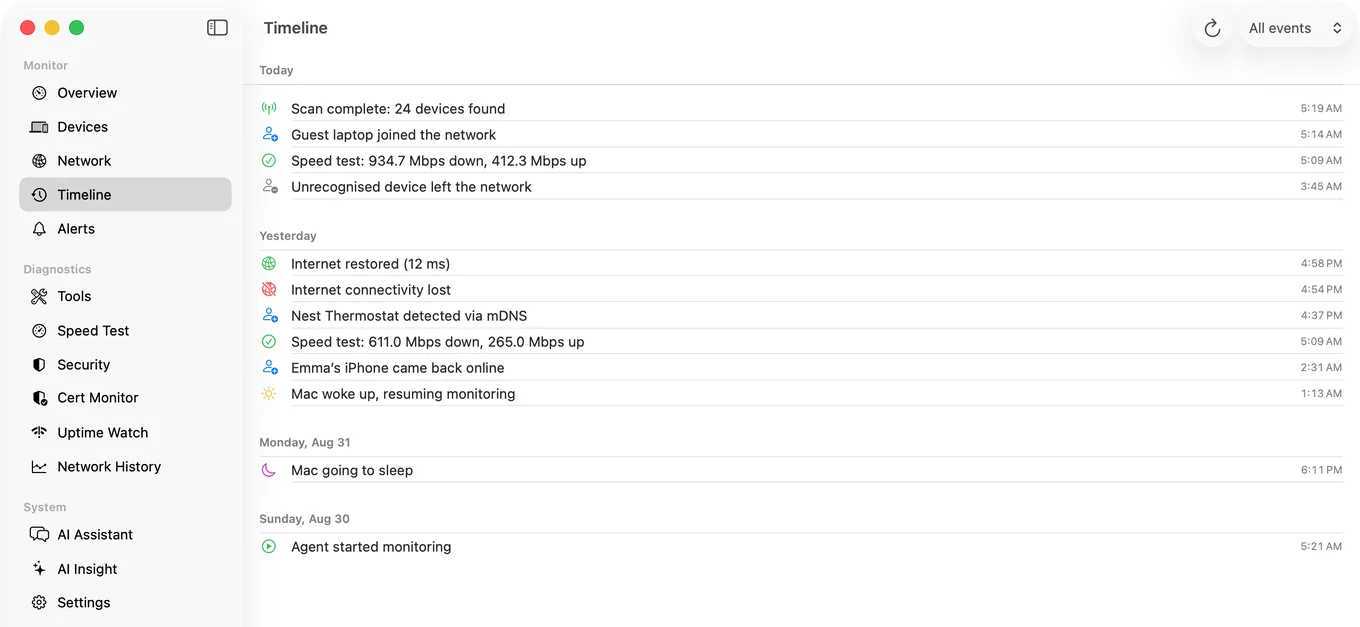
The difference in what you pay for is therefore this: Fing charges for the monitoring itself. PingKit gives the monitoring away on the Mac and charges $2.99 for the iPhone to see it.
Where Fing Wins
- Blocking and time limits. If the reason you want a monitor is to cut a device off, Fing does it and PingKit does not, by design.
- Device identification. Fing's database is the largest in the category. PingKit identifies well from what devices announce over Bonjour and SSDP or report over NetBIOS and SNMP, from vendor prefixes (on a Mac running macOS 15 or 26, or macOS 27 with Agent 3.3.0 or later) and from port signatures, with a cloud AI fallback on Guardian once you allow PingKit's own AI service, but Fing has more names for more things.
- Windows. If the computer that stays on runs Windows, Fing Desktop is your only option between these two.
- Hardware. Fingbox exists. Some people prefer a box to a computer they have to leave on.
- Two networks on one plan. Premium monitors two; PingKit's answer is one Agent per Mac per network, and your iPhone shows one Mac with Guardian or up to five with Guardian Plus.
Where PingKit Wins
- Price. $2.99 against $7.99, and the free tier has no ads and no scan limit.
- Scope beyond the LAN. Uptime Watch and Cert Monitor watch things on the internet, which none of Fing's plans list.
- The toolkit. MTR, traceroute, port scanning of your own network, DNS, WHOIS, HTTP and SSL inspection, subnet calculator, Bonjour browser and a security checkup, all free on iPhone; the Mac's 8 free tools include traceroute, port scanning, DNS and the security checkup.
- Trends. Guardian charts latency, speed, jitter and security score per network by day and reads the direction once there are four days of data.
- Nothing to buy or host. No box, no Windows, and no account.
Which Should You Choose
Choose Fing Premium if you need to block or limit devices, if the computer you leave on is a Windows PC, or if you want Fing Agent on a Pi or NAS rather than a computer. Choose PingKit Guardian if you have a Mac that stays awake, want its alerts and timeline on your iPhone for $2.99 a month, and would use the website or certificate monitoring or the free toolkit. If you are unsure, Guardian has a one-week trial on iPhone and on Mac.
Honest Limits
- PingKit does not block, limit or pause any device. It reads the network; it does not police it.
- PingKit's Agent is Mac only. A Guardian subscription bought on either the iPhone or inside the Mac Agent unlocks it on both through iCloud.
- Fing's pricing page does not list Starter; the Starter prices above are from the App Store listing's in-app purchases and may differ by region.
Frequently Asked Questions
Is Fing Premium worth it?
If you want to block or limit devices, or run the monitoring half on Windows, yes: PingKit does neither. If you want alerts from a Mac that stays awake, PingKit's free Mac Agent raises them on the Mac with no subscription, and Guardian, at $2.99 a month against $7.99, puts its alerts and dashboard on your iPhone and raises website monitoring to 10 sites and certificate monitoring to 5 domains.
Does Fing Premium work without a Fingbox?
Yes, with Fing Desktop on a Mac or Windows PC, or Fing Agent. Fing's pricing page states that monitoring requires an active Fing Desktop, Fing Agent or Fingbox for automated scans, checks and reporting.
Does PingKit Guardian need a Mac?
For network monitoring, yes: the free PingKit Agent on a Mac running macOS 15 or later. Uptime Watch, trend charts, the Monday weekly report and, on an iPhone with Apple Intelligence, Private Cloud Compute answers work on the iPhone alone.
Can PingKit block a device from the network?
No. PingKit is a diagnostic tool for a network you own and has no blocking or parental-control features. Fing Premium with Fing Desktop does.
Is there a free trial on PingKit Guardian?
Yes, one week, on the monthly and yearly plans, on iPhone and on Mac. Cancel at least a day before it ends and you are not charged; two days before the end, the device you started it on reminds you, if notifications are on.
Try Guardian free for a week.
Free to download. Guardian is $2.99 a month or $24.99 a year on iPhone and on Mac, with a 1-week free trial on both plans. Cancel anytime. The Mac Agent is free on the Mac App Store.
Download PingKit for iPhone