Fingbox Alternatives (2026): Software Options Without the Hardware
Short version. Fingbox is a physical device that sits on your network permanently, and some of what it does genuinely requires that. Presence detection and always-on monitoring need something that never sleeps; device blocking needs a box positioned to interfere with traffic. Software can replace the monitoring and discovery half. It cannot block devices, and you should be sceptical of anything claiming otherwise.
People look for a Fingbox alternative for a few reasons: cost, wanting fewer boxes on the network, or wanting something that is not tied to one vendor's cloud. Before comparing options it helps to separate what Fingbox does into things software can do and things it cannot.
Full disclosure: I build PingKit, so weigh the recommendation accordingly. The comparison below is written to stay useful even if you pick something else, and the limits section is not padding. Competitor features and pricing change, so check the current listing before you decide.
What Genuinely Needs Hardware
Always-on monitoring. A phone sleeps, and iOS suspends apps in the background. Anything that must notice an event at three in the morning needs a device that stays awake. That does not have to be a Fingbox, but it has to be something.
Device blocking and bandwidth control. To stop a device reaching the internet you must sit in the traffic path or manipulate the local network so traffic comes to you. That is what a box on the LAN can do and an app on your phone cannot.
Continuous presence detection. Knowing when someone arrived or left depends on constant polling, which again needs something always powered.
What Software Replaces Well
Device discovery and identification. Sweeping the network and working out what each device is works fine from a phone.
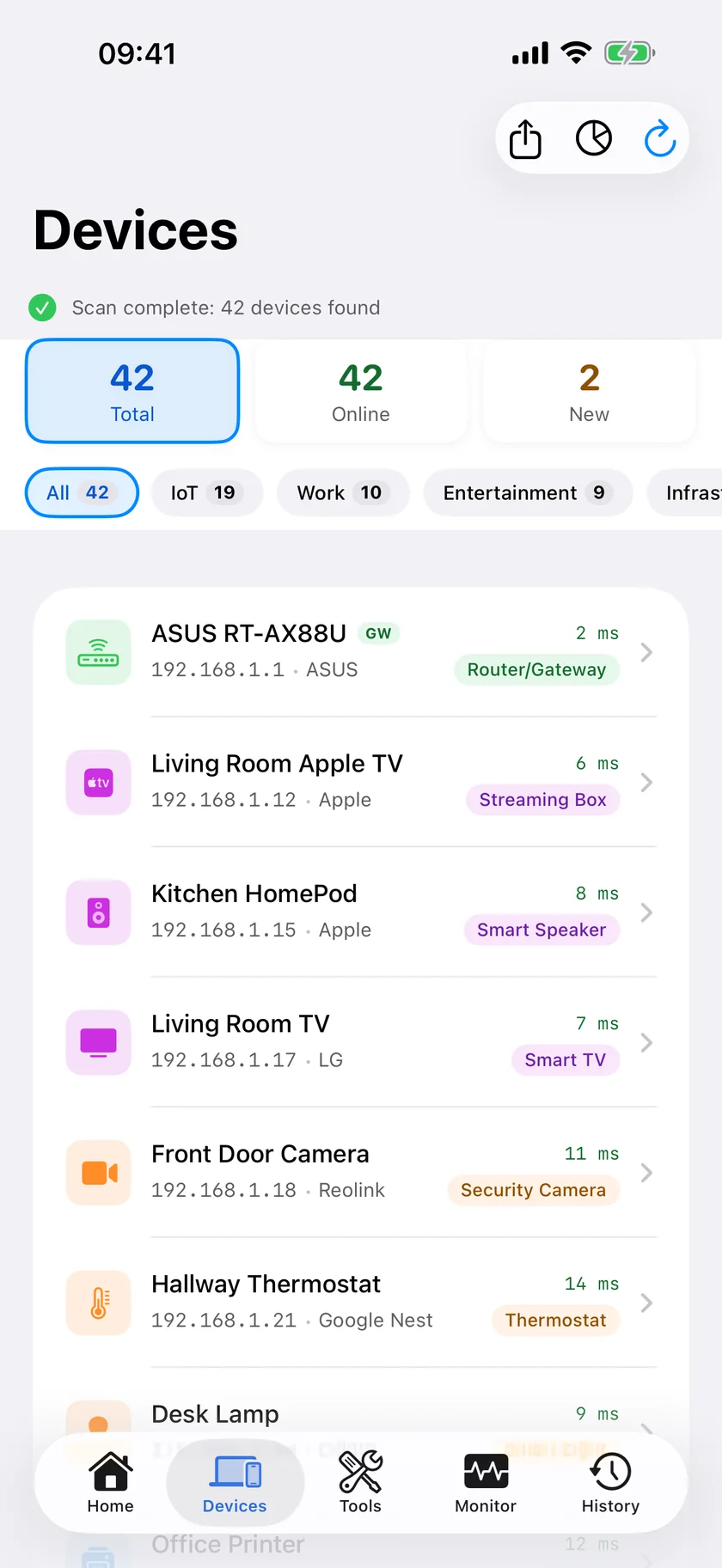
On-demand security checks. Router configuration review, open port checking and certificate inspection are all pull operations.
Diagnostics. Latency, jitter, packet loss, path analysis, DNS and speed testing.
The Options
| Approach | Always on | Can block devices | Cost model |
|---|---|---|---|
| Fingbox | Yes | Yes | Hardware purchase |
| Phone app only | No | No | Free to subscription |
| Phone app plus a Mac left awake | While the Mac is awake | No | Free on the Mac; optional subscription for its dashboard on the iPhone |
| Router with built-in controls | Yes | Yes | Included with the router |
| Pi-hole or similar on a Pi | Yes | DNS level only | Cheap hardware, self-managed |
The option most people overlook is the fourth one. If your router already offers device blocking and a guest network, you may not need a second box at all. Check the router's own admin interface before buying anything.
Where PingKit Fits
On iPhone, PingKit is free and covers the discovery and diagnostic half: LAN Scanner, Port Scanner, Security Scan, ping, traceroute, MTR, DNS, WHOIS, TLS inspection and more, with no ads and no account.
For the always-on half there is a Mac menu bar Agent that keeps watching while your Mac is awake and, with Guardian, shows its findings on your iPhone through your own private iCloud database. It watches and alerts. It does not block devices, and it needs a Mac you leave running, so it suits people who already have one rather than being a reason to buy one.
On device identification. PingKit identifies devices from what they announce over Bonjour and SSDP or report over NetBIOS and SNMP, from hostnames and open-port patterns, and, on the Mac Agent, from the maker behind each MAC prefix (under macOS 15 and 26, and under macOS 27 from Agent 3.3.0; iOS hides most devices' MAC addresses from apps). Guardian subscribers who allow PingKit's own AI service additionally get an AI fallback that runs only when signature matching is genuinely uncertain. It is good, not infallible, and unusual devices will sometimes come back unlabelled.
Which Should You Pick?
You need to block a device tonight: your router, or hardware built for it. No phone app does this.
You want to know what is on the network and whether it is healthy: a free phone app covers it.
You want overnight alerting and already leave a Mac on and awake: the app plus Agent combination works without adding hardware.
Frequently Asked Questions
What can replace a Fingbox?
It depends which feature you rely on. Device discovery, security checks and diagnostics can be replaced by a phone app. Always-on monitoring needs a device that never sleeps, such as a Mac set not to sleep or a Raspberry Pi. Device blocking needs your router or dedicated hardware, because no phone app can do it.
Can an iPhone app block devices from my WiFi?
No. Blocking requires sitting in the traffic path or manipulating the local network, which iOS does not permit. Use your router's admin interface, which usually includes device blocking and a guest network.
Do I need hardware for network monitoring at home?
Only for continuous monitoring and alerting while you are not looking. On-demand scanning and diagnostics work fine from a phone. If you already leave a Mac running and awake, software on that Mac can cover the monitoring part without new hardware.
Is PingKit a Fingbox replacement?
Partly. It replaces the discovery, security checking and diagnostic functions, free on iPhone. With the Mac Agent, on a Mac that stays awake, it also covers continuous monitoring and alerting. It cannot block devices or control bandwidth, and it is not hardware.
Does the PingKit Mac Agent need to run all the time?
It monitors while your Mac is awake and running. If the Mac sleeps, monitoring pauses. It suits people who already keep a Mac powered rather than being a reason to buy one.
Start with the free half
Device discovery and 19 tools, including security checks, free on iPhone and iPad. Add the Mac Agent later only if you want alerts from a Mac that stays awake.
Download PingKit Free