Know When the Rental's WiFi Goes Down Before the Guest Tells You
Short version. The internet at a short-let property fails when nobody who can fix it is there, and you hear about it in a message that ends up in a review. Nothing on the public internet can check a property's WiFi, because a home network has no public address to check. What works is something at the property: a Mac running the free PingKit Agent, which pings the internet every thirty seconds and records Internet Down after three consecutive failures and Internet Restored when it comes back. Internet Down has to leave over the line that just failed, so it does not reach you while the line is down; with Guardian, PingKit on your iPhone shows that the Mac has stopped reporting, and Internet Restored arrives once the line is back.
Why the Obvious Approach Does Not Work
The instinct is to use a website uptime checker, pointed at the property. It cannot work, and it is worth understanding why so you do not buy something that will not help.
An uptime checker sends an HTTP request from the internet to a public address. A home or rental network does not have a public service to request. The router has a public IP, but it is not serving anything, it usually refuses unsolicited traffic by design, and on many connections that address changes or is shared with other customers through carrier-grade NAT. Nothing outside the property can see inside it.
So the watcher has to be inside. That is the whole design problem, and it has a cheap answer.
What to Put at the Property
A Mac that stays on and plugged in. A Mac mini is the usual choice and it does not need to be new; the Agent requires macOS 15 or later. It can be the same machine doing anything else you need there, or nothing at all.
Install the free PingKit Agent on it. Out of the box, with no subscription:
- It pings 1.1.1.1 and 8.8.8.8 every thirty seconds. After three consecutive failures it raises Internet Down; after two consecutive successes it raises Internet Restored and resolves the first.
- It scans the network every five minutes and keeps a device list with first and last seen times.
- It runs a scheduled speed test, every 24 hours by default, configurable to 1, 6 or 12 hours.
- It records all of that on a timeline with timestamps.
- It can raise a High Latency alert when the round trip crosses a threshold, on by default at 100 ms.
All of that happens on the Mac, for nothing. What it does not do by itself is reach you.
The Mac Agent is free, and it starts watching the connection as soon as it is installed. Get the free PingKit Agent for Mac
Getting the Alert to Your Phone
With PingKit Guardian, $2.99 a month or $24.99 a year on iPhone or Mac with a one-week free trial, the Agent's alerts, history and timeline reach your iPhone through your own private iCloud, which is one hop and best effort rather than instant. That works for alerts raised while the property's internet is up. Internet Down is the exception: it has to leave over the line that just failed, so it does not reach you while the line is down. What you see instead, when you open PingKit on your iPhone, is that your Mac has stopped reporting, and Internet Restored arrives once the line is back.
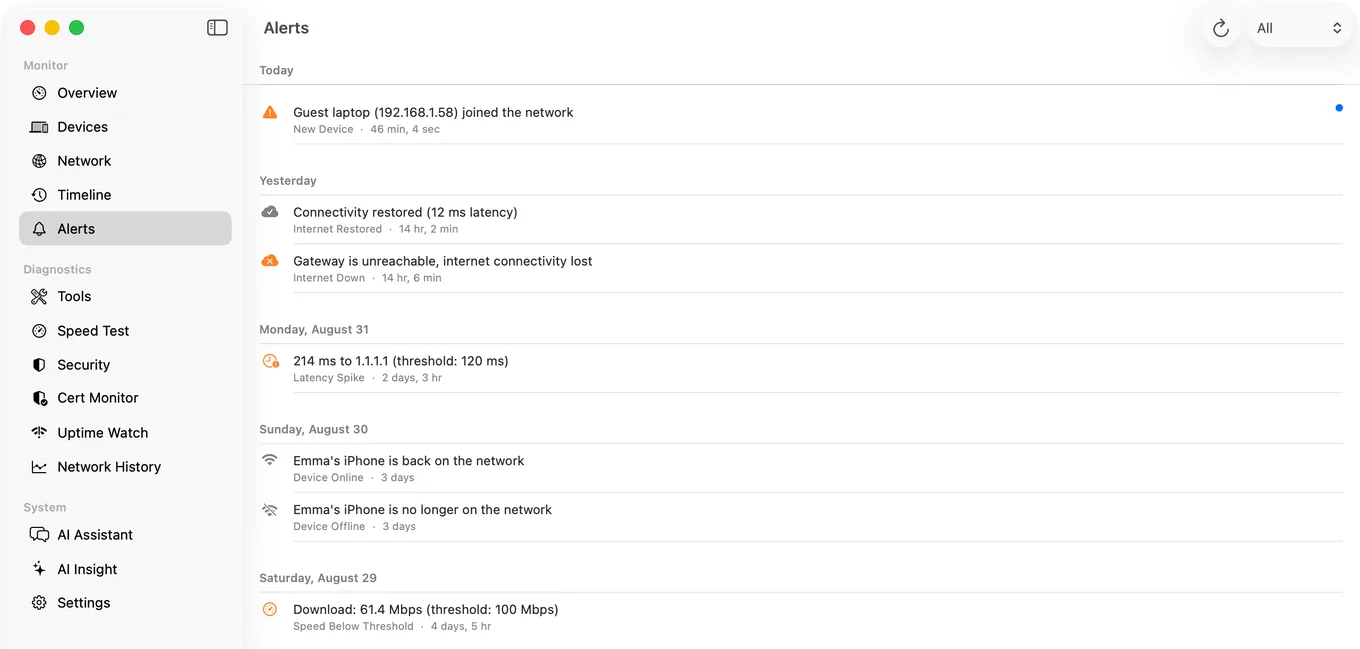
The sequence you can set up is: the line drops and the Agent records it within ninety seconds; with Guardian, PingKit on your iPhone shows that your Mac has stopped reporting when you check, so you can message the cleaner or the neighbour who holds the key and have the router power-cycled. When the line comes back, the Internet Restored alert confirms it without anyone having to ask.
What Else Is Worth Watching, and What Is Not
| Thing | Can you watch it remotely? | How |
|---|---|---|
| The property's internet connection | Yes, with Guardian | With Guardian, your iPhone shows that the Mac has stopped reporting while the line is down, and Agent Internet Restored arrives when it is back |
| Speed actually delivered, against what you advertise in the listing | Yes | The Agent's scheduled speed tests, synced to the phone with Guardian |
| A specific device, such as a smart lock bridge or a TV box | Yes, after about half an hour by default | Agent Device Offline, which waits until the device has been unseen for fifteen minutes and then counts missed scans, three by default. Device Offline alerts are off by default: turn the Device Offline toggle on in the Agent's Settings under Device Alerts, and for a quicker alert set Offline scans before alert, one section below under Alert Debouncing, to 1. With Guardian, the alert also reaches your iPhone. |
| Whether the WiFi signal reaches the far bedroom | No, not remotely | Measure it once, in person, and fix it with an access point |
| The property's network from the internet, with no Mac there | No | There is no public service to check. This is the constraint the page opens with |
| A website or booking page you run | Yes | Uptime Watch, from Cloudflare. One URL is free, permanently, checked hourly. Guardian watches ten, every five minutes. |
Two Things Worth Doing at the Same Time
Put the router on a smart plug. The most common fix for a dead line is a power cycle, but a plug you switch from an app over the property's internet cannot be reached while that line is down, so pick one you can switch another way, or ask someone at the property. With Guardian, PingKit on your iPhone shows you that the Mac has stopped reporting, and Internet Restored tells you when the line is back.
Separate guest WiFi from anything of yours. If the property has a NAS, a camera you own, or any device you would not want a guest reaching, a guest network is the right structure: How to Set Up a Guest WiFi Network. Note that guest networks isolate clients, which will also stop guests casting to the TV, so decide deliberately. Put the Mac on the network your own equipment uses, not on an isolated guest network: there it can see little beyond the router, and if only your router answers a scan, PingKit Agent says the Wi-Fi may be keeping devices apart.
A word on the device list. The Agent shows what is on the network, which at a let property includes guests' phones and laptops. Use it to check that the equipment you provide is present, and resist the temptation to treat it as anything else. It is a diagnostic tool for your own equipment, and your listing should say plainly what is on the network, especially anything with a camera.
Honest Limits
- This needs a Mac at the property, awake and on the network. There is no version of remote network monitoring that works with nothing on site.
- If the property's power or internet fails, the Mac cannot reach you, so you get silence rather than an alert until it is back. With Guardian, PingKit on your iPhone shows when your Mac stopped reporting, which is itself information, but it is not a notification.
- The Agent records when the internet went down and, with Guardian, tells you on your iPhone when it is back. It cannot tell you why, since a dead router and a dead line look the same to it, and it cannot restart the router. That is what the smart plug is for.
- PingKit's alerts reach your own devices through your own iCloud. There is no team account or shared dashboard; with Guardian Plus, PingKit Agent can also post its alerts to a webhook, such as a chat channel a cleaner can read, whenever the property's internet is up.
- Uptime Watch cannot see the property's LAN, and no internet-side checker can.
Frequently Asked Questions
How can I tell if the WiFi at my rental property is down?
Put something at the property that keeps checking. A Mac that stays awake, running the free PingKit Agent, pings the internet every thirty seconds and records an Internet Down alert after three consecutive failures. That alert has to leave over the line that just failed, so it does not reach you while the line is down; with Guardian, PingKit on your iPhone shows instead that the Mac has stopped reporting, and Internet Restored arrives when the line returns.
Can I monitor a rental's internet without anything installed there?
No. A home network has no public service for an internet-side checker to request, the router's public address is often shared or changing, and it refuses unsolicited traffic by design. The watcher has to be on the property's network.
Does a website uptime monitor work for this?
Not for the property's own network. Uptime Watch and every service like it check public URLs. They are useful for a booking page or a site you run, and useless for a router in a flat.
What is the cheapest setup that works?
A used Mac mini running macOS 15 or later with the free PingKit Agent, Guardian ($2.99 a month on iPhone or Mac) to see its alerts and status on your phone, and a smart plug on the router that can be switched without the property's internet, so a power cycle does not require a visit.
Can I see how fast the internet actually is at the property?
Yes. The Agent runs a scheduled speed test, every 24 hours by default and configurable down to hourly, and Guardian syncs those results to your iPhone. That is also how you check that what your listing advertises is what guests get.
See it on your phone, not in a review.
PingKit Agent is free on the Mac. Guardian, $2.99 a month or $24.99 a year on iPhone or Mac with a 1-week free trial, brings its alert history and timeline to the iPhone app.
Download PingKit for iPhone