Pi-hole Not Responding: Diagnose a DNS Outage From Your iPhone
Short version. A Pi-hole that stops answering produces the most misleading symptom on a home network: everything says you are connected, and nothing loads. PingKit's Smart Diagnostics makes that visible in one run, because it tests internet connectivity by IP address and name resolution separately, so you see Internet Connectivity pass and DNS Resolution fail. Then ping the Pi itself to find out whether the machine is down or just the service. Note one thing carefully: the Mac Agent's Internet Down alert pings IP addresses, so it will not fire for a DNS-only failure. The alert that catches this one is Device Offline on the Pi.
The Symptom That Fools Everyone
When DNS stops, WiFi stays connected, the router is fine, the connection is fine, and every app reports some version of "no internet". Nothing is wrong with the path to the internet. The only thing that has stopped is turning names into addresses, and since almost nothing on a phone uses a raw address, almost everything fails.
If you run a Pi-hole as your network's DNS server and it stops answering, this is exactly what you get. So the first job is not to fix anything. It is to confirm that DNS, and only DNS, is what has failed.
Step 1: Run Smart Diagnostics
Open PingKit and run Smart Diagnostics from the Tools tab. It runs six checks in order, and the order is what makes it useful here:
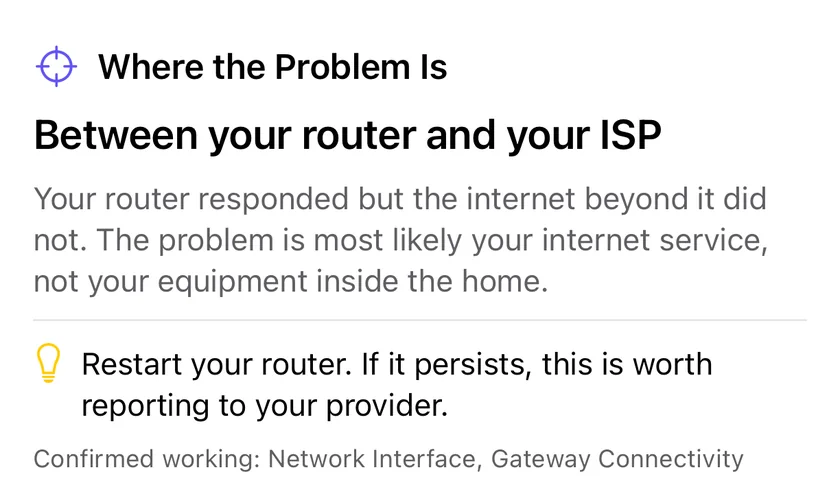
- Network Interface, is the interface up
- Gateway Connectivity, can it reach your router
- Internet Connectivity, can it reach public DNS servers by IP address
- DNS Resolution, can it turn a name into an address
- Web Connectivity, does an HTTPS request complete
- Connection Speed, roughly how fast is the link
A Pi-hole outage has a signature you cannot mistake: steps 1, 2 and 3 pass, and step 4 fails. Connectivity to the internet is proven, by address, and name resolution is broken. If step 2 fails as well, your problem is the router or the WiFi and the Pi-hole is a red herring.
Smart Diagnostics, DNS Lookup and ping are free in PingKit, with no account and no ads. Get PingKit for iPhone
Step 2: Confirm It With a Lookup
Open DNS Lookup, enter a domain you know resolves, pick the A record type, and run it. PingKit queries through the resolver your phone is configured to use, which on a Pi-hole network is the Pi-hole itself, and it reports the query time alongside the answers.
- The lookup times out or returns nothing. Your configured resolver is not answering. That is the Pi-hole.
- The lookup answers normally. DNS is working for your phone. Either the Pi-hole is fine and something else is wrong, or your phone is not using the Pi-hole at all, which happens when a device has a DNS server set manually or is using a private relay.
Step 3: Is the Pi Down, or Just the Service?
This is the distinction that decides what you do next. Go to the Devices tab, tap Scan Network, and look for the Pi. Then open Ping Test, which the Tools tab lists simply as Ping, enter its address and send 20 packets.
| Ping the Pi | DNS Lookup | What has happened | What to do |
|---|---|---|---|
| No answer, absent from the scan | Fails | The whole machine is down or off the network | Check power, the SD card, and the Ethernet or WiFi link |
| Answers cleanly | Fails | The machine is up and the DNS service is not | Restart the DNS service, check disk space, check the upstream resolvers in the Pi-hole settings |
| Answers cleanly | Works | DNS is healthy right now | The failure was intermittent. Keep a record, next section |
A Pi-hole that answers a ping but not a query is the common case, and it is usually one of three things: the DNS service has stopped or crashed, the SD card has filled or gone read-only, or the upstream resolvers the Pi-hole forwards to have become unreachable.
Step 4: A Fallback That Stops This Being an Emergency
Most routers let you set two DNS servers for the network. If you set both to the Pi-hole, it is a single point of failure for every device in the house. Setting a public resolver as the secondary is a trade: you get graceful failure when the Pi is down, at the cost of some queries bypassing the blocklist even when it is up, because clients do not reliably prefer the primary.
The alternative, which keeps blocking absolute, is to accept the single point of failure and be told quickly when it fails. That is the next section. Our general background on resolvers is What Is a DNS Server and Why Does It Matter?, and the symptom page is How to Fix "Connected to WiFi But No Internet" on iPhone.
Being Told, and the One Thing to Know About It
The free PingKit Agent on a Mac that stays awake scans the network every five minutes on mains power. Once the Pi has gone unseen for fifteen minutes it is marked offline and a "stopped answering" entry is written to the timeline; with Device Offline alerts on, an alert follows. Device Offline alerts are off by default: turn the Device Offline toggle on in the Agent's Settings under Device Alerts. With PingKit Guardian, that alert and the Agent's history also appear on your iPhone. The alert reaches the iPhone through your own private iCloud, which is one hop and best effort rather than instant.
Now the caveat, stated plainly because it would be easy to imply otherwise. The Agent's Internet Down alert works by pinging 1.1.1.1 and 8.8.8.8 by IP address every thirty seconds on mains power, or every sixty on battery, and raising the alert after three consecutive failures. Those pings do not use DNS. So when your Pi-hole dies and name resolution stops for the whole house, Internet Down does not fire, because the internet is genuinely still reachable. The alert that catches a dead Pi is Device Offline on the Pi itself, and that only fires if the machine has actually left the network. A Pi that is up with its DNS service stopped raises neither, and the honest answer is that PingKit will not tell you about that case.
Honest Limits
- PingKit does not query the Pi-hole's admin API, read its blocklists or report its statistics. It is a network diagnostic, not a Pi-hole client.
- A Pi that is powered on with a stopped DNS service looks healthy to every check the Agent runs. No alert exists for that state.
- Internet Down pings addresses, not names, by design. It is a connectivity alert, and it will not report a DNS outage.
- DNS Lookup uses the resolver your phone is configured with. If the phone has a manual DNS setting or a relay in the way, the result tells you about that resolver rather than about the Pi-hole.
- Device Offline alerts need a Mac running the Agent, awake, on the same network.
Frequently Asked Questions
How do I know if my Pi-hole is down?
Run Smart Diagnostics in PingKit. If Internet Connectivity passes and DNS Resolution fails, name resolution is broken while the connection is fine, which on a Pi-hole network means the Pi-hole. Then ping the Pi's address to find out whether the machine itself is down or only the DNS service.
Why does my internet stop working when the Pi-hole goes down?
Because almost nothing uses raw IP addresses. If the Pi-hole is your only DNS server and it stops answering, every name lookup fails and everything reports no internet, even though the connection is untouched.
Will PingKit alert me when my Pi-hole stops resolving?
Only if the Pi leaves the network, and only once you have turned Device Offline alerts on, because they are off by default. That alert covers a Pi that has gone dark; the Internet Down alert pings IP addresses and so will not fire for a DNS-only failure. A Pi that is powered on with a stopped DNS service raises neither alert.
Should I set a second DNS server as a fallback for Pi-hole?
It is a genuine trade-off. A public secondary means the house keeps working when the Pi is down, but clients do not reliably prefer the primary, so some queries will bypass blocking even when the Pi-hole is healthy. If blocking matters more, keep the Pi-hole as the only resolver and make sure you find out quickly when it fails.
Can I check DNS from my iPhone without a computer?
Yes. PingKit's DNS Lookup queries through the resolver the phone is configured to use and reports the records and the query time, and Smart Diagnostics separates the connectivity check from the resolution check so you can see which of the two failed.
See which layer actually failed.
PingKit Agent is free on the Mac. Guardian, $2.99 a month or $24.99 a year on iPhone or Mac with a 1-week free trial, brings its alert history and timeline to the iPhone app.
Download PingKit for iPhone