The Best Wake-on-LAN Software for Mac: 7 Options, From brew to the Menu Bar (2026)
Short version. To wake a machine from the Mac you are sitting at, brew install wakeonlan is free and one line, and Wake on Lan - Menu Bar is the tidiest paid menu bar app. If you want the Mac to wake machines for you when you are not at it, PingKit Agent is free on the Mac App Store with a Wake-on-LAN tool, and with Guardian it sends the packet for PingKit's Wake-on-LAN on your iPhone from anywhere and, when it knows the machine's address, says whether it woke, while your Mac is awake.
Free. PingKit Agent's Wake-on-LAN tool picks the machine from the device list it already keeps. No account.
Most lists of Wake-on-LAN software for Mac put every app in one pile. They split along one line that matters more than the interface: does the tool only send a packet when you click, or is it something that stays running and can send one when you are not at the Mac? For the first job, a one-line Terminal command is hard to beat. For the second, you need an app that is still running when you need it. Here are the seven realistic options on a Mac, sorted by that difference.
Full disclosure: I build PingKit Agent, one of the seven, so weigh the recommendation accordingly. Where another tool is the better answer, this page says so, and for waking a machine from your desk it often is. If you need the setup on the machine you are waking (firmware, adapter, Ethernet), that is in Wake-on-LAN from a Mac: setup that works. This page is about the sender.
The Short List
| Tool | What it is | Saved machines | From away | Cost |
|---|---|---|---|---|
| PingKit Agent | Menu bar app, Mac App Store | Picks from its own device list | Yes, for PingKit on your iPhone, with Guardian | Free; optional Guardian subscription |
| wakeonlan (Homebrew) | Command line | No, type the MAC or script it | No | Free, open source |
| Wake on Lan - Menu Bar | Menu bar app, Mac only | Yes | Not listed | Paid |
| Magic Packet | iPhone, iPad, Mac and Watch app | Yes, synced over iCloud | Listed, with a port per host | Paid |
| Wake Me Up | iPad app that runs on Apple silicon Macs | Yes | Not stated by the developer | Free |
| WakeyToo | iPhone, iPad, Mac and Apple TV app | Not listed | Local network | Free |
| Depicus Wake On Lan | Mac app, plus a command line download | Bookmarks machines it has woken | Listed | Paid |
Prices change, so they are in the sections below, as listed on October 26, 2026. "From away" means waking a machine at home when the sender is not on that network; a magic packet is a local broadcast, so every tool that does it needs either a forwarded port on your router or something at home that sends the packet for you.
Send on Click, or Stay Running
Waking a machine from the Mac you are sitting at is a one-shot job: you know the machine, you want it on, you send the packet. Every tool here does that, and the differences are where the MAC address comes from and how many clicks it takes. The harder job is waking something when you are not at home, or before you get to your desk. That needs a sender that is already on the home network when the moment comes, and on a Mac it means an app that runs from the menu bar on a Mac that stays awake. Only one of the seven is built around being that sender for another device.
App by App
PingKit Agent
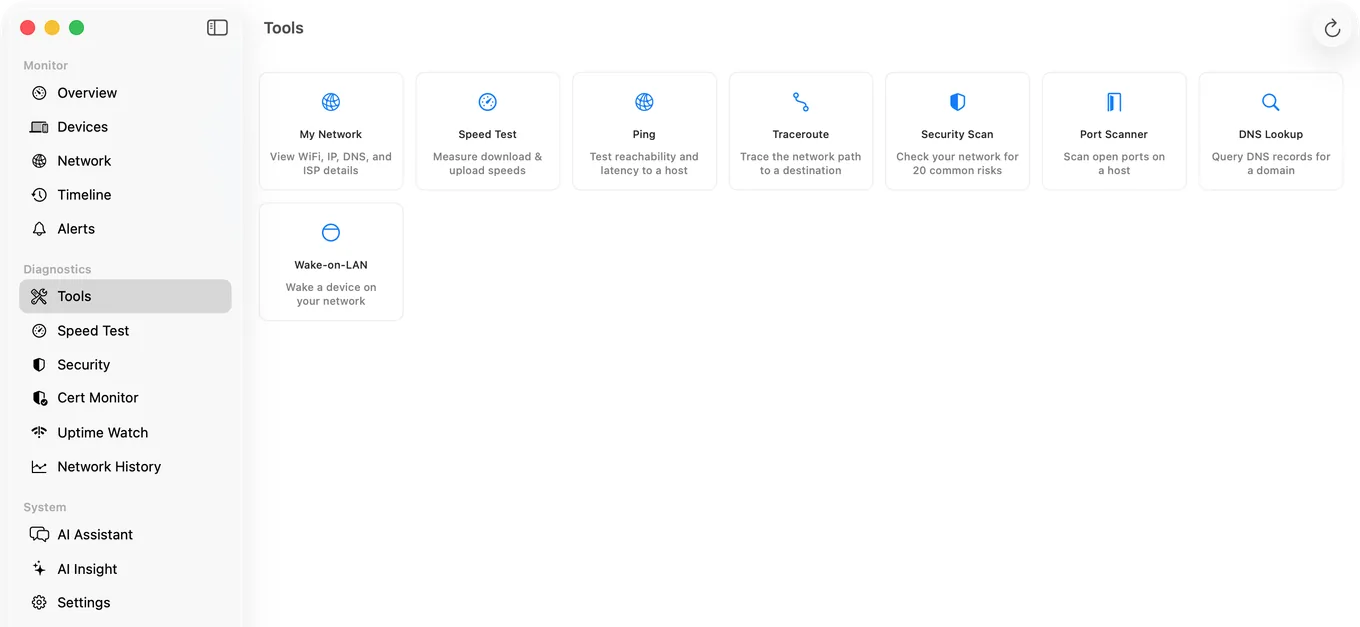
A free menu bar app for macOS 15 or later, on the Mac App Store. Its Wake-on-LAN tool is one of its eight tools and is free: type a MAC address, or pick a device from the list the Agent already keeps of your network, and send. Because the Agent is watching the network anyway, the machine's address is usually already there rather than something to look up (on macOS 27 this needs Agent 3.3.0 or later). It also adds a Wake Device action to Shortcuts, for any device in that list with a MAC address. The parts no other Mac app here does are covered below: waking a machine for PingKit on your iPhone, and scheduled wakes. The full page is PingKit Agent for Mac.
wakeonlan, from Homebrew
A small open-source command line tool, version 0.50 in Homebrew as listed on October 26, 2026. brew install wakeonlan, then wakeonlan AA:BB:CC:DD:EE:FF. By default it sends to the limited broadcast address on port 9; -i 192.168.1.255 sends to your subnet's broadcast address instead, and -p picks another port. If you live in Terminal, wake one machine from the Mac you are at, and already know its MAC address, this is the right answer and nothing below beats it. Put it in a shell alias and it is two keystrokes. It does nothing until you run it.
Wake on Lan - Menu Bar
From Lumibit GmbH, $1.99 on the Mac App Store as listed on October 26, 2026, Mac only, macOS 12 or later. It lives in the menu bar, keeps as many devices as you like, can wake devices after you log in, and shows the status of the last wake. The listing's last update is version 1.0.6, from December 2022. If you want a menu bar button for a few machines and nothing else, it is the tidiest single-purpose choice.
Magic Packet
Magic Packet: WOL Wake-on-LAN, from Nikita Somenkov, $1.49 with optional tip purchases, as listed on October 26, 2026, on iPhone, iPad, Mac and Apple Watch. The Mac version needs macOS 26 or later. It keeps unlimited hosts synced over iCloud, works with Siri and Shortcuts, has widgets and Control Center controls on iOS 18, and its listing says it works over the local network and the internet, with a custom UDP port for each host. The internet half is the forwarded-port route, so your router has to be set up for it.
Wake Me Up
Wake Me Up - Wake-on-LAN, from Thomas Di Meco, free as listed on October 26, 2026. On the Mac it is the iPad app, which runs on Macs with Apple silicon and macOS 15 or later. It keeps multiple devices with names, colours and icons, has widgets including on the Mac, and works with Shortcuts and Siri. Its version history adds unicast requests to IPv4, IPv6 or domain names, which is what a forwarded port needs, though the developer does not describe waking over the internet.
WakeyToo
From Ernest Cho, free as listed on October 26, 2026, on iPhone, iPad, Mac (macOS 14 or later) and Apple TV. It wakes computers on your local network, with Shortcuts and Siri. A simple free option if you want the same app on every Apple device you own.
Depicus Wake On Lan
Depicus has made Wake-on-LAN tools for years, including a Mac command line version you download from its site. Its Mac App Store app is $1.99 as listed on October 26, 2026, says it requires macOS 10.5 or later, and was last updated to version 1.6 in August 2011. The listing says it wakes an enabled computer from anywhere in the world, bookmarks machines you have woken, and can scan your network for devices. Fifteen years without an update is a reason to check it opens on your version of macOS before relying on it.
PingKit Agent: The Wake-on-LAN Tool
The tool itself is plain on purpose: a MAC address field, a broadcast address field that starts at 255.255.255.255 (a typed address or a host name both work), and the list of devices the Agent knows a hardware address for, one click to fill the field. When the Mac knows its own subnet, each wake also goes to the subnet's broadcast address, such as 192.168.1.255, because routers and access points differ in which of the two they pass on. The packet leaves from the Mac's network connection that carries its traffic, Wi-Fi or Ethernet, and never from a VPN tunnel. Devices the Agent has no hardware address for are not in the pick list, and the tool says so; type the address for those.
Waking From Your iPhone Through the Mac
This is what a Mac app can do that a phone app cannot. A magic packet only reaches the network it is sent on, so an iPhone on cellular, or on the office Wi-Fi, cannot put one on your home network by itself. With Guardian, PingKit on your iPhone asks the Agent through your own iCloud, the Mac at home sends the packet on its network, and, if you gave the machine an address to watch or the Mac already has it in its device list, the Mac pings it for up to 2 minutes and tells the iPhone it woke, with the seconds it took, or that it did not answer. No port is opened on your router. The Mac checks for requests every 15 seconds on mains power and every minute on battery, so a request can take up to a minute to be picked up, and one that waits more than 10 minutes is dropped rather than run late.
Guardian is $2.99 a month or $24.99 a year, on iPhone or on the Mac, with a 1-week free trial, and a subscription on either device unlocks the other. The Mac has to be awake, running the Agent and on the same network as the machine you are waking. The step by step for the iPhone side, and the two routes that do not need a Mac, are in how to wake a PC remotely from your iPhone.
Scheduled wakes are Guardian Plus and run on the Mac: in a device's detail in the Agent, choose a time and every day or weekdays only, and the Mac sends the packet at that time, so a NAS or a desktop is up before you sit down. If the Mac was asleep at that moment, it still sends the wake if it wakes within ten minutes; later than that, it skips that day's wake rather than sending it hours late. Guardian Plus is $4.99 a month or $39.99 a year on the Mac ($9.99 or $79.99 if bought on iPhone), with a 1-week free trial.
Honest Limits
- It sends while your Mac is awake. The Agent does not keep the Mac awake, so waking from your iPhone and scheduled wakes need a Mac that is awake at the time, such as a Mac mini set not to sleep.
- Port 9, always. Every wake the Agent sends, from its own tool, for the iPhone or on a schedule, goes out on UDP port 9. A machine set up to listen only on port 7 needs the command line or another app.
- No groups and no scripting language. One device per wake. If you want to wake ten machines from a script,
wakeonlanin a loop is the better tool. - A machine on a different network from the Mac. The Agent sends on its own network. A machine at another site still needs a forwarded port, a VPN to a device there, or a sender on that network.
- No app can fix a target that is not listening. Wake-on-LAN has to be enabled on the machine you wake, and it should be on Ethernet.
- macOS 15 or later.
Which One Should You Use?
- You live in Terminal and wake one machine from your desk:
brew install wakeonlan. - A menu bar button for a few machines, nothing else: Wake on Lan - Menu Bar.
- The same paid app on iPhone, Mac and Watch, with a forwarded port for away: Magic Packet.
- Free, with widgets and Shortcuts on every device: Wake Me Up or WakeyToo.
- Waking machines from your iPhone when you are out, without opening a port: PingKit Agent with Guardian, on a Mac that stays awake.
- The NAS up at 07:00 on weekdays: PingKit Agent with Guardian Plus.
Frequently Asked Questions
Does macOS have a built-in Wake-on-LAN command?
No. The quickest free option is Homebrew: brew install wakeonlan, then wakeonlan followed by the MAC address. For an app, PingKit Agent's Wake-on-LAN tool is free on the Mac App Store, and Wake on Lan - Menu Bar is a paid menu bar app.
What is the best free Wake-on-LAN app for Mac?
For one machine from your desk, the wakeonlan command from Homebrew. For an app that picks the machine from a device list it already keeps, PingKit Agent is free on the Mac App Store. Wake Me Up and WakeyToo are free too and add widgets and Shortcuts.
Can a Mac wake a computer for my iPhone when I am away from home?
Yes, with PingKit Agent on the Mac and Guardian. The iPhone asks the Mac through your own iCloud, the Mac sends the magic packet on the home network, and if it knows the machine's address it pings it for up to 2 minutes and tells you whether it woke. The Mac has to be awake and running the Agent, and nothing is opened on your router.
Can I schedule Wake-on-LAN on a Mac?
PingKit Agent sends scheduled wakes with Guardian Plus: pick a time and every day or weekdays in a device's detail. The Mac has to be awake then; if it wakes within ten minutes of the time it still sends the packet, and later than that it skips that day's wake.
Does PingKit Agent keep my Mac awake to send wakes?
No. It does not keep the Mac awake, so remote and scheduled wakes need a Mac that is already awake at the time, such as a Mac mini set not to sleep.
Wake machines from the menu bar, and from your iPhone
PingKit Agent's Wake-on-LAN tool is free and picks the machine from the device list it already keeps. With Guardian, it wakes them for your iPhone from anywhere while your Mac is awake. macOS 15 or later.
Get PingKit Agent for Mac