The Best IP Scanner for Mac: 7 Network Scanners Compared (2026)
Short version. For a one-off list of what is on your network, Angry IP Scanner is free and LanScan is the tidiest native app. If you want the list to keep itself up to date, PingKit Agent is free on the Mac App Store: it rescans every 5 minutes by default while your Mac is awake and alerts you on the Mac when a new device joins. On macOS 27, check that a scanner fills in MAC addresses before you pay for it; PingKit Agent does from version 3.3.0.
Free. PingKit Agent rescans your network every few minutes while your Mac is awake and alerts you when a new device joins. No account.
Most lists of IP scanners for Mac treat every app as doing the same job. Some sweep your network once and hand you a table, which is right for an audit. Others keep sweeping and tell you when something changes, which is what most people want once a scan has shown them a device they do not recognise. Here are the seven realistic options on a Mac, sorted by that difference.
Full disclosure: I build PingKit Agent, one of the seven, so weigh the recommendation accordingly. Where another tool is the better answer, this page says so, and for a one-off scan it often is.
The Short List
| Tool | What it is | Between scans | Alerts | Cost |
|---|---|---|---|---|
| PingKit Agent | Menu bar app, Mac App Store | Rescans on a schedule while the Mac is awake | New device, internet down and more, on the Mac | Free; optional Guardian subscription |
| Angry IP Scanner | Open-source desktop app | Nothing until you scan again | None | Free, open source |
| LanScan | Native scanner, Mac App Store | Nothing until you scan again | None listed | Free, paid Pro upgrade |
| iNet Network Scanner | Native scanner, Mac App Store | Nothing until you scan again; watches Bonjour services live | None listed | One-time purchase |
| Fing Desktop | Desktop app, optional Fing account | Watches while the app is running | Yes | Free for personal use; paid plans add more |
| nmap and Zenmap | Command line, with a graphical front end | Nothing until you scan again | None | Free, open source |
| arp -a | Built into macOS | Shows what your Mac has recently talked to | None | Built in |
Prices change, so they are in the sections below, as listed on October 18, 2026.
Scan Once, or Keep Watching
A scan answers "what is on my network right now", which is the right question when you are setting up a printer or looking for a Raspberry Pi's address. The question behind most searches is different: did anything join while I was not looking. A device that joined at 2am and left by breakfast is invisible to every scanner you did not leave running. That is a monitor's job, and only two of the seven do it on a Mac: Fing Desktop and PingKit Agent. Both need the computer awake. Fing says its desktop app keeps watch whenever it is running, and PingKit Agent's checks pause while the Mac sleeps.
App by App
PingKit Agent
A menu bar app for macOS 15 or later, free on the Mac App Store. It sweeps your network every 5 minutes by default on mains power (every 1, 5, 10, 15 or 30 minutes if you change it, and every 15 on battery), keeps the list between scans and raises a new device alert on the Mac when something it has never seen joins, after a first 24 hours spent learning what is already there. Each device's detail shows its IP address, hostname and when it was first and last seen, and, on macOS 15 and 26 or with Agent 3.3.0 or later on macOS 27, its MAC address and the maker of its network chip. The full page is PingKit Agent for Mac.
Angry IP Scanner
The free, open-source classic, under GPLv2, for Windows, macOS and Linux. Version 3.10.0 comes as separate Apple Silicon and Intel bundles with the Java runtime included, though macOS asks you to allow it on first launch. It sweeps any range you give it, can fetch hostnames, MAC addresses, open ports and NetBIOS details, and saves results as CSV, TXT, XML or an IP-port list. For auditing a subnet it is hard to beat. The setup steps are in Angry IP Scanner for Mac.
LanScan
A native scanner from iwaxx, free on the Mac App Store, with a LanScan Pro upgrade at $9.99 as listed on October 18, 2026. It finds devices over ARP and shows IP address, MAC address, vendor and hostname, resolving names over DNS, mDNS and SMB, with no limit on the number of devices. The free version blanks out some hostnames and other columns until you upgrade. It exports to CSV and can show IPv6 addresses. Its listing describes no alerts. More in LanScan alternatives for Mac.
iNet Network Scanner
From BananaGlue in Germany, a one-time purchase of $24.99 on the Mac App Store as listed on October 18, 2026, with updates included and no account. It shows IP and MAC addresses, opens SSH, VNC or HTTP connections to a device, finds open ports, watches Bonjour services live, sends Wake-on-LAN, can put a Mac to sleep, restart it or shut it down, and exports to CSV or PDF. The iPhone version is a separate, free app with an in-app upgrade. The head-to-head is at PingKit vs iNet.
Fing Desktop
Fing's app for Windows and macOS, free for personal use. It lists who is connected, raises alerts, keeps an event timeline, runs scheduled speed tests and can block a device from your Wi-Fi, which PingKit cannot. Fing says the computer needs to be on, and that a paid Fing subscription adds more monitoring and enhanced security checks. If blocking matters to you, start here. The comparison is in Fing Desktop alternatives for Mac.
nmap and Zenmap
The most capable scanner here: free, open source and a command line tool. Install it with Homebrew (brew install nmap) or from the official macOS installer, which also includes Zenmap, the graphical front end. nmap -sn 192.168.1.0/24 is a discovery sweep of a typical home network; everything beyond that is depth on one host. It scans when you run it, and only then. More in nmap on a Mac.
arp -a
Already on your Mac: arp -a in Terminal lists the devices your Mac has recently exchanged traffic with, each with its MAC address. It is instant, and it undercounts, because a device your Mac has not talked to is not in the table. How to see every device on your network from a Mac covers filling it first.
MAC Addresses and macOS 27
A Mac's advantage over a phone is hardware addresses. iOS hides most devices' MAC addresses from apps, while Mac scanners have long read the system's ARP table, where the first half of each address names the maker of the device's network chip.
macOS 27 changed that for apps. The system calls a scanner uses to read the ARP table now return nothing unless the app carries an entitlement Apple grants. LanScan's developer reported the block during the macOS 27 beta, and LanScan's release notes say MAC addresses are readable again. PingKit Agent reads them on macOS 27 from version 3.3.0. For any other scanner, run one scan on macOS 27 and check the MAC column is filled before you pay. arp -a still lists them on macOS 27, because it is Apple's own tool.
PingKit Agent: What Free Gets You on a Mac
Everything the Agent does on the Mac is free: the device list, the scans, the alerts and its eight tools, which include a port scanner for the devices on your network. The alerts are Mac notifications for a new device, a device going offline or coming back, the internet going down and coming back, a latency spike over 100 ms by default, a slow speed test, a security risk and a changed service. Device offline and slow speed test alerts are off by default and switched on in Settings. The internet down alert waits for three failed checks in a row, so a single lost packet does not interrupt you, and the outage is logged from the first of them.
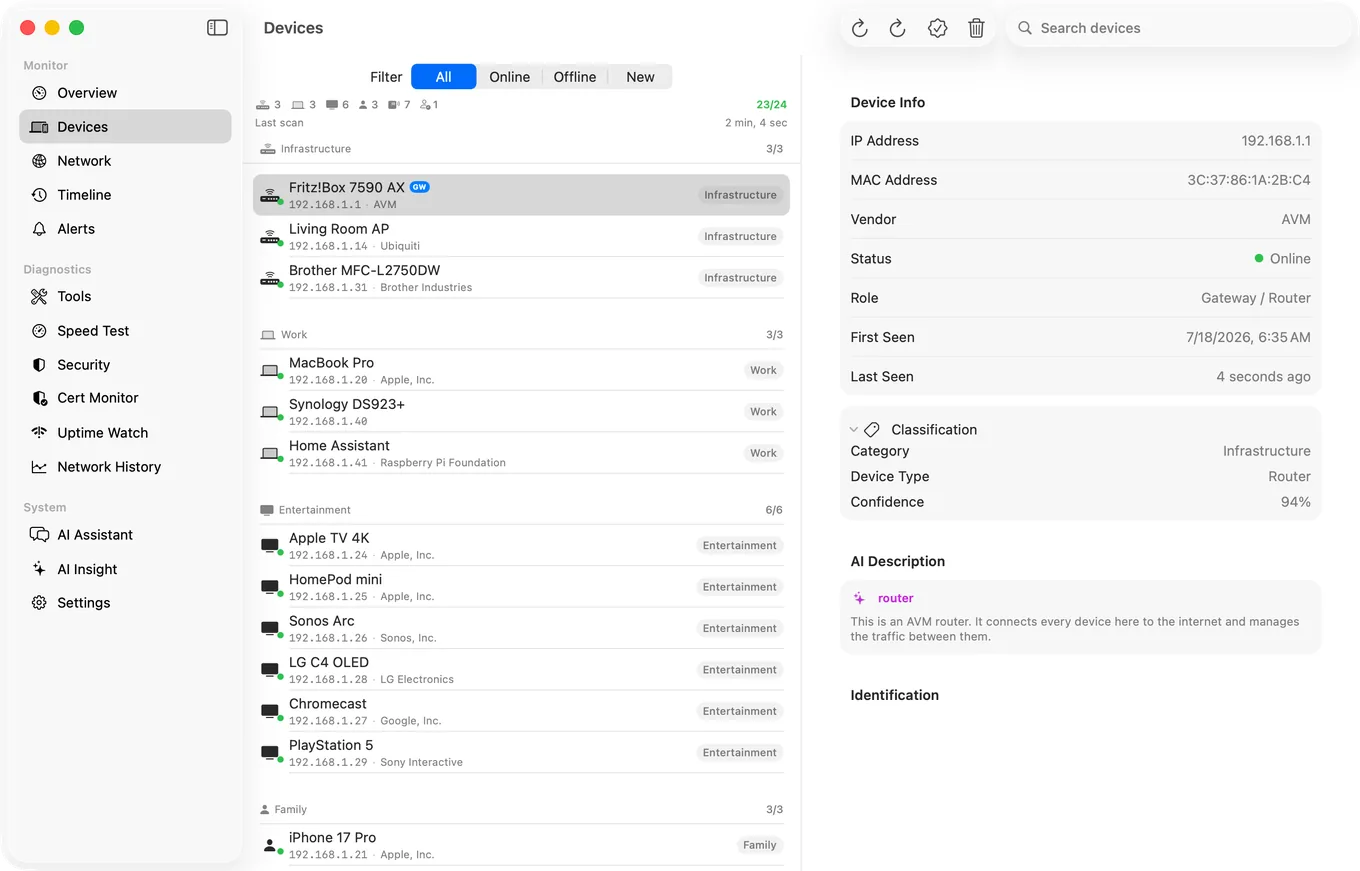
Devices are named from what they announce about themselves, such as Bonjour and UPnP services and hostnames, and a device's detail shows the brand it reports where it reports one, next to the network chip maker. Naming is good, not perfect: a device that announces nothing stays an address.
Guardian, the optional subscription ($2.99 a month or $24.99 a year on the Mac, with a 1-week free trial), puts the Agent's devices, alerts and timeline in the PingKit iPhone app through your own private iCloud database. The iPhone app is free on its own, with a LAN scan and 19 tools, but iOS suspends it when it is closed, so the watching lives on the Mac.
Honest Limits
- It watches while your Mac is awake. The Agent does not keep the Mac awake and its checks stop while it sleeps, so a MacBook with the lid closed records nothing.
- IPv4 only. The device list is built from IPv4 probes, so a device with only an IPv6 address is not listed.
- Your network, not arbitrary ranges, and no export. Angry IP Scanner and nmap scan any range you are allowed to and save the results. The Agent watches the network your Mac is on, and its device list has no CSV export.
- It cannot block a device. Fing Desktop can; otherwise, use your router.
- It is not a bandwidth monitor. It does not show which app or device is using your connection.
- macOS 15 or later. On macOS 27, MAC addresses need Agent 3.3.0 or later.
Which One Should You Use?
- One scan, free, any range: Angry IP Scanner.
- One scan, a native app, tidy results: LanScan.
- Bonjour services, remote wake and SSH in one paid app: iNet.
- Depth on one host: nmap.
- A quick look with nothing to install:
arp -a. - Blocking as well as watching: Fing Desktop.
- Knowing when something new joins, free, from the menu bar: PingKit Agent, while your Mac is awake.
Frequently Asked Questions
What is the best free IP scanner for Mac?
For a one-off scan of any range, Angry IP Scanner is free and open source, with Apple Silicon and Intel builds that include Java. For a scanner that keeps scanning and alerts you when a new device joins, PingKit Agent is free on the Mac App Store and works while the Mac is awake. arp -a in Terminal is free and already installed, but it lists only devices the Mac has recently talked to.
Can a Mac network scanner show MAC addresses on macOS 27?
Yes, when the app holds the entitlement Apple requires to read the ARP table on macOS 27, and arp -a in Terminal still lists them. PingKit Agent 3.3.0 or later shows MAC addresses on macOS 27, and LanScan's release notes say it reads them again. For any other scanner, run one scan on macOS 27 and check before buying.
Which Mac network scanner alerts me when a new device joins?
PingKit Agent raises a free new device alert on the Mac, after a first 24 hours learning the devices you already have, and Fing Desktop raises alerts too. Both work only while the computer is awake and the app is running. Angry IP Scanner, LanScan, iNet and nmap scan when you run them, and their own pages describe no new device alerts.
Is there an Advanced IP Scanner for Mac?
No. Advanced IP Scanner lists only Windows versions. The closest Mac equivalents are Angry IP Scanner for a free sweep with exports, and LanScan for a native scanner on the Mac App Store.
Does PingKit Agent scan my network while my Mac is asleep?
No. PingKit Agent scans and checks the connection while the Mac is awake, and its checks stop while the Mac sleeps. It does not keep the Mac awake, so it suits a Mac you already leave running.
A scanner that keeps scanning
PingKit Agent rescans your network on a schedule while your Mac is awake, keeps the device list between scans and alerts you when something new joins. Free, no account, macOS 15 or later.
Get PingKit Agent for Mac