Starlink Keeps Dropping: How to Log the Outages as Evidence
Short version. Starlink drops tend to be short, and short drops are invisible to a speed test, which reports an average over a few seconds. What catches them is a per-second latency graph, which is Live Connection in PingKit's Monitor tab, and a long ping run that reports loss as a percentage. MTR then shows whether the loss starts at the dish, at the carrier-grade NAT hop beyond it, or further out. To have the outages logged rather than watched, a Mac running the free PingKit Agent records every Internet Down and Internet Restored with a timestamp while it is awake, and the Agent's own free Network Report PDF turns the most recent of them into something you can attach to a support ticket.
Why a Speed Test Cannot See This
A speed test opens several connections, pushes data for a few seconds and averages the result. A four-second dropout inside that window shows up as a slightly lower number, if it shows up at all. So the reported speed stays respectable while calls drop and streams buffer, and you are left arguing with a number that does not describe your problem.
What describes it is a measurement every second, kept for long enough to catch a drop, and timestamped. That is what this page sets up.
Step 1: Watch It Per Second
Open PingKit, go to the Monitor tab and start Live Connection. It pings once a second and graphs the last sixty results, showing current, average, minimum and maximum latency, the jitter, and any timeouts marked along the bottom of the graph.
Leave it running for a few minutes at a time when the connection misbehaves. Three shapes are worth recognising on a satellite link:
| Shape | What it usually means |
|---|---|
| Timeout markers appearing in short bursts, repeating | Brief dropouts. On a dish this is typically an obstruction or a satellite handover |
| A steady baseline with large spikes but no timeouts | Congestion or queuing, not loss of signal |
| Latency that rises steadily and then everything stops | The link is saturating before it fails. Look at what is uploading |
| Consistently high latency with no timeouts | Normal for the medium. Satellite latency is higher than fibre and that is not a fault |
Live Connection runs while the view is open and the screen is on. That is an iOS limit and it is why step 4 exists.
Live Connection, ping, MTR and the Network Report PDF are all free on the iPhone. Get PingKit for iPhone
Step 2: Put a Number on the Loss
Open Ping Test, target 1.1.1.1, set the count to 100 and run it. At PingKit's fixed one-second interval that is a bit over a minute and a half of continuous testing, and it gives you loss as a percentage alongside minimum, average and maximum round-trip times.
Run it several times across a day rather than once. A single run that catches a drop tells you drops exist; five runs that each lose 3% to 8% tell you how often, which is the thing support will ask.
Step 3: Find Out Where the Loss Starts
Open MTR and run it against 1.1.1.1. MTR pings every hop along the path repeatedly and reports per-hop loss and latency, which traceroute cannot do because traceroute passes each hop once.
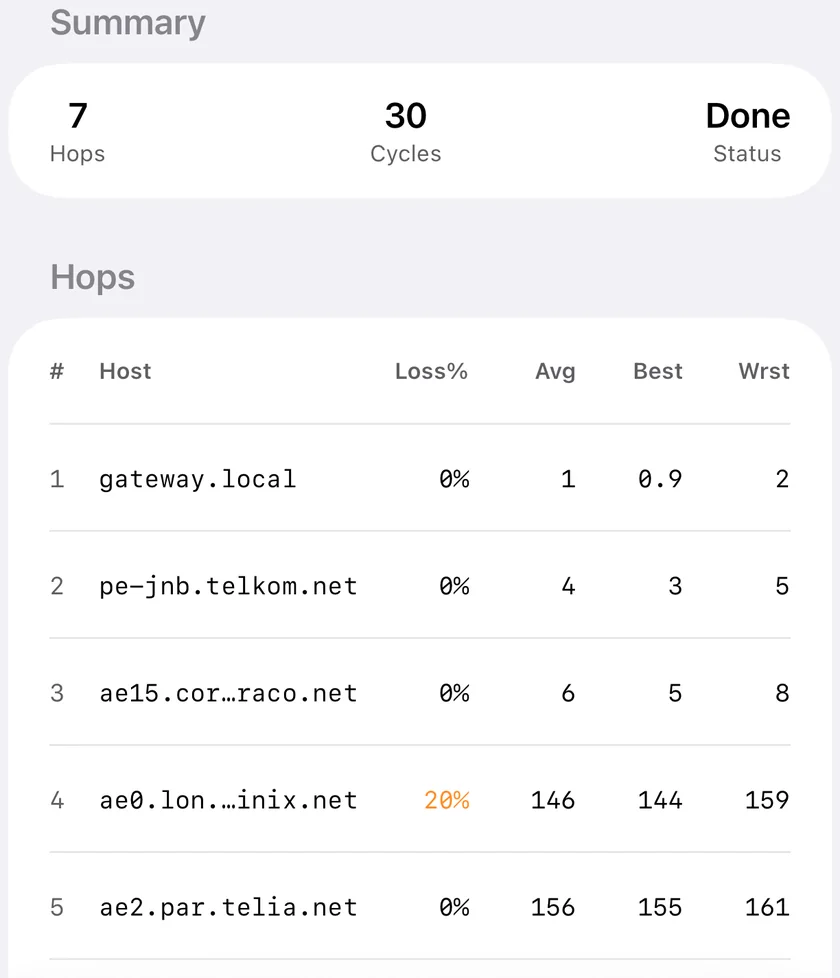
On a satellite connection the first hops are distinctive. You will usually see the dish or router as the first private address, then one or more addresses in the carrier-grade NAT range that begins 100.64, which is shared address space your provider uses rather than giving every customer a public address. Loss that begins at the very first hop points at your own local link. Loss that begins at the CGNAT hop and continues to the end points upstream of you. Loss that appears at one middle hop and does not continue to the destination is usually that router deprioritising its own replies, which is normal and not a fault. What Is MTR and Why It's Better Than Traceroute covers reading the output properly.
One consequence of CGNAT worth knowing: you do not have a public address of your own, so inbound port forwarding does not work, and any service you want to reach from outside needs a tunnel rather than a forwarded port.
Step 4: Log the Outages Instead of Watching For Them
Everything above needs you present. The outages that matter happen while you are working, and the honest requirement is a log with timestamps.
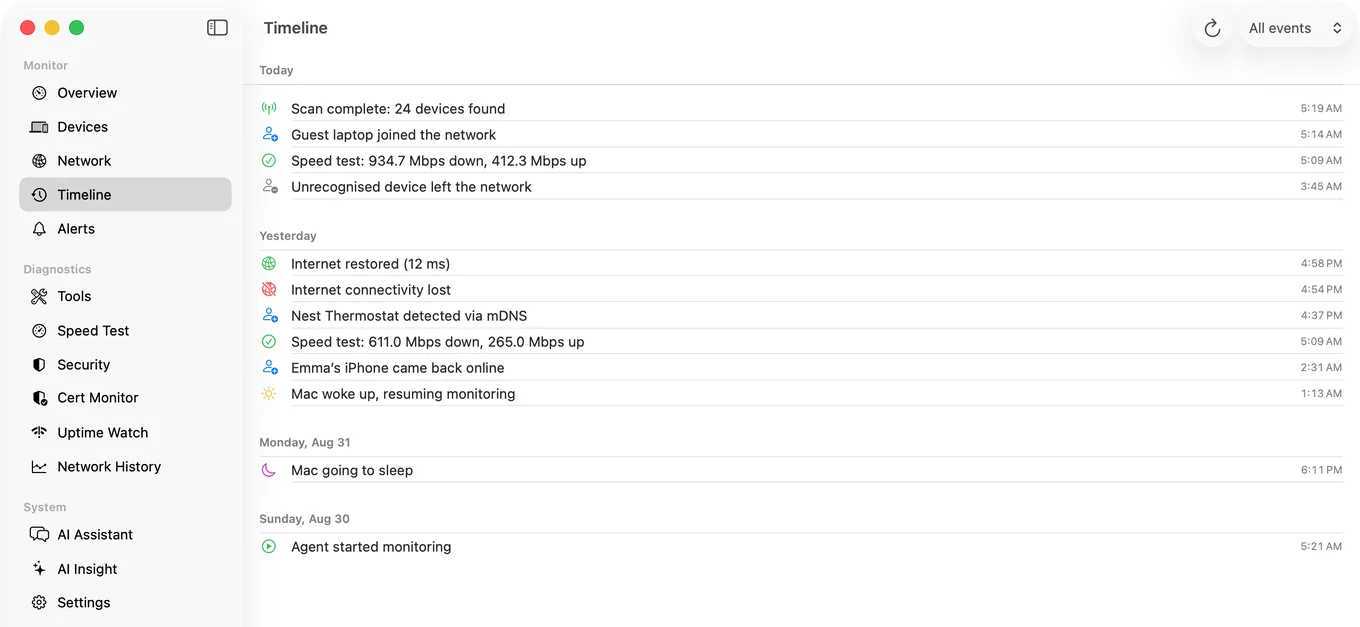
An iPhone cannot produce one, because iOS does not let an app keep testing while it is closed. The free PingKit Agent on a Mac that stays awake does exactly this. On mains power it pings 1.1.1.1 and 8.8.8.8 every thirty seconds, and it writes the first failed check straight to its timeline, so even a single thirty-second blip is recorded.
The record and the alert arrive together. After three consecutive failures the timeline records the outage, dated to its first failed check, and Internet Down is raised; after two consecutive good checks the timeline records the recovery and Internet Restored resolves the alert, which gives that outage an end time. So you get two things: a timeline that marks the first failed check and the first good one of every outage that lasted three checks, and a list of alerts with a start and an end, which is what you want a week later instead of a memory of a bad Tuesday.
The Agent also runs scheduled speed tests, every 24 hours by default and configurable to 1, 6 or 12 hours, so the throughput record sits alongside the outage record.
The alerts appear on your Mac for free, and PingKit Guardian brings them, with the timeline, to the iPhone app. The alert reaches the iPhone through your own private iCloud, which is one hop and best effort rather than instant.
Step 5: Make It Something You Can Send
The Mac Agent has its own Network Report PDF, also free, and it includes the most recent timeline entries, at most about the last half day at the default five-minute scan, so create it soon after a bad spell. That is the one to send, because the outage history is the argument.
PingKit's Network Report on the iPhone is free too and describes the network rather than the outages: connection facts, the devices on it, your speed test results, latency with packet loss, the security summary, certificates and uptime targets, and the events the phone itself recorded, which are its own tool runs rather than the Agent's timeline. Send both if you are making a case; either is more persuasive than a screenshot, because they carry the dates and the numbers together.
A word on expectations: a dish with a partial view of the sky will drop briefly and repeatedly, and no ISP-side fix exists for that. Check the obstruction view in your provider's own app before opening a ticket, because the first thing support will do is ask.
Honest Limits
- Live Connection runs only while its view is open with the screen on. There is no background mode on iOS and PingKit does not claim one.
- The Agent records an outage, and raises its Internet Down alert, only after three consecutive failed checks at thirty-second intervals, so the shortest drop it logs or notifies you about is on the order of a minute and a half, or three minutes on battery. A shorter dropout leaves no trace in the Agent. Those are the ones Live Connection shows while you watch.
- PingKit does not read anything from the dish or the provider's app. Its evidence is what it can measure from your network.
- The Agent needs a Mac that stays awake, and plugged in: on battery it halves its own cadence by default, to a sixty-second connectivity check. A laptop that sleeps logs nothing while asleep.
- Lag under load (bufferbloat) is measured on iPhone only, by Session Watch with PingKit Guardian: a session ends with a 15-second download while latency is still being measured, and the rise is shown. It loads the download direction only, it is skipped on mobile data and in Low Data Mode, and the Mac Agent has no such test. Here is how to test for it.
Frequently Asked Questions
How do I prove Starlink is dropping out?
Watch a per-second latency graph while it happens, run repeated 100-packet pings to get loss as a percentage, and keep a timestamped log of outages. A speed test averages over a few seconds and will not show a short dropout at all.
Why does my speed test look fine when the connection keeps dropping?
Because a speed test measures throughput over a few seconds and averages it. A four-second outage inside that window barely moves the number. Loss and latency over time are the measurements that describe dropouts.
What is the 100.64 address in my traceroute?
That is carrier-grade NAT space, shared address range that a provider uses instead of giving every customer a public address. It is normal on satellite and mobile connections. It also means inbound port forwarding will not work for you, so anything you want to reach from outside needs a tunnel.
Can PingKit keep a log of my outages?
The free Mac Agent does, while your Mac is awake. On mains power it pings the internet every thirty seconds (every sixty on battery, by default) and, once three checks in a row have failed, logs the outage to its timeline dated to the first of them and raises Internet Down; after two good checks it logs the recovery and raises Internet Restored, which gives each outage a start and an end. Its own Network Report PDF includes the most recent timeline entries, at most about the last half day at the default five-minute scan. With Guardian, the alerts and the history reach your iPhone as well.
How short an outage can be recorded?
One that lasts three checks in a row. The Agent checks every thirty seconds on mains power and every sixty on battery by default, so that is about a minute and a half on mains power or three minutes on battery. The timeline entry and the Internet Down alert arrive together, and the entry is dated to the first failed check. A shorter dropout leaves no trace in the Agent, and those are the ones Live Connection's per-second graph shows while you are watching.
Turn dropouts into a log with timestamps.
PingKit Agent is free on the Mac. Guardian, $2.99 a month or $24.99 a year on iPhone or Mac with a 1-week free trial, brings its alert history and timeline to the iPhone app.
Download PingKit for iPhone