Uptime Kuma Alternatives for Mac (2026): Uptime Monitoring Without a Server
Short version. Uptime Kuma is excellent and free, but it needs somewhere that never sleeps: a VPS, a NAS, or a Raspberry Pi. If you do not want to run and maintain that, a hosted check is the alternative. PingKit's Uptime Watch runs its checks server-side, hourly for one free URL and every five minutes for up to ten targets with Guardian, so the checks never depend on your Mac being awake (alerts shown on the Mac itself need Guardian and an awake Mac). It is deliberately much simpler than Uptime Kuma.
Uptime Kuma is one of the best pieces of free software in its category. The reason people look for alternatives is almost never the software. It is that self-hosting means a machine, a container, updates, and a thing that breaks silently at the worst moment.
Full disclosure: I build PingKit Agent, so weigh the recommendation accordingly. The limits section is not padding, and there is a whole category of Mac network tool below that PingKit deliberately is not.
The Real Question: Where Does the Check Run?
An uptime monitor is only as reliable as the thing performing the check. This is the decision that matters:
| Where it runs | Trade-off |
|---|---|
| Self-hosted (Uptime Kuma on a VPS or Pi) | Total control and unlimited checks, and you maintain it |
| Self-hosted on your own Mac | Stops when the Mac sleeps, which defeats the point |
| Hosted service | Nothing to maintain, less flexibility |
The middle row is the trap. Running an uptime monitor on a laptop tells you the site was up whenever you happened to be at your desk.
How PingKit's Uptime Watch Works
Checks run server-side on a scheduled job, not on your Mac or iPhone. The app adds and views targets; it does not perform the probes. So your Mac can sleep, your phone can be off, and the checks continue.
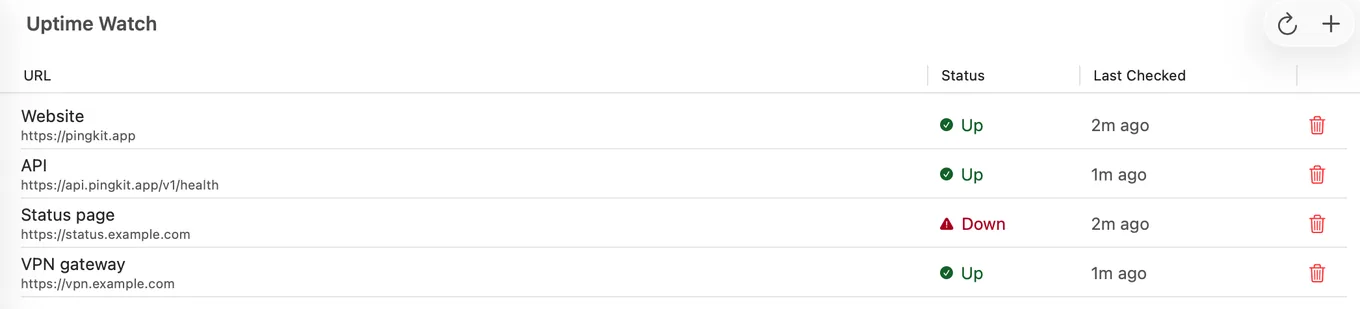
Being precise about the mechanics, because vagueness here is how people get let down:
- Every five minutes with Guardian, hourly on the free tier. The cadence belongs to the tier, not a configurable interval.
- Website or port. A target is an HTTP(S) URL, or with Guardian a TCP port on a public host. Any final status from 200 to 399 counts as up.
- Optional content checks with Guardian. A website target can require a keyword on the page (case-sensitive, exact text) or an exact status code.
- Targets and history: one target and 7 days of history on the free tier; ten targets and 30 days with Guardian, each with an hourly response-time chart.
- How you are told. A Mac cannot receive a push. With Guardian the Agent reads its targets every five minutes while it runs and shows a notification on the Mac when one goes down or recovers; a target added on the iPhone gets a push there. Guardian Plus also sends every alert by email and to a webhook, which reach you while the Mac sleeps.
- Sites that turn checks away. A site that answers HTTP 401, 403 or 405 is marked "Checks refused" instead of down, sends no down alert and is not counted against its uptime; on iPhone, PingKit explains why and gives you the User-Agent to ask the site owner to allow.
Where Uptime Kuma Wins, Clearly
| Feature | Uptime Kuma | PingKit Uptime Watch |
|---|---|---|
| Check interval | From 20 seconds | 5 minutes with Guardian, hourly free; fixed |
| Keyword / content matching | Yes | Keyword or expected status, with Guardian |
| TCP, ping, DNS, push monitors | Yes | HTTP, plus TCP port with Guardian; no ping, DNS or push |
| Status pages | Yes | No |
| Notification integrations | 90+ | Mac notification with Guardian, iPhone push; email and one webhook with Guardian Plus |
| Number of monitors | Unlimited | 1 free, 10 with Guardian |
| Maintenance burden | Yours | None |
| Cost | Free plus hosting | Free tier, then $2.99/mo on Mac |
If you need sub-minute checks, ping or DNS monitors, dozens of notification services or a public status page, Uptime Kuma is simply the better tool and you should run it. Five-minute checks suit "tell me soon after my site goes down", not "page me within a minute".
What Comes With It
Uptime Watch is one pane of the Agent rather than a standalone product, so it sits alongside regular device scans while your Mac is awake, internet up/down alerting, scheduled speed tests and TLS certificate expiry monitoring. If you want an uptime monitor and nothing else, a dedicated service is a cleaner fit.
Honest Limits
- Five minutes at best (hourly on the free tier), and HTTP or TCP only, as above. This is the main gap.
- Public targets only. The checks run on Cloudflare, so they cannot reach anything with a private address. Port checks also cannot use port 25, and a port check of a host behind Cloudflare always reads down, because Cloudflare does not let the checks connect to its own addresses.
- No status pages, and no integrations beyond email and one webhook, both of which need Guardian Plus ($4.99/mo on Mac).
- The apps do not perform the checks, so the checks carry on if you close them; the Mac's own alert banners appear only while PingKit Agent is running and the Mac is awake.
- macOS 15 or later for the Agent.
Frequently Asked Questions
Can I run Uptime Kuma on my Mac?
You can, but it stops when the Mac sleeps, which undermines the purpose. Uptime Kuma is best on something that never sleeps, such as a VPS, a NAS or a Raspberry Pi.
What is a good Uptime Kuma alternative without self-hosting?
A hosted check. PingKit's Uptime Watch runs its checks server-side, so the checks never depend on your devices being awake: one URL hourly for free, or ten website or TCP port targets every five minutes with Guardian. On a Mac, alerts need Guardian and an awake Mac, or Guardian Plus email or a webhook, which reach you while it sleeps. It is far simpler than Uptime Kuma: no one-minute checks, no ping or DNS monitors and no status pages.
Does PingKit check uptime from my Mac or iPhone?
Neither. Checks run on a scheduled server-side job, so your Mac can sleep and your phone can be off without affecting the checks. The apps add and view targets, and alerts shown on the Mac itself need Guardian and appear only while the Mac is awake.
How often does PingKit check a site?
Every five minutes with Guardian and once an hour on the free tier. The cadence belongs to the tier and is not user-configurable. If you need checks every minute, use a dedicated uptime service or self-host Uptime Kuma.
How many sites can I monitor?
One on the free tier, checked hourly, and ten with a Guardian subscription, checked every five minutes. Guardian is $2.99 per month or $24.99 per year on the Mac.
Uptime checks that do not depend on your Mac
Server-side website checks (and port checks with Guardian), plus device monitoring and internet alerts in your menu bar, and certificate expiry warnings with Guardian.
Get PingKit Agent for MacRelated Articles
- Uptime Kuma on iPhone: There Is No App, Here Is What Works
- Uptime Watch: Free for One Site on iPhone and Mac
- Best Uptime Monitoring Apps for iPhone
- Monitor SSL Certificate Expiry from Your Mac
- PingKit Agent for Mac
- Best Network Monitoring Apps for Mac
- PingKit vs Uptime Kuma
- Monitor a Cloudflare Tunnel: Know When Your Origin Goes Down
Monitoring self-hosted services from a Mac?
Uptime is only half the picture: apt upgrade does not touch Plex, Jellyfin, Grafana or Portainer, so a green dashboard can sit on top of software nobody has refreshed in months. Noxen, our sister Mac app, audits Linux and VPS hosts nightly over SSH and matches the installed package list against a signed daily CVE feed. PingKit watches reachability; Noxen watches what is running.
The patching gap for self-hosted services →