Uptime Kuma on iPhone (2026): There Is No App, Here Is What Works
Short version. Uptime Kuma has no official iPhone app and the project has never shipped one; it is a self-hosted server with a web dashboard. On an iPhone you have four real options: open the dashboard in Safari and add it to your Home Screen, route alerts through one of its 100-plus notification providers (ntfy, Pushover, Gotify, Apprise), install a third-party client such as Uptime Kuma Manager, KumaAlert or Wuma, or skip the server entirely with PingKit's Uptime Watch: one URL free checked hourly, or ten targets every five minutes with Guardian, checked from Cloudflare with a push to your phone.
Why There Is No App
Uptime Kuma is a monitoring server. You run it, on a Raspberry Pi, a NAS, a VPS or a Docker host, and it checks your things and shows the results on a web dashboard. The project's scope stops there; the phone side has always been "use a notification provider". That is not a gap so much as a design: the server already talks to more than a hundred services that can reach a phone, so a first-party app would mostly duplicate them.
Option 1: The Dashboard in Safari
The dashboard is a responsive web app. Open it in Safari, tap Share, then Add to Home Screen, and it behaves like an app: full screen, its own icon, your login remembered. It is read-only in the sense that it shows state rather than pushing it; you will not get a notification from a Home Screen web app when a monitor goes red, which is what the next option is for. If your Kuma is only reachable on your LAN, this works at home and not from the train, unless you have a VPN or a tunnel back.
Option 2: Push Through a Notification Provider
This is the route most people should take. Uptime Kuma's notification list runs past a hundred providers, and several of them are built to land on a phone: ntfy (free, open source, install the ntfy app and subscribe to a topic), Pushover (a one-time purchase per platform), Gotify (self-hosted, with an Android client and third-party iOS ones), and Apprise, which fans out to almost anything. Set the provider up once under Settings, then Notifications, in Kuma, attach it to your monitors, and the down and up events arrive as push. Delivery is as fast as Kuma's check interval, which you can set down to seconds.
Option 3: A Third-Party Client
Three apps on the App Store speak to a Kuma server directly. Uptime Kuma Manager is free and shows your monitors and their status. KumaAlert is a one-time purchase with iPhone, iPad and Apple Watch support, critical alerts that cut through Focus modes, widgets and Live Activities. Wuma covers iPhone, iPad and Apple Watch with widgets and notifications. All three are independent of the Kuma project, and all three need your server to be reachable from wherever the phone is, plus credentials or an API key. Read the privacy label before handing over either.
Option 4: No Server at All
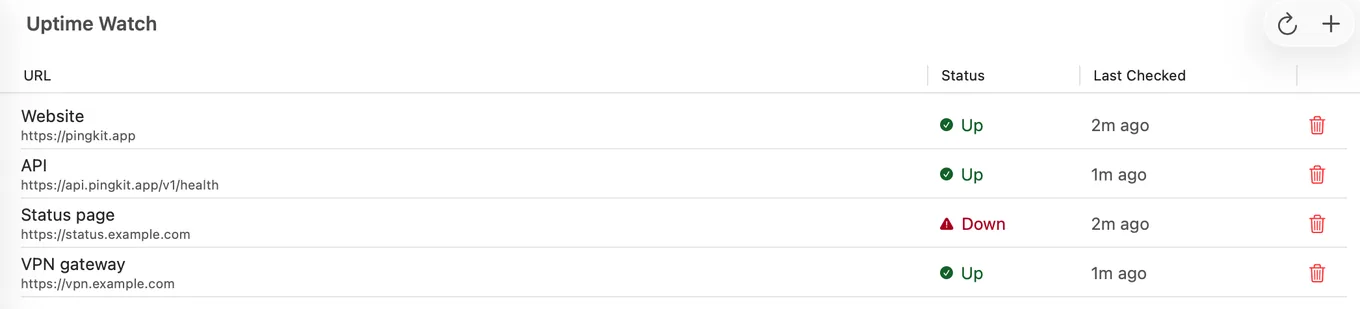
If the reason you are reading this is that you do not want to run a server, or you want a phone-side monitor for one or two sites without the dashboard, PingKit's Uptime Watch is the other shape of answer. Add a URL in the Monitor tab and PingKit's backend on Cloudflare's network checks it, with a 10-second timeout, recording status and response time. An error status or no answer, confirmed by a second check 30 seconds later, sends a push to your iPhone; the next good check sends the recovery. A site that turns automated checks away (HTTP 401, 403 or 405) is marked "Checks refused" instead of down, and PingKit gives you the User-Agent to ask the site owner to allow. One URL is free, permanently, with no account: checked once an hour, with 7 days of history. Guardian, $2.99 a month or $24.99 a year on iPhone, watches ten targets every five minutes with 30 days of history, and adds TCP port checks plus an optional keyword or expected status code on a website. The same app has the traceroute, MTR, DNS and SSL tools you reach for after the push, and Cert Monitor watches one domain's certificate free.
Kuma vs Uptime Watch, Honestly
| Uptime Kuma | PingKit Uptime Watch | |
|---|---|---|
| Interval | Configurable, down to seconds | 5 minutes with Guardian, 1 hour free; fixed per tier |
| Check types | HTTP, keyword, JSON, TCP, ping, DNS, Docker, push and more | HTTP; TCP port, keyword and expected status with Guardian |
| LAN targets | Yes, it runs on your LAN | No, public URLs only |
| Status pages | Yes | No |
| iPhone push | Via a provider or a third-party client | Built in |
| What you host | The server | Nothing |
| Price | Free, plus the machine and the upkeep | 1 URL free; 10 for $2.99/mo on iPhone or Mac |
Kuma is the more capable monitor by a distance, and if you already run one, keep it and pick Option 2. Uptime Watch is for the person who wants a push about a few sites and no server, or who wants a check from outside their own network that does not depend on that network being up. The Mac side of the same question.
Honest Limits
- Uptime Watch checks every five minutes at best (hourly on the free tier) and is not configurable beyond that. It does HTTP and, with Guardian, TCP ports and a keyword and an expected status per target; it will not do JSON queries, ping, DNS or Docker containers, and it cannot see anything with a private address. A TCP port check cannot use port 25, and always reads down for a host behind Cloudflare, because the checks themselves run on Cloudflare.
- A Home Screen web app does not push. Only a notification provider or a client app does.
- The third-party clients are maintained by individuals, not by the Uptime Kuma project. Their futures are their own.
Frequently Asked Questions
Is there an official Uptime Kuma app for iPhone?
No. Uptime Kuma is a self-hosted server with a web dashboard and the project has not shipped a mobile app. Third-party clients exist on the App Store, and the server can push to a phone through more than a hundred notification providers.
How do I get Uptime Kuma notifications on my iPhone?
Add a notification provider in Kuma's settings that reaches a phone, such as ntfy, Pushover or Apprise, and attach it to your monitors. Down and up events then arrive as push notifications through that provider's app.
Can I use Uptime Kuma's dashboard on an iPhone?
Yes. It is a responsive web app; open it in Safari and use Add to Home Screen for an app-like icon. It shows status but does not send notifications on its own.
What are the third-party Uptime Kuma apps for iOS?
Uptime Kuma Manager (free), KumaAlert (one-time purchase, with Apple Watch support and critical alerts) and Wuma. All three connect to your own server and are independent of the Uptime Kuma project.
Is there an uptime monitor for iPhone that needs no server?
PingKit's Uptime Watch. It checks from Cloudflare's network and pushes to your iPhone when a target goes down and when it recovers. One URL is free, checked hourly; Guardian watches ten websites or TCP ports every five minutes for $2.99 a month on iPhone.
One site, one push, no server.
Free to download. Guardian is $2.99 a month or $24.99 a year on iPhone, with a 1-week free trial on both. Cancel anytime.
Download PingKit for iPhoneRelated Articles
- Uptime Monitor App for iPhone and Mac: Free for One Site
- Uptime Kuma Alternatives for Mac
- PingKit vs Uptime Kuma
- UptimeRobot Alternatives for iPhone
- Get an iPhone Alert When Home Assistant Goes Offline
- Pingdom Alternative for iPhone: Uptime Alerts Without a Dashboard
- Freshping Alternative After the Shutdown: What to Move To