Pingdom Alternative for iPhone: Uptime Alerts Without a Dashboard
Short version. Pingdom is a monitoring platform for teams: a web dashboard, multi-region checks, transaction scripting, SMS credits and per-check pricing. PingKit's Uptime Watch is a much smaller thing: a website or port check run from Cloudflare that pushes to your iPhone when a site stops answering and again when it recovers, with no account and no dashboard. One URL is free, permanently, checked hourly. Guardian watches ten, every five minutes, with optional keyword checks. If you need one-minute checks, several regions, scripted transactions or a team rota, Pingdom is the right tool and this page will tell you so. If you have a handful of sites and want to be told, the smaller one is enough.
Two Different Products That Share a Word
"Uptime monitoring" covers a business tool with an on-call rota and a personal tool that taps you on the shoulder. Pingdom is firmly the first. It sells Synthetic Monitoring and Real User Monitoring, priced by a calculator on its own pricing page: the smallest configuration listed is 10 uptime checks, 1 advanced check and 50 SMS credits, scaling to thousands of each, with a free trial that covers both products. That is a product bought by a team, for sites where downtime costs money by the minute.
PingKit's Uptime Watch is the second. It exists because the person running a personal site, a home server behind a tunnel, or a client's WordPress install does not want another dashboard to remember to look at. They want their phone to buzz.
This page is about whether the smaller thing is enough for you, which means being specific about what it does not do.
What Uptime Watch Actually Does
Precisely, because a monitoring tool that is vague about its own interval is not worth having. None of these is a setting you tune; the interval, the number of targets and the history belong to your tier:
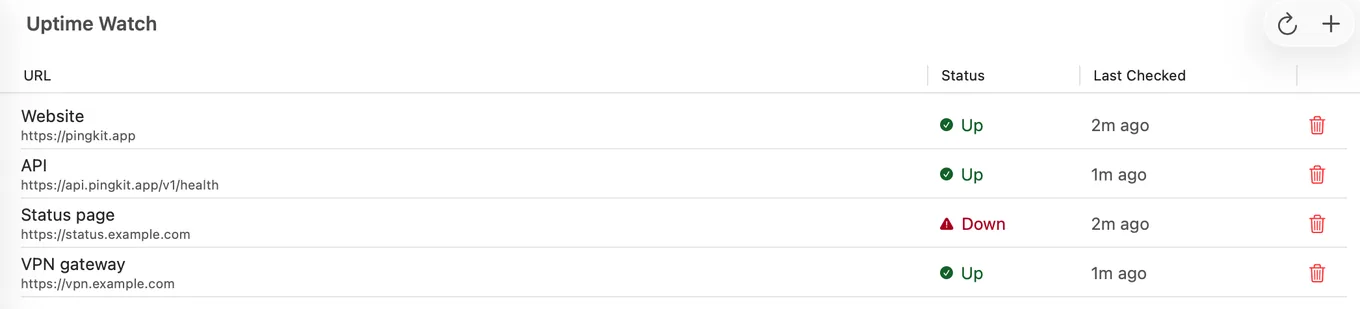
- Checks each target every five minutes on Guardian and hourly on the free tier, from Cloudflare's network. Your phone can be off; the check does not run on it.
- Checks a website over HTTP or HTTPS, or on Guardian a TCP port on a public host. It follows redirects and waits up to 10 seconds. If a server refuses the first lightweight request, it retries as a normal GET rather than calling the site down.
- Counts any final status from 200 to 399 as up. A site that answers 401, 403 or 405 is marked as refusing automated checks rather than down, and is left out of its uptime figure; anything else, or a timeout, is down. On Guardian a website target can also require a keyword on the page or an exact status code.
- Pushes a notification to your iPhone when a target goes down, and again when it comes back.
- Keeps 7 days of results on the free tier and 30 days on Guardian, with an hourly response-time chart, so you can see a pattern rather than only the last event.
- Needs no account, no login and no dashboard. Targets live in the Monitor tab of the app.
- One URL is free, permanently, checked hourly. Guardian watches ten targets every five minutes. The free target is permanent, not a trial.
One URL watched free, permanently, push notifications included. Get PingKit for iPhone
What It Does Not Do
Stated plainly, because a comparison page that hides this is worthless.
- No one-minute checks. Five minutes on Guardian, hourly on the free tier, and neither is configurable. Worst case between a failure and a notification is about five minutes on Guardian, about an hour on free.
- No multi-region checking. One check from Cloudflare's network, not five cities voting on whether your site is really down.
- No scripted or multi-step checks. A Guardian keyword check reads one page for one piece of text. It cannot log in, fill a form or walk through a checkout.
- No ICMP, DNS or transaction checks. HTTP and HTTPS on every tier, TCP port checks on Guardian, and public addresses only.
- No SMS, no phone calls, no escalation policy, no team. Push notifications to your iPhone (on a Mac with Guardian, PingKit Agent shows alerts for the targets you add there while it is awake), and with Guardian Plus an email address and a webhook for each device as well.
- No public status page and no SLA reporting.
- No Real User Monitoring. Uptime Watch never touches your visitors' browsers.
Which One You Need
| Your situation | The answer |
|---|---|
| Downtime costs money by the minute, and someone is on call | Pingdom or an equivalent platform. Five-minute checking without escalation is not adequate |
| You need to prove an SLA to a customer | Pingdom. Multi-region checks and reporting are the product |
| You need to know a page still contains the right content | Uptime Watch on Guardian, for one keyword on one public page. Pingdom if reaching the content takes a login or several steps |
| You have three to ten sites and want to know within minutes | Uptime Watch, ten targets checked every five minutes on Guardian at $2.99 a month on iPhone or Mac |
| You have one site and want it watched for nothing | Uptime Watch, one target free, permanently, checked hourly |
| You want to watch a home server, a NAS or a tunnel | Uptime Watch on the public hostname, and the free Mac Agent for anything that only has a private address: switch on its Device Offline alerts, and it watches while your Mac is awake |
The Certificate Half, Which Is Usually the Real Reason
Most people who set up uptime monitoring for a personal site are really worried about two things: the site going down, and a certificate expiring on a Sunday. PingKit's Cert Monitor covers the second: it tracks certificate expiry and chain validity and notifies at 30, 14, 7 and 1 days out. One domain is free, Guardian raises it to 5, and Guardian Plus to 50.
This one works differently from Uptime Watch and the difference matters. The certificate itself is read by the app, not by the server, so the warnings depend on a recent reading: if the newest result is more than three hours old, no expiry warning is sent off it. On an iPhone alone that means opening Cert Monitor in PingKit from time to time, because iOS will not refresh it in the background. A Mac running the Agent keeps its own readings fresh, every hour while it is awake, which is the setup to use if you want this unattended; add the certificates on the Mac, because each device checks only its own list. With Guardian it shows its own notification as a certificate nears expiry, and Guardian Plus sends the alerts by email or to a webhook and tells you once if the Mac has sent no reading for 18 hours.
That combination, a five-minute uptime check and an expiry warning a month ahead, is what a small operator actually needs, and it is the part that costs $2.99 a month on iPhone or Mac rather than a per-check subscription.
Setting It Up
- Install PingKit on the iPhone and open the Monitor tab.
- Add a target under Uptime Watch. Use the full URL including https (or, on Guardian, a host and port for a TCP check), and give it a label you will recognise in a notification.
- Allow notifications when iOS asks; without that permission there is nothing to deliver.
- Wait for the first check, then look at the target's history to confirm it is reading your site correctly.
- If your site sits behind a login or an access proxy, read the next paragraph before trusting the result.
One behaviour to understand: because redirects are followed and anything under 400 counts as up, a site that redirects to a login page which answers correctly reads as up. That is usually right, since it proves the web server and the path to it are alive, but it means a plain check reports "the address answers", not "the application is healthy". On Guardian, adding a keyword that only appears on the real page closes most of that gap.
If a firewall or bot filter turns Uptime Watch away with HTTP 401, 403 or 405, PingKit on iPhone marks the site "Checks refused" instead of down, explains why, and gives you the name it checks with, PingKit-UptimeWatch/2.0 (+https://pingkit.app/uptime-watch/), to ask the site owner to allow. If a site you watch starts turning Uptime Watch away, PingKit tells you once, so you know it is no longer being measured.
Honest Limits
- Five-minute checks on Guardian, hourly on the free tier. This is not a pager and does not claim to be.
- The free target checks one URL's status and keeps 7 days of history. Keyword and status assertions, TCP port checks and 30 days of history are Guardian.
- A Guardian TCP port check cannot use port 25 and cannot reach a host behind Cloudflare, because the checks themselves run on Cloudflare.
- Uptime Watch cannot see a private address. Anything LAN-only needs the free Mac Agent instead, whose Device Offline alert, off until you switch it on, works while your Mac is awake.
- Notifications go to your own devices. There is no team, no rota and no escalation.
- The push fires on a change of state, so a target you add while it is already down records the outage without notifying you. The first notification that target sends will be its recovery.
- Pingdom's pricing is set by a calculator on its own page and changes; the configuration quoted above is what that page listed on 12 September 2026.
Frequently Asked Questions
Is there a cheap alternative to Pingdom?
For a small number of sites, yes. PingKit's Uptime Watch checks a site from Cloudflare and pushes to your iPhone when it stops answering and when it recovers. One target is free permanently, checked hourly; Guardian, $2.99 a month on iPhone or Mac, raises that to ten targets checked every five minutes. It is not a Pingdom replacement for a team, because it has no one-minute checks, no multi-region voting and no escalation.
How often does PingKit check a website?
Every five minutes on Guardian and once an hour on the free tier, from Cloudflare's network. The worst case between a site failing and a notification arriving is about five minutes on Guardian and about an hour on free. Pingdom can check every minute, which still matters if each minute of downtime costs you money.
Does PingKit check page content or just whether the server answers?
By default, whether the server answers: it follows redirects and treats any final status from 200 to 399 as up. On Guardian you can also require a keyword the page must contain (case-sensitive, exact text) or an exact status code, so a server returning the wrong page reads as down. The free target checks the status only.
Do I need an account to use Uptime Watch?
No. There is no login, no dashboard and no web console. Targets are added in the Monitor tab of the iPhone app, and notifications arrive on that iPhone.
Can PingKit warn me before a certificate expires?
Yes. Cert Monitor checks expiry and chain validity and notifies at 30, 14, 7 and 1 days out. The iPhone reads your certificates when you open Cert Monitor, and PingKit Agent on a Mac that is awake reads the ones you add there every hour. One domain is free, with alerts on iPhone; on a Mac, certificate alerts need Guardian. Guardian raises it to 5 domains and Guardian Plus to 50.
Have your phone tell you, without a dashboard.
One URL is free, permanently, checked hourly. Guardian watches ten, every five minutes. Guardian is $2.99 a month or $24.99 a year on iPhone or Mac, with a 1-week free trial.
Download PingKit for iPhone