UptimeRobot Alternatives for iPhone (2026): Monitoring Without a Dashboard Tab
Short version. UptimeRobot is a good service, and its free plan (50 monitors, 5-minute checks, an iOS app) is hard to beat on numbers. People leave it for three reasons: SSL expiry alerts need the $9-a-month Solo plan, the monitor and the tools live in different apps, and they would rather not run a dashboard at all. PingKit's Uptime Watch checks one URL free forever (hourly) and ten with Guardian ($2.99/mo on iPhone, every five minutes) from Cloudflare, with a push on your iPhone, and Cert Monitor watches one domain's certificate free, read by your iPhone each time you open it. Uptime Kuma is the self-hosted route. Pingdom is the enterprise one.
What UptimeRobot Gives You, Honestly
As of September 2026, UptimeRobot's free plan is 50 monitors at a 5-minute interval, with a mobile app for Android and iOS. The paid plans are Solo at $9 a month, Team at $35 and Scale at $65, billed annually at $108, $420 and $780. SSL expiry monitoring, with alerts 30, 14 and 7 days before a certificate expires, is on the paid plans only. Status pages, shorter intervals and more integrations scale up through the tiers.
None of that is a reason to leave. Fifty free monitors at five minutes is generous, and the iOS app delivers push notifications. If you are happy, stay.
Why People Look for an Alternative
- Certificate alerts cost $9 a month. For a person with one or two domains, that is the whole bill for a single feature.
- The monitor and the diagnosis are in different places. When the push arrives, the next step is a traceroute, a DNS check or a look at the certificate, and that is a different app.
- Another account, another dashboard. Some people want a monitor that lives inside a tool they already open, with no web console to log in to.
- Overkill for a side project. A service built for on-call teams, with its tiers, integrations and status pages, is more than a personal site needs, and the free plan's headline numbers are not the same as the features you actually want.
Alternative 1: PingKit Uptime Watch
Uptime Watch is a feature of PingKit, the 19-tool network kit for iPhone, and of its Mac companion, PingKit Agent. Add a URL and PingKit's backend on Cloudflare's network checks it, with a 10-second timeout, and records the status code and response time: hourly with 7 days of history for the free target, every five minutes with 30 days of history on Guardian. An error status or no answer, confirmed by a second check 30 seconds later, marks it down and sends a push to your iPhone; the next successful check sends a recovery push. A site that turns automated checks away (HTTP 401, 403 or 405) is marked "Checks refused" instead of down, and PingKit gives you the User-Agent to ask the site owner to allow. Nothing runs on your phone, and there is no account.
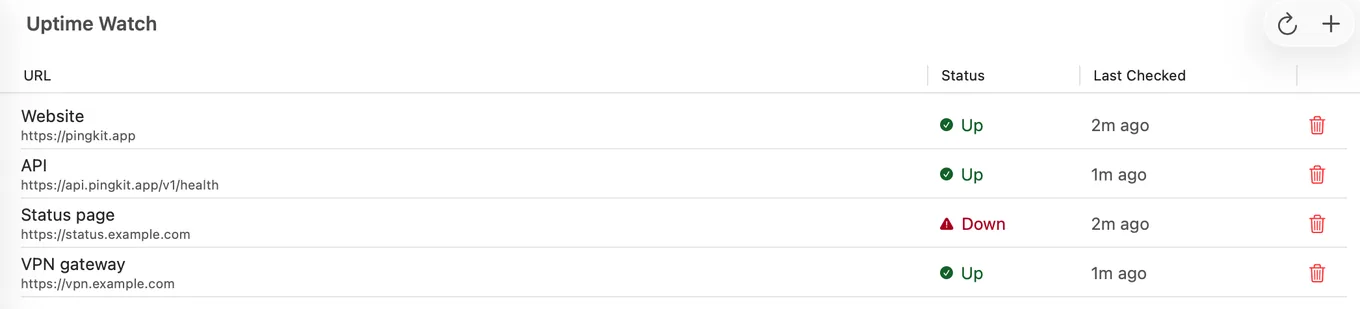
One URL is free, permanently. Guardian, $2.99 a month or $24.99 a year on iPhone with a 1-week trial, raises the limit to ten, and adds TCP port checks and an optional keyword or expected status code on a website. Separately, Cert Monitor watches one domain's certificate free and can push a warning 30, 14, 7 and 1 day before it expires, which is the feature UptimeRobot charges $9 a month for; Guardian takes that to 5 domains and Guardian Plus to 50. The certificate is read by your own device, not by PingKit's servers: one you add on your iPhone is read each time you open Cert Monitor there, so a warning needs a recent visit, and one you add in PingKit Agent is read every hour while your Mac is awake, where alerts need Guardian. And when the push arrives, the traceroute, MTR, DNS lookup, HTTP analyzer and SSL inspector are in the same app.
What it is not: free five-minute checking (the free target is hourly, and five minutes needs Guardian, where UptimeRobot gives 50 monitors at five minutes for nothing); anything faster than five minutes; ping, DNS or multi-region checks; status pages; email and webhook alerts without Guardian Plus ($9.99 a month on iPhone), and even then one address and one webhook rather than a list of integrations; and the target must be reachable from the internet. If those matter, UptimeRobot is the better tool and this page will not pretend otherwise.
Alternative 2: Uptime Kuma
Uptime Kuma is the self-hosted favourite: a Node.js server with a web dashboard, monitor types from HTTP to TCP to DNS to Docker containers, intervals down to seconds, status pages, and more than a hundred notification providers including Pushover, ntfy, Gotify and Apprise. It costs nothing but the machine it runs on and the time to keep it running. There is no official iPhone app; the dashboard is a responsive web app and the push comes through whichever provider you wire up. The iPhone situation in full. If you already run a home server, this is the most capable free option there is.
Alternative 3: Pingdom and the Enterprise Tier
Pingdom, and the other services in its bracket, are built for companies with an on-call rotation, SLAs and a status page customers read. They are excellent at that and priced for it. For a personal site or a homelab they are the wrong shape, which is a comment on fit, not quality. Where the line sits.
Side by Side
| UptimeRobot Free | PingKit Uptime Watch | Uptime Kuma | |
|---|---|---|---|
| Monitors | 50 | 1 free, 10 with Guardian | Unlimited |
| Interval | 5 minutes | 5 minutes with Guardian, 1 hour free; fixed per tier | Configurable, down to seconds |
| Check types | HTTP, keyword, ping, port and more | HTTP; TCP port, keyword and expected status with Guardian | HTTP, keyword, TCP, ping, DNS, Docker and more |
| SSL expiry alerts | Paid plans, from $9/mo | 1 domain free on iPhone, 5 with Guardian, 50 with Guardian Plus; read when you open Cert Monitor on iPhone, hourly on a Mac that is awake | Yes, built in |
| iPhone push | Via the UptimeRobot app | Built in, no extra app | Via a notification provider or a third-party app |
| Status page | Yes | No | Yes |
| What you host | Nothing | Nothing | The server |
| Account | Required | None | Your own |
Which to Choose
- Many monitors, five-minute checks for free, intervals under five minutes, a status page: stay on UptimeRobot, or run Uptime Kuma if you would rather host it.
- A few personal sites, a push on your iPhone, a free certificate watch without a $9 plan, and the diagnostic tools in the same app: PingKit Uptime Watch, one URL free.
- An on-call team and customers who read a status page: Pingdom's bracket.
Frequently Asked Questions
Does UptimeRobot have an iPhone app?
Yes. UptimeRobot's pricing page lists a mobile app for Android and iOS on every plan, including the free one, for push notifications.
Is UptimeRobot's free plan enough?
For most personal sites, yes: 50 monitors at a 5-minute interval. The gap is SSL expiry alerts, which need a paid plan from $9 a month. PingKit watches one domain's certificate free and can push at 30, 14, 7 and 1 days, but your own device reads the certificate: on iPhone, each time you open Cert Monitor.
How often does PingKit's Uptime Watch check?
Every five minutes with Guardian and once an hour on the free tier, from Cloudflare's network, with a 10-second timeout. The interval belongs to the tier and is not configurable. UptimeRobot's free plan checks 50 monitors every 5 minutes at no cost, so if you want five-minute checks without paying, UptimeRobot is the better choice.
Is there an uptime monitor for iPhone with no account?
PingKit's Uptime Watch needs no account. PingKit's backend keeps the URL, its results and your iPhone's notification token to run the checks and send the push, and Guardian Plus can also send alerts to an email address or a webhook you give it.
Can I use Uptime Kuma from an iPhone?
Yes, through its web dashboard in Safari and through any of its notification providers that reach a phone, such as ntfy or Pushover. There is no official Uptime Kuma app; third-party clients exist.
Watch one site free, with the push on your iPhone.
Free to download. Guardian is $2.99 a month or $24.99 a year on iPhone, with a 1-week free trial on both. Cancel anytime.
Download PingKit for iPhoneRelated Articles
- Uptime Monitor App for iPhone and Mac: Free for One Site
- Uptime Kuma on iPhone: There Is No App, Here Is What Works
- Best Website Uptime Monitoring Apps for iPhone
- PingKit vs UptimeRobot
- Pingdom Alternative for iPhone: Uptime Alerts Without a Dashboard
- Freshping Alternative After the Shutdown: What to Move To