Check Your Home Network Settings from a Mac (2026)
Short version. Most home network weaknesses are configuration, not sophistication: a default router password, an admin page reachable from the internet, WPS still on, firmware years out of date, or a service forwarded and forgotten. All of it is checkable from a Mac in about twenty minutes, and the fixes are settings changes rather than purchases.
This is a checklist for reviewing your own network. Everything here is ordinary maintenance on equipment you administer.
Full disclosure: I build PingKit Agent, so weigh the recommendation accordingly. The limits section is not padding, and there is a whole category of Mac network tool below that PingKit deliberately is not.
The Checklist, Roughly in Order of Impact
1. The router admin password
If it is still the printed default, change it now. This single item outweighs most of the rest combined, because everything else is reachable once someone is in.
2. Remote administration
Look for "Remote Management", "WAN access" or "Administer from Internet" and confirm it is off. If you genuinely need it, reach your network over a VPN instead.
3. Port forwarding you have forgotten
Old rules accumulate: a game server from years ago, a camera, a NAS interface. Each is a permanently open door. Delete anything you cannot currently justify.
4. WiFi encryption
WPA3 if everything supports it, WPA2 otherwise. If WEP or an open network appears anywhere, fix it immediately. Avoid mixed WPA/WPA2 modes unless a specific old device needs it.
5. WPS
Turn it off. The push-button convenience is not worth the PIN mechanism's weaknesses.
6. Firmware
Check the current version against the manufacturer's page. Home routers routinely run firmware years old, and this is where publicly documented issues get fixed. Enable automatic updates if offered.
7. UPnP
Convenient, and it lets any device on your network open ports without asking you. If you can live without it, disable it and forward the one or two ports you actually need by hand.
8. Guest network
Use it for visitors and, more usefully, for smart home devices. It keeps the class of device most likely to be poorly maintained away from the machines holding your files.
What an App Adds
PingKit Agent's security checkup runs these kinds of checks against your own network and presents findings in priority order, including router-specific settings and firmware guidance for your brand. Between checkups, while your Mac is awake, PingKit Agent also rates each device it finds after every network scan and raises a security risk alert when a device's rating reaches high, which matters because this list is not a one-off task.
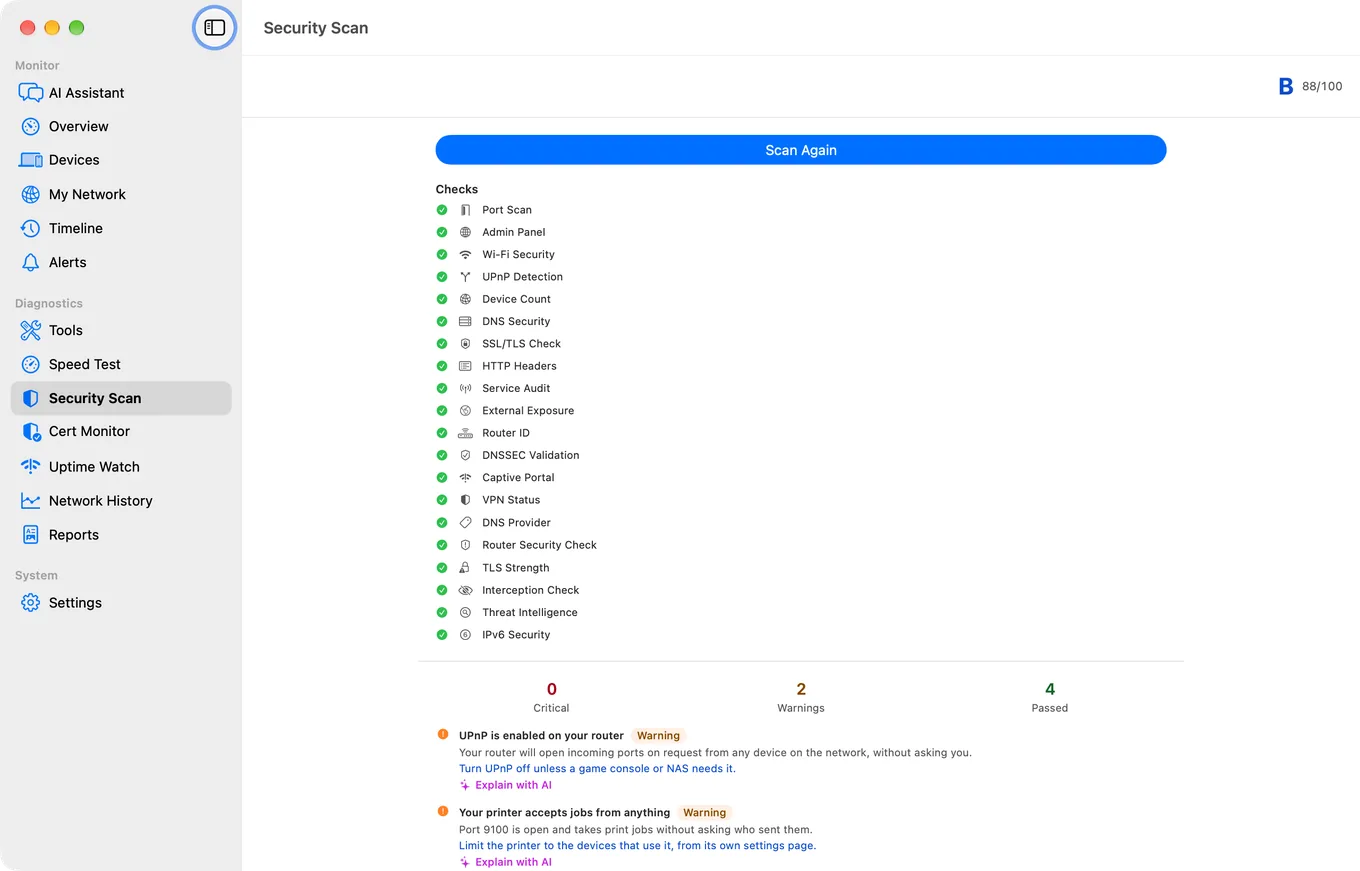
One thing worth knowing about the scores: the Security Scan grades your network out of 100, and higher is better. PingKit Agent also gives each device its own risk rating, and that one runs the other way: lower is better.
The router recommendations are free. Brand-specific settings guidance, firmware instructions and known-issue notes appear as ordinary findings for everyone. The device risk ratings PingKit Agent refreshes after each scan while your Mac is awake are free as well.
Honest Limits
- This is a configuration review of your own network, not a formal security assessment and not a substitute for one.
- It cannot check inside your router. No app can read your admin password, and PingKit Agent does not read your router's port forwarding, so check both in the router's own interface.
- It does not scan the internet or anything you do not own.
- Encryption type is visible on the Mac but not on iPhone, because iOS does not report it to apps at all.
- Automatic re-checking runs only while the Mac is awake. It is free; no subscription needed. macOS 15 or later.
Frequently Asked Questions
What is the most important home network setting to check?
The router's admin password. If it is still the printed default, change it before anything else, because every other setting is reachable once someone has admin access.
Should I disable UPnP on my router?
If you can live without it, yes. UPnP lets any device on your network open ports without asking you, which is convenient and also means you no longer know what is exposed. Forward the one or two ports you actually need by hand instead.
How do I know if my router firmware is out of date?
Check the version in the router's admin interface against the manufacturer's support page. Home routers commonly run firmware several years old, and firmware updates are where publicly documented issues get fixed. Enable automatic updates if the router offers them.
Should smart home devices go on a guest network?
It is a good idea. Smart home devices are the class most likely to be poorly maintained and slow to receive updates, and a guest network keeps them separated from the computers holding your files.
Does a lower or higher security score mean better?
It depends on which score. PingKit's Security Scan grades your network out of 100, and higher is better. On a Mac, PingKit Agent also gives each device a risk rating, where lower is better.
Check it once, then keep checking
A configuration review of your own network with prioritised findings, plus a risk rating for each device that PingKit Agent refreshes after every scan while your Mac is awake, with an alert when one reaches high.
Get PingKit Agent for Mac