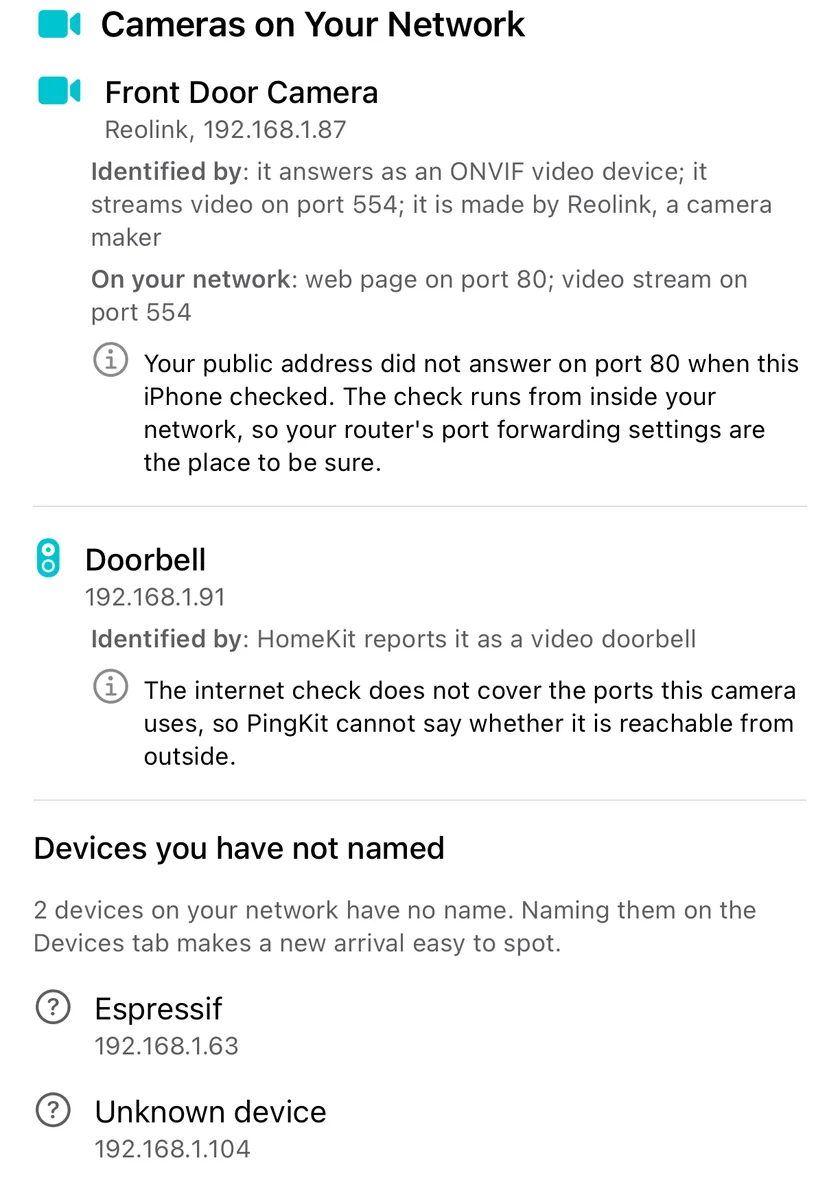
PingKit's Security Scan lists every camera it can identify on your Wi-Fi, says how it knows each one is a camera, and tries whether your own public address answers on a port that camera uses. It runs on your iPhone, on your own network, when you run the scan.
The cameras section needs Guardian: $2.99 a month or $24.99 a year, with a 1-week free trial. The Security Scan and the Devices list are free.
How to see which cameras are on your Wi-Fi
Join your own Wi-Fi with your iPhone. PingKit can only see the network the phone is on, and it is meant for a network you own.
Open the Security Scan, from the Home tab or the Tools tab, and run it. A run takes about a minute, because it includes a timed sweep of the devices on your network.
Read Cameras on Your Network, which sits just below the list of devices each finding belongs to. Every camera and video doorbell PingKit identified is there, with its name or "Unnamed camera", its maker when known, and its address on your network.
Name the ones you recognise on the Devices tab. A camera you cannot place is worth walking round the house to find.
The section is part of PingKit Guardian. Without it, the scan and its score are unchanged and free, and the Devices list still shows each camera with its device type.
How PingKit decides a device is a camera
A device is listed as a camera when at least one signal that only a camera sends is present, or when the device classifier, which weighs everything it knows, concludes "Security Camera". Two weaker signals are shown as supporting evidence but never list a device on their own.
Signal
What it is
Lists a device on its own?
HomeKit camera
The accessory tells HomeKit it is a camera
Yes
HomeKit video doorbell
The accessory tells HomeKit it is a doorbell with video
Yes
A camera maker's own service
It advertises Wyze's own Bonjour service
Yes
The device classifier
Its name, maker, services and ports together match a camera
Yes
Port 554
It answers on the usual port for a live video stream (RTSP)
Not by itself, because a recorder on a NAS answers there too; the classifier often concludes camera from it when nothing better fits
Makers such as Google, Amazon and TP-Link are left out of that last row on purpose: they make cameras and far more of everything else, so their name alone says nothing. Their cameras are still listed when one of the stronger signals is there.
What each entry tells you
Identified by. The evidence, strongest first, in plain words: "HomeKit reports it as a camera", "it advertises a camera service from Wyze", "it streams video on port 554".
Each camera found, the evidence that identified it, the ports it uses at home, and what the check from your public address could and could not say.
On your network. What the camera serves locally, from the ports the scan checks: a video stream on 554, or a web page on 80, 443, 8080 or 8443 (usually its settings page).
Your public address. One line about your own public address, which the Security Scan tries from your iPhone on seven ports: 22, 23, 80, 443, 3389, 5900 and 8080. There are four possible answers, and PingKit is careful about which one it gives.
Your public address answers on a port this camera also uses. Shown first, with an orange mark. If your router forwards that port to the camera, the camera can be reached from the internet, so check port forwarding in your router's settings. It is a prompt to look, not proof: the Security Scan does not read your router's forwarding table, the port may be forwarded to something else, and some routers answer their own public address from inside the network.
Your public address does not answer on the camera's ports. Only when the check covered at least one of them and finished. Because the check is made from inside your network, a router that does not loop connections back to itself can hide a forwarded port, so confirm it in the router.
The check does not cover this camera's ports. The usual case for a camera that only streams on 554, because 554 is not one of the seven. PingKit says it cannot tell, rather than calling the camera unreachable.
Not checked on this scan. PingKit could not find your public address, or the check was interrupted before it finished.
Beside the cameras is a second list: every device that has no name from you and none from the network, shown with its maker or device type and its address. The first five are listed, with a count of the rest. This is the list that turns "I have 38 devices" into something you can work through, and it is where a camera that announces nothing about itself usually turns up.
Give each one you recognise a name on the Devices tab. A short list is easy to re-check after each scan, and a device you do not recognise there is worth finding. On an iPhone a name is remembered by the device's address, so a device that moves to a new address can show up here again.
With a Mac at home: an alert when a camera joins
The iPhone builds the section when you run the scan, because iOS does not let an app watch a network in the background. The PingKit Agent for Mac does watch, from a Mac that stays on, and raises an alert whenever a new device joins. With Guardian Plus ($9.99 a month on iPhone, $4.99 a month on the Mac) a new device that is a camera, by the same rule as the Security Scan, gets its own alert: New Camera on Your Network.
What it does not do
It only sees your network. The scan looks at the Wi-Fi your iPhone is joined to. A camera that is not joined to it, such as one that only records to a memory card, never appears.
The scan does not read your router. The public address line compares what your public address answers, tried from inside your network, with the camera's ports. With Guardian, Router mode reads the forwards your router lists over UPnP, and your router's own port forwarding page has the rest.
It does not change anything. PingKit does not block, disconnect or reconfigure a device. Every probe is an ordinary connection attempt or discovery query, and nothing tries to get into a camera.
It does not run on its own on the iPhone. The list is as fresh as your last Security Scan.
Join your own Wi-Fi with your iPhone, open PingKit's Security Scan and run it. With Guardian, the finished checkup has a section called Cameras on Your Network that lists every camera and video doorbell PingKit could identify, with how it identified each one and what each serves on your network. Without Guardian, cameras still appear in the Devices list with their device type.
Can PingKit tell whether my camera can be reached from the internet?
Partly, and it says which part. From your iPhone, the Security Scan tries your own public address on seven ports: 22, 23, 80, 443, 3389, 5900 and 8080. If one of those answers and is also a port your camera uses, it tells you and suggests checking port forwarding in your router. 554, the usual video stream port, is not among the seven, so for a camera that only uses ports the check does not try, PingKit says the check does not cover them rather than calling the camera unreachable. Because the check is made from inside your network, some routers answer it differently from how they answer the internet, so your router's port forwarding and UPnP pages are the definitive answer.
Why is a camera I own not in the list?
PingKit lists a device as a camera when HomeKit reports it as a camera or video doorbell, when it advertises a camera maker's own service, or when the device classifier concludes it is a security camera. A camera that announces none of these, which is common for battery cameras that talk only to their maker's cloud, can appear as an ordinary device instead, often in the list of devices you have not named. Giving it a name on the Devices tab at least means it is no longer an unknown.
Is the cameras section free?
The Security Scan, its score and every finding are free, and so is the Devices list, which shows cameras with their type. The Cameras on Your Network section and the list of devices you have not named are part of PingKit Guardian, $2.99 a month or $24.99 a year with a 1-week free trial.
Does my iPhone keep watching for new cameras?
No. iOS does not let an app scan your network in the background, so the section is built when you run the Security Scan. For an alert when a new camera joins, PingKit Agent on a Mac that stays on at home watches the network continuously, and with Guardian Plus its new-device alert for a camera is titled New Camera on Your Network.
Know every camera on your network.
Download PingKit, run the Security Scan on your own Wi-Fi, and see every camera on your network with Guardian.