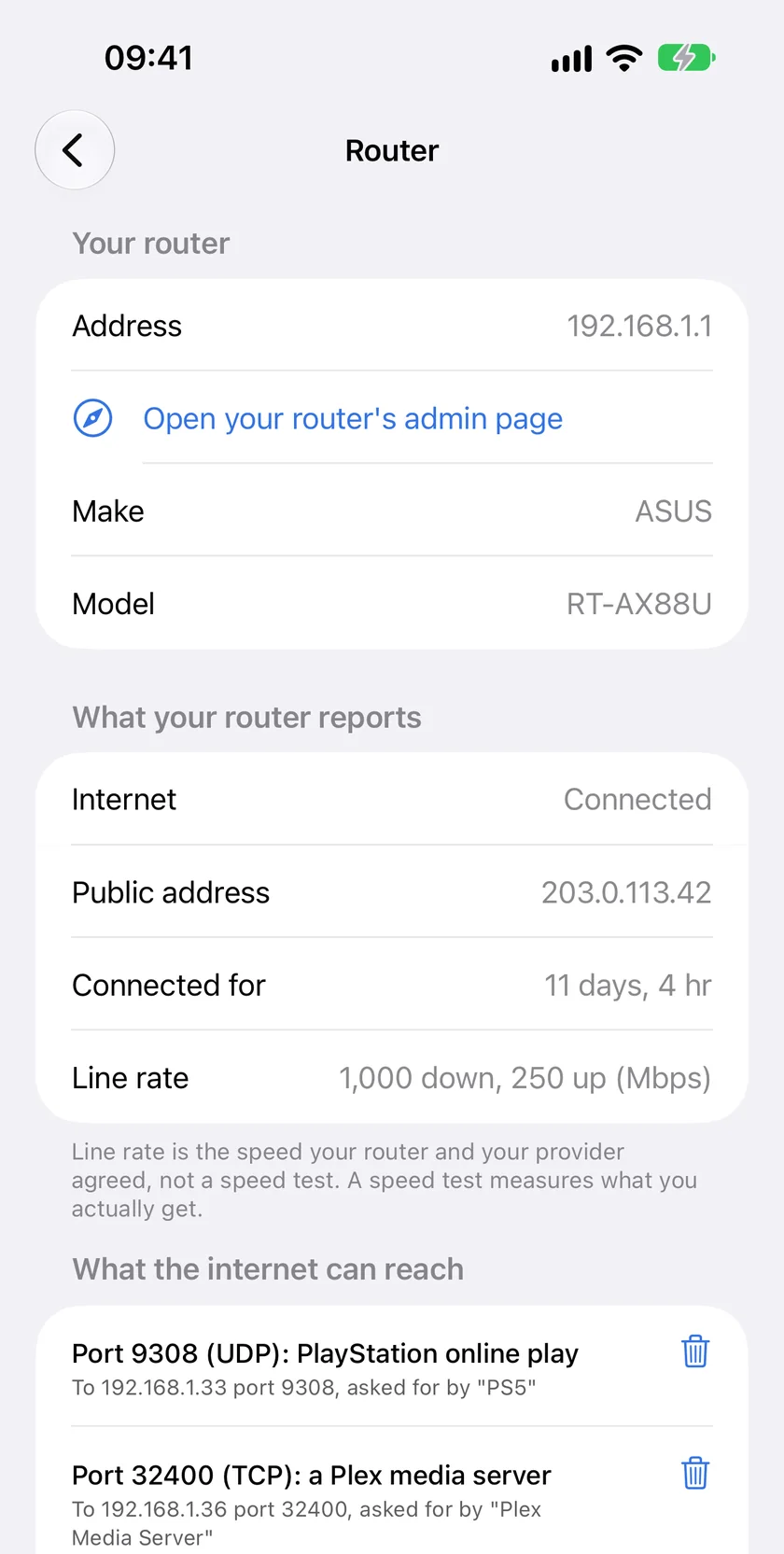
PingKit's Router tool asks your own router what it knows, over your Wi-Fi. Whether the internet link is up, your public address and the line rate are free. With Guardian it reads every port your router forwards from the internet, and removes the ones you do not want.
Join your own Wi-Fi first. The status view is free; port forwarding needs Guardian, $2.99 a month or $24.99 a year with a 1-week free trial.
Before you start
Join your own Wi-Fi with your iPhone. Router mode talks to the router of the network the phone is on, and without Wi-Fi it only says Wi-Fi Required. It is meant for a router you own.
Open the Tools tab and tap Router, in the Network group.
Wait a few seconds while PingKit asks your router what it offers. Pull down on the screen to read it again later.
Router mode never reaches a router over the internet. Everything it reads comes from the router on your own network, and nothing it reads is sent anywhere else.
What every router tells you, free
Most home routers answer a few questions about themselves over UPnP, with no login. Router mode shows what yours answers:
Make, model, connection, public address, uptime and line rate, read from the router over UPnP with no login. The forwarding table under it is the Guardian half.
Row
What it means
Address
Your router's address on your network, with a link that opens its admin page in Safari
Make and Model
What the router calls itself, when it announces it
Internet
Whether the router says its internet link is connected
Public address
The address your router has on the internet side
Connected for
How long the internet connection has been up since it last dropped or the router restarted
Line rate
The speed your router and your provider agreed. It is not a speed test
Two readings say more than they seem to. If the public address is a private one, such as 192.168.x.x or 10.x.x.x, or falls between 100.64.x.x and 100.127.x.x, a second router or your provider's carrier-grade NAT sits between you and the internet, and a port forward on this router cannot be reached from outside. How to detect double NAT explains the difference. And if Connected for is much shorter than you expect, the connection restarted recently: a drop, a router restart, or a provider that reconnects every night, which some DSL providers still do.
Some routers have UPnP status switched off, which is a sensible choice. Router mode then says your router does not offer UPnP status, and still shows its address and the link to its admin page, where everything is.
What the internet can reach: the port forwarding audit
With Guardian, Router mode reads your router's UPnP port forwarding table. Each entry is a port the router forwards from the internet to a device at home, usually because that device asked for it: a game console, a NAS offering remote access, a media server, a camera.
Every entry is written in plain language. The first line names the port, the protocol and what the port is usually for, such as "Port 3074 (UDP): Xbox online play". The second says where it goes and who asked, such as 'To 192.168.1.40 port 3074, asked for by "Xbox"'. A port PingKit does not recognise is listed with its number and protocol only.
Seven services get an orange note, "Worth a look: this service is not usually opened to the internet.": file transfer (FTP, 21), remote login (SSH, 22), remote login without encryption (Telnet, 23), file sharing (445), a camera or video stream (554), remote desktop (3389) and screen sharing (5900). It is a prompt to check, not a verdict. A forward you set up on purpose can be exactly right.
Removing a forward
Tap the bin beside an entry and confirm. PingKit asks your router to delete it and then reads the table again, so the list shows what the router now holds rather than what the app assumes. Many routers refuse: some only allow changes in their own settings, and some only let the device that asked for a forward remove it. PingKit tells you when the router did not remove it. A device that opened a port through UPnP can ask again the next time it needs it, so to stop it for good, switch UPnP off on that device or on the router.
What the table does not show
The table is what your router lists over UPnP. On many routers a rule you typed into the admin page yourself is not part of it, and neither is an exposed host (DMZ) setting or an opening in the router's IPv6 firewall. When the router returns an empty table, PingKit says nothing has asked it for a forward through UPnP. The router's own port forwarding page is the complete list.
It does not replace your router's admin page. Rules you set by hand, Wi-Fi passwords, firmware updates, parental controls and the guest network's settings all live there. Router mode mostly reads. It changes one thing only: a port forward you remove.
It only talks to your own router. The router of the Wi-Fi your iPhone is joined to, over your own network.
It does not watch in the background on iPhone. Each reading is taken when you open it.
It does not show hardware (MAC) addresses, and it does not block or disconnect devices.
Can I see my router's port forwarding from my iPhone?
Yes, for the forwards your router lists over UPnP, which is usually every port a device on your network asked it to open. Join your own Wi-Fi, open the Tools tab and tap Router. With Guardian, the section called What the internet can reach lists each forward, which device it points at and what the port is usually for. A rule you typed into the router's own settings may not be listed this way on every router, so the router's port forwarding page stays the complete answer.
Does PingKit need my router password?
No. The status view and the port forwarding table use UPnP, which answers without a login, and Router mode never asks for your router's password.
Which routers does Router mode work with?
The status view and the port forwarding table work with any router that offers UPnP status, which most home routers do unless it has been switched off.
Is Router mode free?
The status view is free: your router's address and admin page link, its make and model when it announces them, whether the internet link is up, the public address, how long the connection has been up and the line rate. The port forwarding table is part of PingKit Guardian, $2.99 a month or $24.99 a year with a 1-week free trial.
Does my iPhone keep watching my router?
No. iOS does not let an app watch a network in the background, so Router mode reads your router when you open it.
See what your router is telling you.
Download PingKit, join your own Wi-Fi and open Router in the Tools tab. The status view is free.