How to See and Remove UPnP Port Forwards from Your iPhone
Short version. When UPnP is on, any device on your network can ask your router to open a port from the internet to itself, and the router keeps a table of what it agreed to. On an iPhone joined to your own Wi-Fi, PingKit's Router mode reads that table with Guardian, names what each port is usually for, marks the services that are not usually opened to the internet, and removes an entry after you confirm. Some routers refuse removal from an app, a device can ask again, and a rule you typed into the router yourself may not be listed, so the router's own admin page stays the final word.
What a UPnP Port Forward Is
Your router lets connections out to the internet freely and turns unrequested connections from the internet away. A port forward is an exception: a rule that sends traffic arriving on one port of your public address to one device at home. You can type one into the router's admin page yourself, or, if UPnP is switched on, a device can ask the router for one and the router adds it without asking you.
That second route is why UPnP exists. A game console needs other players to reach it, a NAS wants to be reachable when you are away, a media server wants to stream to your phone on the train. Each asks the router for the port it needs and it works without anyone opening a settings page. The price is that the list of what your network exposes grows by itself, and nobody looks at it.
Why the Table Is Worth Reading
PingKit's Security Scan reports UPnP Enabled when your router answers UPnP discovery. That tells you the door can open. It does not tell you what has come through it. The table does: every forward the router agreed to, which device it points at, and usually the name the device gave when it asked.
Reading it answers the questions that matter. Is anything pointed at a device you replaced last year? Did a camera or a recorder open its own path in? Is a computer offering remote desktop to the whole internet because some app asked for it once? Those are the forwards worth removing, and you only find them by looking.
Reading the Table on Your iPhone
- Join your own Wi-Fi. Router mode talks to the router of the network your iPhone is on, and nothing else.
- Open PingKit, go to the Tools tab and tap Router, in the Network group.
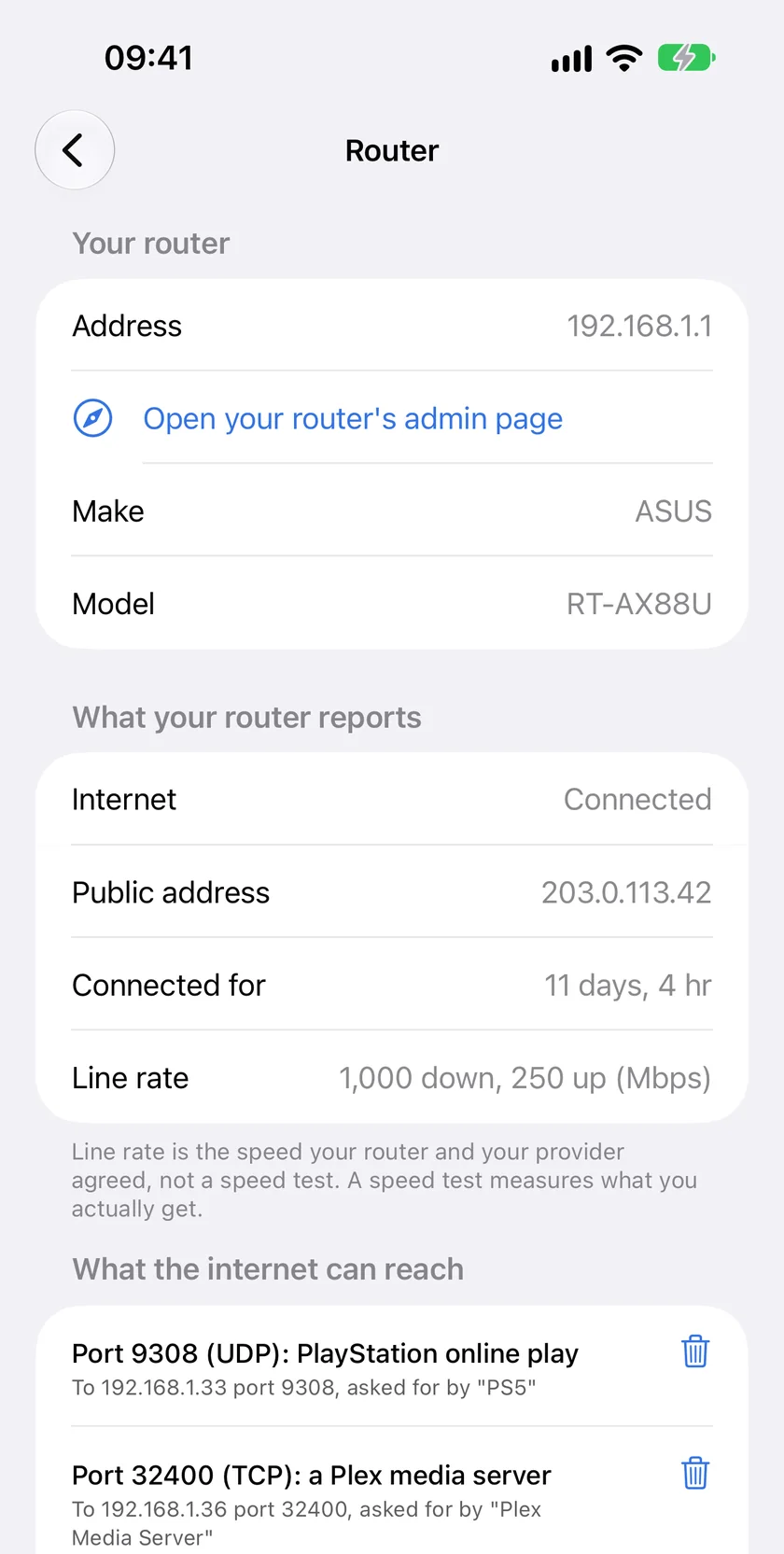
- After a few seconds of asking the router, the section called What the internet can reach lists every forward. The table is part of PingKit Guardian; without it the section is locked, and the free status view above it is unchanged.
Each entry has two lines. The first names the port, the protocol and what the port is usually for, such as Port 32400 (TCP): a Plex media server. The second says where the traffic goes and who asked for it, such as To 192.168.1.20 port 32400, asked for by "Plex Media Server". When PingKit does not recognise a port, it shows the number and protocol only, and the device's own description is the best clue.
| Usually | Port | Typical owner |
|---|---|---|
| Xbox online play | 3074 | An Xbox |
| Game and voice chat | 3478 | Consoles and calling apps |
| A Plex media server | 32400 | The computer or NAS running Plex |
| A Minecraft server | 25565 | Someone's Java Edition server |
| A VPN | 1194 or 51820 | OpenVPN or WireGuard at home |
| A NAS's web page | 5000 or 5001 | A NAS offering remote access |
The Entries Marked "Worth a Look"
Seven services get an orange note in Router mode, because they are rarely meant to be reachable by anyone on the internet: file transfer (FTP, 21), remote login (SSH, 22), remote login without encryption (Telnet, 23), file sharing (445), a camera or video stream (554), remote desktop (3389) and screen sharing (5900).
The note is a prompt, not a verdict. If you run an SSH server at home on purpose and keep it patched, its forward is exactly right. What deserves action is the forward nobody remembers asking for: a remote desktop port opened by a program you have since uninstalled, a camera that opened 554 to itself so its app could stream, a file share someone exposed while testing. Is your security camera reachable from the internet? covers the camera case step by step.
Removing a Forward
Tap the bin beside the entry. PingKit asks you to confirm and says what will happen: the device at that address stops being reachable from the internet on that port, and it can ask your router again if it needs to. Confirm, and PingKit asks the router to delete the entry, then reads the whole table again, so what you see afterwards is what the router actually holds.
Two things can happen that are not PingKit's to decide:
- The router refuses. This is common. Some routers only let port forwarding be changed in their own settings, and many only let the device that asked for a forward remove it. PingKit tells you the router did not remove it, and the entry stays. Remove it in the router's admin page instead.
- The device asks again. A console or a NAS with UPnP enabled will usually recreate its forward the next time it starts or needs it. To stop that, switch UPnP off in the device's own network settings, or switch it off on the router for everything.
What the Table Cannot Show You
Router mode reads what your router publishes over UPnP, and that is not always everything:
- Rules you typed in yourself. On many routers a forward set up by hand in the admin page is not part of the UPnP table. An empty list means nothing asked for a forward through UPnP; it does not prove there are no forwards at all.
- An exposed host or DMZ setting, which sends everything unrequested to one device, and openings in the IPv6 firewall, which are a separate list.
- Whether a forward can be reached at all. If the public address Router mode shows is a private one, such as 192.168.x.x or 10.x.x.x, or falls between 100.64.x.x and 100.127.x.x, a second layer of address translation sits between you and the internet, usually carrier-grade NAT or a second router, and nothing from outside reaches this router's forwards. How to detect double NAT explains it.
- A router with UPnP status switched off. Router mode then says the router does not offer UPnP status and shows its address and admin page link instead of the table. That is often a deliberate, sensible setting.
When the Router's Own Page Is the Better Answer
For a complete audit, open the admin page. Router mode's status view has a link to it, and it is usually the gateway address PingKit shows, such as 192.168.1.1. That page lists the forwards you set by hand next to the UPnP ones, lets you switch UPnP off altogether or, on some routers, per device, and holds the DMZ and IPv6 settings. What the iPhone adds is speed and plain language: a thirty-second look from the sofa at what the internet can reach, with the entries that deserve attention already marked.
With Guardian, the network report also carries a Port Forwarding section from Router mode's last reading, dated, which is a simple way to keep a record of what was open and when.
Frequently Asked Questions
How do I see UPnP port forwards on my router?
Open your router's admin page and look for a UPnP or port forwarding section. From an iPhone joined to your own Wi-Fi, PingKit's Router mode reads the same UPnP table with Guardian and lists each forward with the device it points at and what the port is usually for.
Can I remove a UPnP port forward from my iPhone?
Often. In Router mode, tap the bin beside the entry and confirm, and PingKit asks the router to delete it and re-reads the table. Many routers only allow changes in their own settings, or only let the device that asked for a forward remove it, and PingKit tells you when the router refuses. A device with UPnP on can ask for the forward again, so switch UPnP off on the device or the router to stop it.
Why does Router mode not show a port forward I set up myself?
Router mode reads the table your router publishes over UPnP. On many routers a rule typed into the admin page by hand is kept separately and is not part of that table, so the router's own port forwarding page is the complete list.
Is it safe to leave UPnP on?
It depends on what is on your network. UPnP lets any device on it open ports without asking you, which is convenient for consoles and media servers and risky for anything poorly maintained. Reading the table from time to time, and removing what you do not recognise, is the middle ground. What Is UPnP and Should You Turn It Off? goes through the trade-off.
Is the port forwarding table free in PingKit?
No, it is part of PingKit Guardian, $2.99 a month or $24.99 a year with a 1-week free trial. Router mode's status view, with the internet link, public address and line rate, is free.
Read your own router from your iPhone.
Router mode's status view is free. Guardian adds the port forwarding table, $2.99 a month or $24.99 a year with a 1-week free trial.
Download PingKit for iPhone