How to Detect Double NAT and CGNAT From Your iPhone
Short version. If port forwarding does not work no matter what you configure, you are probably behind two layers of address translation. There are two kinds and the fix differs: double NAT, where you have two routers in a row and you can remove one, and CGNAT, where your ISP never gave you a public address and you cannot. Two checks from an iPhone tell them apart: read your gateway and public IP in My Network, then run a traceroute and look at the first two hops. A second private address at hop 2 means double NAT; an address starting 100.64 means CGNAT.
The Two Things That Look the Same
Network address translation lets many devices share one public address. One layer of it is normal and fine. Two layers, one inside the other, breaks anything that needs an inbound connection: port forwarding, some game consoles, self-hosted services, and occasionally VPNs.
- Double NAT happens when you have two routers in a row. An ISP modem-router with its own routing turned on, plus your own router behind it. This is yours to fix.
- CGNAT, carrier-grade NAT, happens when your ISP shares one public address between many customers. Common on mobile broadband, satellite, and increasingly on fixed lines as public addresses run out. You cannot fix this from inside; you can only ask the ISP or work around it.
They produce identical symptoms, and the diagnosis takes about ninety seconds.
Check 1: Your Gateway and Your Public Address
Open PingKit and go to My Network. It shows your local IP, your gateway, your subnet mask, and separately your public IP with the ISP and the ASN behind it.
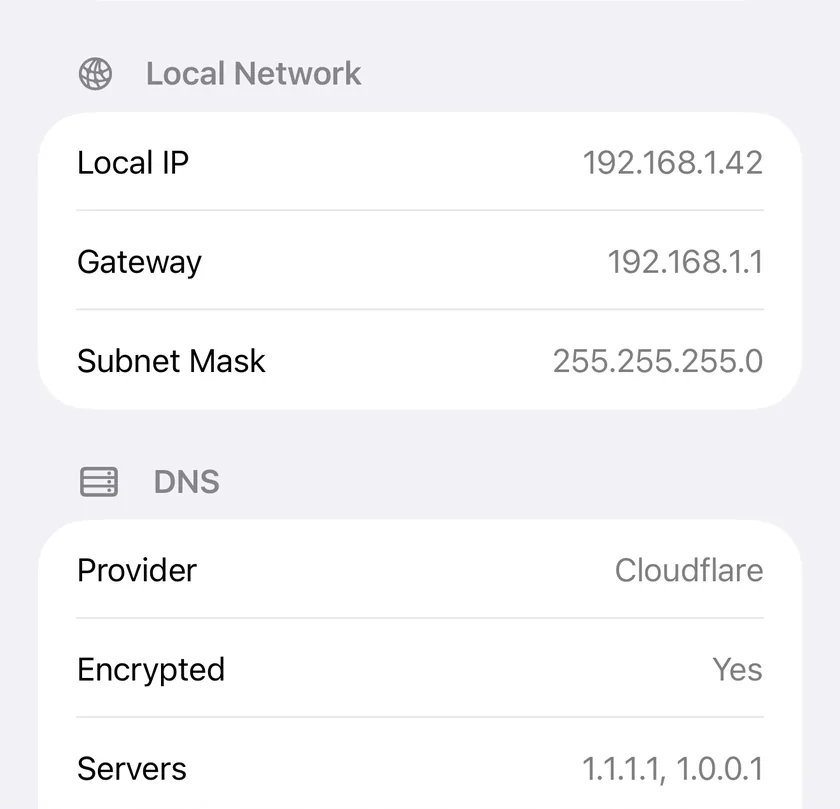
Note two things: the gateway, which will be a private address such as 192.168.1.1, and the public IP, which is the address the internet sees you as.
Now open your router's admin page and find its WAN or internet address, or, if your router offers UPnP, open Router in PingKit, which shows that address as Public address under What your router reports. Compare it with the public IP PingKit reported.
| Router's WAN address | What it means |
|---|---|
| Matches the public IP PingKit showed | Single NAT. Your router holds the public address and port forwarding will work |
| A private address (10.x, 172.16 to 172.31.x, or 192.168.x) | Double NAT. Something upstream is translating before your router does |
| An address starting 100.64 to 100.127 | CGNAT. Your ISP is sharing one public address among customers |
Check 2: Traceroute, If You Cannot Get Into the Router
You do not need router access. Open Traceroute in PingKit and run it against 1.1.1.1. It lists every hop between you and the destination, private addresses included, in order.
Read the first three lines:
- Hop 1 is your gateway, a private address. Always.
- Hop 2 is a public address. Single NAT. You are done and this page is not your problem.
- Hop 2 is another private address (10.x, 172.16 to 172.31.x, 192.168.x). Double NAT: there is a second router between you and the internet.
- Hop 2 or 3 is in the 100.64 to 100.127 range. CGNAT. That range is reserved for exactly this purpose, so it is a definitive answer rather than a guess.
Run it twice to be sure, since a hop that does not reply can shift what you see on a single run.
What to Do About Double NAT
- Put the ISP box into bridge or modem mode. It stops routing and hands the public address through to your router. This is the correct fix and most ISP equipment supports it, though some hide it and some require a phone call.
- Or use only one router. If your own router is doing nothing the ISP box cannot, remove it from the path.
- Or put your router in the ISP box's DMZ. A workaround rather than a fix: the outer box forwards everything to the inner one. It works, and it means the outer box's own firewall is no longer protecting anything behind it.
- Or turn your inner router into an access point. Disable its DHCP and routing, connect it by a LAN port rather than its WAN port, and it becomes a WiFi extension of the ISP box instead of a second network.
After any of these, re-run check 2. Hop 2 should be a public address. Then test the forwarding itself: How to Port Forward on Your Router (and Test It Works).
What to Do About CGNAT
You cannot open a port through it, and no router setting changes that. Three realistic responses:
- Ask the ISP for a public address. Many will provide one, sometimes free, sometimes on a business tariff. It is worth a call before anything else.
- Use a tunnel. An outbound connection to a service that accepts inbound traffic on your behalf sidesteps the problem completely, and is how most people self-host behind CGNAT now. It also removes the need for any port forwarding at all.
- Use IPv6, if you have it. CGNAT is an IPv4 shortage workaround. If your ISP gives you real IPv6, services reachable over IPv6 are not affected, though clients that are IPv4-only will not reach them.
Honest Limits
- Traceroute depends on intermediate routers replying. A hop that stays silent shows as a gap, which can hide the address you are looking for; run it more than once.
- The 100.64 range is a strong indicator of CGNAT, but some ISPs use ordinary private ranges for the same purpose, so a private address at hop 2 with no router of your own in the path also points at the carrier.
- PingKit does not sign in to your router. Its Router tool shows, free, what your router reports over UPnP, including the WAN address Check 1 needs, and with Guardian it can remove a port forward you choose; if your router has UPnP off, read the WAN address from the router's own admin page.
- PingKit's Port Scanner works on your own network only, so it cannot test a port from the outside. On iPhone, the Security Scan also tries seven common ports on your own public address, but skips that check when PingKit's Router tool has recently read a different address from your router, which is what double NAT and CGNAT look like; either way it is not a test of the specific port you just forwarded, so use a port-check service after you have made the change.
Frequently Asked Questions
How do I know if I am behind double NAT?
Run a traceroute to 1.1.1.1 from your phone and look at hop 2. Hop 1 is always your own gateway; if hop 2 is also a private address, something upstream is translating before your router and you have double NAT. Comparing your router's WAN address with the public IP the internet sees gives the same answer.
What does an IP address starting with 100.64 mean?
That range, 100.64.0.0 to 100.127.255.255, is reserved for carrier-grade NAT. Seeing it in a traceroute means your ISP is sharing one public address among many customers, so inbound port forwarding cannot work for you.
Does double NAT slow down my internet?
Not meaningfully in most cases. What it breaks is inbound connections: port forwarding, some console features, and reaching services you host at home. Throughput is usually unaffected.
How do I fix double NAT?
Put the ISP's box into bridge or modem mode so your router holds the public address, or remove one of the two routers from the path, or convert the inner router into an access point by disabling its DHCP and connecting it by a LAN port.
Can I port forward through CGNAT?
No. Ask your ISP for a public address, use a tunnel that makes an outbound connection on your behalf, or use IPv6 if your ISP provides it.
Find out which layer is in your way.
Free to download, with all 19 tools and no ads. Guardian is $2.99 a month or $24.99 a year on iPhone or Mac (US prices), with a 1-week free trial. Cancel anytime.
Download PingKit for iPhone