DSL Sync Rate vs the Speed You Pay For: How to Check It
Short version. On DSL, your modem and the exchange agree a speed when the line connects: the sync rate. Nothing on your network can go faster, so it is the first number to check when your internet feels slower than your plan. Your router's DSL status page shows it. On an iPhone, PingKit's Router mode shows the line rate your router reports, for free. Well below your plan, say under 80% of it, it is worth raising with your provider. A sync close to the plan with slow speed tests points at Wi-Fi or the network, not the line.
Three Numbers, in Order
When your internet feels slower than what you pay for, three numbers are involved, and each one caps the next:
- The plan. The headline speed on your contract, such as 100 Mbps down.
- The sync rate. The speed your modem and the provider's equipment agreed when the line connected. It depends on the length and quality of the copper to the exchange or cabinet, and on the profile the provider allows.
- The throughput. What a speed test measures: the data you actually get, after protocol overhead, through your router, your Wi-Fi and whatever else is using the connection.
The sync rate is the gross rate of the line, overhead included, so on a healthy line it normally sits at or a little above the plan's headline figure. A speed test always comes out somewhat under the sync, because every packet carries overhead. A sync well below the plan means the line itself is the limit. What matters is a large gap, and where it sits.
Where to Read Your Sync Rate
Every DSL router shows it on a status page in its admin interface, usually called DSL, Line or Broadband status. Many routers also show the line's maximum attainable rate, error counters and the noise margin there: the most complete picture you can get.
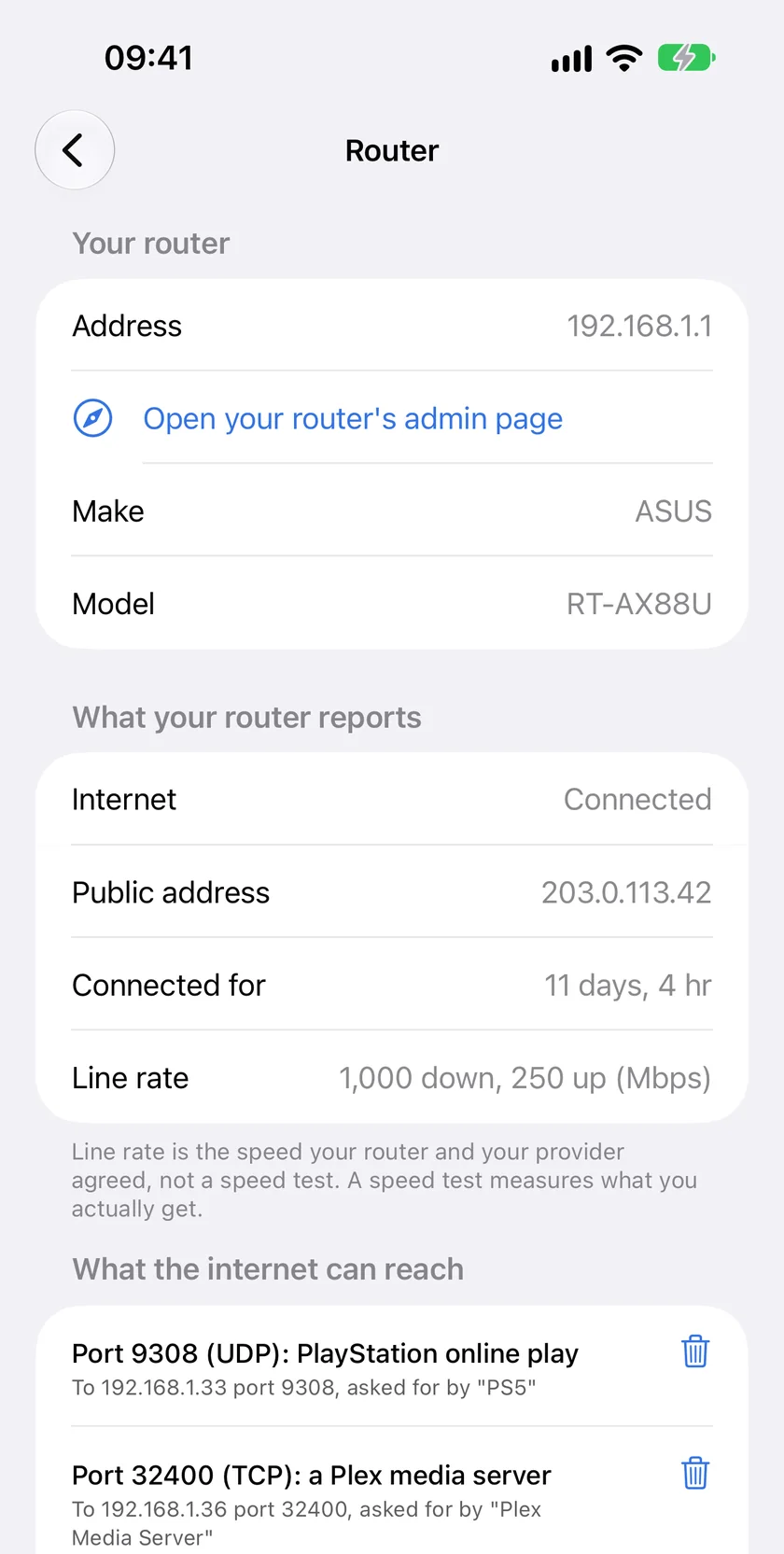
From an iPhone on your home Wi-Fi, PingKit's free Router mode gives the short version on most routers: Line rate, the speed your router reports for its internet link over UPnP, down and up. PingKit labels it as the speed your router and your provider agreed, not a speed test.
Reading the Result
| Sync vs plan | Speed test vs sync | Where the problem is |
|---|---|---|
| Close to the plan | Close to the sync | Nowhere. You are getting what the line can carry |
| Close to the plan | Far below the sync | Inside your home: Wi-Fi, the device, or something else using the connection |
| Well below the plan | Close to the sync | The line itself. A speed test cannot fix this; the sync is the ceiling |
| Well below the plan | Far below the sync | Both. Fix the line first, then look at Wi-Fi |
For the inside-your-home case, is it your Wi-Fi, router or ISP? walks through separating them, and a speed test run next to the router, ideally over a cable, removes Wi-Fi from the picture.
When the Sync Is Well Below the Plan
- Check the wiring at home first. Plug the router into the first phone socket where the line enters the building, with the shortest cable you have. Extension cables, old splitters and extra sockets all cost sync.
- Look at the error counters on the router's DSL page. A line with many errors is often held at a lower, more stable rate by the provider's equipment.
- Note the numbers, with dates. A sync reading from Router mode, the router's DSL page and speed tests at different times of day are what a provider's support line asks for.
- Call the provider. A line that syncs far below the plan it was sold on is theirs to fix, and some regulators give customers rights when a line under-delivers. In Germany, the Bundesnetzagentur's broadband measurement (Breitbandmessung) is the recognised way to document it; in the UK, many providers have signed Ofcom's voluntary code on minimum guaranteed speeds.
Cable and Fibre
Sync rate is a DSL idea. On cable and fibre the router does not negotiate a speed with a cabinet in the same way, and what it reports as its line rate varies from model to model: it may be the provisioned speed, the port speed, or nothing at all. Treat any of these as a ceiling, not a measurement, and use a speed test for the real figure.
Keeping a Record
Router mode shows the sync when you open it; iOS does not let an app take readings in the background. For a history, the PingKit Agent on a Mac can run scheduled speed tests, and with Guardian the results appear on your iPhone. A week of speed tests next to one sync reading is usually enough to show whether the line or the house is the problem.
Frequently Asked Questions
What is a DSL sync rate?
The speed your modem and the provider's equipment agree when the line connects. It depends on the line's length and quality and on the profile the provider allows, and nothing on your network can go faster than it.
Why is my sync rate lower than my plan?
On a healthy line the sync normally sits at or a little above the plan's headline figure, because it is the gross rate, overhead included. Well below it means the line is the limit: long or poor copper, in-house wiring such as extension cables and old splitters, interference, or a lower profile the provider has set after errors. Check the wiring at home, then take the numbers to the provider.
How do I check my sync rate from my iPhone?
Open your router's DSL status page in Safari. With PingKit, the free Router mode shows the line rate most routers report over UPnP.
My sync rate is fine but speed tests are slow. Why?
Then the line is not the limit. Look inside your home: Wi-Fi signal and interference, the device you test from, or other devices using the connection. A speed test next to the router, over a cable if you can, tells you whether Wi-Fi is the difference.
Does PingKit log the sync rate over time?
No. Router mode reads it when you open it, because iOS does not allow background readings. For a history of what you actually get, PingKit Agent on a Mac runs scheduled speed tests, and Guardian brings the results to your iPhone.
Read your own router from your iPhone.
Router mode's status view is free. Guardian adds the port forwarding table, $2.99 a month or $24.99 a year with a 1-week free trial.
Download PingKit for iPhone