Session Watch: Is Your Connection Good Enough to Play?
Session Watch pings your router and times a connection to the internet roughly once a second, then grades your connection A to F for real-time games. The one-minute check is free. Guardian measures against the cloud region nearest your game for up to two hours, eight with Guardian Plus, and tells you whether the lag is your Wi-Fi or beyond your router.
Join your own Wi-Fi first and keep PingKit on screen while it measures. The one-minute check is free; Guardian is $2.99 a month or $24.99 a year with a 1-week free trial.
Before you start
Join your own Wi-Fi with your iPhone. Session Watch measures two things at once, your router and a target on the internet, and the router half needs the router of the network your iPhone is on.
Open the Tools tab and tap Session Watch, in the Diagnostics group.
Keep PingKit on screen while it measures. iOS does not let an app measure the network in the background, so a session pauses when you switch away or the iPhone locks, and carries on when you come back, until the end time you chose. Leaving the Session Watch screen ends the session and grades what it measured. PingKit keeps the screen on while a session is measuring, so Auto-Lock does not interrupt it, but pressing the side button does. For a long session, put the iPhone on its charger.
It measures your iPhone's connection. The part beyond your router is shared by everything in your home, so a slow line or a bad evening shows up the same for your console. The Wi-Fi part is the iPhone's own. For the closest reading, put the iPhone where you play, on the same Wi-Fi as the console or PC. If the console is on a cable and the iPhone is on Wi-Fi, the Wi-Fi half describes the phone, not the console. And because the session pauses whenever another app is in front, it suits play on a console, a PC or another device, not a game on the same iPhone.
What it measures
Roughly once a second, Session Watch takes two readings at the same moment:
Row
What it is
Ping to router
A ping to your router, the same kind of ping the Ping tool sends. A healthy router on a good Wi-Fi link answers in a few milliseconds, every time
Ping to target
How long a connection to the target takes to open on port 443: one handshake, closed at once, with nothing sent after it. That takes about one round trip, plus a name lookup when the iPhone does not already have the region's address, and it is how PingKit times cloud endpoints, which do not answer ping
A target reading that takes longer than a second counts as lost. A ping to the router that gets no reply within a second counts as lost too, and the next pair of readings waits for it, so a router that drops pings, or ignores them altogether, slows the readings down: on a router that never answers, there is a pair about every two seconds, some thirty in a one-minute check. From the target readings, Session Watch works out three numbers:
Latency: the median time to the target, so one slow reading does not move it.
Jitter: how much each reading differs from the one before, on average. This is the unevenness you feel as stutter and rubber-banding.
Packet loss: the share of readings that never came back.
Because the target is timed by opening a connection, the latency can read a little higher than the ping a game shows for a server in the same place. Compare Session Watch with itself, across evenings and regions, rather than with an in-game number.
The grade, A to F
Each number gets a grade, and the connection gets the worst of them. A connection with 20 ms of latency that loses 2% of its readings is a D, because the loss is what you will feel.
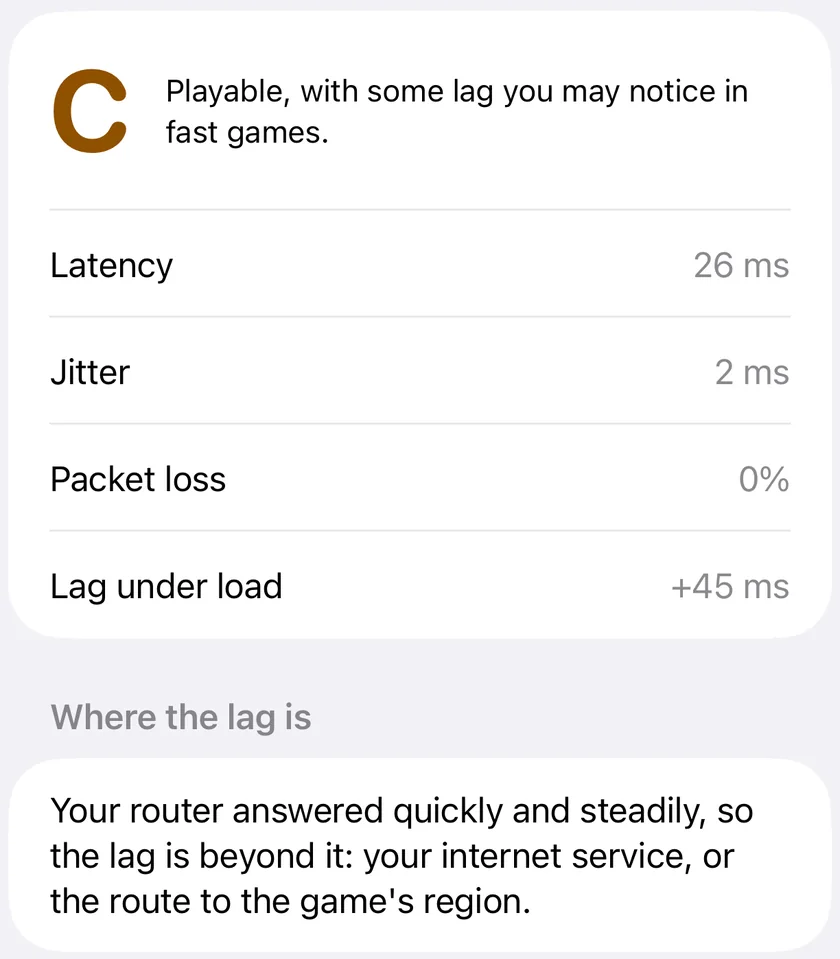
A finished session. The grade is the worst of the four numbers under it, so this C comes from the lag under load, and the router answered steadily, which puts the lag beyond it.
A
B
C
D
F
Latency
40 ms or less
up to 70 ms
up to 100 ms
up to 150 ms
over 150 ms
Jitter
5 ms or less
up to 10 ms
up to 20 ms
up to 40 ms
over 40 ms
Packet loss
none
up to 0.5%
up to 1%
up to 3%
over 3%
Lag under load (Guardian)
+5 ms or less
up to +30 ms
up to +60 ms
up to +200 ms
over +200 ms
Next to the grade, one sentence says what it means for play:
A: "Game-ready. Low, steady latency with nothing lost."
B: "Good for most games. Fine for competitive play."
C: "Playable, with some lag you may notice in fast games."
D: "Expect noticeable lag or stutter in real-time games."
F: "Not good enough for real-time games right now."
One thing to know about short checks: a one-minute check takes at most about sixty readings, so a single lost one is already more than 1% and makes a D, or worse, on its own. Run it again before you act on a D that rests on loss alone. A longer Guardian session smooths that out.
Where the lag is
When the grade is C or worse, Guardian compares the two readings and says which side of your router the problem is on. The router's answers decide it: if the router itself was slow (a median over 20 ms), uneven (jitter over 10 ms) or lost more than 1% of its pings, and at least two of them, the lag starts inside your home. A single lost ping is never enough to blame your Wi-Fi, and a healthy home router is far inside all of those limits.
Your Wi-Fi: "Your router itself answered slowly or unevenly, so the lag starts inside your home. Try a cable, or move closer to the router."
Beyond your router: "Your router answered quickly and steadily, so the lag is beyond it: your internet service, or the route to the game's region."
Cannot tell: "Your router does not answer pings, so PingKit cannot tell whether the lag is inside your home or beyond it." Plenty of routers ignore pings, and that says nothing about the link.
Without Guardian the section still appears on a poor grade, with a note that Guardian tells you whether the lag is your Wi-Fi or beyond your router. Why a game lags on Wi-Fi but not on a cable goes through the Wi-Fi case.
Measure against your game's region
The free check measures against The internet, 1.1.1.1, which is close to almost everyone. With Guardian, Measure against offers ten regions:
US East (Virginia), US Central (Ohio), US West (Oregon)
South America (São Paulo)
Europe West (Ireland), UK (London), Europe Central (Frankfurt)
Asia East (Tokyo), Asia Southeast (Singapore)
Oceania (Sydney)
Each region is an Amazon Web Services endpoint in that region, reached with the same one-handshake connection. None of them is a game server, and PingKit never contacts a game's own servers. A region measures the distance from your network to that cloud region. Many online games run their servers in cloud regions like these, which is why the one nearest your game's servers is a fair stand-in, but your game may use another provider or another city, and its own ping display is the final word for its servers.
Comparing two targets is useful on its own. If The internet grades A from London and Oceania (Sydney) grades F, the problem is distance, not your home.
Sessions, lag under load and history
Sessions up to two hours, or eight with Plus
With Guardian, Length runs from one minute to 15 minutes, 30 minutes, an hour or two hours, so you can measure through a match or a session of play rather than a minute before it. Guardian Plus adds four and eight hours, for a whole evening; eight hours is as long as a Live Activity can run, so that is the limit. The grade updates as the session runs, under So far, and becomes the Result at the end. Tap Stop to end early: whatever was measured after the first few seconds is graded, and a Guardian session is kept in History.
A Live Activity
A Guardian session puts a Live Activity on the Lock Screen and in the Dynamic Island, with the grade and latency so far and the time left. Because PingKit cannot measure in the background, it pauses whenever it is not on screen, so away from the app the Live Activity shows the grade and latency so far, the time left, and a note that the session is paused until you open PingKit again. At the end it shows the final grade for a few minutes.
Lag under load
With Test lag under load at the end switched on, which it is by default, a further 15 seconds follow the length you chose, with a download running on the iPhone from Cloudflare's speed test service while the readings continue. The rise in latency is shown as Lag under load, such as +45 ms, and it counts toward the grade. That rise is bufferbloat: the lag your connection adds when it is busy, which is what happens when someone else starts a stream or a download during your match. When more than half the readings during the download never come back within a second, PingKit counts the rise as at least a second, +1,000 ms, which is an F, rather than leaving the worst case out. The test loads the download direction only, with a single download stream that may not fill a very fast line. It runs only while PingKit is on screen: if you are away when the session's time runs out, it runs when you come back. How to test for bufferbloat on iPhone covers what the number means.
History
Every Guardian session with a grade is kept on this iPhone. History lists the ten most recent with their grade, region, date and latency, and charts latency across your last 30 sessions. The chart mixes every region you measured, so measure against the same target each time, and a connection that is fine on Sunday morning and poor every weeknight shows as a pattern rather than a memory. A session that never reached its target reads unreachable and is left off the chart. The free check is not saved.
CSV export, with Guardian Plus
With Guardian Plus, a share button on the History header exports your whole session history as a CSV file for a spreadsheet: one row per session, with its start time, length in minutes, target, grade, median latency, jitter, packet loss, lag under load and where the lag was. An unreachable session's latency cell is left empty.
Free and Guardian
Session Watch
Free
Guardian
Guardian Plus
Grade A to F with a plain verdict, latency, jitter and packet loss
Yes
Yes
Yes
Target
The internet (1.1.1.1)
The internet or one of ten regions
The internet or one of ten regions
Length
One minute, once each time PingKit starts
1 minute to 2 hours, as often as you like
1 minute to 8 hours, as often as you like
Where the lag is
No
Yes
Yes
Lag under load
No
Yes
Yes
Live Activity on the Lock Screen and Dynamic Island
No
Yes
Yes
History of your sessions
No
Yes
Yes
CSV export of your history
No
No
Yes
PingKit Guardian is $2.99 a month or $24.99 a year on iPhone, with a 1-week free trial, and it includes everything else Guardian does. Guardian Plus is $9.99 a month or $79.99 a year on iPhone, also with a 1-week free trial.
What Session Watch does not do
It does not change your connection. It measures and explains. It does not reroute traffic, prioritise a game or lower anyone's ping.
It does not contact game servers. Its targets are 1.1.1.1 and ten cloud regions.
It does not measure in the background. A session runs while PingKit is on screen and pauses otherwise.
It does not measure your console. It measures the iPhone's connection, which shares everything beyond your router with the console but not necessarily the Wi-Fi.
It does not test upload under load, run on a Mac or run on a schedule.
How do I check if my internet is good enough for gaming on iPhone?
Join your own Wi-Fi, open PingKit, go to the Tools tab and tap Session Watch in the Diagnostics group, then tap Run the 1-minute check. PingKit measures your router and the internet roughly once a second and grades the connection A to F for real-time games, from latency, jitter and packet loss. An A or a B is good enough for competitive play. The check is free, once each time PingKit starts.
Does Session Watch ping the game's servers?
No. PingKit never contacts a game's own servers. The free check measures a well-known internet address, 1.1.1.1. With Guardian you can measure against one of ten cloud regions instead, an Amazon Web Services endpoint in each, which shows how far your connection is from that region. Many online games run in the same cloud regions, but the ping shown inside your game is the final word for that game's server.
Does Session Watch keep measuring when I lock my iPhone?
No. iOS does not let an app measure the network in the background, so a session pauses when you leave PingKit or the iPhone locks, and carries on when you come back, until the end time you chose. With Guardian, the Live Activity on the Lock Screen says the session is paused rather than pretending it is still measuring.
Why did I get a D when my ping is low?
The grade is the worst of its parts, so low latency does not rescue a connection that loses packets or jitters. In a one-minute check, a single lost reading is already more than 1% of the readings, which can be enough for a D, or worse, by itself. Run the check again before you act on a D that rests on loss alone.
Can Session Watch lower my ping?
No. PingKit measures your connection and explains what it found; it does not change your connection, route your traffic or prioritise a game. What it can tell you, with Guardian, is whether the lag starts on your Wi-Fi or beyond your router, which decides whether a cable, your router or your provider is the place to look.
Is Session Watch free?
The one-minute check is free: a grade, a plain verdict, latency, jitter and packet loss against the internet. PingKit Guardian adds the ten regions, sessions of up to two hours with a Live Activity, the lag-under-load test, where the lag is, and a history of your sessions. Guardian is $2.99 a month or $24.99 a year on iPhone, with a 1-week free trial. Guardian Plus adds four- and eight-hour sessions and a CSV export of your history, $9.99 a month or $79.99 a year on iPhone, with a 1-week free trial.
Find out if your connection is ready to play.
Download PingKit, join your own Wi-Fi and open Session Watch in the Tools tab. The one-minute check is free.
Requires iOS 17.0 or later. Regions, long sessions, lag under load, where the lag is and history need Guardian; eight-hour sessions and CSV export need Guardian Plus.