Xfinity Internet Keeps Going Out? Log It and Claim the Outage Credit
Short version. Xfinity's own route to an outage credit is its Check credit eligibility form on the Support page, or Xfinity Assistant, and the form asks for the outage's start and end dates. Its agreement lets you request a credit for an outage lasting more than 24 consecutive hours after you report it, within 120 days; credits for shorter drops are Xfinity's call. So report each outage as it happens and keep your own dated record. The free PingKit Agent for Mac logs every Internet Down and Internet Restored while your Mac is awake. For the Internet Outage Report, run PingKit Agent on a Raspberry Pi, NAS or Docker host that stays on: only that agent produces it.
Full disclosure: I build PingKit, so weigh the recommendation accordingly. Xfinity is Comcast's brand, and its agreement names an affiliate of Comcast Cable Communications as the provider, so everything here applies to Comcast internet too. Every Xfinity rule below comes from Xfinity's own pages, linked beside it with the date I read it, because rules like these change and a forum answer is not policy. Nothing here promises a credit: whether Xfinity pays one is Xfinity's decision.
What Xfinity's Own Terms Say About Outage Credits
There are two kinds of credit, and it helps to keep them apart: the one the agreement gives you a right to ask for, and the ones Xfinity gives at its discretion.
- The 24-hour rule. The Xfinity Residential Services Agreement says you may request a pro rata credit for any service interruption exceeding 24 consecutive hours after the interruption is reported to Xfinity, or another period set by law, and that you must request it within 120 days of the interruption (Xfinity Residential Services Agreement, checked 2026-11-16).
- The cap. Unless the law requires more, that credit does not exceed your fixed monthly charges for the month, and it leaves out one-time charges, regulatory fees, surcharges and taxes (same agreement, checked 2026-11-16).
- Everything else is discretionary. The agreement calls a credit your sole and exclusive remedy for an interruption, except where the law prohibits that, and says any additional credits are given at Xfinity's sole discretion (same agreement, checked 2026-11-16).
- What it does not cover. Xfinity says it is not liable for interruptions caused by circumstances beyond its immediate control. Its list starts with causes attributable to you, your equipment or your home, and includes power failures and weather (same agreement, checked 2026-11-16). The state rules the agreement adds are about TV service, not internet.
So a line that keeps going out for twenty minutes at a time is not what the 24-hour rule covers. Xfinity can still credit it, and its self-service credit check exists for exactly this request, but that is its call. A long outage you reported promptly is the case the agreement covers.
How to Ask Xfinity for an Outage Credit
- Report the outage while it is happening. The agreement's 24 hours count from when the interruption is reported. On Xfinity's outage map, a Report an outage link appears when no outage is listed for you, and you can text OUT to 266278 to check for an outage in your area (Xfinity: report issues and Xfinity: check for a service outage, checked 2026-11-16). Write down when you reported it, or take a screenshot.
- When it is over, use Check credit eligibility. On Xfinity's Support page, scroll to Outage map and credit, click Check credit eligibility and enter the details of the outage; the form has fields for its start and end dates. Xfinity says that if your account meets eligibility, including not having reached the maximum credit limit, the credit is added to your account automatically (Xfinity: check for a service outage, checked 2026-11-16).
- Or ask Xfinity Assistant. Sign in to the Xfinity app or xfinity.com, open Ask Xfinity Assistant and enter credit. Service outage is one of the reasons it lists. Xfinity says primary account holders and managers may request a credit, and that a new credit can take up to 10 minutes to show on your account (Xfinity: request a credit through Xfinity Assistant, checked 2026-11-16).
- If it says no, talk to the agent it hands you to. Xfinity says the Assistant explains why a request does not qualify and transfers you to an agent (same article, checked 2026-11-16). This is where your own dates do the work.
- Keep inside 120 days for anything you are claiming under the agreement's 24-hour rule.
What I could not find on any Xfinity page: an outage length that earns a credit automatically, or the size of the maximum credit limit. Forum threads quote figures for both. They are not policy, so they are not on this page.
Why Your Own Dated Record Matters
The credit form asks for start and end dates, and an agent will ask when it happened. Xfinity sees its own network. If the outage was on your line alone, or came and went before anyone looked, "most evenings last week" is the weakest thing you can offer. A record from inside your home gives you dates to type into the form and to read out on a call. A useful one has:
- When each outage began and ended, to the minute, kept by something that was watching rather than remembered afterwards.
- Whether it was the line or your own equipment. The agreement leaves out causes attributable to your equipment, so settle this first. If your router keeps answering while the internet does not, the fault is past your home. How to tell if it is your Wi-Fi, your router or your ISP walks through the check.
- The gaps. When the record was not running, so a quiet night is not mistaken for a good one.
- Weeks, not one evening, so a pattern shows: nine outages in fourteen days, six of them after 7 p.m., is a specific claim an agent can check against Xfinity's own records.
A log made at home does not prove what failed inside Xfinity's network, and it does not file anything. It turns "it keeps going out" into dates. For the different question of whether there is an outage right now, see how to check if your ISP has an outage.
Start the log tonight, free: PingKit Agent for Mac records every Internet Down and Internet Restored while your Mac is awake, with no account.
Log Every Outage on Your Mac, Free
PingKit Agent is a free menu bar app for macOS 15 or later, and it logs outages from the Mac you already have. Its Timeline is the record: each outage is a pair of rows, when the internet was lost and when it came back.
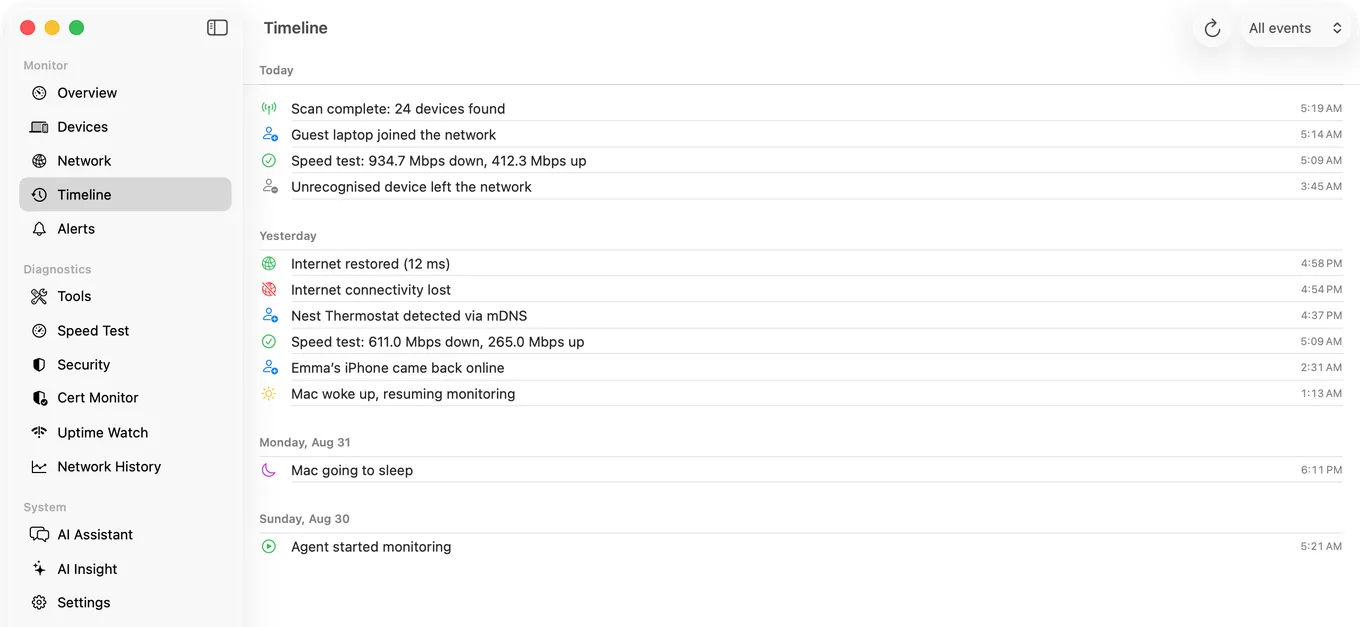
With no subscription and no account, while your Mac is awake, it:
- Checks your router and the internet every 30 seconds on mains power, every minute on battery. The internet check pings 1.1.1.1 and 8.8.8.8.
- Records Internet Down once three checks in a row fail, dated to the first failed check, and Internet Restored after two good checks in a row, dated to the first of them. A drop shorter than three checks leaves no entry.
- Alerts you on the Mac when the internet goes down and when it comes back.
- Keeps the timeline for 30 days on the Mac, or 90 with Guardian.
- Writes "Mac going to sleep" and "Mac woke up, resuming monitoring" rows, so a gap in the record shows as a gap.
To read the dates out for Xfinity, open Timeline, choose Connectivity from the filter at the top right, and Control-click a row for Copy Timestamp.
Only while the Mac is awake. The Agent does not keep your Mac awake, and its checks stop while it sleeps. A MacBook with its lid shut records nothing, so for weeks of evidence use a Mac that stays awake, or the agent in the next section. One more limit: an Internet Down row does not say whether your router or the line failed. The Agent's Overview shows whether your router (Gateway) is answering while it happens, but the row does not keep it.
For the Outage Report: PingKit Agent on a Raspberry Pi, NAS or Docker
The Mac Agent's timeline is a list of dates. The Internet Outage Report, the document built for a complaint, comes only from PingKit Agent for Docker and Raspberry Pi, running on a device that stays on: a Raspberry Pi 4 or 5 on 64-bit Raspberry Pi OS, a NAS that runs containers (Synology, QNAP, TrueNAS SCALE, Unraid), a Linux computer with Docker, or Home Assistant. A Mac Agent does not feed the report. Docker Desktop on a Mac or a Windows PC is not supported either, because the agent needs the host's own network.
That agent checks once a minute and uses the same rule: Internet Down after three failed checks in a row, Internet Restored after two good ones. Beyond the dates, it records:
- Times as honest bounds, such as "Began between 21:10:02 and 21:11:02", because an outage starts somewhere between the last good check and the first failed one.
- Whether your router answered during each outage, and a verdict in plain words, such as "Looks like your ISP's line is down." or "Looks like your router or Wi-Fi did not answer." Each verdict is an inference from which checks answered, not a finding about Xfinity's equipment.
- Time the monitor was not running, counted as unmonitored and never as connected.
- Loss, latency and speed tests by day, so slow evenings show alongside the full drops.
With PingKit Guardian, PingKit on your iPhone turns that log into the Internet Outage Report: a PDF, with the data file it was made from exported beside it and that file's SHA-256, so anyone can check it has not been changed. For the United States it adds a note on comparing your figures with your plan's broadband label and filing a complaint with the FCC. Running the agent is free, and its own pages in your browser show 30 days of outages. The report needs Guardian: $2.99 a month or $24.99 a year on iPhone, with a 1-week free trial.
Setup is in the Raspberry Pi guide and on the Docker and NAS page; what the log and the report hold is in Log Internet Outages From a Raspberry Pi or NAS.
When Xfinity Says No
A refusal is an answer from Xfinity's records, not a verdict on your evening. With dates in hand, three things are still open:
- Read the dates to the agent. Start and end of each outage, when you reported it, and whether your router kept answering. Keep it to the outages that matter for the credit.
- Ask for the fault to be fixed. In the Xfinity app, WiFi and then Troubleshoot runs Xfinity's own test, and if it finds a problem it cannot fix online, Xfinity's page says to schedule a technician (Xfinity: internet connection troubleshooting, checked 2026-11-16). A dated list is what makes an intermittent fault worth a visit.
- Compare with your broadband label, and use the FCC. Under FCC rules, providers publish a broadband label for each plan that discloses its typical download and upload speeds and typical latency, and a provider with an online account portal must give you easy access there to your current plan's label (FCC Report and Order 26-48, adopted July 22, 2026, checked 2026-11-16). Complaints go to the FCC at consumercomplaints.fcc.gov.
What a log cannot do is make the decision for Xfinity. It does not file a claim, it does not prove which part of Xfinity's network failed, and Xfinity may still refuse a credit that is at its discretion. It gives the form and the agent the dates they ask for.
Frequently Asked Questions
Does Xfinity give credit for internet outages?
Yes, in two ways. Its Residential Services Agreement lets you request a pro rata credit for an interruption lasting more than 24 consecutive hours after you report it, within 120 days. Its Check credit eligibility form on the Support page, and Xfinity Assistant, add a credit automatically when your account is eligible. Credits for shorter outages are at Xfinity's discretion. All checked on Xfinity's own pages on 2026-11-16.
How do I request an outage credit from Xfinity?
Report the outage while it is happening. When it is over, go to Xfinity's Support page, scroll to Outage map and credit, click Check credit eligibility and enter the start and end dates. Or sign in to the Xfinity app or xfinity.com, open Ask Xfinity Assistant and enter credit. If it does not qualify, the Assistant says why and transfers you to an agent.
How long does an Xfinity outage have to last for a credit?
The agreement's right to a credit starts at more than 24 consecutive hours after the outage is reported. Xfinity does not publish a shorter threshold for its credit eligibility check on any page I could find, so ask for shorter outages anyway and give the dates.
Does this apply to Comcast internet?
Yes. Xfinity is Comcast's brand, and the Xfinity Residential Services Agreement names an affiliate of Comcast Cable Communications as the provider, so the same credit routes apply.
Can PingKit file the credit claim for me?
No. PingKit keeps a dated record of each outage from inside your home: the Mac Agent while your Mac is awake, or PingKit Agent on a Raspberry Pi, NAS or Docker host that stays on. You take the dates to Xfinity's form or an agent, and Xfinity decides.
Does the Mac Agent make the Internet Outage Report?
No. Only PingKit Agent on a Raspberry Pi, NAS, Docker host or Home Assistant produces it, through PingKit on your iPhone with Guardian. The Mac Agent's free timeline gives you the dates of each outage while the Mac is awake.
Start the log before the next outage.
PingKit Agent for Mac is free and keeps a dated timeline of every outage while your Mac is awake. For the Internet Outage Report, run PingKit Agent on a Raspberry Pi, NAS or Docker host that stays on and pair it with PingKit on your iPhone. Only that agent produces the report, and the report needs Guardian: $2.99 a month or $24.99 a year on iPhone, with a 1-week free trial.
Get the Free Mac AgentRelated Articles
- Log Internet Outages From a Raspberry Pi or NAS
- How to Check If Your ISP Has an Outage (vs. Just You)
- How to Prove Your Internet Keeps Dropping
- Is My Internet Working? How to Tell If It's Your WiFi, Router or ISP
- How to Prove Internet Drops to Your ISP: A Mac Guide
- Internet Connection Monitor for iPhone and Mac
- Network Reports and Evidence PDFs
- PingKit Agent: Free Mac Network Monitoring