Keyword Monitoring: Get a Push When a Status Page Changes
Short version. An ordinary uptime check passes whenever the server answers with a success code, and plenty of broken pages do exactly that: a maintenance page, a hosting provider's placeholder, a status page announcing an outage. A keyword check fetches the page and fails when a word you chose is missing. Pick text that only a healthy page contains, such as All Systems Operational, and you hear about the change within five minutes. In PingKit it is part of Uptime Watch with Guardian; the match is exact and case-sensitive, and the text has to be in the page's HTML rather than drawn later by JavaScript.
Why "It Answered" Is Not the Same as "It Works"
A status-code check asks one question: did the server answer with a 2xx or a 3xx? That catches a server that is down, unreachable or throwing errors. It misses every failure where the server answers politely with the wrong page:
- A site in maintenance mode whose plugin serves its "back soon" page with a 200 (some do, although WordPress's own maintenance page sends a 503).
- A hosting provider's "account suspended" or default landing page served in place of yours after a billing problem or a DNS change.
- A single-page app whose shell always loads with a 200 while the data behind it fails.
- A status page that is itself perfectly healthy while it tells the world the service is having a major outage.
The last one is the most useful case for most people. If you depend on someone else's service, their status page is the fastest official word that something is wrong, and it changes before most people notice.
How a Keyword Check Works
Instead of asking only for the status, the check downloads the page and looks for a piece of text you chose. If the server answers with a success code and the text is there, the target is up. If the text is missing, it is down, and you get the same push you would for any outage, followed by a second one when the text comes back.
In PingKit the check reads the first 256 KB of the page, which is plenty for a status page, whose headline sits near the top, and the match is exact: the same characters, the same spaces, the same capital letters. "Operational" and "operational" are different checks. The text can be up to 128 characters long.
Choosing the Right Words
A keyword check can only look for text that is present. It cannot fail because a word appeared, so choose the words a healthy page always contains, not the words a broken one might show.
| What you are watching | A good keyword | Why |
|---|---|---|
| A vendor's status page | All Systems Operational | The usual headline while nothing is wrong, and it changes the moment an incident is posted |
| Your own website | A phrase from your footer or a product name | Missing from maintenance, suspended and error pages |
| An API health endpoint | "status":"ok" or whatever yours returns | Exactly what the endpoint says when it is healthy |
| A shop | Add to cart | Disappears when the catalogue fails to load |
Before relying on a word, look at the page's source on a Mac (Safari's Develop menu, or view source in any desktop browser). The check does not run JavaScript, so text that only appears after scripts load is invisible to it. Many status pages render their headline on the server and work well; some modern dashboards do not, and there a keyword check will read as down from the first check onward. You will see that in the app straight away; the push only fires when a target changes state, so a check that has never passed sends none.
Setting It Up in PingKit
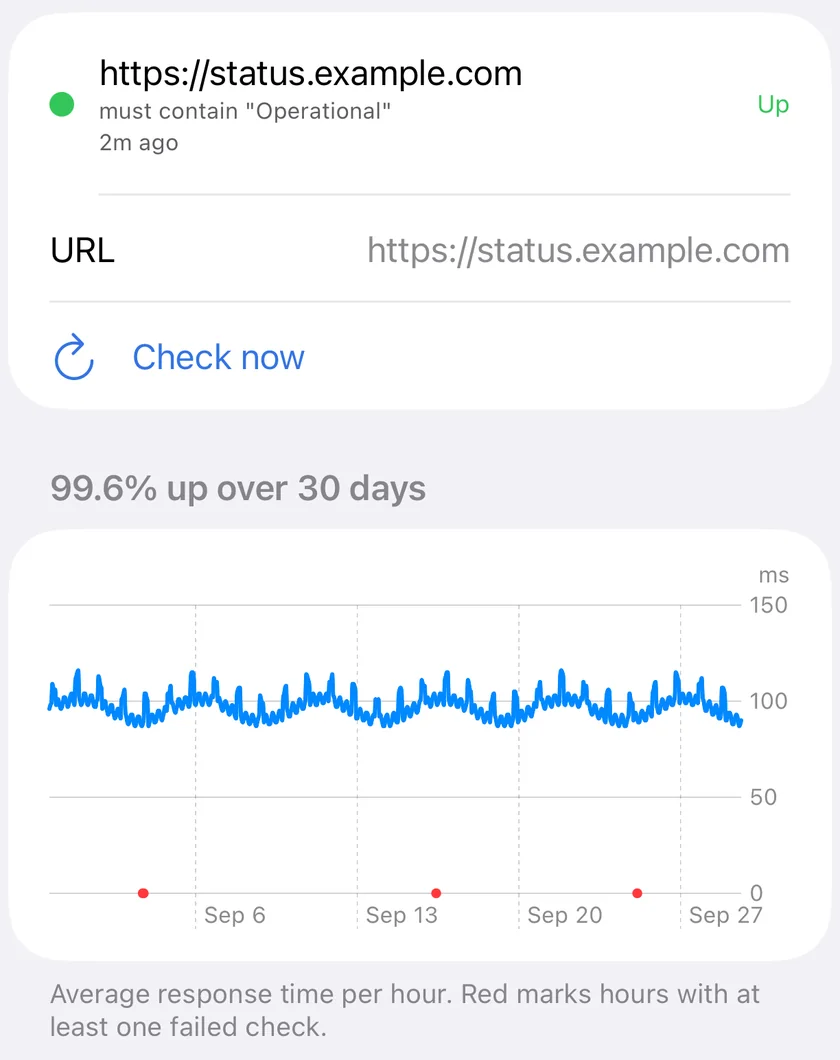
- Open PingKit on your iPhone, go to the Monitor tab and tap Uptime Watch. The Mac Agent has the same form, but only the iPhone receives the push (with Guardian the Mac shows its own notification while the Agent runs), so add the target there to be notified wherever you are.
- Add a target with Website (HTTP) selected and paste the page's full URL, including
https://. - In Page must contain (optional), type the text exactly as it appears on the page.
- Optionally, fill in Expected status code. By default any final 2xx or 3xx counts as up; an expected code makes anything else count as down, which is useful for an endpoint that should always return exactly 200.
Keyword and status-code checks are part of PingKit Guardian, along with ten targets checked every five minutes and 30 days of history with an hourly response-time chart. The free tier keeps one URL, checked hourly with a status code only.
What the Check Sees
The request comes from Cloudflare's network with a user agent that names PingKit Uptime Watch, so it sees the page the way any visitor from the internet does and keeps checking while your iPhone is off. A plain uptime check starts with a lightweight HEAD request and falls back to GET if the server refuses it, but a keyword check always uses GET, because the text is in the body. Redirects are followed, and each attempt gives up after ten seconds.
Honest Limits
- "Must contain" only. There is no "must not contain" rule, and no pattern matching: one exact piece of text per target.
- No JavaScript, no login and no multi-step flows. It reads the page a server sends, nothing more.
- Every five minutes at best. A status page can change and change back within that window.
- Push to your own devices, and with Guardian Plus to one email address and one webhook as well. There is no team alerting or escalation.
- Public pages only. A page on your home network with a private address cannot be reached from outside.
Frequently Asked Questions
What is keyword monitoring?
A type of uptime check that downloads a page and looks for a piece of text you chose. If the server answers but the text is missing, the check fails. It catches maintenance pages, placeholder pages and status pages announcing an outage, all of which pass an ordinary status-code check.
Is the keyword match case-sensitive?
Yes. PingKit matches the text exactly, including capital letters and spaces, so check the page source and copy the text as it appears. The match looks at the first 256 KB of the page.
Can I get an alert when a word appears on a page, instead of disappearing?
No. PingKit's keyword check is must-contain only: the target is down when the text is missing. To watch for an outage notice, watch for the words that are there when all is well, such as All Systems Operational.
Why does my keyword check say down when the word is on the page?
Usually because the text is drawn by JavaScript after the page loads. The check reads the HTML the server sends and does not run scripts, so view the page source and pick text that is present there. Also check capital letters, since the match is exact.
Does keyword monitoring need a subscription?
Yes, in PingKit keyword and expected-status checks are part of Guardian, $2.99 a month or $24.99 a year with a 1-week free trial. The free tier monitors one URL hourly by status code.
Watch the servers you run.
One URL is free, checked every hour. Guardian watches ten sites or ports every five minutes, $2.99 a month or $24.99 a year with a 1-week free trial.
Download PingKit for iPhone