How to Monitor a Server Port from Your iPhone
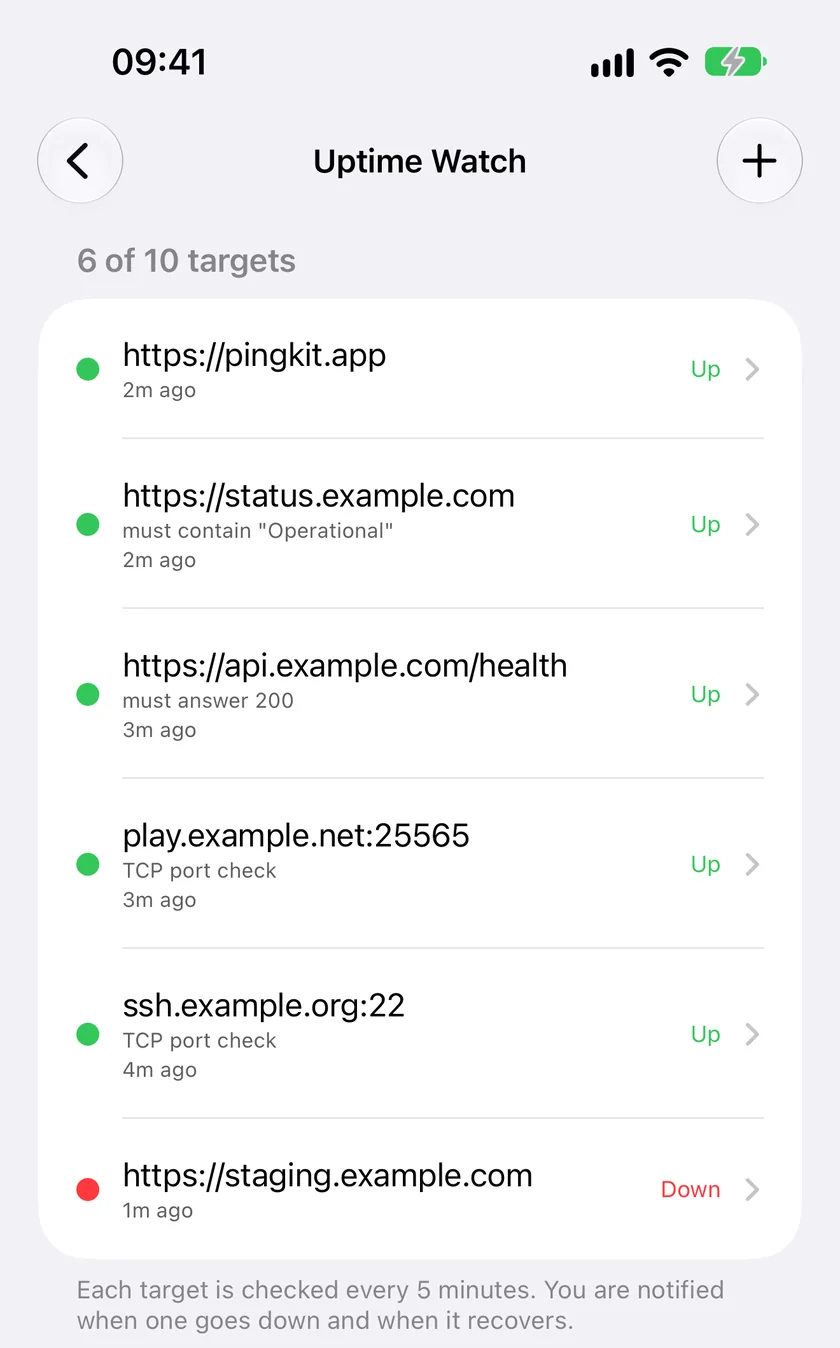
Short version. A website monitor asks for a page, and SSH, a game server or a database has no page to give. What they do have is a port that accepts connections while the service is running. A TCP port check opens one connection to that port, closes it, and calls the service down when the connection is refused or times out. In PingKit that is a Guardian feature of Uptime Watch: ten targets, checked every five minutes from Cloudflare's network, with a push to your iPhone when one stops answering and another when it is back. The server has to be reachable from the internet, and a game that only speaks UDP cannot be checked this way.
Why a Website Monitor Cannot See Your SSH Server
Most uptime monitors, including the free tier of PingKit's, send an HTTP request and read the status code. That is the right test for a website and the wrong one for everything else. An SSH daemon on port 22 does not speak HTTP. Neither does a Minecraft Java server on 25565, a PostgreSQL database on 5432 or a Remote Desktop host on 3389. Point an HTTP check at any of them and it fails even when the service is perfectly healthy, which is worse than no check at all.
What those services do have in common is a listening TCP port. While the service runs, the port accepts connections. When the process crashes, the machine reboots, the container stops or the firewall changes, the port refuses the connection or stops answering. That difference is the whole test.
What a TCP Port Check Proves, and What It Does Not
A TCP check opens a connection to the host and port you give it and closes it again as soon as the connection is made. Nothing is sent, no login is attempted, and no data is read. The result is one of three things:
- The connection opens. Something is listening on that port and reachable from the internet. The target is up.
- The connection is refused. The machine answered, but nothing is listening on that port. The service is down, even though the host is up.
- Nothing answers within the timeout. The host is off, the network path is broken, or a firewall is silently dropping the connection.
What it does not prove is that the service behind the port is working properly. A game server that has hung but still holds its socket open will pass, and so will an SSH daemon whose disk is full. A port check answers "is it accepting connections?", which catches crashes, reboots and network failures, the outages you most need to hear about, and not the subtler ones.
Setting It Up in PingKit
- Open PingKit on your iPhone, go to the Monitor tab and tap Uptime Watch. PingKit Agent on a Mac has the same form. A Mac cannot receive the push: with Guardian it shows its own notification while the Agent runs, so add the target on the iPhone to be notified wherever you are.
- Tap add, and under Check choose Port (TCP) instead of Website (HTTP).
- Enter the Host (a hostname such as
play.example.com, or a public IPv4 address) and the Port, and give it a label you will recognise in a notification. - Allow notifications when iOS asks. The first check runs straight away, and after that every five minutes.
Port checks are part of PingKit Guardian. The free tier of Uptime Watch keeps one website, checked hourly; Guardian raises that to ten targets, any mix of websites and ports, each checked every five minutes, with 30 days of history drawn as an hourly response-time chart. The response time for a port check is how long the connection took to open, which makes a slow drift in a server's network visible before it turns into an outage.
Ports People Actually Watch
| Service | Usual TCP port | Notes |
|---|---|---|
| SSH | 22 | Or whatever port you moved it to |
| Minecraft (Java Edition) | 25565 | Bedrock Edition uses UDP 19132, which a TCP check cannot see |
| Remote Desktop | 3389 | Better behind a VPN than open to the internet |
| PostgreSQL / MySQL | 5432 / 3306 | Only if you deliberately expose the database |
| A reverse proxy or VPN endpoint on TCP | 443, 8443 and similar | A website check may be the better fit on 443 |
| Mail submission | 587 or 465 | Port 25 cannot be checked, see below |
Two limits come from the network the check runs on rather than from PingKit. Port 25 is refused when you add it, because Cloudflare does not allow outbound connections to it and a check there could only ever fail. And many game servers, Valheim and Bedrock among them, speak only UDP, which has no connection to open, so there is nothing a TCP check can test.
Making Sure the Check Can Reach Your Server
The connection comes from Cloudflare's network, not from your phone, which is what lets it keep checking while your iPhone is off. It also means the server has to be reachable from the internet at that address and port. Three things commonly get in the way:
- A home server without a forwarded port. A box with only a private address, 192.168.x.x or 10.x.x.x, cannot be checked from outside at all. Either forward the port on your router (how to port forward), or watch it from inside with the free PingKit Agent on a Mac, whose device-offline alert covers LAN-only machines.
- Carrier-grade NAT. Some ISPs, and most mobile and satellite connections, share one public address between many customers, so nothing can be forwarded to you. A tunnel service is the usual way round it.
- A firewall allow-list. If the server only accepts connections from known addresses, the check will be dropped and read as down. Cloudflare does not publish a fixed address for these checks, so an allow-listed server is not one to watch from outside.
- A host behind Cloudflare's proxy. Checks run on Cloudflare's network, which cannot open TCP connections back to Cloudflare's own addresses, so point the check at the server's own address instead.
Your server's logs will show the check. An SSH daemon, for example, typically logs a connection that closed before authentication every five minutes. That is expected. fail2ban's default sshd filter does not count a connection that never attempts a login, but its ddos and aggressive modes do, so check your jail's mode before adding the check.
Honest Limits
- Every five minutes is the fastest interval, with Guardian or Guardian Plus. An outage can run up to five minutes before you hear about it, or up to an hour on the free tier, which checks websites only.
- One region. The check runs from Cloudflare's network, not from several cities voting on whether your server is really down.
- TCP only: no UDP, no ICMP ping monitor, no DNS record checks.
- Notifications go to your own devices by push. Guardian Plus also sends them by email and to one webhook, which a Slack or Discord channel can receive; there are no status pages or team rotas.
Frequently Asked Questions
Can I monitor an SSH server from my iPhone?
Yes. Add it to PingKit's Uptime Watch as a Port (TCP) target with the server's public hostname or address and port 22, or whichever port SSH listens on. With Guardian it is checked every five minutes from Cloudflare's network and you get a push when it stops accepting connections and when it is back. The check opens a connection and closes it; it never tries to log in.
Can I get a notification when my Minecraft server goes down?
For Minecraft Java Edition, yes: add the server's public address with port 25565 as a TCP target. Bedrock Edition runs on UDP port 19132, which a TCP check cannot test, so it cannot be monitored this way.
What is the difference between a TCP port check and a ping?
A ping asks the machine to answer an ICMP echo, which says the host is on the network. A TCP port check tries to open a connection to one service, which says that service is listening. A server can answer pings while its game server or database has crashed, so the port check is the more useful alert.
Can I monitor a server on my home network that has no public address?
Not with an outside check, because nothing on the internet can reach a private address. Forward the port on your router, use a tunnel, or run the free PingKit Agent on a Mac at home, which alerts when a device on your network goes offline.
How often is a port checked?
Every five minutes with Guardian or Guardian Plus. Port checks are not available on the free tier, which keeps one website checked hourly.
Watch the servers you run.
One URL is free, checked every hour. Guardian watches ten sites or ports every five minutes, $2.99 a month or $24.99 a year with a 1-week free trial.
Download PingKit for iPhone