arp -a for iPhone (2026): Why iOS Hides MAC Addresses
Short version. There is no arp command on iPhone, iOS does not expose the ARP table to apps, and recent iOS returns a placeholder MAC address for other devices on the network. So the desktop approach of identifying hardware by its OUI prefix simply does not work. The workaround is better than it sounds: identify devices by what they advertise, which PingKit does free.
On a computer, arp -a lists every neighbour your machine has recently talked to, with its MAC address. The first three octets identify the manufacturer, and that is how desktop scanners label devices. None of it works on an iPhone.
Full disclosure: I build PingKit, so weigh the recommendation accordingly. The limits section below is not padding, and the point of these pages is to tell you when the answer is "use a computer".
Two Separate Restrictions
No ARP table access. iOS provides no API for reading the neighbour cache. There is no command and no entitlement.
Placeholder peer MAC addresses. Even where an address is surfaced, recent iOS returns a fixed placeholder value rather than the real hardware address of the peer. So a scanner running on iPhone cannot obtain a genuine MAC address this way for another device on the network, and any vendor lookup built on the placeholder is meaningless.
This is a privacy measure, and the same instinct behind Private WiFi Address, which makes your own iPhone present a different randomised MAC to each network it joins.
What this means when comparing apps. If an iPhone scanner displays confident MAC addresses and manufacturer names for every device, be sceptical. It may be showing a value it did not really obtain. Apps that name devices without claiming MAC addresses are usually being more honest, not less capable.
The Approach That Does Work
Devices announce themselves constantly, and those announcements are richer than a vendor prefix:
- Bonjour and mDNS. A device advertising
_airplay._tcpand_raop._tcpis an AirPlay receiver._ipp._tcpis a printer._googlecast._tcpis a Chromecast or a TV with it built in. - TXT records attached to those advertisements often carry a model string or a device category outright.
- SSDP and UPnP announcements identify media devices, speakers and many smart home hubs.
- Hostnames, which are frequently the model or the owner's name.
- Open port patterns. A device answering on the ports a NAS typically uses is probably a NAS.
In practice this identifies more household devices than an OUI lookup, because the network chip vendor of a smart plug tells you far less than the plug announcing what it is. It identifies fewer silent devices: something that advertises nothing and answers no ports remains just an address.
If You Genuinely Need MAC Addresses
- Your router's admin page. The DHCP client list shows the real MAC for every device that requested an address. This is the most reliable route and costs nothing.
- A computer on the same network.
arp -aon macOS, Windows or Linux works normally. - Your own iPhone's address: Settings, WiFi, the (i) beside the network, WiFi Address. Remember it is per-network, not a device identifier.
What PingKit Shows
LAN Scanner sweeps the local segment and labels devices from the signals above. Bonjour Browser shows the raw service advertisements including TXT records, which is where you look when a label is wrong or missing. Both are free.
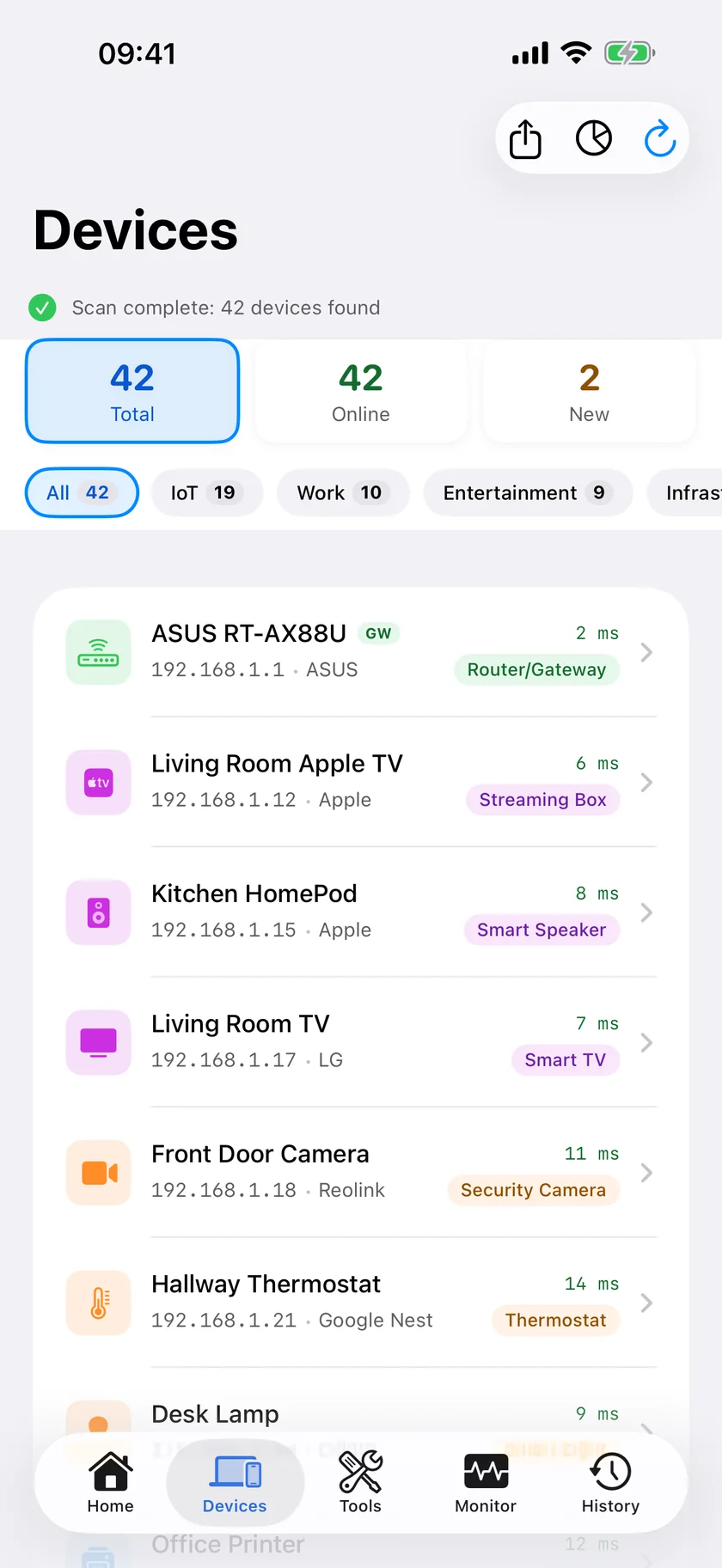
arp -a for, this is the answer.Device labelling is good rather than infallible, and unusual hardware will sometimes come back unnamed. That is a more honest outcome than a confident vendor name derived from an address the phone never really saw.
Frequently Asked Questions
Is there an arp command on iPhone?
No. iOS has no shell and provides no API for reading the ARP or neighbour cache, so an app cannot read the MAC addresses of most devices on your network.
Why do iPhone network scanners not show MAC addresses?
Recent iOS returns a placeholder MAC address rather than the real hardware address when an app queries a network peer. Vendor identification from the OUI prefix is therefore unreliable, so good iOS scanners identify devices from advertised services instead. PingKit for iPhone can still show the MAC address of a device that answers NetBIOS, such as a Mac with File Sharing turned on, on that device's detail screen; phones, tablets, TVs and most smart-home devices show none.
How can I see the MAC addresses of devices on my network?
Open your router's admin page and look at the DHCP client list, which shows the real MAC address for every device that requested an address. Alternatively run arp -a on a computer connected to the same network, or use the free PingKit Agent, which reads them on a Mac running macOS 15 or 26, or macOS 27 with PingKit Agent 3.3.0 or later. PingKit for iPhone can also show the MAC address of a device that answers NetBIOS, such as a Mac with File Sharing turned on.
How do iPhone apps identify devices without MAC addresses?
From what devices advertise: Bonjour and mDNS service types, TXT records attached to those advertisements, SSDP and UPnP announcements, hostnames, and patterns of open ports. This identifies most consumer devices and often more precisely than a vendor prefix would.
What is my iPhone's MAC address?
Settings, WiFi, then the (i) button beside your network, shown as WiFi Address. With Private WiFi Address enabled, which is the default, this is a randomised address specific to that network rather than a permanent device identifier.
Identify devices by what they actually say
LAN scanning with service-based device naming, plus a Bonjour browser showing raw TXT records. Free, no ads, no account.
Download PingKit Free