Find Your Raspberry Pi's IP Address From an iPhone
Short version. A headless Pi has no screen to tell you its address, and the address changes whenever its DHCP lease does. Three ways to find it from an iPhone, all free in PingKit: scan the network in the Devices tab and look for its hostname, browse for the SSH service in the Bonjour Browser, which is the fastest route when the Pi has SSH enabled, or try the hostname raspberrypi.local directly. Then reserve its address in your router so you never do this again.
Method 1: Scan and Read the Manufacturer
Open PingKit on the iPhone, go to the Devices tab and tap Scan Network. The scan sweeps your subnet and lists what answers, with each device's hostname where it publishes one.
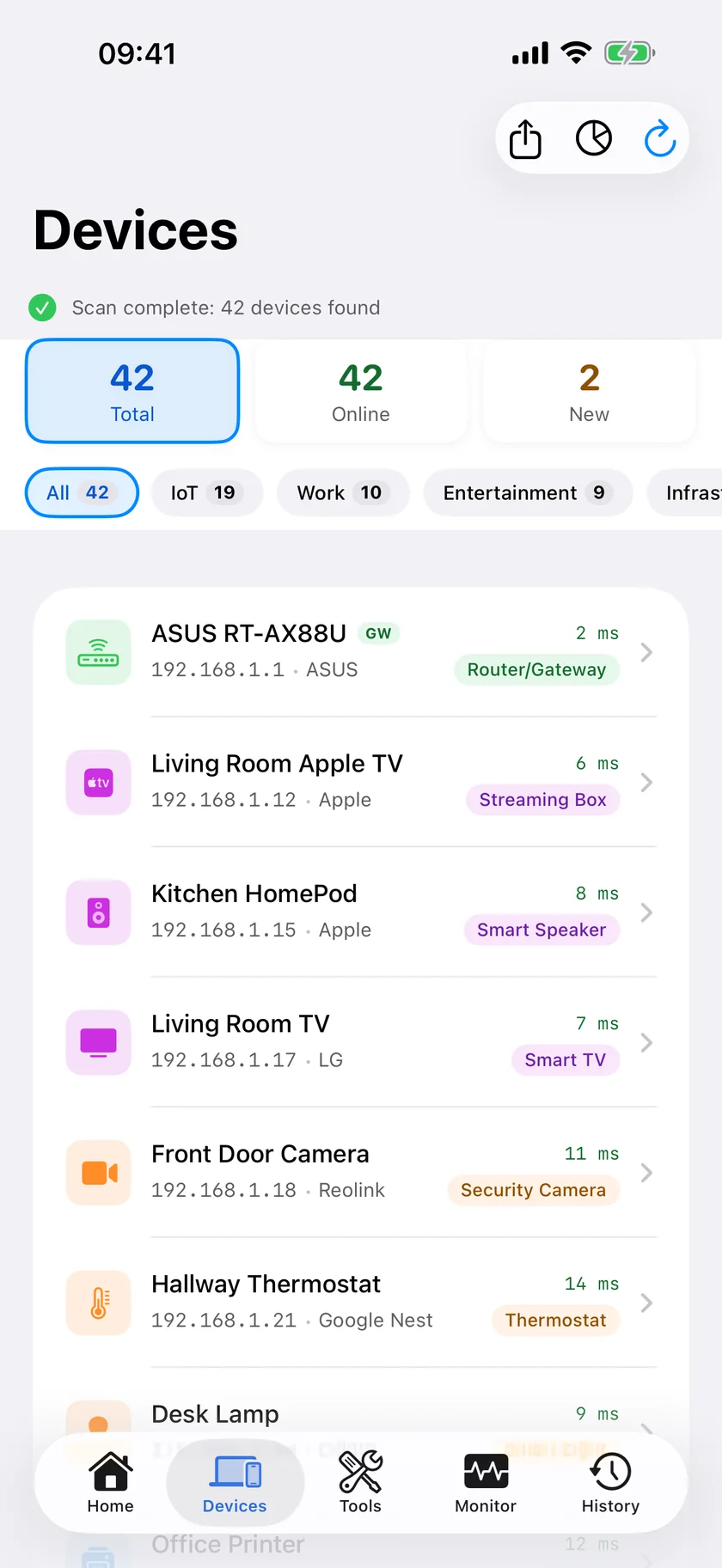
A Pi running Raspberry Pi OS publishes the hostname you gave it at setup, raspberrypi if you left the default, and PingKit labels a device with that name as a Raspberry Pi. On a busy network that one line is usually enough to pick it out, and the address is next to it.
Two things to know about this method. It depends on the hostname, so a Pi you renamed to something unrecognisable will appear as an ordinary device with an address, and method 2 is the better route for it. And the MAC address depends on your iOS version: on iOS 27 and later, PingKit shows the Pi's MAC address and its network chip's maker on its detail screen, while on iOS 17 to 26 iOS hides most devices' hardware addresses from apps, answering with a placeholder, so PingKit shows none rather than showing you a fiction. If two Pis appear, distinguish them by hostname, which is a good argument for setting a distinct one at first boot.
Method 2: Listen for Its SSH Advertisement
This is faster when it works, and it works whenever the Pi has SSH enabled and the standard mDNS service is running, which is the default on Raspberry Pi OS.
Open the Bonjour Browser in the Tools tab and look for the SSH section. PingKit browses 39 service types and groups what it finds by service, so _ssh._tcp appears as SSH and _sftp-ssh._tcp, which Pis usually advertise alongside it, as SFTP. The entry carries the name the Pi advertises, normally its hostname, and its address.
Other sections are useful too, depending on what the Pi is running: Windows File Sharing if it is sharing files with Samba, HTTP if it is serving a web interface, and OCTOPRINT if it is driving a 3D printer.
Method 3: Just Try the Hostname
Raspberry Pi OS publishes itself as raspberrypi.local by default, and macOS and iOS both resolve .local names natively. So before scanning anything, try connecting to raspberrypi.local.
When it fails, it usually fails for one of these reasons, and knowing which saves time:
- You changed the hostname during setup. The name follows the hostname, so it might be
pihole.localor whatever you typed. - You have more than one Pi. The second one gets a name like
raspberrypi-2.local, and which one answers becomes unpredictable. - The mDNS service is not running, which happens on minimal or server images.
- You are on a different subnet or a guest network.
.localresolution does not cross a subnet boundary: What Is mDNS / Bonjour?
If method 3 fails, methods 1 and 2 still work, because they do not depend on the hostname.
Confirm It Is the Right Device
Before you rely on an address, prove it. Open Ping Test, enter the address and send 10 packets; a clean reply means something is there. If the Pi runs a service on a known port, PingKit's Port Scanner will confirm it: 22 for SSH, 80 or 443 for a web interface, 53 if it is doing DNS.
Stop the Address Moving
The reason you are looking for the address is that it changed. Fix that once and the problem is gone for good.
In your router's admin page, find the DHCP or LAN settings and create a reservation binding the Pi's MAC address to a fixed address inside your subnet. Read the MAC on the Pi itself, where ip link prints it, from the router's own client list, or, on iOS 27 and later, from the Pi's detail screen in PingKit; on iOS 17 to 26 the iPhone usually cannot supply it, for the reason in method 1. The Pi carries on asking for an address normally and keeps getting the same one. This is better than setting a static address on the Pi itself, because the router knows about the reservation and will not give that address to anything else. The full walkthrough is How to Set a Static IP Address on Your Home Network.
While you are there, write the address and what the Pi does on a label and stick it to the Pi. Every person who has ever run three of these wishes they had.
Honest Limits
- A scan finds devices on the subnet your phone is joined to. A Pi on a different VLAN, on a guest network, or connected by Ethernet to a different segment will not appear.
- On iOS 17 to 26, iOS does not give apps the hardware address of most devices, so on iPhone most rows show no MAC address; on iOS 27 and later most rows show one, with the maker of the network chip. Either way the phone identifies devices by what they publish about themselves and what they answer when PingKit asks for their name, and a device that does neither appears as an address alone. The Mac Agent does see real MAC addresses on macOS 15 and 26, and Agent 3.3.0 or later reads them on macOS 27.
- The Bonjour Browser only sees what is advertised. A Pi with SSH disabled or mDNS not running will not appear there, though it will still answer a scan.
- PingKit does not log in to the Pi or run anything on it. It finds it, checks which common ports answer, reads what its SSH or web server says about itself, and confirms it is reachable.
Frequently Asked Questions
How do I find my Raspberry Pi's IP address without a monitor?
Scan the network from your phone and look for the Pi's hostname, which is raspberrypi unless you changed it, or browse for the SSH service in the Bonjour Browser, which a Pi with SSH enabled advertises along with its hostname and address. Trying raspberrypi.local directly often works too. On iOS 27 and later, PingKit also shows the Pi's MAC address and the maker of its network chip; on iOS 17 to 26 the iPhone usually cannot show it, because iOS hides most devices' hardware addresses from apps.
Why does raspberrypi.local not work?
Usually because the hostname was changed during setup, because there is more than one Pi and the names have collided, because the mDNS service is not running on a minimal image, or because your phone is on a different subnet or a guest network, which .local resolution does not cross.
How do I stop my Raspberry Pi's IP address changing?
Create a DHCP reservation in your router that binds the Pi's MAC address to a fixed IP. That is better than a static address set on the Pi, because the router knows about the reservation and will not hand that address to anything else.
Can I find a Pi that has SSH disabled?
Yes. A network scan finds it because the scan does not depend on any advertisement, only on the device answering. It will not appear in the Bonjour Browser under _ssh, because there is nothing to advertise.
How do I confirm the address I found is the Pi?
Ping it, then check a port you expect to be open: 22 for SSH, 80 or 443 for a web interface. A clean ping plus the expected open port is as much confirmation as you need before connecting.
Find it in a minute, then never lose it again.
Free to download, with all 19 tools and no ads. Guardian is $2.99 a month or $24.99 a year on iPhone or Mac, with a 1-week free trial. Cancel anytime.
Download PingKit for iPhone