PingKit vs Network Analyzer
Network Analyzer is a long-standing, highly-rated iPhone toolkit with a one-time price. PingKit covers the same diagnostics free with no ads, adds AI explanations, and brings background monitoring to your Mac. Here's an honest head-to-head from the PingKit team.
All 19 tools are free on iPhone. No ads, no account.
Network Analyzer (and its Pro version by Techet) is one of the most respected diagnostic apps on the App Store - around 4.8 stars across thousands of ratings, and deservedly so. We make PingKit, so we have a horse in this race, but the comparison below is written to be genuinely useful. App details change, so check the current Network Analyzer listing before you decide.
Feature-by-Feature
| Capability | PingKit | Network Analyzer |
|---|---|---|
| LAN device discovery | Yes (many named from what they announce) | Yes |
| Port scanner | Yes, free | Yes |
| Ping / traceroute / MTR | Yes (incl. MTR), free | Ping & traceroute |
| DNS / Whois lookup | Yes, free | Yes |
| Speed test | Yes (6 parallel connections) | Yes |
| WiFi signal view | Connection quality (iOS gives no app a signal reading); real dBm on the Mac Agent | Per-channel signal (Android) |
| Security scan + score | Yes, free | No |
| AI explanations of findings | Yes (free) | No |
| Background monitoring | Mac companion (free) | No |
| Ads | None | Yes (Lite tier) |
| Price | Free + optional Guardian from $2.99/mo (iPhone or Mac) | Free w/ ads or $3.99 one-time |
Where Network Analyzer Wins
Two things stand out. First, the one-time Pro purchase ($3.99) removes ads forever with no subscription, which some people simply prefer. Second, Network Analyzer is a deep, long-standing toolkit with a strong track record and an excellent rating. If you'd rather pay once than subscribe, that one-time purchase is a genuine plus.
Where PingKit Wins
Breadth, a clean free tier, and ongoing monitoring. PingKit gives you LAN scanning, a port scanner, ping, traceroute, MTR, security scanning with a score, SSL inspection, DNS lookup, speed testing and 11 more tools, all free to use, with no ads at all (not even in a free tier) and no account. Findings come with optional plain-English AI explanations, and continuous monitoring runs on a free Mac companion so your network is watched whenever that Mac is awake, not just when you remember to open an app.
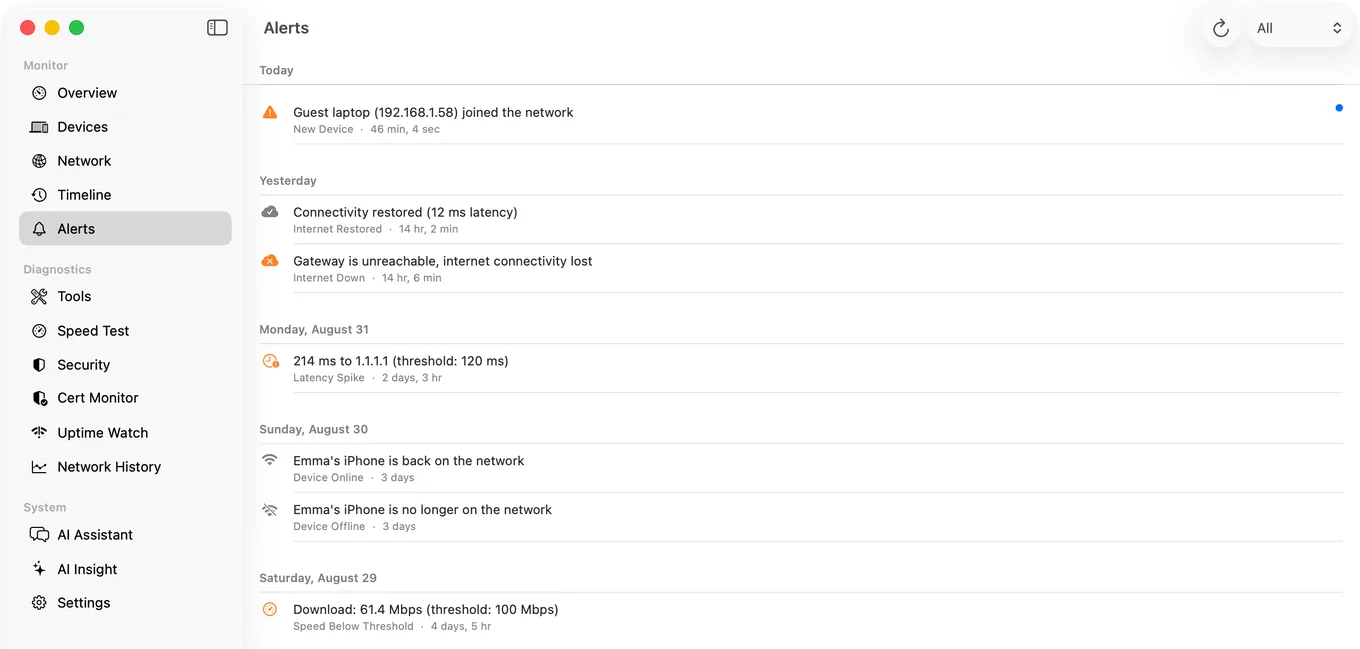
The monitoring angle: Network Analyzer is a manual, on-demand toolkit - you scan when you think to. PingKit's Mac Agent keeps watching after you put your phone down, alerting you to new devices and outages. That's the biggest practical difference between the two.
Which Should You Choose?
- Want a mature toolkit with a one-time price: Network Analyzer.
- Want the widest free toolkit with zero ads and no account: PingKit.
- Want background monitoring on your iPhone: PingKit Guardian + the free Mac app.
Comparing more than two apps? See our roundup of the best network tools for iPhone.
More Comparisons
- PingKit vs Fing
- PingKit vs iNet
- PingKit vs Scany
- PingKit vs WiFiman
- Best Network Monitoring Apps for iPhone (2026): Which Ones Actually Alert You
- Mac Network Monitor: The Best Apps for Traffic and Uptime (2026)
- Every PingKit comparison
Try PingKit Free
19 network tools, on-device device ID, no ads, no account. See how it compares for yourself.
Download PingKit Free