PingKit vs WiFi Explorer
These two tools solve different problems. WiFi Explorer is a deep Mac-only WiFi spectrum analyzer. PingKit is a whole-network toolkit for iPhone, iPad and Mac (device discovery, security, speed and diagnostics), with everyday Wi-Fi analysis on the Mac. Here's an honest head-to-head from the PingKit team.
All 19 tools are free on iPhone. No ads, no account.
WiFi Explorer (by Intuitibits) is rightly respected among WLAN professionals for visualizing the airwaves around you. We make PingKit, so we have a horse in this race, but the goal below is to help you pick the right tool for the job - which sometimes means picking WiFi Explorer. App details change, so check the current listing before you decide.
Different Jobs, Briefly
WiFi Explorer answers "what does the WiFi spectrum around me look like?" - channels, signal, noise, overlap, 802.11 details. PingKit answers "what's on my network, is it secure, and is it fast?" - devices, ports, security score, speed, latency - on the phone you carry, with background monitoring on your Mac while it is awake.
Feature-by-Feature
| Capability | PingKit | WiFi Explorer |
|---|---|---|
| Runs on iPhone / iPad | Yes (+ Mac; with Guardian, Mac Agent to iPhone via iCloud) | No (macOS only) |
| Deep WiFi spectrum analysis | Not offered (Live Connection shows your internet connection's latency, jitter and loss) | Best-in-class |
| Channel / noise / 802.11 detail | On the Mac, for the network you are on: channel, band, signal and noise (not 802.11 element detail); not on iPhone or iPad (iOS restriction) | Yes (pro-grade) |
| LAN device discovery | Yes (signature-based ID) | No |
| Security scan + score | Yes, free | No |
| Speed test / ping / traceroute | Yes, free | No |
| Background monitoring + alerts | Mac companion (free, while the Mac is awake) | No |
| Price | Free + optional Guardian from $2.99/mo (iPhone or Mac) | ~$19.99 (Pro 3 approx $129.99 to $149.99, as of July 2026) |
Where WiFi Explorer Wins
If your job is to diagnose the WiFi airspace - pick the cleanest channel, spot overlapping networks, read detailed 802.11 information elements, or do a proper site survey - WiFi Explorer is excellent and goes far deeper than PingKit's WiFi view. WLAN professionals use it for a reason.
Where PingKit Wins
Everything around the WiFi itself. PingKit runs on the iPhone you carry to the weak-signal corner, and covers the whole network: device discovery and connection stability, plus security scanning, speed, ping and 16 more tools - free, no ads, no account. For most people troubleshooting slow WiFi at home, that's the faster path to an answer. And the free Mac Agent keeps monitoring in the background whenever your Mac is awake, which WiFi Explorer doesn't do.
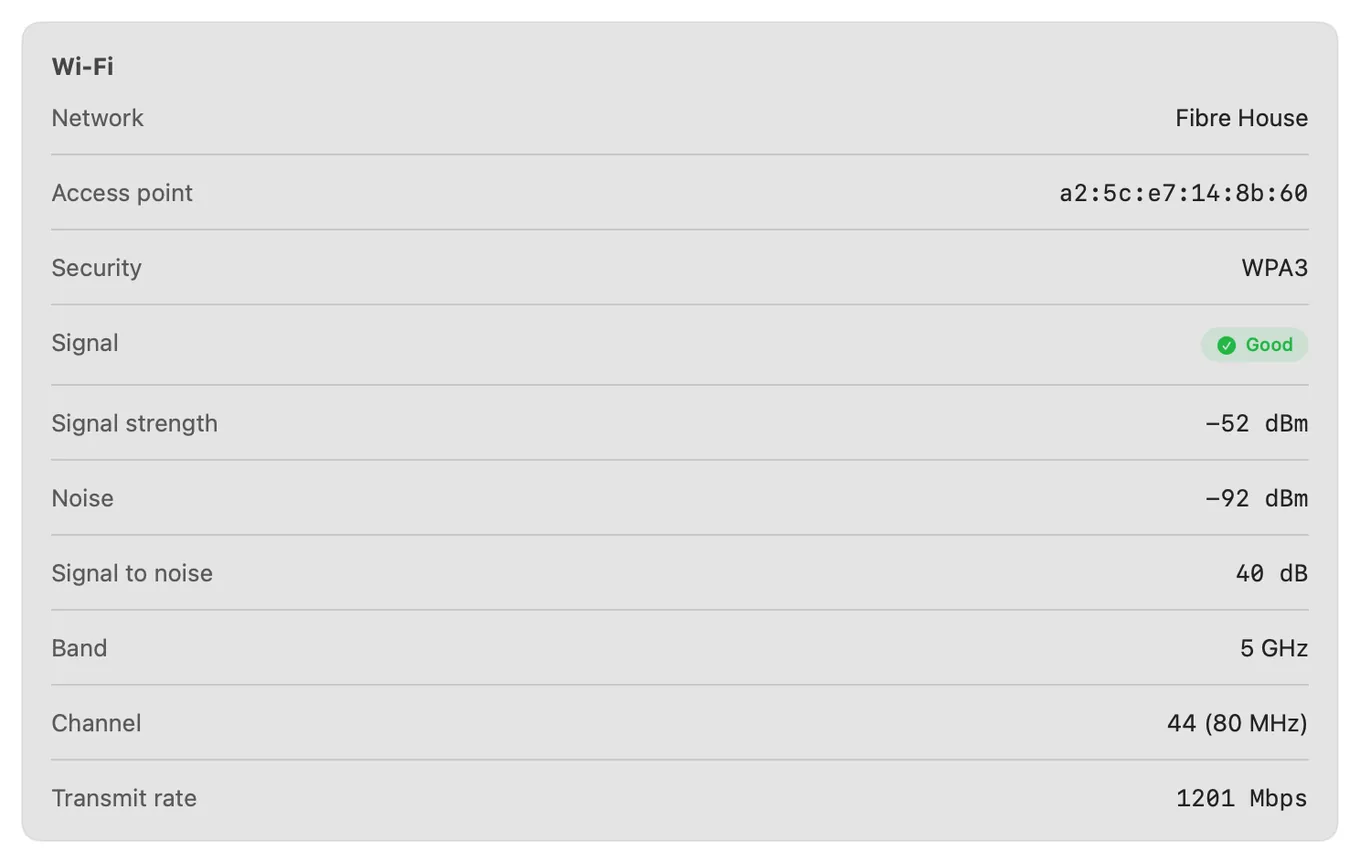
Honestly? Many power users keep both: WiFi Explorer for serious spectrum work on the Mac, PingKit for device monitoring and quick diagnostics on the phone. They overlap very little.
Which Should You Choose?
- Pro WiFi site surveys and 802.11 spectrum analysis: WiFi Explorer.
- Diagnosing slow WiFi from your iPhone, plus device + security checks: PingKit.
- Network monitoring with alerts while your Mac is awake: PingKit's free Mac app.
Want a phone-first WiFi tool? See best WiFi analyzer apps for iPhone and how to fix slow WiFi on iPhone.
More Comparisons
- PingKit vs NetSpot
- PingKit vs WiFiman
- AirPort Utility Alternative
- PingKit vs Fing
- WiFi Analyzer on iPhone: What iOS Actually Allows
- Best WiFi Analyzer Apps for iPhone (2026)
- Every PingKit comparison
Try PingKit Free
19 network tools on iPhone and iPad and 8 on the Mac, with Wi-Fi signal detail on the Mac. Devices, security and speed - no ads, no account.
Download PingKit Free