Wireless Network Watcher for Mac and iPhone: The Alternatives
Short version. NirSoft's Wireless Network Watcher is a free Windows program, and there is no Mac or iPhone version. On a Mac, arp -a gives you a one-off list, and the free PingKit Agent does the part people run Wireless Network Watcher for: it keeps a list of your devices with when each was first and last seen, and alerts you when a new one joins, while your Mac is awake. An iPhone can scan your network but cannot keep watching it, because iOS suspends apps in the background.
Free. PingKit Agent keeps your device list, with first and last seen, and alerts you when something new joins, while your Mac is awake. No account.
Wireless Network Watcher is one of NirSoft's small free utilities. It scans the network your computer is on and lists every device it finds, with its IP address, device name, MAC address and the company that made its network adapter. It needs no installation, and it can beep when something new turns up. It is also Windows only: NirSoft lists Windows 2000 through Windows 11 and nothing else, as listed on October 18, 2026. There is no Mac build and no iPhone app.
Full disclosure: I build PingKit, including the Mac Agent recommended below, so weigh the recommendation accordingly. The limits section is not padding, and there are things Wireless Network Watcher does that PingKit does not.
What Wireless Network Watcher Actually Does
It does more than list devices, which matters when you look for a replacement. As listed on nirsoft.net on October 18, 2026 (version 2.45), it shows for each device:
- IP address, device name, MAC address and network adapter company
- Whether the device is active now, how many times it has been detected, and when it was first and last detected
- A free text column for your own note
On Windows, Wireless Network Watcher can run a lighter background scan while you use other programs, beep or show a tray balloon when a new device appears or one disconnects, run a command on either event, and export the list to HTML, XML, CSV or text. Despite the name, NirSoft says it can scan a small wired network too.
So the Mac question is really two questions: what lists the devices on my network, and what keeps watching it and tells me when something new joins.
On a Mac, the One-Off List: arp -a
Every Mac already has the first half. Open Terminal and run:
arp -aYou get every device your Mac has recently talked to on the local network, by IP and MAC address. It is free and instant, and because arp is Apple's own tool it works on every macOS version. The catch is that the table only holds devices your Mac has exchanged traffic with, so it undercounts. A broadcast ping first helps a little:
ping -c 3 192.168.1.255
arp -a
Adjust the address for your own subnet. Many devices ignore broadcast pings, so this is still a partial list, and it has none of Wireless Network Watcher's memory: no first seen, no detection count, no alert. For a fuller one-off sweep, nmap and Angry IP Scanner both run natively on a Mac, and the Advanced IP Scanner for Mac guide covers both.
What PingKit Agent Keeps Instead
The second half, the watching, is what PingKit Agent is for. It is a free menu bar app for macOS 15 or later that rescans your network every 5 minutes by default (you can pick 1, 5, 10, 15 or 30) and checks your router and the internet every 30 seconds, on mains power, while the Mac is awake. Each scan is compared against the devices it already knows, so the list builds up over time instead of starting fresh.
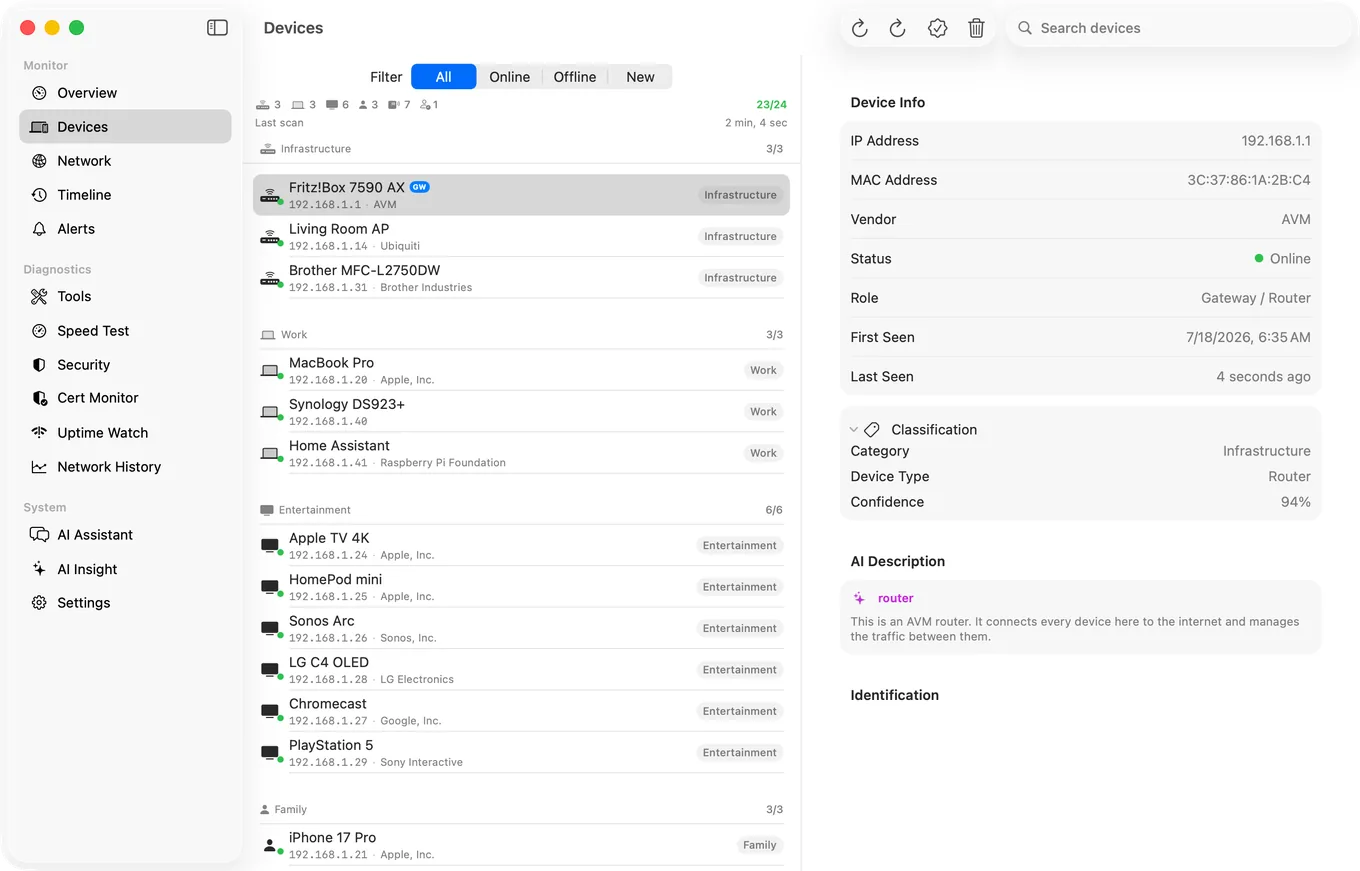
Column by column:
| Wireless Network Watcher (Windows) | PingKit Agent (Mac) |
|---|---|
| IP address, device name | IP address, hostname, and a name from what the device announces, such as its NetBIOS or Bonjour name |
| MAC address | On macOS 15 and 26; on macOS 27 from Agent 3.3.0 |
| Network adapter company | "Network chip" maker from the MAC, plus the brand the device reports about itself where it reports one |
| First and last detected | First Seen and Last Seen on each device |
| Active | Online, Asleep, or "Not seen for 20 min" |
| User text | A custom name and a category you set |
| Beep or balloon on a new device | A Mac notification on a new device |
| Alert on disconnect | Device offline alert, off by default, switched on in Settings |
| Export to CSV, HTML, XML or text | No CSV; a PDF network report that lists every device it has seen |
| Detection count | Not shown |
The "Not seen for" label is careful on purpose. A device that stops answering may have left, or it may just be asleep: phones and laptops doze, and a sleeping Mac can hand its Bonjour records to an Apple TV or HomePod that keeps answering for it. So the Agent says "Asleep" where it can tell and "Not seen for 20 min" where it cannot, rather than calling the device gone. Read it as "this device may have left", not as proof.
The New Device Alert, and Its First Day
Alerts are why people leave Wireless Network Watcher running, and they are free in the Agent too, as local Mac notifications. When a scan finds a device that was not there before, you get a notification naming it, or giving its address if nothing names it. If more than five arrive in one scan, they come as one summary instead of a stack of banners.
Two behaviours are worth knowing before you rely on it:
- The first 24 hours are spent learning. On its first day the Agent builds a picture of the devices you already have and holds back new device alerts, so your own phone, TV and printer do not each set one off. You can end it early from the menu bar.
- Device alerts fire on your home network. On a café or office network the Agent still scans and lists, but it does not alert you about other people's devices.
The device offline alert is off by default, and when you switch it on it waits for three missed scans in a row before it fires, so a phone that dozes through one scan does not set it off. The full set, including internet down and latency alerts, is in the guide to getting an alert when a new device joins your WiFi.
On iPhone: The Scan Works, the Watching Does Not
If you searched for Wireless Network Watcher for iPhone, the answer has two parts. The scan works: PingKit's LAN scan sweeps your network and names devices from what they announce about themselves, free with all 19 tools, no ads and no account. Two things that make Wireless Network Watcher useful do not carry over to a phone, though.
- Almost no MAC addresses. iOS hands apps a placeholder instead of other devices' hardware addresses, so an iPhone scanner, PingKit included, shows almost none. From PingKit 3.3.0 some Windows-style devices fill one in from their NetBIOS answer; most still show none. Your router's device list, or a Mac, has the real ones.
- No watching in the background. iOS suspends an app soon after you leave it, so no iPhone app can keep scanning and tell you about something that joined at 2am. It shows what is on your network while you look.
The way round both is a Mac at home. With Guardian, the PingKit iPhone app shows the Agent's devices and alerts through your own private iCloud database. Guardian is $2.99 a month or $24.99 a year on iPhone or Mac, with a 1-week free trial; the Agent and its alerts on the Mac are free without it.
Honest Limits
- It watches only while your Mac is awake. The Agent does not keep the Mac awake, and its scans stop while it sleeps. A Mac mini or iMac with sleep turned off suits it; a laptop in a bag records nothing. Wireless Network Watcher has the same limit on a Windows PC.
- No CSV export and no detection count. If you feed the list into a spreadsheet, Wireless Network Watcher does that and the Agent does not; the Agent's export is a PDF report.
- No command on a new device. Wireless Network Watcher can run a program when a device appears or disconnects. The Agent sends a notification and nothing more.
- Identification is good, not perfect. A device that announces nothing stays a bare address until you name it, and a phone using a private Wi-Fi address shows a different MAC on each network, so it can look new.
- It does not block anything. Blocking a device belongs to your router.
- macOS 15 or later.
Which to Use
You want a list once, now: arp -a, or your router's device list, which also shows devices that are asleep.
You want what Wireless Network Watcher's background scan gave you on Windows: PingKit Agent, on a Mac that stays awake.
You only have your phone with you: the iPhone LAN scan, for what is there right now. For more ways to get the full picture from a Mac, see how to see every device on your network from a Mac.
Frequently Asked Questions
Is there a Mac version of Wireless Network Watcher?
No. NirSoft's Wireless Network Watcher is a free Windows program, listed for Windows 2000 through Windows 11, with no macOS or iPhone version. On a Mac, arp -a in Terminal lists devices once, and PingKit Agent keeps watching the network while the Mac is awake.
What is the best Wireless Network Watcher alternative for Mac?
For the watching part, PingKit Agent: a free menu bar app that rescans your network every few minutes while the Mac is awake, keeps first and last seen for each device, and sends a Mac notification when a new device joins. For a one-off list, arp -a is already installed on every Mac.
Can an iPhone app watch my Wi-Fi for new devices like Wireless Network Watcher?
Not on its own. iOS suspends apps in the background, so an iPhone app can scan your network while you look but cannot keep scanning and alert you later. With Guardian, PingKit's iPhone app shows the alerts that PingKit Agent raises on a Mac at home.
Does PingKit Agent show MAC addresses?
Yes, on macOS 15 and 26, and on macOS 27 from Agent 3.3.0, which has the entitlement Apple requires there to read the system's address table. Each device also shows the maker of its network chip, looked up from the MAC address unless the device uses a private address.
Why does PingKit Agent say Not seen for instead of offline?
Because a device that stops answering may have left the network or may only be asleep. PingKit Agent shows Asleep where it can tell, and Not seen for a duration where it cannot, rather than claiming the device has gone.
Watch your network from the menu bar
PingKit Agent keeps your device list with first and last seen, and alerts you on the Mac when something new joins, while your Mac is awake. Free on the Mac App Store, macOS 15 or later.
Get PingKit Agent for Mac