SoftPerfect Network Scanner for iPhone (2026): The iOS Equivalent
Short version. SoftPerfect Network Scanner runs on Windows, macOS and Linux, not iOS. Its discovery core, sweeping the network and listing what answers, works well on iPhone. Its administration features (share enumeration, remote commands, scripted actions) depend on desktop operating system access and do not translate. PingKit covers the discovery half free.
SoftPerfect Network Scanner is a long-standing favourite among system administrators, largely because it combines fast discovery with the ability to act on what it finds: it enumerates shared folders, runs remote SSH, PowerShell and Python commands, and handles Wake-on-LAN and remote shutdown. Moving that to a phone works for one half and not the other.
Full disclosure: I build PingKit, so weigh the recommendation accordingly. The limits section below is not padding, and the point of these pages is to tell you when the answer is "use a computer".
Discovery Translates. Administration Does Not.
| Capability | On iPhone | Why |
|---|---|---|
| Sweep a range for live hosts | Yes | Standard ICMP and TCP probing |
| Resolve hostnames | Yes | DNS, mDNS, NetBIOS and LLMNR |
| Detect open TCP ports | Yes | Connect scan |
| Identify what a device is | Yes | From advertised services |
| Wake-on-LAN | Yes | UDP broadcast is permitted |
| Read MAC addresses | Mostly no | iOS returns a placeholder for peers |
| Enumerate shared folders | No | No SMB enumeration API for apps |
| Remote SSH / PowerShell / Python commands | Partly | No arbitrary commands. PingKit's Guardian Plus sends only sleep, restart and shut down, over SSH, to Macs and Linux machines |
| Scheduled or scripted scans | Partly | No scan timer, since iOS suspends background apps; Siri and Shortcuts can run Scan for Devices without opening PingKit once you have allowed Local Network access in the app |
| Custom columns and exports | Partly | Export exists, custom columns do not |
The MAC Address Difference Is the Big One
On a desktop, SoftPerfect reads MAC addresses from the ARP table and identifies manufacturers from the OUI prefix. That is the backbone of desktop device identification.
iOS does not expose the ARP table, and recent versions return a placeholder MAC address for network peers. Vendor lookup from the prefix therefore cannot be relied on. Good iOS scanners compensate by identifying devices from what they advertise: Bonjour and SSDP service announcements, hostnames, and the pattern of open ports.
In practice this identifies more consumer devices than an OUI lookup would, because a device announcing _googlecast._tcp tells you far more than knowing its network chip vendor. It identifies fewer obscure ones, because a device that advertises nothing and answers no ports is just an address.
What PingKit Does
LAN Scanner sweeps your local segment and names what responds. Port Scanner checks TCP ports with a top-ports preset, ports 1 to 1024, a web preset, or any custom range up to 65535, and can send UDP probes too. Bonjour Browser shows the raw service advertisements including TXT records, which is where model names often live. Wake-on-LAN sends magic packets.
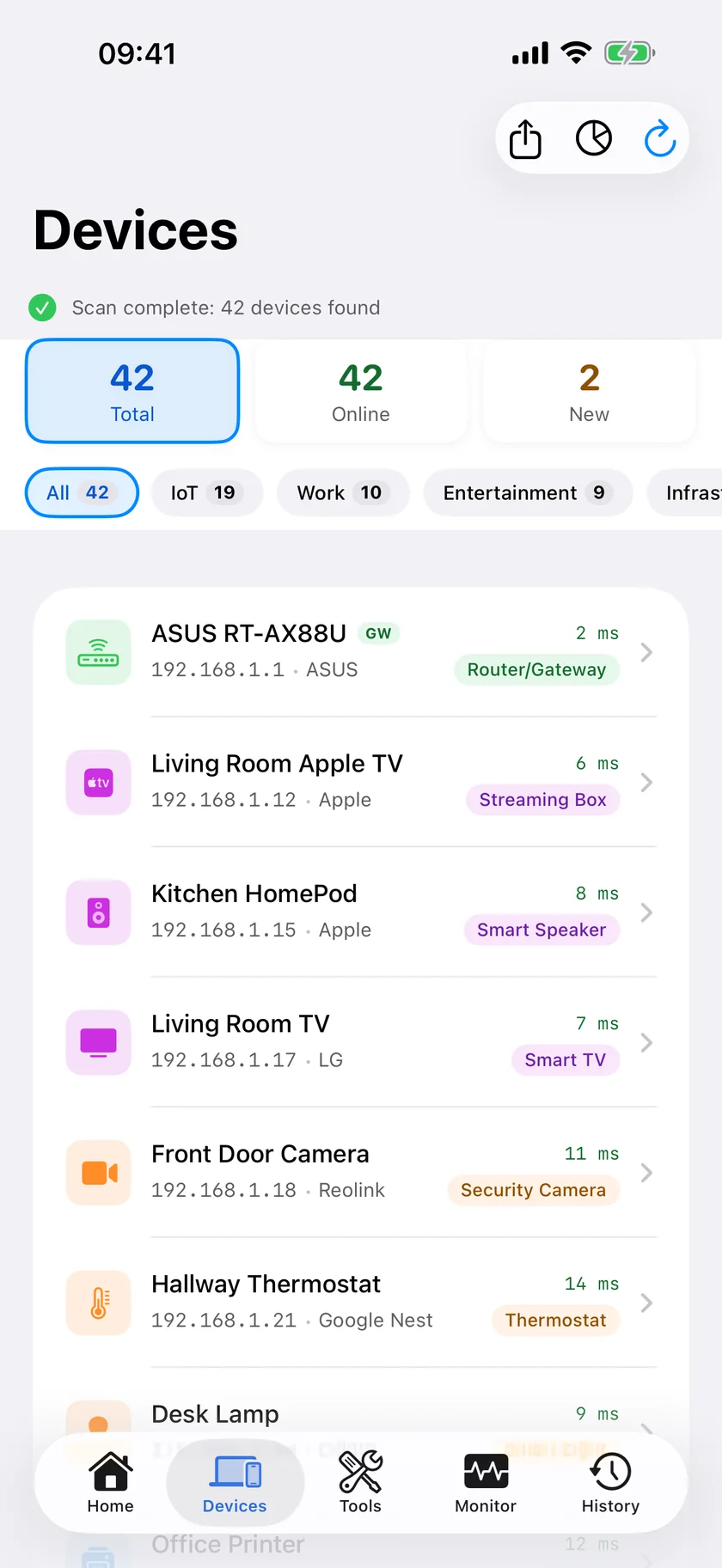
Nineteen tools in total, free, no ads and no account.
Honest Limits
- UDP checks are basic. PingKit's Port Scanner can send UDP probes, but a UDP port that stays silent is listed as open even when a firewall is dropping the probe, so treat a UDP result as a lead rather than proof.
- No share enumeration, remote commands or scripted actions.
- The sweep is scoped to your local segment rather than arbitrary large ranges.
- Scans run when you open the app or ask Siri or Shortcuts for one. PingKit on iOS has no scan timer; scheduled scanning is a Mac Agent feature, while your Mac is awake.
Which Should You Use?
Administering a fleet: stay on the desktop. The value of SoftPerfect is acting on results, and a phone cannot.
Standing in front of the rack or the router: a phone scanner is faster to reach for and answers the discovery question just as well.
Frequently Asked Questions
Is SoftPerfect Network Scanner available for iPhone?
No. It runs on Windows, macOS and Linux. There is no iOS version. Native iOS scanners cover the discovery half of what it does.
Why can't iPhone apps show MAC addresses like desktop scanners?
iOS does not expose the ARP table to apps and recent versions return a placeholder MAC address for network peers. iOS scanners identify most devices from Bonjour and SSDP advertisements, hostnames and open ports instead. PingKit on iPhone can show the MAC address of a device that answers NetBIOS, such as a Mac with File Sharing turned on; phones, tablets, TVs and most smart-home devices still show no MAC on the iPhone.
What is the best network scanner for iPhone?
PingKit is free with no ads or account and includes LAN scanning, TCP port scanning with custom ranges, a Bonjour browser with TXT records and Wake-on-LAN. Fing has the largest device identification database but shows ads on its free tier.
Can an iPhone scanner browse shared folders?
Not from within a scanner. iOS provides no SMB enumeration API to apps. You can connect to a known share through the Files app, but not enumerate shares from a scan result.
Can I schedule scans on iPhone?
Not inside PingKit. iOS suspends apps in the background, so PingKit has no scan timer; a scan runs when you open the app, or when you ask Siri or Shortcuts to Scan for Devices, which runs without opening PingKit once you have allowed Local Network access in the app. Scheduled monitoring requires something that stays awake, such as PingKit Agent on a Mac.
The discovery half, in your pocket
LAN sweep with device naming, TCP port scanning up to any range, Bonjour browsing with TXT records and Wake-on-LAN. Free.
Download PingKit Free