Advanced IP Scanner for iPhone and Mac (2026): The Alternatives
Short version. Advanced IP Scanner is Windows only and always has been. Its core job, sweeping the LAN and listing what is there, translates cleanly to iPhone and Mac. Its Windows-specific extras (shared folder browsing, Radmin, remote shutdown) do not, because they depend on Windows networking. PingKit covers the discovery half free on both iPhone and Mac.
Advanced IP Scanner by Famatech is a fixture on Windows: free, portable, no install required. There is no macOS or iOS build, and there has never been one. If you have moved to Apple hardware, here is what actually replaces it and what does not.
Full disclosure: I build PingKit, so weigh the recommendation accordingly. The comparison below is written to stay useful even if you pick something else, and the limits section is not padding. Competitor features and pricing change, so check the current listing before you decide.
Splitting the Tool in Two
Advanced IP Scanner really does two separate jobs, and only one of them travels.
Network discovery. Sweep a range, list live hosts, resolve names, show manufacturer, flag open ports. This is platform-neutral and there are good equivalents on both Apple platforms.
Windows administration. Browse SMB shares, launch Radmin sessions, wake or shut down machines remotely, connect over RDP. These lean on Windows networking and Windows tooling. On a Mac you can reach shares through Finder and RDP through Microsoft Remote Desktop, but no single scanner bundles it the way Advanced IP Scanner does.
| Feature | iPhone | Mac |
|---|---|---|
| Range sweep / live hosts | Yes | Yes |
| Hostname resolution | Yes | Yes |
| Manufacturer identification | Partly | Yes |
| Open port detection | Yes (TCP, plus UDP probes) | Yes (TCP) |
| Wake-on-LAN | Yes | Yes |
| Browse SMB shares | Files app | Finder |
| Radmin integration | No | No |
| Remote shutdown | Macs and Linux over SSH, with PingKit's Guardian Plus; not Windows | The same |
What PingKit Covers
On iPhone and iPad, LAN Scanner sweeps your whole network in one pass when it has up to 1,022 addresses (a /22 or smaller) and names many of the devices it finds from what they announce: Bonjour and UPnP advertisements, the name a device gives over mDNS, NetBIOS or LLMNR, what a printer, NAS or router reports over SNMP, its hostname, the brand it reports and the pattern of its open ports. Port Scanner checks TCP ports on any device on your own network, and Wake-on-LAN sends magic packets to machines that support it, which is the one Advanced IP Scanner administration feature that carries over cleanly.
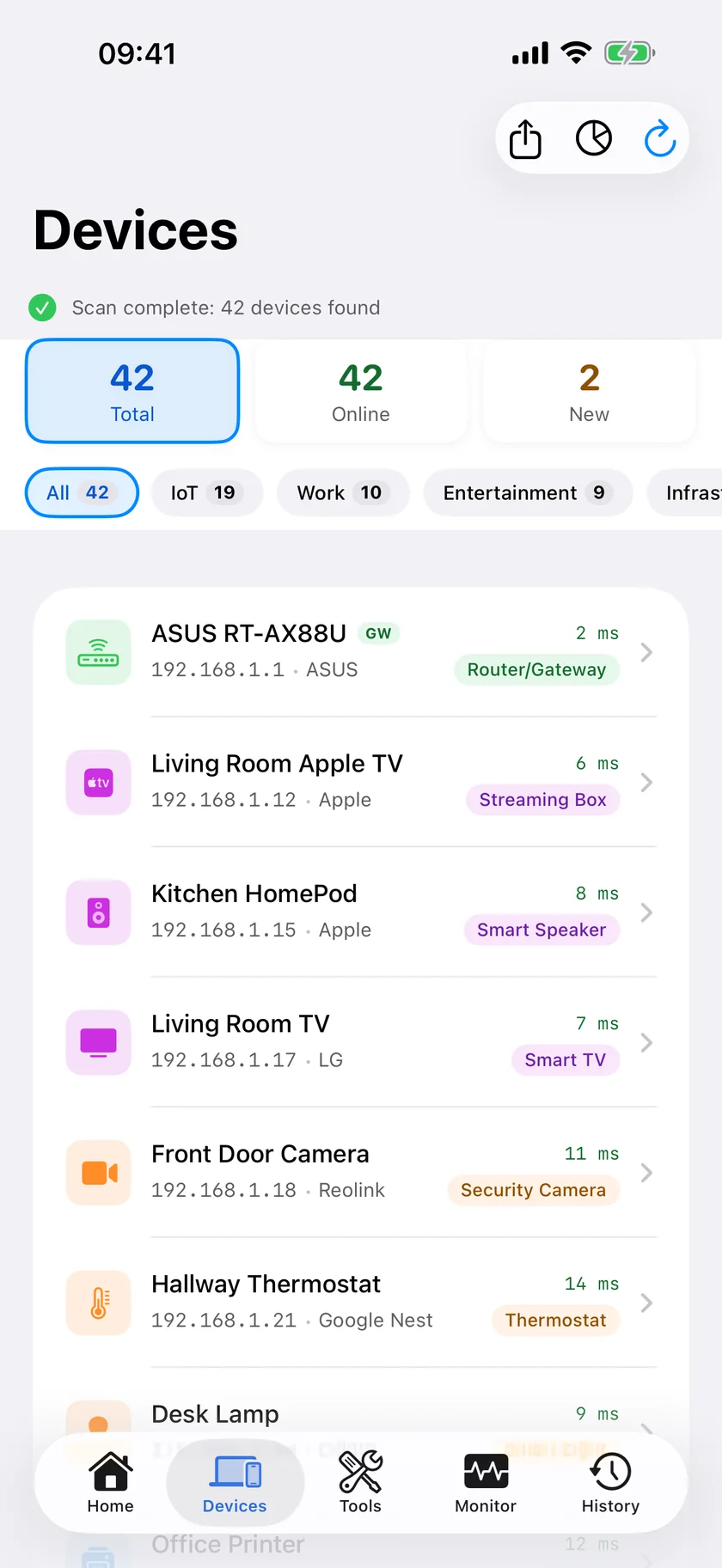
On Mac there is a companion menu bar Agent that keeps watching the network while the Mac is awake and alerts you on the Mac. The Agent is a free download, like every tool listed above; Guardian, the optional subscription, brings its alerts and dashboard to the iPhone app through your own private iCloud database.
Honest Limits
- Manufacturer identification is weaker on iPhone than on Windows. iOS returns a placeholder MAC address for network peers, so OUI vendor lookup is unreliable. Device naming leans on what devices announce instead, which names many devices but works differently.
- No SMB browsing inside the app. Use the Files app on iOS or Finder on Mac.
- No remote shutdown of Windows PCs and no remote control. Guardian Plus can sleep, restart or shut down your own Macs and Linux machines over SSH, but nothing in PingKit replaces Radmin or the Windows shutdown Advanced IP Scanner uses.
- UDP is a hint, and only on iPhone. PingKit's Port Scanner on iPhone can send UDP probes as well as TCP connects; it lists a UDP port that answers or stays silent as open and one the device refuses as closed, and a silent port may just be filtered. PingKit Agent's Port Scanner on Mac checks TCP only.
Which Should You Use?
You still have Windows machines to administer: keep Advanced IP Scanner on a Windows box. Nothing on Apple platforms replaces the Radmin and shutdown pieces.
You want to see and check what is on the network: a native iOS or macOS scanner does that job as well or better, and is with you when you are standing at the router.
Frequently Asked Questions
Is Advanced IP Scanner available for Mac or iPhone?
No. Advanced IP Scanner is a Windows-only application from Famatech. There is no macOS or iOS version and none has been announced.
What is the best Advanced IP Scanner alternative on iPhone?
A native LAN scanner. PingKit provides free local network discovery, TCP port scanning and Wake-on-LAN on iPhone and iPad. Fing, iNet and Scany are other options with different pricing and feature trade-offs.
Can I get the Radmin and remote shutdown features on Mac?
Not in a single scanner. Those features depend on Windows networking and Radmin specifically. On Mac you would use Finder for shares and Microsoft Remote Desktop for RDP sessions separately. For Macs and Linux machines, PingKit's Guardian Plus can sleep, restart or shut them down over SSH, from your iPhone or your Mac.
Does Advanced IP Scanner run on Mac under Wine or Parallels?
It may run in a Windows virtual machine such as Parallels, since that is a real Windows environment. Results under Wine are inconsistent and network access from the emulated environment can behave unexpectedly.
Can an iPhone do Wake-on-LAN like Advanced IP Scanner?
Yes. Wake-on-LAN sends a magic packet over UDP broadcast, which iOS apps can do. PingKit includes a free Wake-on-LAN tool. The target machine still needs Wake-on-LAN enabled in its firmware and network adapter settings.
The discovery half, free, on iPhone and iPad
PingKit sweeps your network, names devices, scans TCP ports and sends Wake-on-LAN packets. Nineteen tools, no ads, no account.
Download PingKit Free