Angry IP Scanner for iPhone (2026): iOS Equivalents That Work
Short version. Angry IP Scanner is a Java desktop application for Windows, macOS and Linux. There is no iOS build and no official plan for one. On iPhone the equivalent job, sweeping your local range and reporting what answers, is handled well by a native scanner: PingKit does it free, with device naming and a TCP port scanner alongside.
Angry IP Scanner is a deservedly popular tool: free, open source, fast, and it does one thing clearly. When people move from a desk to a phone they naturally look for it in the App Store, and it is not there.
Full disclosure: I build PingKit, so weigh the recommendation accordingly. The comparison below is written to stay useful even if you pick something else, and the limits section is not padding. Competitor features and pricing change, so check the current listing before you decide.
Why It Is Not on iOS
Two reasons, and only one of them is technical.
The practical one is that Angry IP Scanner is written in Java with SWT for its interface. Neither runs on iOS. A port would be a rewrite, not a recompile.
The technical one is that some of what desktop scanners do casually is restricted on iOS. Raw socket access is unavailable to App Store apps, so ICMP behaviour is more constrained and full UDP scanning is out of reach. Sweeping a range with TCP connect probes and ICMP echo, however, is entirely possible, and that covers most of what people use Angry IP Scanner for at home.
What an iPhone Can Actually Do
| Angry IP Scanner feature | On iOS? | Notes |
|---|---|---|
| Ping sweep of a range | Yes | Standard on iOS scanners |
| Hostname resolution | Yes | Via reverse DNS and mDNS |
| MAC address and vendor | Partly | See the limits section below |
| TCP port checking | Yes | Connect scan only |
| Arbitrary large ranges | Limited | Practical on a local segment |
| CSV / XML export | Varies | App dependent |
| Plugin / script extensions | No | No equivalent on iOS |
Doing It with PingKit
PingKit's LAN Scanner sweeps your whole network in one pass when it has up to 1,022 addresses (a /22 or smaller) and lists every host that responds. Results are named, where they can be, from the signals a phone can legitimately collect: Bonjour and SSDP advertisements, the name a device gives over mDNS, NetBIOS or LLMNR, what a printer, NAS or router reports over SNMP, hostnames, and the pattern of open ports. A printer that advertises IPP, a Sonos speaker announcing itself over SSDP and a Synology NAS with its usual ports open are all recognisable this way.
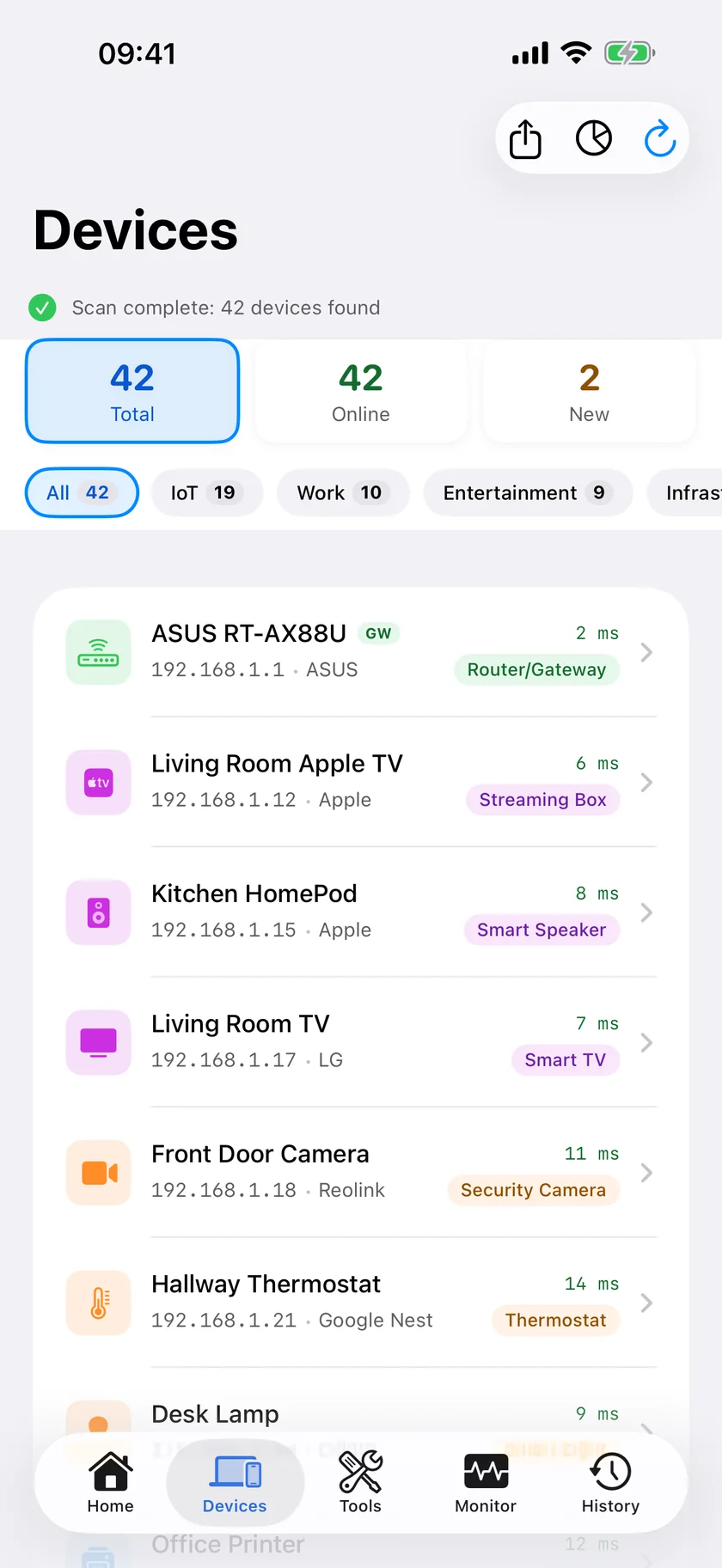
From any device's details you can ping it or open it in the Port Scanner. PingKit for iPhone has 19 network tools you can use free, with no ads and no account.
Honest Limits on iPhone
- MAC addresses are not reliably available. Modern iOS returns a placeholder address for peers rather than the real hardware address, so vendor lookup from OUI alone is not dependable. PingKit works around this by naming devices from what they announce: the services they advertise and the names they answer with.
- The sweep covers the network you are connected to. PingKit scans it in one pass when it has up to 1,022 addresses (a /22 or smaller); on a larger network it scans the 254 addresses around your iPhone and tells you so. That is deliberate: very wide ranges are slow and rarely what someone on a phone actually wants.
- UDP is a hint, not a verdict. PingKit's Port Scanner on iPhone can send UDP probes as well as TCP connects; it lists a UDP port that answers or stays silent as open and one the device refuses as closed, and a silent port may just be filtered.
- No plugin system. Nothing equivalent to Angry IP Scanner's fetchers.
Which Should You Use?
You are at a desk: keep using Angry IP Scanner. It is free, fast and good, and a phone is not an upgrade.
You are standing in front of the router or the device: a phone scanner wins on convenience, which is most of the point.
You need scripted or scheduled scanning: that is a desktop or server job.
Frequently Asked Questions
Is there an Angry IP Scanner app for iPhone?
No. Angry IP Scanner is a Java desktop application for Windows, macOS and Linux. There is no iOS version, and porting it would require a full rewrite since Java and SWT do not run on iOS.
What is the best Angry IP Scanner alternative for iPhone?
A native iOS LAN scanner. PingKit provides a free local network sweep with device naming, plus a port scanner and 18 other network tools you can use free. Other options include Fing, iNet and Scany, each with different trade-offs on ads, price and depth.
Can an iPhone see MAC addresses of other devices?
Only for some devices. iOS hides most devices' hardware addresses from apps and returns a placeholder instead, so phones, tablets, TVs and most smart-home devices show no MAC address on an iPhone. PingKit can show the MAC address of a device that answers NetBIOS, such as a Mac with File Sharing turned on, on that device's detail screen, and looks up the maker of its network chip from it; other devices are identified from Bonjour, SSDP and hostname signals instead.
Can I scan a large IP range from an iPhone?
In practice you are limited to your local segment. Wide range sweeps are slow on a phone and most iOS scanners scope the sweep to the network you are connected to. PingKit scans the network you are connected to in one pass when it has up to 1,022 addresses (a /22 or smaller), and on a larger network scans the 254 addresses around your iPhone and says so.
Does PingKit scan UDP ports?
Partly, on iPhone. PingKit's Port Scanner has a UDP mode that sends a probe to each port: it lists a port that answers, or one that stays silent, as open, and one the device refuses as closed. A silent UDP port cannot be told apart from a filtered one, so read a UDP result as a hint. PingKit Agent's Port Scanner on Mac checks TCP only.
Sweep your network from your pocket
PingKit lists the devices it finds on your network, names many of them from what they announce, and lets you port scan or ping any of them. Free, no ads.
Download PingKit Free