iNet Network Scanner Alternatives for iPhone and Mac (2026)
Short version. iNet, from BananaGlue, is a careful on-demand scanner: free on iPhone with a $9.99 iNet Pro upgrade, and $24.99 once on the Mac, as listed on October 18, 2026. The closest free alternative on iPhone is PingKit's LAN scan, with all 19 tools free and no ads, and on the Mac it is the free PingKit Agent, which keeps scanning while your Mac is awake and alerts you when a new device joins. iNet still does things PingKit does not, such as remote sessions from the device list and a live Bonjour monitor on the Mac.
PingKit's LAN scan is free, with all 19 tools. No ads, no account.
iNet has been a quiet favourite among network scanners for years: a clean, ad-free app from BananaGlue in Germany, on the iPhone and, as a separate app, on the Mac. People look for an iNet alternative for a few reasons: the free iPhone version only scans, the Mac version is a paid download, and neither one tells you when something new joins your network. This page compares it with PingKit on each platform, and says where iNet is the better buy.
Full disclosure: I build PingKit, so weigh the recommendation accordingly. iNet's details below are from its two App Store listings, read on October 18, 2026. Check them before you buy, because prices and features change.
iNet and PingKit at a Glance
| iNet, iPhone | PingKit, iPhone | iNet, Mac | PingKit Agent, Mac | |
|---|---|---|---|---|
| Price | Free scan; the rest with iNet Pro, $9.99 in-app | All 19 tools free | $24.99 one-time | Free |
| Device scan | Yes | Yes | Yes | Yes, on a schedule |
| Port scan | iNet Pro | Yes | Yes | Yes |
| Bonjour services | iNet Pro | Yes, Bonjour Browser | Yes, live monitor | Per device, no browser |
| Wake-on-LAN | iNet Pro | Yes | Yes | Yes |
| Alert when a device joins | Not listed | No, iOS suspends apps | Not listed | Yes, while the Mac is awake |
| Ping, traceroute, DNS and more | Not listed | Yes | Not listed | Yes, 8 tools |
| Ads or account | Neither | Neither | Neither | Neither |
On iPhone: iNet vs PingKit
The free iNet scans your network and lists what it finds, cleanly and with no ads. The rest, as its listing presents it, is unlocked by iNet Pro for $9.99: a Bonjour monitor, a port scanner with predefined port lists, and Wake on LAN over your network or the internet, along with putting a Mac to sleep, restarting it or shutting it down, and running SSH commands. Its scanner also lets you give devices names and icons, open SSH, VNC or HTTP connections to them, and export a scan as CSV or PDF.
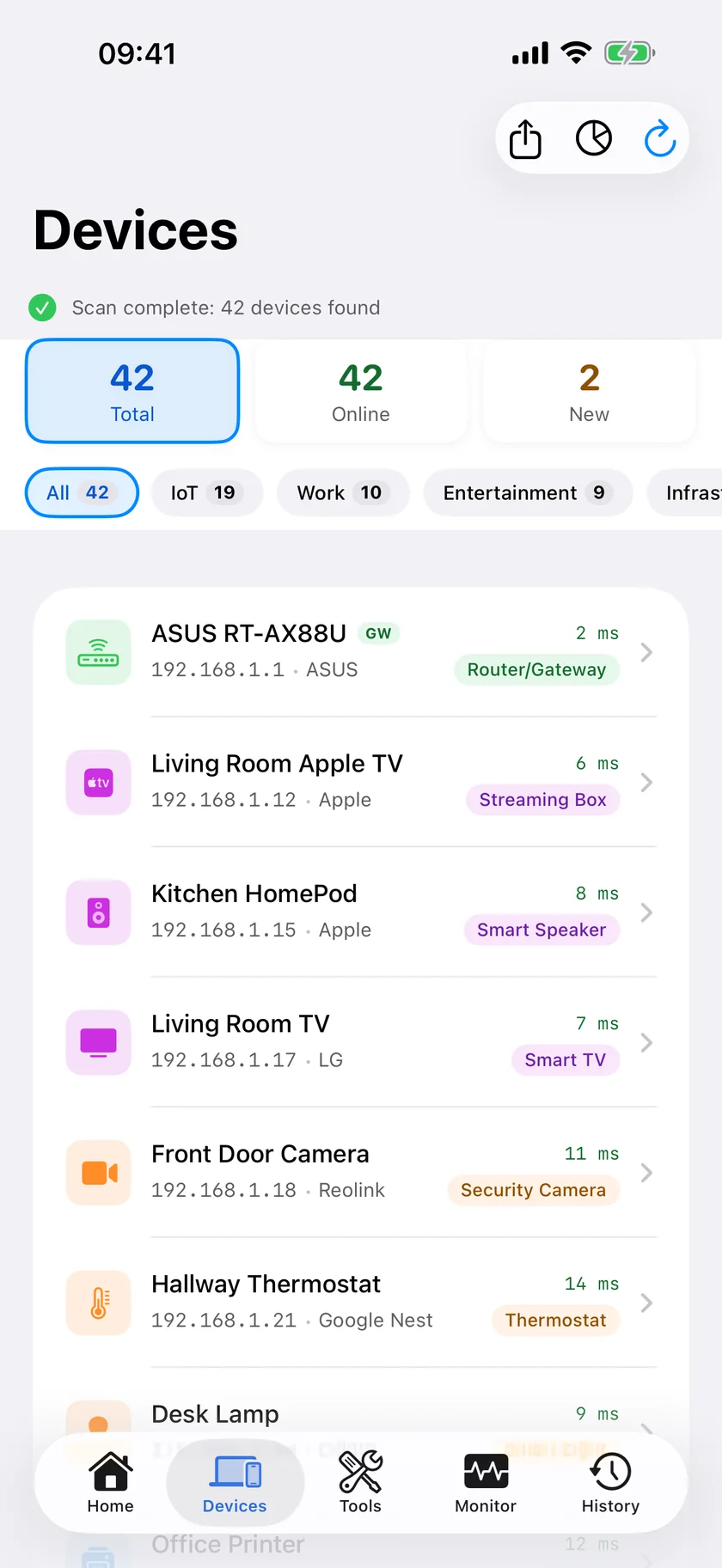
PingKit's LAN scan is free along with everything else in the app: a port scanner (the top 100 ports, 1 to 1024, common web ports or a custom range up to 65535, with TCP connect and UDP probes), a Bonjour Browser, Wake-on-LAN, ping, traceroute, MTR, DNS lookup, WHOIS, SSL and HTTP inspection, a speed test and a Security Scan: 19 tools, no ads, no account. Devices are named from what they announce, such as Bonjour and UPnP services and hostnames, and sorted into categories.
Where iNet is better: one price for the paid parts, export, and a remote session to a device straight from the list, which PingKit does not open. Where PingKit is better: the free tier is the whole app, and the diagnostic kit around the scanner is much larger. Neither can watch your network from the phone, because iOS suspends an app when it is closed.
The MAC Address Limit on iPhone
For years iOS has handed apps a placeholder, 02:00:00:00:00:00, instead of most devices' MAC addresses, and that has applied to every scanner on the App Store, iNet included. It is why iPhone scanners name devices from what they announce rather than from the maker of their network chip.
iNet's release notes for version 4.1.2 say it improved manufacturer detection with access to MAC addresses in iOS 27. I have not tested how many devices that fills in, so if MAC addresses on the phone are what you would buy iNet Pro for, run its free scan on your own iPhone first and look.
PingKit's own scan on iPhone fills in a MAC address one way: from version 3.3.0, for a device that answers NetBIOS, often a Mac with File Sharing on or a Windows PC, from the unit ID in its reply. For the rest, the real addresses come from your router's device list, or from a Mac: with Guardian and PingKit Agent running on a Mac, the iPhone app shows the addresses the Mac read, on macOS 15 and 26, or on macOS 27 with Agent 3.3.0 or later.
On the Mac: iNet vs PingKit Agent
iNet for Mac is $24.99 once, for macOS 11 or later, with updates included, no subscription and no account. It scans and shows IP and MAC addresses, watches Bonjour services as they come and go, finds open ports, wakes machines over your network or the internet, can put a Mac to sleep, restart it or shut it down, runs SSH commands, monitors older AirPort base stations and exports to CSV or PDF. It is a thorough toolbox you open when you have a job to do.
PingKit Agent is free, for macOS 15 or later, and does a different job. It lives in the menu bar and rescans your network every 5 minutes by default while your Mac is awake, keeps the device list between scans, and raises a new device alert on the Mac when something it has never seen joins, after a first 24 hours spent learning what you already have. It also alerts when the internet goes down and comes back and when latency spikes, and carries eight tools, including a port scanner and Wake-on-LAN. A device's detail shows its MAC address and network chip maker on macOS 15 and 26, or on macOS 27 with Agent 3.3.0 or later, plus the brand the device reports where it reports one, and the services it advertises over Bonjour.
The trade is plain. iNet does more on demand: a live Bonjour monitor, remote sessions, export. The Agent does the part iNet's listing does not describe, which is noticing a change while you are not looking. On macOS 27, also check that iNet fills in MAC addresses on your Mac before you buy: macOS 27 withholds the ARP table from apps that lack an entitlement Apple grants, and iNet's Mac listing does not say how it handles that.
What Each Costs
iNet, as listed on October 18, 2026: free on iPhone, with iNet Pro at $9.99 as an in-app purchase; $24.99 once on the Mac, as a separate purchase.
PingKit: every tool is free on both, the Mac Agent's alerts included. The optional subscription is Guardian, $2.99 a month or $24.99 a year on iPhone or Mac, with a 1-week free trial. Guardian puts the Agent's devices, alerts and timeline in the iPhone app through your own private iCloud database, and lets the iPhone wake a machine from anywhere through your Mac. Guardian Plus, $9.99 a month or $79.99 a year on iPhone and $4.99 or $39.99 on the Mac, also with a 1-week free trial, adds sleep, restart and shut down over SSH, among other things. If you only want a one-off scan and prefer to pay once, iNet's pricing is honest and simple.
Honest Limits
- No remote sessions or export. PingKit does not open SSH or VNC sessions from the device list, and the Agent's device list has no CSV export.
- No Bonjour browser on the Mac. The Agent lists each device's advertised services in its detail but has no live browser like iNet's; the iPhone app has one.
- The iPhone scans when you open it. iOS suspends apps in the background, so PingKit on iPhone cannot notice a new device while it is closed. That is the Mac's job, while it is awake.
- Few MAC addresses on iPhone. NetBIOS devices only, or the Mac's readings with Guardian.
- Naming is good, not perfect. A device that announces nothing stays an address.
- IPv4 only on the Mac, and macOS 15 or later.
Which Should You Pick?
- One paid toolbox with remote sessions and export: iNet.
- The scanner and the diagnostic tools around it, free on iPhone: PingKit.
- Knowing when something new joins: PingKit Agent, on a Mac that stays awake.
- MAC addresses on iPhone: try iNet's free scan on iOS 27 and see, or read them from a Mac or your router.
Other iPhone scanners are compared in Fing alternatives for iPhone, and the Mac scanners in LanScan alternatives for Mac.
Frequently Asked Questions
Is iNet Network Scanner free?
The iPhone version is free and ad-free for scanning your network and listing its devices. iNet Pro, a $9.99 in-app purchase as listed on October 18, 2026, unlocks the rest, such as the Bonjour monitor, port scanner and Wake on LAN. The Mac version is a separate $24.99 one-time purchase with updates included.
What is a free alternative to iNet for iPhone?
PingKit for iPhone scans your network free and includes a port scanner, a Bonjour browser and Wake-on-LAN among 19 tools, all free with no ads and no account. iNet's paid version still offers things PingKit does not, such as SSH and VNC connections from the device list and exports of a scan.
Does iNet show MAC addresses on iPhone?
iNet's listing says it shows IP and MAC addresses, and its version 4.1.2 release notes mention access to MAC addresses in iOS 27. iOS has long given App Store apps a placeholder instead of most devices' MAC addresses, so check what iNet shows on your own iPhone with the free version before paying.
Is there an iNet alternative for Mac that alerts me to new devices?
PingKit Agent is a free menu bar app for macOS 15 or later that rescans your network every 5 minutes by default while your Mac is awake and raises a new device alert on the Mac. iNet for Mac scans when you run it, and its listing does not describe alerts.
Do I need both PingKit apps?
No. Each is free on its own. The iPhone app scans when you open it, because iOS does not let apps scan in the background, and PingKit Agent watches your network while the Mac is awake. With Guardian, the iPhone app also shows what the Mac found.
Scan free on iPhone, keep watching on a Mac
PingKit's LAN scan and all 19 tools are free on iPhone, with no ads and no account. PingKit Agent is free on the Mac and alerts you when a new device joins, while your Mac is awake.
Download Free on the App Store