GlassWire for Mac: There Is No Mac Version, So Here Is What to Use
Short version. GlassWire has no Mac version: its download page offers Windows and an Android app, as listed on October 18, 2026. It is two tools in one, and on a Mac each half has its own replacement: LuLu (free and open source) or Little Snitch (paid) for the firewall, Activity Monitor or nettop for traffic per app, and the free PingKit Agent for GlassWire's Things tab, the list of devices on your network with an alert when a new one joins. PingKit Agent is not a firewall and does not show per-app bandwidth.
Free. PingKit Agent covers GlassWire's devices half: your device list and new-device alerts, while your Mac is awake. No account.
GlassWire is popular on Windows for a good reason: it puts a live graph of your traffic, a per-app usage breakdown, an "ask to connect" firewall and a list of the devices on your network in one window. People who move to a Mac look for the same app and find forum threads asking when the Mac version is coming. As of October 18, 2026 there is none: GlassWire's download page offers a Windows installer (version 3.11, for Windows 10 or later) and an Android app on Google Play, and nothing for macOS.
Full disclosure: I build PingKit Agent, which covers one of the halves below and not the other. I will say plainly which, and name the tools I would use for the half it does not do.
GlassWire Is Two Tools
Splitting it is the whole trick to replacing it on a Mac:
- Your computer's own traffic. Which apps use the network, how much, and where they connect, plus a firewall that asks before an app connects and lets you block it. This is about the machine GlassWire runs on.
- The rest of your network. GlassWire's Things tab keeps a list of every device that has been on your network, a separate list for each network you join, and can alert you when a new unknown device joins. This is about everything else on your Wi-Fi.
No single Mac app does both the way GlassWire does. Each half has a solid Mac answer, though, and two of them cost nothing.
The Firewall Half: LuLu or Little Snitch
macOS has a built-in firewall, but it only handles incoming connections. GlassWire's "ask to connect" mode is about outgoing ones: an app tries to reach the internet and you allow or deny it. On a Mac that job belongs to two apps.
LuLu, free and open source
LuLu, from Objective-See, is a free, open-source outbound firewall. When an app tries to make a new outgoing connection, it asks you to allow or block it. Objective-See lists it for macOS 10.15 or later, at version 4.5.2, as of October 18, 2026. If you mainly used GlassWire to stop apps connecting without asking, start here.
Little Snitch, the paid option
Little Snitch, from Objective Development, is the long-standing paid Mac app for the same job, with finer control: rules by app, server, domain, port or protocol, and a network monitor that groups connections by app, domain or country. It has a 30-day free trial, and without a licence it runs in a demo mode for three hours at a time, as listed on October 18, 2026. Check obdev.at for the current price.
The Traffic Half: Activity Monitor and nettop
For "which app is using my bandwidth", you do not need to install anything. Open Activity Monitor (Applications, then Utilities) and click Network: every process is listed with bytes and packets sent and received, and sorting a column puts the heaviest app at the top. In Terminal, the built-in nettop gives a live view by process:
nettop -P-P collapses it to one line per process. Neither keeps GlassWire's long history graph, which is the part of GlassWire with no free Mac equivalent I know of; Little Snitch's network monitor, which shows data volumes, gets nearer. The trade-offs between these and iStat Menus are covered in the Mac network monitor roundup.
The Things Half: PingKit Agent
This is the half I build for. PingKit Agent is a free menu bar app for macOS 15 or later that does the Things tab's job for the devices on your network:
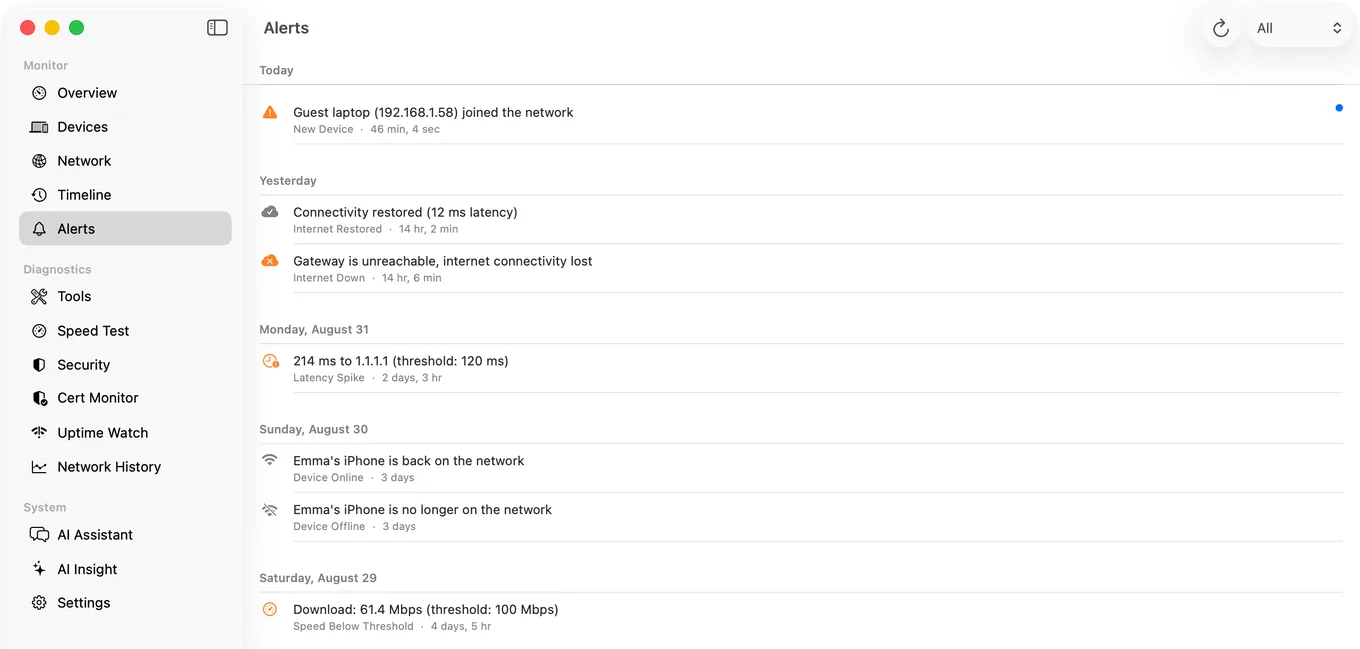
- It rescans your network every 5 minutes by default, on mains power, while your Mac is awake, and keeps every device it has seen, with First Seen and Last Seen.
- It sends a Mac notification when a new device joins, after a first 24 hours spent learning the devices you already have, and only on your home network, so a café's Wi-Fi does not set it off.
- Each device shows its MAC address (on macOS 15 and 26, and on macOS 27 from Agent 3.3.0), the maker of its network chip, the brand it reports about itself where it reports one, and a custom name and category you can set.
- A device that stops answering shows as "Not seen for 20 min", or Asleep where the Agent can tell, because a quiet device may have left or may only be asleep.
- It also checks your router and the internet every 30 seconds and alerts you when the internet drops or comes back, or latency spikes.
All of that is free. With Guardian, the PingKit iPhone app shows the Agent's devices and alerts through your own private iCloud database; on the Mac, Guardian is $2.99 a month or $24.99 a year, with a 1-week free trial. The alert list in full is in the guide to getting an alert when a new device joins your WiFi.
GlassWire Feature by Feature on a Mac
| GlassWire on Windows | On a Mac | Cost |
|---|---|---|
| Ask-to-connect firewall | LuLu, or Little Snitch | LuLu free; Little Snitch paid, 30-day trial |
| Usage by app | Activity Monitor's Network tab; nettop | Built in |
| Where apps connect | LuLu's connection alerts; Little Snitch's network monitor | As above |
| Long-term traffic history graph | No free equivalent | None found |
| Things: devices on your network | PingKit Agent's device list | Free |
| Alert when a new device joins | PingKit Agent, while the Mac is awake | Free |
| Block a device | Your router | Free |
Honest Limits
- PingKit Agent is not a firewall. It cannot block an app or a device. Blocking apps is LuLu's or Little Snitch's job; blocking a device on your Wi-Fi is your router's.
- No per-app bandwidth. It watches the network and the devices on it, not your Mac's own traffic.
- It watches only while your Mac is awake. It does not keep the Mac awake, and its scans stop while it sleeps.
- Device names are good, not perfect. A device that announces nothing stays a bare address until you name it, and a phone using a private Wi-Fi address can look new.
- macOS 15 or later. LuLu reaches further back, to macOS 10.15.
A Mac Setup That Covers What GlassWire Did
For most people leaving GlassWire, three apps are enough: LuLu for outgoing connections, Activity Monitor when something is eating bandwidth, and PingKit Agent in the menu bar for the devices on your network. All three are free. Swap LuLu for Little Snitch if you want finer rules and are happy to pay. LuLu asks about every app's new outgoing connections, the Agent's included, so allow the Agent when it first asks. If you are also weighing Fing's desktop app for the devices half, the Fing Desktop alternatives for Mac compares the two.
Frequently Asked Questions
Is GlassWire available for Mac?
No. As of October 2026, GlassWire's download page offers Windows, for Windows 10 or later, and an Android app, with nothing for macOS. On a Mac, LuLu or Little Snitch replace its firewall, Activity Monitor its per-app traffic view, and PingKit Agent its device list and new-device alerts.
What is the best free GlassWire alternative for Mac?
No single free app does all of it. LuLu from Objective-See is a free, open-source outbound firewall; Activity Monitor and nettop, both built into macOS, show traffic per app; and PingKit Agent is a free menu bar app that lists the devices on your network and alerts you when a new one joins while your Mac is awake.
Is PingKit Agent a firewall?
No. PingKit Agent watches the devices on your network and your internet connection. It cannot block apps or devices and does not show per-app bandwidth. For an outbound firewall on a Mac, use LuLu or Little Snitch.
How do I see which app is using my bandwidth on a Mac?
Open Activity Monitor, click Network and sort by bytes sent or received, and the heaviest process rises to the top. In Terminal, nettop -P shows a live view with one line per process. Both are built into macOS.
Can I get an alert on my Mac when a new device joins my Wi-Fi?
Yes. PingKit Agent is free on the Mac App Store, rescans your network every few minutes while the Mac is awake, and sends a Mac notification when a device it has not seen before joins, after a first day spent learning the devices you already have.
The devices half of GlassWire, on your Mac
PingKit Agent lists the devices on your network and alerts you when a new one joins, while your Mac is awake. Free on the Mac App Store, macOS 15 or later. Pair it with LuLu for the firewall half.
Get PingKit Agent for Mac